1. はじめに
ご購入ありがとうございますasing the Samsung HW-S810D Soundbar. This 3.1.2 channel sound system, featuring a wireless subwoofer, is designed to enhance your audio experience with immersive Dolby Atmos and DTS:X technologies. This manual provides essential information for setting up, operating, and maintaining your soundbar. Please read these instructions carefully before use to ensure proper operation and safety.
2. 安全情報
感電、火災、またはユニットの損傷のリスクを軽減するために、次の安全上の注意事項を守ってください。
- この装置を雨や湿気にさらさないでください。
- 通気口を塞がないでください。メーカーの指示に従って設置してください。
- ラジエーター、暖房レジスター、ストーブ、その他の機器(以下を含む)などの熱源の近くに設置しないでください。 amp熱を発生する装置。
- 特にプラグ、コンセント、および装置から出ている部分で、電源コードが踏まれたり挟まれたりしないように保護してください。
- メーカー指定のアタッチメント/アクセサリのみを使用してください。
- すべてのサービスを資格のあるサービス担当者に依頼してください。 装置が何らかの形で損傷した場合は、修理が必要です。
3. パッケージ内容
パッケージにすべてのコンポーネントが含まれていることを確認します。
- Samsung HW-S810D Soundbar
- ワイヤレスサブウーファー
- 電池付きリモコン
- 電源コード(サウンドバーとサブウーファー用)
- HDMIケーブル
- 壁掛けキット(オプション、地域によって異なる場合があります)
- テーブルマウント
- ユーザーマニュアル(このドキュメント)
4.製品オーバーview
The Samsung HW-S810D is a slim, elegant soundbar designed to deliver powerful and immersive audio.
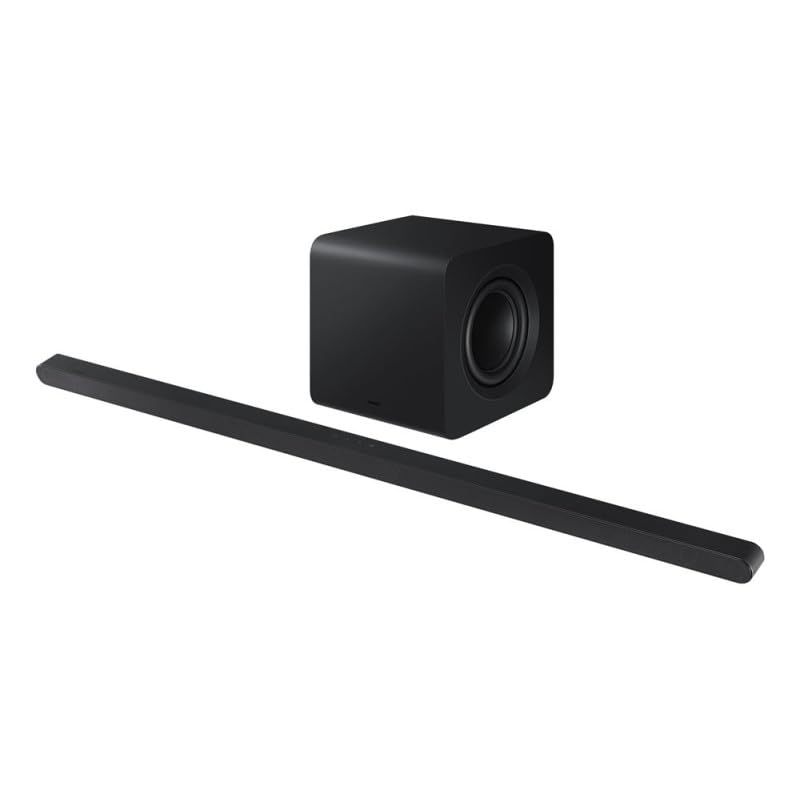
Image 1: Samsung HW-S810D Soundbar and Wireless Subwoofer. The soundbar is a long, slender black unit, and the subwoofer is a compact black cube.
4.1. 主な特徴
- 3.1.2チャンネルオーディオ: Delivers a rich sound experience with dedicated center and up-firing speakers.
- ドルビーアトモスとDTS:X: Object-based audio formats for a truly immersive, three-dimensional sound.
- ワイヤレスサブウーファー: Provides deep, powerful bass without the clutter of cables.
- スリムなデザイン: At only 3.8 cm (1.5 inches) in height, it fits seamlessly under most TVs.
- 複数の接続オプション: Wi-Fi, Bluetooth, and HDMI for versatile connection to your devices.
- 音声コントロール: ハンズフリー操作を可能にする音声アシスタントに対応しています。
4.2. サウンドバーのコンポーネント
- フロントパネル: Speaker grille, LED indicator.
- トップパネル: Touch controls (Power, Volume, Input).
- 後面パネル: Power input, HDMI (eARC) port, Optical input, USB port (for service only).
4.3. ワイヤレスサブウーファー
The wireless subwoofer automatically connects to the soundbar. It features a power input and a pairing button (usually on the rear) for manual connection if needed.
5. セットアップ
5.1.配置
- サウンドバー: Place the soundbar centrally below your TV. Ensure no objects block the front or top speakers.
- サブウーファー: Place the wireless subwoofer anywhere in the room, preferably near the soundbar, for optimal bass distribution. Avoid placing it directly against a wall or in a corner, which can cause excessive resonance.
5.2. 接続
Choose the connection method that best suits your TV and other devices.
5.2.1. HDMI (eARC/ARC) Connection (Recommended)
- Connect one end of the HDMI cable to the HDMI OUT (TV-eARC/ARC) port on the soundbar.
- Connect the other end of the HDMI cable to the HDMI IN (ARC/eARC) port on your TV.
- Power on the soundbar and TV. Select the correct HDMI input on your TV.
5.2.2. 光接続
- Connect an optical cable (not always included) from the DIGITAL AUDIO OUT port on your TV to the OPTICAL IN port on the soundbar.
- Power on the soundbar and TV. Select the Optical input on the soundbar.
5.2.3.Bluetooth接続
- Press the Bluetooth button on the remote or soundbar to enter Bluetooth pairing mode.
- On your mobile device, search for "Samsung HW-S810D" in the Bluetooth settings and select it to pair.
5.2.4. Wi-Fi Connection (SmartThings App)
- Download and install the Samsung SmartThings app on your smartphone or tablet.
- Open the app and follow the on-screen instructions to add your HW-S810D soundbar to your network.
- This connection enables features like AirPlay 2, Spotify Connect, and firmware updates.
5.3. 電源接続
- 電源コードをサウンドバーの電源入力に接続し、壁のコンセントに差し込みます。
- 電源コードをワイヤレス サブウーファーの電源入力に接続し、壁のコンセントに差し込みます。
- The subwoofer should automatically pair with the soundbar. If not, refer to the troubleshooting section.
6. 操作手順
6.1.基本機能
- 電源オン/オフ: リモコンまたはサウンドバーの電源ボタンを押します。
- 音量コントロール: リモコンまたはサウンドバーの音量 +/- ボタンを使用します。
- 入力選択: Press the Source button on the remote to cycle through HDMI, Optical, Bluetooth, and Wi-Fi inputs.
- ミュート: Press the Mute button on the remote to temporarily silence the sound.
6.2. サウンドモード
The HW-S810D offers various sound modes to optimize your listening experience:
- 標準: Original sound delivery.
- 囲む: 音を拡張するtagより没入感のある体験をお楽しみいただけます。
- ゲーム: ゲームオーディオ向けに最適化されています。
- アダプティブサウンド: Analyzes content and optimizes sound settings in real-time.
6.3. 音声コントロール
The soundbar supports voice control through compatible voice assistants (e.g., Bixby, Alexa, Google Assistant) when connected via Wi-Fi and configured through the SmartThings app. Follow the app's instructions to enable and customize voice commands.
7. メンテナンス
Proper maintenance ensures the longevity and performance of your soundbar.
- クリーニング: Use a soft, dry cloth to wipe the surfaces of the soundbar and subwoofer. Do not use liquid cleaners or abrasive materials.
- 換気: 過熱を防ぐため、通気口がふさがれていないことを確認してください。
- ストレージ: 長期間保管する場合は、電源コンセントから外し、涼しく乾燥した場所に保管してください。
8。 トラブルシューティング
サウンドバーで問題が発生した場合は、次の一般的な問題と解決策を参照してください。
| 問題 | 考えられる解決策 |
|---|---|
| 電源なし | Check if the power cords are securely connected to the soundbar/subwoofer and the wall outlet. Try a different outlet. |
| 音が出ない |
|
| サブウーファーが接続されない |
|
| Bluetooth接続の問題 |
|
9. 仕様
| 特徴 | 詳細 |
|---|---|
| モデル名 | 本体 |
| ブランド | サムスン |
| スピーカータイプ | ワイヤレスサブウーファー付きサウンドバー |
| チャネル構成 | 3.1.2チャンネル |
| オーディオ出力モード | ドルビーアトモス、DTS:X |
| 接続技術 | Bluetooth、HDMI(eARC)、Wi-Fi |
| 最大スピーカー出力 | 200ワット |
| 制御方法 | Remote, Touch Controls, Voice |
| 重さ | 10.53キログラム(パッケージの総重量) |
| 色 | ブラックチタン |
| 含まれるコンポーネント | Soundbar, Wireless Subwoofer, Remote Control, Power Cords, HDMI Cable, Table Mount |
| 取り付けタイプ | Table Mount (Wall Mount optional) |
| 対応デバイス | TVs, Computers, Smartphones, Tablets |
10. 保証とサポート
This Samsung HW-S810D Soundbar comes with a limited warranty. For specific warranty terms and conditions, please refer to the warranty card included in your package or visit the official Samsung support webサイト。
For technical support, service requests, or to download the latest firmware updates, please visit: www.samsung.com/support
When contacting support, please have your model number (HW-S810D) and serial number ready.