1. はじめに
The BUSICOM PC-SeaV15c is a 15-inch Windows IoT touch panel PC designed for commercial and industrial applications. This manual provides essential information for the safe and efficient setup, operation, and maintenance of your device. Please read this manual thoroughly before using the product and retain it for future reference.
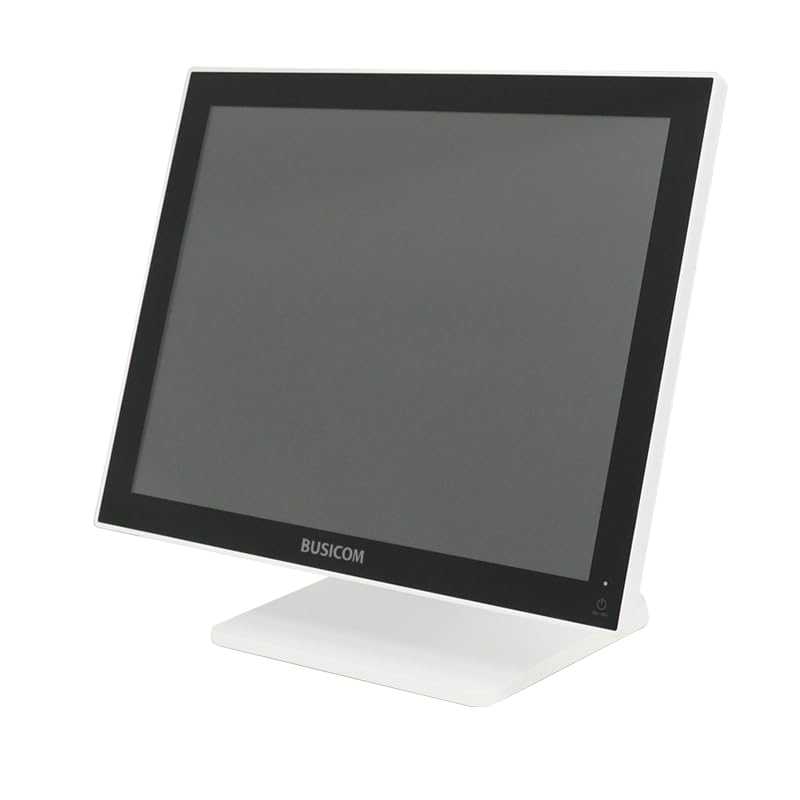
図1: 前面 view of the BUSICOM PC-SeaV15c Touch Panel PC.
2.製品オーバーview
2.1 主な特徴
- 高度なデザイン: Features an ultra-thin bezel and a highly durable 7H reinforced display for enhanced aesthetics and protection.
- 優れたパフォーマンス: Equipped with Microsoft Windows 10 IoT Enterprise, ensuring long-term support and reliable operation.
- 直感的なタッチパネル: Utilizes a capacitive touch method, offering a familiar and responsive touch experience similar to smartphones and tablets.
- メンテナンスが簡単: Designed for simple RAM and SSD replacement, facilitating upgrades and servicing.
- 多用途インターフェース: Provides a wide range of connectivity options to integrate with various peripherals.
- 効率的なストレージ: SSD storage ensures fast processing speeds, quiet operation, and excellent shock resistance.
2.2 コンポーネント
The package typically includes the BUSICOM PC-SeaV15c unit and a power adapter. Additional accessories may vary.

図2: 前面と側面のプロfile of the PC-SeaV15c unit.

図3:背面 view showing access panels for RAM and SSD components.
3. セットアップ手順
3.1 開梱
- Carefully remove the PC-SeaV15c from its packaging.
- 目に見える損傷がないか確認してください。損傷がある場合は、直ちに販売店にご連絡ください。
- リストされているすべてのコンポーネントが存在することを確認します。
3.2 周辺機器の接続
Refer to the interface diagram below for port locations and types.

Figure 4: Detailed diagram of the PC-SeaV15c's rear and bottom interfaces.
- 電源接続: Connect the provided power adapter to the DC In port and then to a power outlet.
- USB デバイス: Use the USB 2.0 (4 ports) and USB 3.0 (2 ports) for connecting keyboards, mice, printers, and other USB peripherals.
- ネットワーク接続: Connect an Ethernet cable to the LAN port for wired network access.
- オーディオ出力: Connect external speakers or headphones to the Audio Out port.
- Serial Ports (RJ45): Utilize COM1, COM2, COM3, and COM6 for connecting specialized POS peripherals such as barcode scanners or receipt printers.
- Cash Drawer (RJ11): Connect a compatible cash drawer to the RJ11 port.
- 外部ディスプレイ: If an external monitor is required, connect it to the Mini DisplayPort.
- USBタイプC: 対応デバイス向け。
3.3 電源のオン/オフ
- 電源オン: Press the power button located on the upper right side of the display bezel or the power mark on the rear panel.
- 電源を切る: To safely shut down the system, use the standard Windows shutdown procedure. Avoid direct power disconnection during operation to prevent data loss.
4. 操作手順
4.1 Windows 10 IoT Enterprise
The PC-SeaV15c operates on Windows 10 IoT Enterprise 2021. Familiarize yourself with the Windows operating system for basic navigation, application management, and system settings.
4.2 Touch Panel Usage
The capacitive touch screen supports multi-touch gestures.
- タップ: マウスのクリックに相当します。
- ダブルタップ: ダブルクリックと同じです。
- 長押し: 右クリックに相当します。
- スワイプ: スクロールまたはナビゲーション用。
- ピンチしてズーム: 2 本の指を使って拡大または縮小します。
5. メンテナンス
5.1デバイスのクリーニング
- 清掃する前に必ずデバイスの電源をオフにし、プラグを抜いてください。
- 柔らかく糸くずの出ない布で軽く拭き取ってください。amp水または非研磨性のスクリーンクリーナーで拭いてください。
- Do not spray liquids directly onto the screen or device.
- 刺激の強い化学薬品、溶剤、研磨材の使用は避けてください。
5.2 RAM and SSD Replacement
The PC-SeaV15c is designed for easy replacement of RAM and SSD components. Refer to Figure 3 for the access panel location. For detailed instructions on component replacement, consult a qualified technician or the BUSICOM support webサイト。
6。 トラブルシューティング
このセクションでは、発生する可能性のある一般的な問題に対する解決策を示します。
- デバイスの電源が入らない:
- 電源アダプタがデバイスと正常な電源コンセントの両方にしっかりと接続されていることを確認します。
- 別のデバイスを接続して、電源コンセントが機能していることを確認します。
- タッチスクリーンが反応しません:
- デバイスを再起動します。
- 画面がきれいで障害物がないことを確認してください。
- 表示なし:
- デバイスの電源がオンになっているかどうかを確認します。
- 外部ディスプレイが接続されている場合は、外部ディスプレイで正しい入力ソースが選択されていることを確認してください。
- 周辺機器が検出されません:
- Ensure the peripheral is correctly connected to the appropriate port (USB, LAN, COM).
- 周辺機器を別のポートに接続してみてください。
- Check the peripheral's own power supply, if applicable.
For further assistance, please contact BUSICOM customer support.
7. 仕様
| 特徴 | 詳細 |
|---|---|
| ブランド | ビジコム |
| モデル名 | PC-SeaV15c |
| 色 | 白 |
| 画面サイズ | 15インチ |
| 解決 | 1024x768 |
| オペレーティング·システム | Windows 10 IoT エンタープライズ 2021 |
| CPUブランド | インテル |
| プロセッサソケット | インテル® N97 |
| CPU速度 | 3.6GHz帯 |
| メモリタイプ | DDR4 |
| インストールされているRAM | 4ギガバイト |
| ハードディスクの種類 | ソリッドステートドライブ |
| SSD容量 | 128 GB (as per product title) |
| グラフィックカードの種類 | 統合された |
| VRAMタイプ | DDR4 メモリ |
| VRAM容量 | 4ギガバイト |
| USB 2.0 ポート | 4 |
| USB 3.0 ポート | 2 |
| 光学ドライブ | なし |
| 製品重量 | 6キログラム |
| 高さ(約) | 307.5 mm (as per dimension diagram) |

図5:背面 view of the PC-SeaV15c with approximate height dimension.
8. 保証とサポート
For warranty information and technical support, please refer to the warranty card included with your product or visit the official BUSICOM webサイトでご確認ください。保証請求の際は購入証明として領収書を保管してください。
BUSICOM Official Webサイト: BUSICOM Store on Amazon.co.jp


