導入
Thank you for choosing the ESX Vision VMX700DAB Universal 2 DIN Multimedia Receiver. This device is designed to provide a comprehensive in-car entertainment and communication experience, featuring a 7-inch touchscreen, digital radio, smartphone integration, and versatile media playback options. This manual provides essential information for the proper installation, operation, and maintenance of your new multimedia receiver.
主な特徴
- 7-inch (17.8 cm) Touchscreen Display
- ワイヤレスApple CarPlayとAndroid Autoの互換性
- DAB+ Digital Radio with included DAB antenna
- FM/AM Radio with RDS function
- Bluetooth Hands-free Function with audio streaming
- Front USB-C port for media and charging (1.5A)
- Rear USB-A port for Apple CarPlay/Android Auto and charging (1.5A)
- 4 x 80 W max. music power output
- 4V RCA pre-amplified outputs (FL/FR/RL/RR/SUB1/SUB2)
- RCA AUX入力(L/R/VIDEO)
- RCA Camera inputs (Front/Rear)
- Internal and external microphone support
- Compatible with analog steering wheel remote control (learnable)
- 統合GPS受信機
- Multimedia player for audio, video, and photos (AVI, FLV, MOV, MKV, WMV, WMA, MP3, FLAC, JPEG, PNG, BMP)
設定
1. パッケージ内容
インストールを開始する前に、すべてのコンポーネントが揃っていることを確認してください。パッケージには通常、以下のものが含まれています。
- ESX VMX700DAB Multimedia Receiver
- 電源およびスピーカー配線ハーネス
- 外部マイク
- DAB+アンテナ
- GPS受信機
- Mounting Hardware and Trim Frame
- RCA Cables for AUX and Camera Inputs
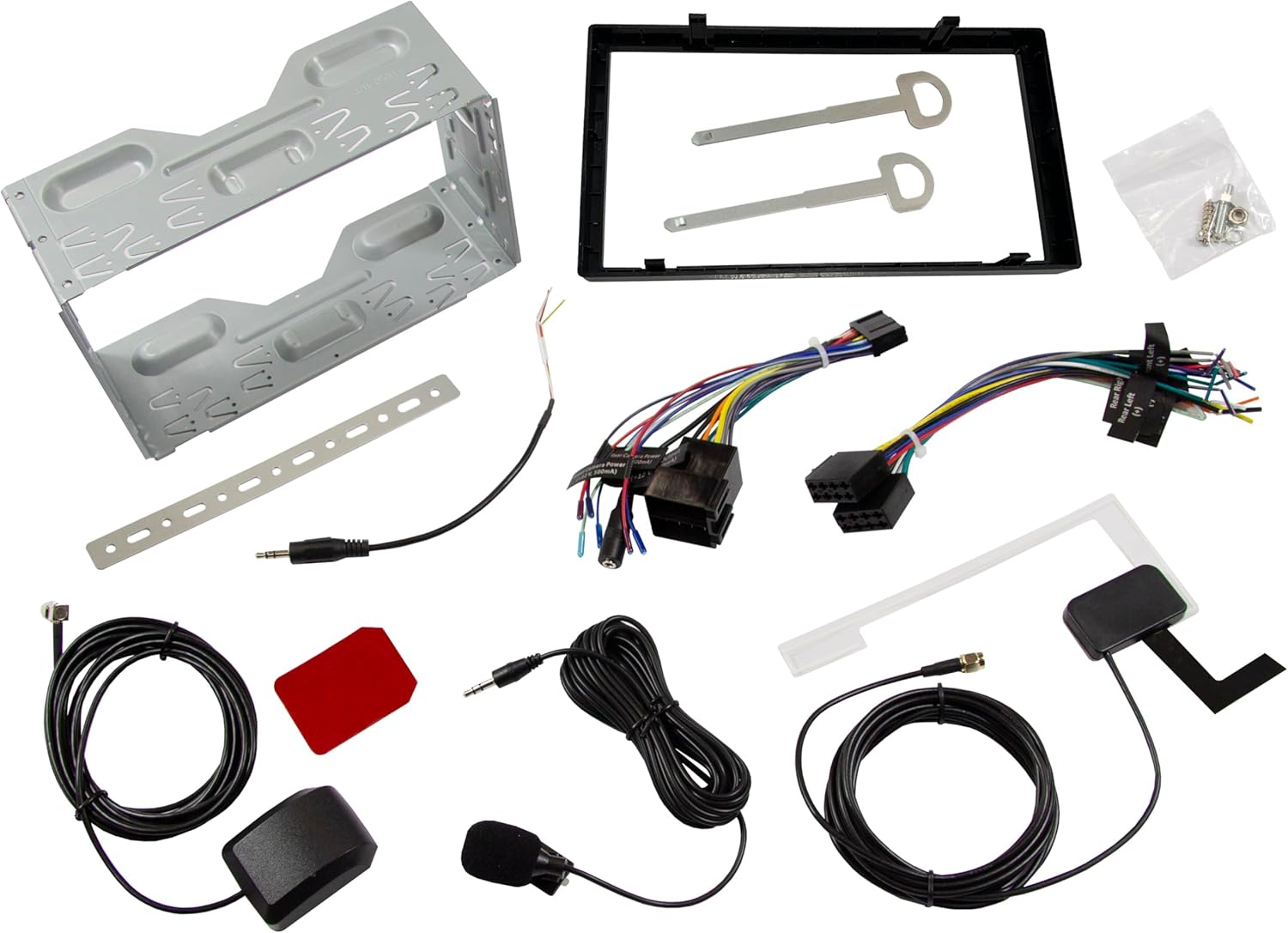
画像: 上view of all included accessories and cables for the ESX VMX700DAB multimedia receiver, including wiring harnesses, antennas, and mounting brackets.
2. インストール
Installation of the ESX VMX700DAB should ideally be performed by a qualified professional to ensure proper wiring and functionality. Incorrect installation can lead to damage to the unit or vehicle electrical system.
- 取り付け: Secure the 2 DIN unit into your vehicle's dashboard opening using the provided mounting brackets and screws. Ensure it is firmly seated.
- 配線: Connect the main power harness, speaker wires, and other auxiliary connections (RCA pre-outs, AUX-in, camera inputs) as per your vehicle's wiring diagram and the receiver's connection ports.
- アンテナ: Connect the DAB+ antenna and GPS receiver to their respective ports on the rear of the unit. Position the antennas for optimal signal reception.
- 外部マイク: Connect the external microphone to the designated input for improved hands-free call quality.
- ステアリングホイールコントロール: If your vehicle supports analog steering wheel controls, connect the appropriate wires and configure the learning function in the unit's settings.
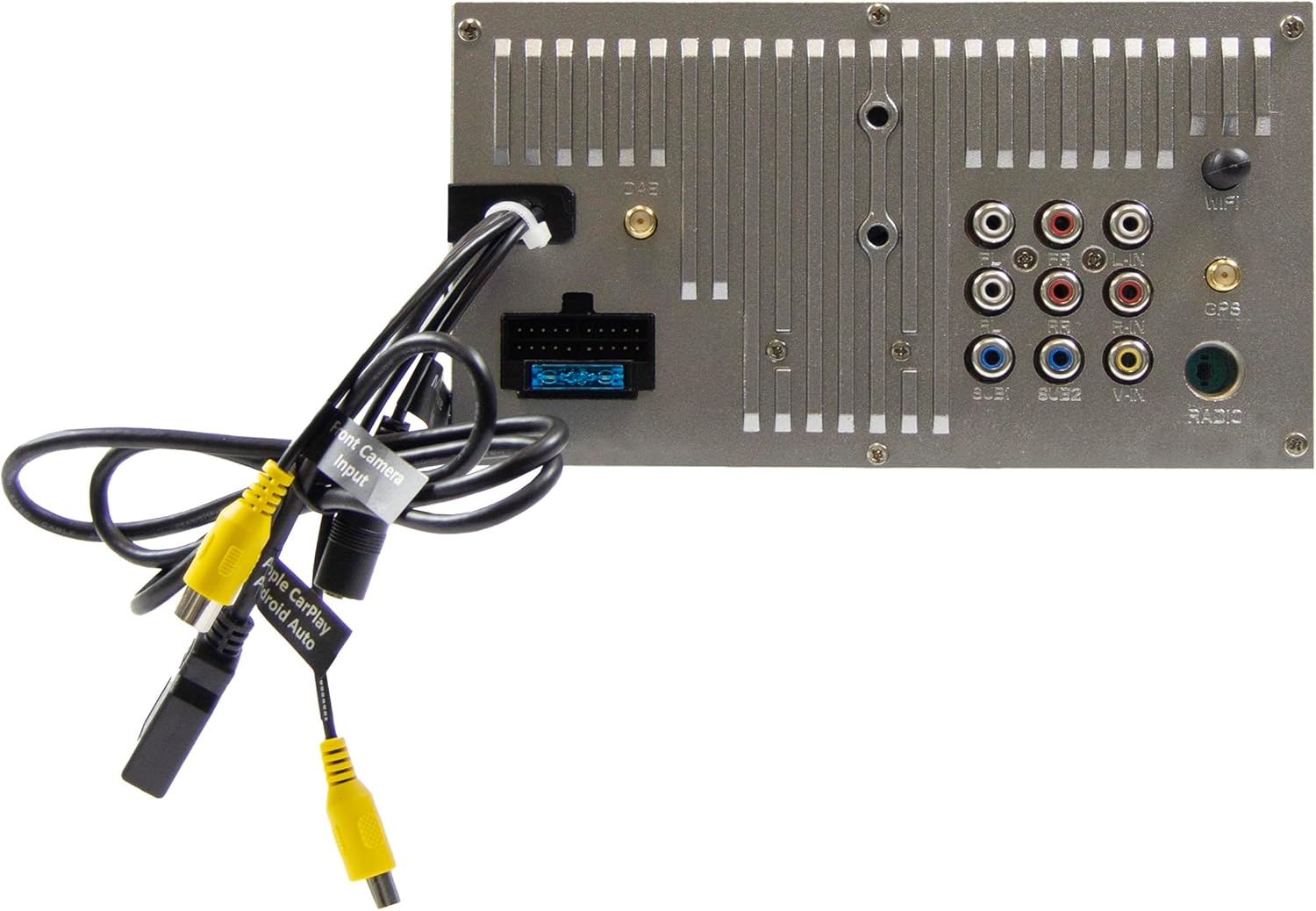
Image: Rear panel of the ESX VMX700DAB multimedia receiver, displaying the array of input and output ports including RCA, USB, and antenna connections for comprehensive system integration.

画像: サイド view of the ESX VMX700DAB unit, highlighting its compact 2 DIN chassis design and the front panel layout with physical controls and USB-C port.

画像: 正面 view of the ESX VMX700DAB multimedia receiver, showcasing its 7-inch touchscreen display and the physical rotary knob and buttons on the left side for easy access to essential functions.
3. 初回電源投入
After installation, turn on your vehicle's ignition. The unit should power on automatically. Follow any on-screen prompts for initial setup, such as language selection or time zone settings.
操作手順
1. 基本的な操作とインターフェース
The VMX700DAB features a large rotary knob for volume control and three function keys on the left side of the control panel for quick access. The primary interface is the 7-inch touchscreen.

Image: The main home screen of the ESX VMX700DAB multimedia receiver, displaying various application icons for functions such as Apple CarPlay, Android Auto, Radio, Phone, Camera, Bluetooth Audio, USB, DAB, Equalizer, AUX, and Settings.
- ロータリーノブ: Turn to adjust volume. Press to mute/unmute or access specific menus depending on context.
- ファンクションキー: These keys provide shortcuts to common functions. Refer to the on-screen labels for their specific actions.
- タッチスクリーン: Navigate through menus, select options, and control playback by touching the corresponding icons or areas on the display.
2. Radio Functions (FM/AM & DAB+)
Select the "Radio" or "DAB" icon from the home screen to access radio functions.
- FM/AMラジオ: Use the on-screen controls to scan for stations, save presets, and utilize RDS features for station information.
- DAB+ラジオ: The integrated DAB+ tuner provides access to digital radio broadcasts. Ensure the DAB antenna is properly connected for optimal reception. Scan for available DAB stations and save your favorites.
3. Bluetooth接続
The built-in Bluetooth module supports hands-free calling and high-quality wireless music streaming.
- ペアリング: Go to the Bluetooth settings on the receiver and enable pairing mode. On your smartphone, search for available Bluetooth devices and select "ESX VMX700DAB" to connect.
- ハンズフリー通話: Once paired, you can make and receive calls directly through the receiver. The 7-inch display shows your phonebook, allowing direct contact selection. The external microphone ensures clear voice quality.
- オーディオストリーミング: Stream music wirelessly from your smartphone to the receiver. Control playback (play/pause, skip tracks) from the receiver's touchscreen.
4. Apple CarPlay & Android Auto (Wireless & USB)
The ESX VMX700DAB supports both wireless and wired connections for Apple CarPlay and Android Auto, mirroring your smartphone's compatible apps directly onto the receiver's screen.

Image: The Apple CarPlay interface displayed on the ESX VMX700DAB screen, showing common iOS applications like Phone, Music, Maps, Messages, and Now Playing, providing seamless smartphone integration.

Image: The ESX VMX700DAB multimedia receiver installed in a car dashboard, displaying music playback information on its screen while a smartphone is held nearby, illustrating the integrated media experience.
- ワイヤレス接続: Ensure your smartphone's Wi-Fi and Bluetooth are enabled. Select the Apple CarPlay or Android Auto icon on the receiver's home screen and follow the on-screen instructions to establish a wireless connection.
- USB接続: Connect your smartphone to the dedicated USB-A port (usually at the rear, or via the front USB-C if supported for data) using a certified USB cable. The system will automatically launch CarPlay or Android Auto.
- 機能性: Access navigation (e.g., Google Maps with live traffic), music streaming services (e.g., Spotify), messaging, and other compatible apps directly from the receiver's touchscreen.
5. メディアの再生
The VMX700DAB supports various audio, video, and photo formats via its USB ports.
- USBメディア: Insert a USB drive into the front USB-C port or rear USB-A port. Select the "USB" icon to browse and play media files.
- サポートされている形式: AVI、FLV、MOV、MKV、WMV、WMA、MP3、FLAC、JPEG、PNG、BMP。
- AUX入力: Connect external audio/video devices to the RCA AUX inputs (L/R/VIDEO) at the rear of the unit. Select "AUX" from the source menu to play content.
6. カメラ入力
The unit features two RCA camera inputs (Front/Rear) for connecting external cameras.
- リアカメラ: When connected, the display will automatically switch to the rear camera view 車両がバックギアに入れられたとき。
- フロントカメラ: フロントカメラ view can typically be activated manually from the "Camera" icon on the home screen or through specific settings.
メンテナンス
- 画面の掃除: 柔らかく糸くずの出ない布でタッチスクリーンを優しく拭いてください。頑固な汚れには、軽くamp布を水または画面に安全なクリーナーで拭いてください。研磨剤や刺激の強い化学薬品の使用は避けてください。
- 一般的な清掃: 本体を埃やゴミから守ってください。ボタンやポートの周りは、柔らかいブラシか圧縮空気で掃除してください。
- ソフトウェアアップデート: Periodically check the ESX website for any available firmware updates for your VMX700DAB model. Updates can improve performance, add features, or fix bugs. Follow the instructions provided with the update file 気をつけて。
トラブルシューティング
If you encounter issues with your ESX VMX700DAB, refer to the following common problems and solutions:
| 問題 | 考えられる原因 | 解決 |
|---|---|---|
| 電源なし | Blown fuse, incorrect wiring, vehicle ignition off. | Check vehicle fuses and the unit's fuse. Verify power wiring connections. Ensure vehicle ignition is on. |
| 音が出ない | 音量が低すぎる、ミュートが有効になっている、スピーカーの配線が間違っている、 ampライフルの問題。 | Increase volume. Check if mute is active. Verify speaker connections. If using external amp充電器の場合は、電源と接続を確認してください。 |
| ラジオの受信状態が悪い(DAB/FM) | アンテナが接続されていない、アンテナの配置が悪い、信号が弱いエリア。 | Ensure antenna is securely connected. Reposition antenna for better signal. Try in an area with stronger signal. |
| Bluetoothが接続されない | デバイスがペアリング モードになっていない、ペアリング プロセスが正しくない、干渉が発生している。 | 両方のデバイスがペアリングモードになっていることを確認してください。以前のペアリングを削除して、もう一度お試しください。デバイスに近づいてください。 |
| Apple CarPlay/Android Autoが起動しない | Incorrect USB cable, phone settings, app issues, wireless connection problems. | Use a certified USB cable. Check phone settings for CarPlay/Android Auto. Restart phone and unit. For wireless, ensure Wi-Fi and Bluetooth are on and paired. |
| タッチスクリーンが反応しない | システムがフリーズし、画面に汚れが出る。 | Perform a soft reset (refer to manual for specific reset button/procedure, often a small pinhole). Clean the screen. |
If the problem persists after trying these solutions, please contact ESX customer support or a qualified service technician.
仕様
| 特徴 | 詳細 |
|---|---|
| モデル番号 | VMX700DAB |
| 画面 | 7インチ(17.8 cm)タッチスクリーン |
| 接続技術 | Bluetooth, USB (Type A, Type C), Auxiliary (RCA) |
| 特集 | Wireless Apple CarPlay, Wireless Android Auto, DAB+ Digital Radio, Hands-free Calling |
| 対応デバイス | スマートフォン |
| Max Music Power Output | 4 x 80 幅 |
| 事前amp生きた出力 | 4V RCA (FL/FR/RL/RR/SUB1/SUB2) |
| オーディオ入力モード | ステレオ |
| サラウンドサウンドチャンネル構成 | 4.2 |
| Video Encoding Formats | AVI, FLV, MOV, MKV, WMV |
| Audio Encoding Formats | WMA, MP3, FLAC |
| 画像フォーマット | JPEG、PNG、BMP |
| アイテム重量 | 1.61キログラム |
保証とサポート
For warranty information, please refer to the warranty card included with your product or visit the official ESX webサイトでご確認ください。保証請求に備えて購入証明書を保管してください。
For technical support, troubleshooting beyond this manual, or service inquiries, please contact ESX customer support through their official channels. Contact information can typically be found on the ESX webサイトまたは製品のパッケージ内。


