1. はじめに
The AiXun PF26 Intelligent Multi-Channel Fast Charger is a versatile charging station designed to efficiently power multiple devices simultaneously. Featuring 4 channels and 8 ports, it delivers a total power output of 260W, with each single port capable of up to 65W. This device supports various fast charging protocols and includes an intuitive 3.5-inch IPS display for monitoring charging status. Its intelligent design incorporates an automatic standby function for energy saving and a 1/4-inch standard screw hole for flexible installation.
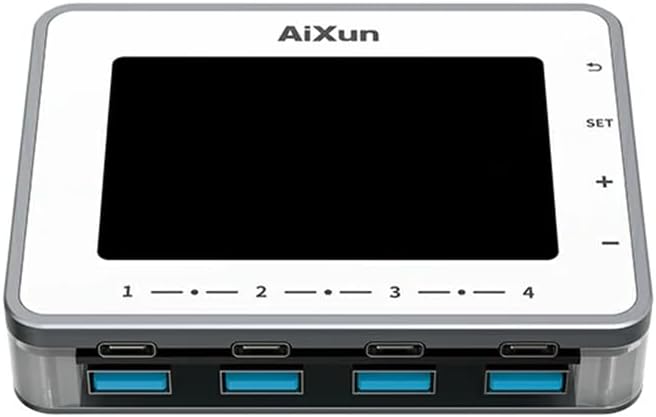
画像1.1:正面 view of the AiXun PF26 Intelligent Multi-Channel Fast Charger, showing the display screen and the eight USB ports (four USB-C and four USB-A).
2. 安全情報
怪我や損傷を防ぐために、この製品を使用する前にすべての安全に関する指示をお読みください。
- デバイスを水、湿気、または極端な温度にさらさないでください。
- Use only compatible power adapters. An external 24V power adapter is required and sold separately.
- デバイスを落としたり、強い衝撃を与えたりしないでください。
- Do not attempt to disassemble or modify the charger. This will void the warranty and may cause damage.
- お子様の手の届かない場所に保管してください。
- 過熱を防ぐために、運転中は適切な換気を確保してください。
3. パッケージ内容
パッケージにすべてのアイテムが含まれていることを確認します。
- 1x AiXun PF26 Intelligent Multi-Channel Fast Charger (Base Unit)
Note: The power adapter is not included and must be purchased separately. Refer to the specifications for compatible adapter requirements.
4 製品の特徴
The AiXun PF26 charger offers advanced features for efficient and intelligent charging:
- ハイパワー出力: Total 260W strong power across 4 channels and 8 ports. Each single port can achieve a peak power of 65W.
- Wide Protocol Compatibility: Supports various fast charging protocols including PPS, PD, QC, AFC, FCP, SCP, PE, and SFCP.
- インテリジェント検出: Automatically detects and recognizes connected devices for optimal charging.
- 自動スタンバイ: Built-in function to reduce energy consumption and prolong device lifespan. Standby time is adjustable from 1 to 60 minutes.
- 3.5インチIPSディスプレイ: 明確な view of charging status, voltage, current, and power parameters.
- 柔軟な設置: Features a standard 1/4-inch BSP Thread Hole on the bottom, allowing adaptation to various brackets (brackets sold separately).
- Remote Upgrades: Supports firmware upgrades via PC connection.

Image 4.1: The AiXun PF26 charger in use, illustrating its 260W total power and 65W per port capability. An external power adapter is shown connected.
5. 仕様
| パラメータ | 価値 |
|---|---|
| 製品名 | Intelligent Multi-channel Fast Charger |
| ブランド | アイシュン |
| モデル | PF26 |
| 入力ボリュームtage | 24V直流 |
| 総出力 | 260W |
| Max Single Port Power | 65W |
| Max Dual Port Output (per channel) | 30W |
| ポート数 | 8 (USB-C x 4、USB-A x 4) |
| 表示タイプ | 3.5インチIPS |
| 通信インターフェース | Type-Cケーブル |
| サポートされている急速充電プロトコル | PPS/PD/QC/AFC/FCP/SCP/PE/SFCP |
| 製品寸法 | 102 x 78 x 7 mm (4.02 x 3.07 x 0.28 インチ) |
| アイテム重量 | 4.4ポンド |
| 取り付け機能 | 1/4-inch BSP Thread Hole |
Recommended Power Adapter Specifications:
The AiXun PF26 requires an external 24V DC power adapter with a 5.5*2.5mm DC port. The required current depends on the desired total power output:
| 力 | 巻tage | 現在 |
|---|---|---|
| 144W | 24V | 6A |
| 192W | 24V | 8A |
| 260W | 24V | 12A |

Image 5.1: Reference table for selecting a compatible charging power adapter, detailing DC port specifications and power output options.
6. セットアップ
- 電源アダプタを接続: Connect a compatible 24V DC power adapter (purchased separately) to the DC input port on the AiXun PF26 charger. Ensure the adapter meets the power requirements listed in Section 5.
- 電源オン: Once the power adapter is connected, the device will automatically power on, and the 3.5-inch IPS display will illuminate.
- オプションの取り付け: If desired, use the 1/4-inch BSP Thread Hole on the bottom of the unit to attach it to a compatible bracket or stand (sold separately).

Image 6.1: Bottom design of the AiXun PF26 charger, highlighting the 1/4-inch BSP Thread Hole for easy adaptation to various mounting brackets.
7. 操作手順
7.1 充電装置
- Connect your devices (smartphones, tablets, laptops, etc.) to the available USB-C or USB-A ports using appropriate charging cables.
- The charger will automatically detect the connected device and initiate charging, utilizing compatible fast charging protocols.
- Monitor the charging status, voltage, current, and power for each port on the 3.5-inch IPS display.
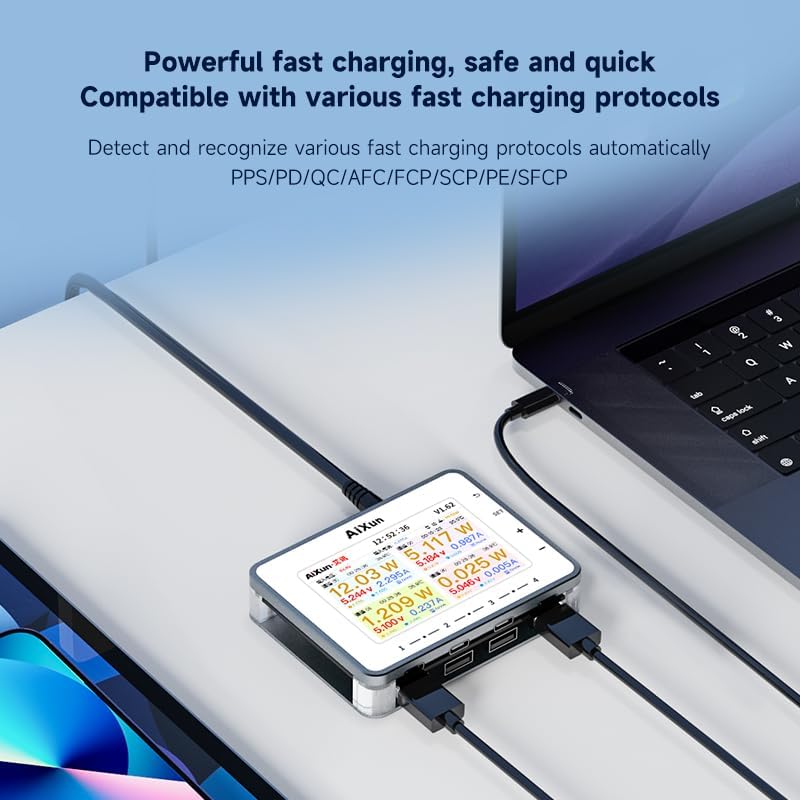
Image 7.1: The AiXun PF26 charger actively charging multiple devices, with its display showing detailed charging parameters for each port.
7.2 ディスプレイのナビゲーションと設定
The charger features a 3.5-inch IPS display and control buttons for navigation:
- SETボタン: 設定メニューにアクセスします。
- + / - ボタン: メニュー オプションを移動したり、値を調整したりします。
- 戻るボタン: 前の画面に戻るか、メニューを終了します。
Within the settings, you can customize parameters such as standby time (1-60 minutes) and view システム情報。

Image 7.2: The AiXun PF26 charger's display showing intelligent features and a connected smartphone indicating 36% charge, demonstrating the energy-saving standby function.
7.3 Connecting to AiXun Platform (PC)
The device can be connected to a PC via a Type-C cable to the AiXun platform software. This allows for:
- Real-time monitoring of current and voltage curves.
- Performing remote firmware upgrades to ensure the device has the latest features and improvements.
8. メンテナンス
- クリーニング: 充電器の外側を拭く際は、柔らかく乾いた布をご使用ください。液体クリーナーやエアゾールは使用しないでください。
- ストレージ: 使用していないときは、デバイスを直射日光や極端な温度を避け、涼しく乾燥した場所に保管してください。
- ケーブル管理 損傷を防ぐため、充電ケーブルが過度に曲がったり絡まったりしないようにしてください。
9。 トラブルシューティング
- デバイスの電源が入らない: Ensure the 24V DC power adapter is correctly connected and functioning. Verify the adapter meets the specified voltage および現在の要件。
- デバイスが充電されない: Check if the charging cable is securely connected to both the charger and the device. Ensure the device supports the fast charging protocols offered by the AiXun PF26. Try a different port or cable.
- ディスプレイが機能しない: If the display is blank or unresponsive, try disconnecting and reconnecting the power adapter. If the issue persists, contact customer support.
- 充電が遅い: 電源アダプターが十分な電力を供給していることを確認してくださいtage for the number of devices being charged. Some devices may not support the highest fast charging speeds.
10. 保証とサポート
For warranty information and technical support, please refer to the documentation provided with your purchase or visit the official AiXun website. You may also contact AiXun customer service directly for assistance with product operation, troubleshooting, or warranty claims.