導入
Thank you for choosing the RAINPOINT Sprinkler Timer. This programmable water timer is designed to simplify your garden and lawn watering, offering automatic, manual, and rain delay modes. With its easy-to-read LCD screen and intuitive controls, managing your irrigation has never been easier. This manual provides detailed instructions for setting up, operating, and maintaining your new sprinkler timers.

Image: Two RAINPOINT Sprinkler Timers, highlighting their compact design and digital displays.
安全情報
- Do not immerse the timer in water. It is designed to be water-resistant (IP54), not submersible.
- Use only 2 AAA alkaline batteries (not included). Do not mix old and new batteries or different battery types.
- 漏れを防ぐために、すべての接続がしっかりと固定されていることを確認してください。
- Do not expose the timer to freezing temperatures. Remove from faucet and store indoors during winter.
- お子様の手の届かない場所に保管してください。
パッケージ内容
- RAINPOINT Sprinkler Timer (x2)
- ユーザーマニュアル (x1)
注記: 2 AAA alkaline batteries are required for each timer and are not included in the package.
設定
1. バッテリーの取り付け
- タイマーの背面にある電池ボックスを見つけます。
- バッテリートレイをスライドさせて取り出します。
- 正しい極性 (+/-) を確認して、新しい AAA アルカリ電池 2 本を挿入します。
- バッテリー トレイを、カチッと音がするまでコンパートメント内にスライドさせて戻します。
2. Attaching the Timer to the Faucet
- 蛇口が清潔でゴミがないことを確認してください。
- Screw the timer's inlet (top connector) onto your outdoor faucet or hose bib. Hand-tighten only. Do not overtighten.
- The timer features an upgraded anti-leakage design with increased thread engagement for a tighter fit.
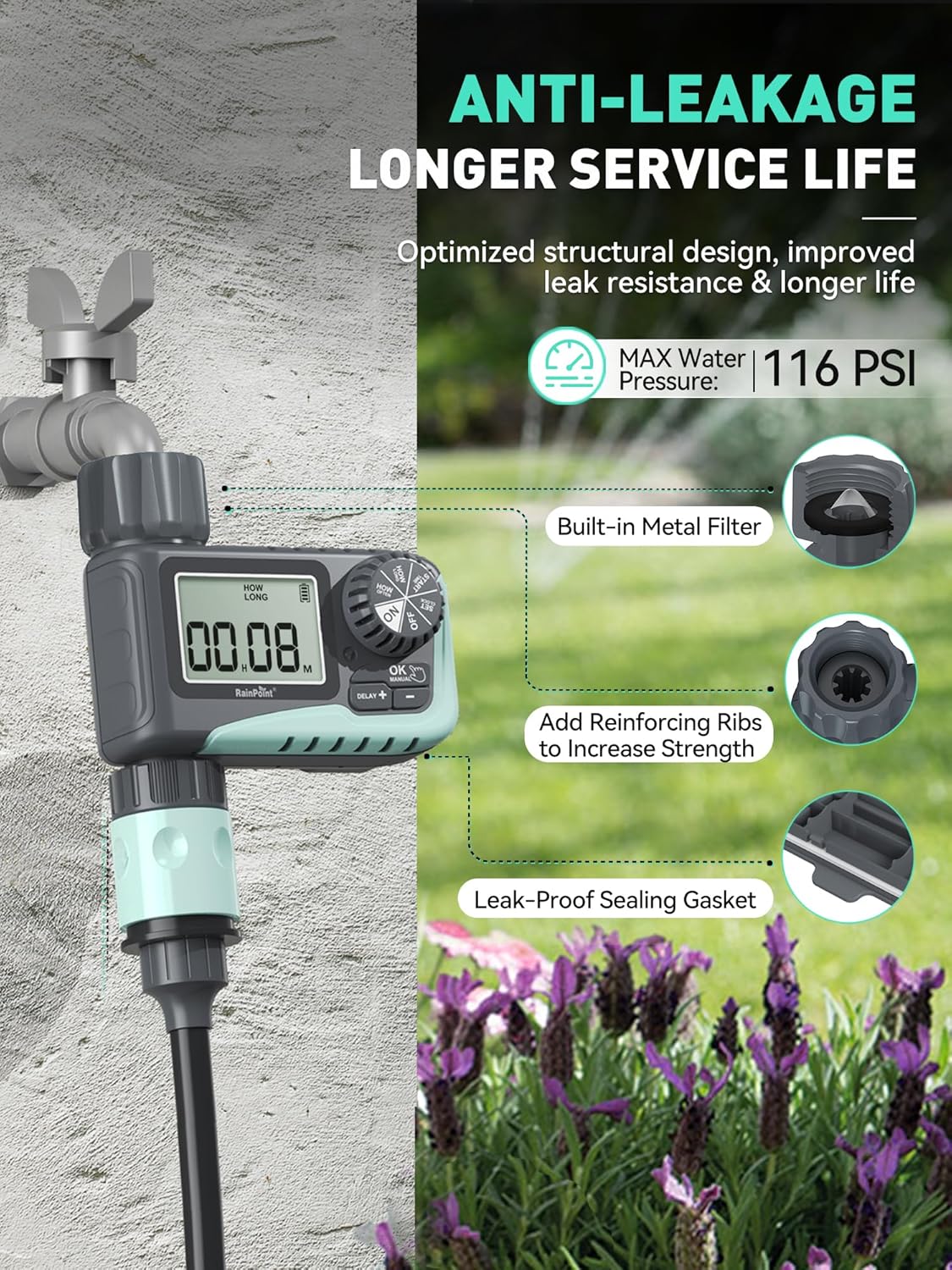
Image: The sprinkler timer connected to a faucet, illustrating its anti-leakage design and built-in metal filter for debris prevention.
3. ホースの接続
- ガーデンホースをタイマーの出口(下部コネクタ)にねじ込みます。必ず手で締めてください。
- The timer is designed to withstand up to 116 PSI water pressure.
操作手順
The RAINPOINT Sprinkler Timer features a large LCD screen and a rotary dial for easy programming. The dial allows you to select different modes, and the buttons below the screen are used for adjustments.

画像: クローズアップ view of the timer's large LCD display and user-friendly rotary dial, emphasizing ease of setup and reading.
1. 時計の設定
- ダイヤルを回して「SET CLOCK」にします。
- 「+」ボタンと「-」ボタンを使用して現在の時刻を調整します。
- 「OK」を押して確定し、次の設定に進みます。
2. Programming Automatic Watering
This mode allows you to set a customized watering schedule.
- Turn the dial to "START TIME". Use "+" and "-" to set the desired start time for watering. Press "OK".
- Turn the dial to "HOW LONG". Set the watering duration from 1 minute to 3 hours 59 minutes. Press "OK".
- Turn the dial to "HOW OFTEN". Choose the watering frequency:
- Every 1h to 12h (e.g., every 6 hours)
- Every 1 day to 7 days (e.g., every 2 days)
- Turn the dial to "ON" to activate the programmed schedule.

Image: The timer's display showing options for setting watering duration and frequency, including hourly and daily cycles.
3. 手動散水モード
Use this mode for immediate, on-demand watering without affecting your programmed schedule.
- Turn the dial to "ON".
- 「MANUAL」ボタンを押します。
- Use "+" and "-" to set the desired manual watering duration (1 minute to 8 hours).
- Press "OK" to start manual watering. The timer will automatically return to its programmed schedule after the manual watering is complete.
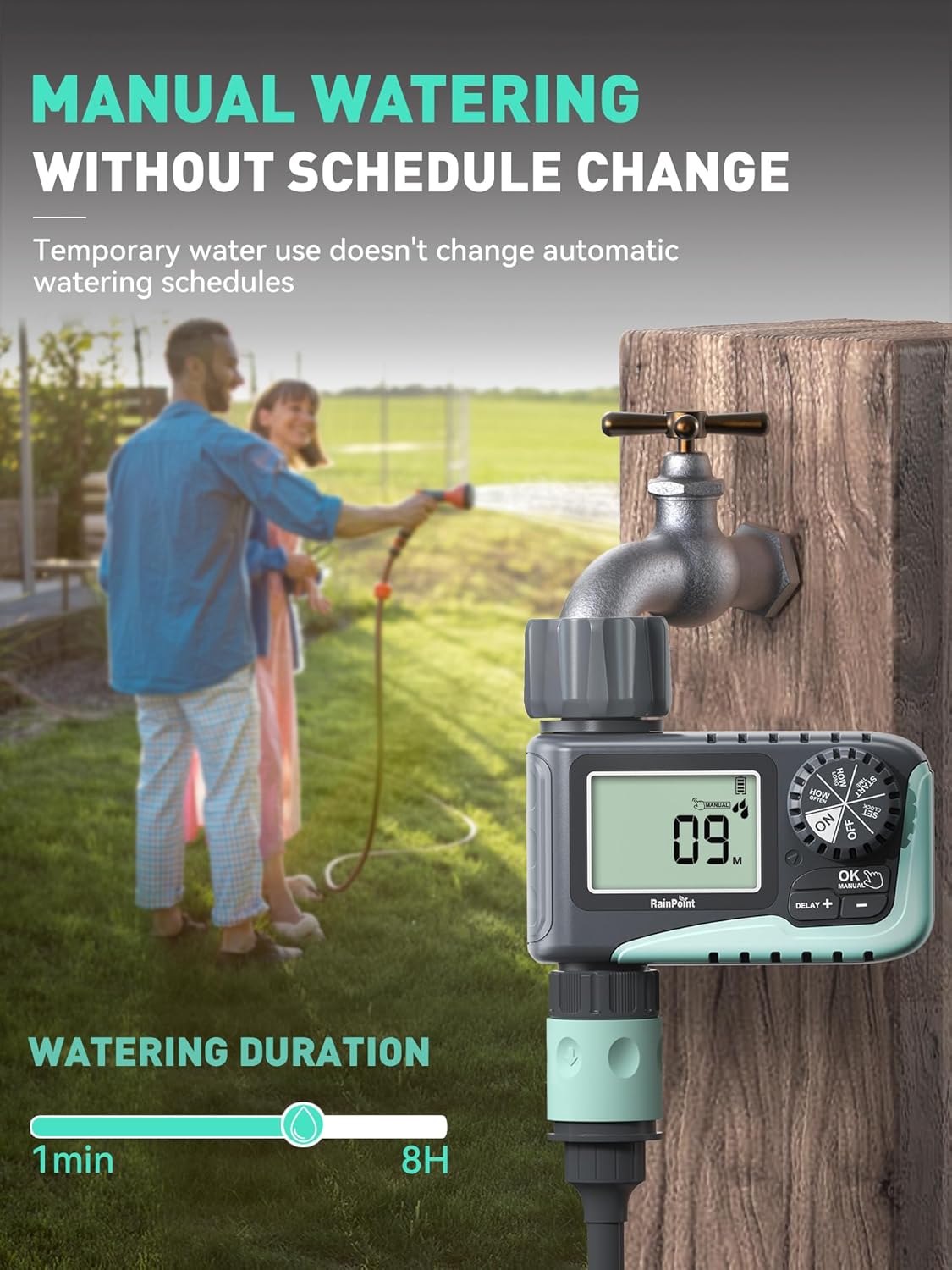
Image: A person manually watering a garden using the RAINPOINT Sprinkler Timer, demonstrating the manual mode functionality.
4. 雨天遅延モード
This feature allows you to pause your watering schedule during rainy periods to conserve water and prevent overwatering.
- Turn the dial to "ON".
- Press the "DELAY +" button.
- Each press will increase the delay by 24 hours (options: 24h, 48h, 72h).
- 選択した遅延期間が経過すると、タイマーはプログラムされたスケジュールを自動的に再開します。

Image: The sprinkler timer displaying a rain delay countdown, set against a backdrop of a rainy garden, illustrating its water-saving feature.
5. タイマーをオフにする
- Turn the dial to "OFF". This will stop all watering programs.
メンテナンス
バッテリーの寿命と交換
- The timer is designed for long battery life (up to 365 days).
- The LCD screen will display a low power indicator when batteries need replacement.
- When the battery is low, the valve will automatically close to prevent flooding and water waste.
- Replace batteries promptly when the low power indicator appears. Your programmed settings will be saved during battery replacement.

Image: The timer's display indicating low battery, with an icon showing the valve automatically closing to prevent flooding, emphasizing its low power auto-shutoff feature.
フィルターの清掃
- The timer has a built-in metal filter at the inlet to prevent debris from entering the irrigation system.
- Periodically check and clean the filter to ensure optimal water flow and prevent blockages.
- Unscrew the timer from the faucet, remove the filter, rinse it under running water, and reinsert.
冬季保管
- Before the first frost, remove the timer from the faucet.
- タイマーに残っている水を排出します。
- タイマーは乾燥した、霜が降りない屋内に保管してください。
トラブルシューティング
| 問題 | 考えられる原因 | 解決 |
|---|---|---|
| Timer not turning on/display blank. | 電池が切れているか、正しく取り付けられていない。 | 正しい極性を確認して、新しい AAA アルカリ電池と交換してください。 |
| 水が流れません。 | 蛇口がオフになっている、水圧が低い、フィルターが詰まっている、プログラミングが間違っている。 | Ensure faucet is fully open. Check water pressure. Clean the inlet filter. Verify programming settings. |
| タイマーが漏れています。 | Loose connection; damaged washer; cracked housing. | Ensure connections are hand-tight. Check rubber washer for damage and replace if necessary. If housing is cracked, contact support. |
| Watering schedule not starting. | Timer is in "OFF" or "MANUAL" mode; incorrect start time/frequency. | Turn the dial to "ON". Recheck and adjust your programmed start time and frequency. |
仕様
- ブランド: レインポイント
- モデル: ITV 107 (Based on video information)
- 材料: プラスチック
- 色: 緑
- 製品寸法: 奥行き5インチ x 幅4インチ x 高さ4.8インチ
- 商品の重量: 1.3 pounds (for the pack, likely)
- 電源: 単4アルカリ電池2本(別売)
- 水やり時間: 1 minute to 3 hours 59 minutes (Automatic), 1 minute to 8 hours (Manual)
- 水やり頻度: 1 ~ 12 時間ごとまたは 1 ~ 7 日ごと
- 雨天延期オプション: 24h、48h、72h
- 最大水圧: 116PSI
- 耐水性: IP54
保証とサポート
RAINPOINT products are designed for quality and reliability. For any questions, technical support, or warranty claims, please contact RAINPOINT customer service. Refer to the contact information provided in your product packaging or visit the official RAINPOINT webサポートサイト。
また、 RAINPOINT Store on Amazon 詳細とサポートリソースについては、こちらをご覧ください。


