1. はじめに
Thank you for choosing the ELECTROPRIME LANGTU LT700 Wired Silent Punk Keyboard. This keyboard features a unique punk keycap design, silent operation, and strong compatibility, making it suitable for various computing tasks. Its ergonomic design ensures a comfortable typing experience, even during extended use. This manual provides essential information for setting up, operating, maintaining, and troubleshooting your keyboard.
2. 安全情報
- キーボードを液体や過度の湿気にさらさないでください。
- 極端な温度を避けてください。
- キーボードをご自身で分解したり修理したりしないでください。必要に応じて、資格のあるサービス担当者にご連絡ください。
- お子様の手の届かない場所に保管してください。
- キーボードは柔らかく乾いた布で拭いてください。刺激の強い化学薬品は使用しないでください。
3. パッケージ内容
パッケージにすべてのアイテムが含まれていることを確認します。
- ELECTROPRIME LANGTU LT700 Wired Silent Punk Keyboard
- ユーザーマニュアル(このドキュメント)
4. セットアップ
The LANGTU LT700 keyboard is designed for simple plug-and-play operation.
- キーボードをパッケージから取り出します。
- コンピューターで使用可能なUSBポートを見つけます。
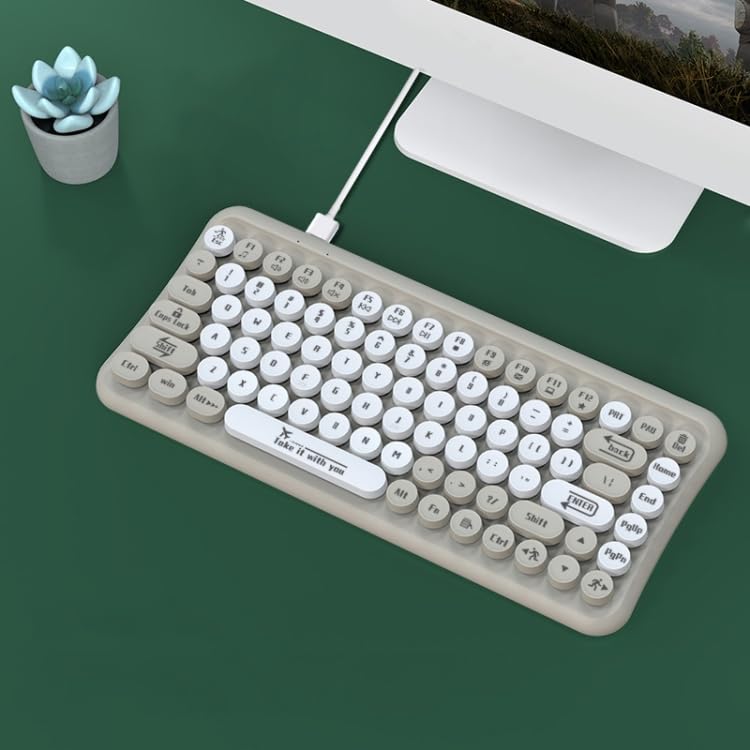
- Plug the USB connector of the keyboard into the USB port on your computer.
- オペレーティングシステムは必要なドライバーを自動的に検出し、インストールします。通常、追加のソフトウェアのインストールは必要ありません。
- これで、キーボードを使用する準備が整いました。
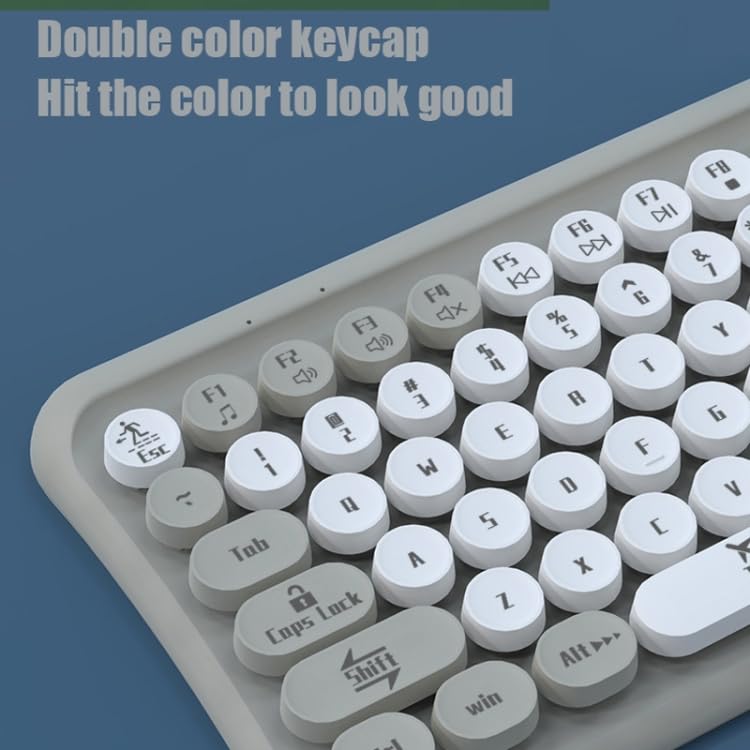
Image: The ELECTROPRIME LANGTU LT700 keyboard connected via its USB cable to a desktop computer, ready for use.
5. 操作手順
5.1 基本的なタイピング
The keyboard functions as a standard 85-key layout. Simply press the desired keys to input text or commands into your computer.
5.2 静音動作
The keycaps utilize noise reduction technology, significantly reducing the sound of keystrokes for a quieter typing experience.
5.3個のファンクションキー
The top row of keys (F1-F12) includes standard function keys and may have secondary multimedia functions accessible by pressing the 'Fn' key in combination with the respective function key. Refer to the icons printed on the keycaps for specific functions such as volume control, media playback, or screen brightness.
画像: クローズアップ view of the keyboard's double-color keycaps, highlighting the ergonomic design and the icons on the function keys (F1-F12) for multimedia control.
6. メンテナンス
6.1 クリーニング
- 清掃する前に、キーボードをコンピューターから取り外してください。
- 柔らかく糸くずの出ない布を使用してキーボードの表面を拭きます。
- キー間のほこりやゴミを取り除くには、圧縮空気または小さなブラシを使用します。
- Do not use abrasive cleaners, solvents, or spray cleaners directly on the keyboard.
6.2 ストレージ
長期間使用しない場合は、キーボードを直射日光や極端な温度を避け、涼しく乾燥した場所に保管してください。
7。 トラブルシューティング
7.1 キーボードが反応しない
- USB ケーブルがキーボードとコンピューターの両方にしっかりと接続されていることを確認します。
- キーボードをコンピューターの別の USB ポートに接続してみてください。
- コンピュータを再起動します。
- 別のコンピューターでキーボードをテストして、問題がキーボードにあるかコンピューターにあるかを判断します。
7.2 特定のキーが機能しない
- Check for any debris or obstructions under the non-functional key. Gently clean around the key.
- クリーニングしても問題が解決しない場合は、キー機構が損傷している可能性があります。
If you continue to experience problems, refer to the Warranty and Support section.
8. 仕様
| 特徴 | 仕様 |
|---|---|
| モデル | LANGTU LT700 |
| インタフェース | USB有線 |
| キーの数 | 85つのキー |
| キーキャップの種類 | Punk Keycap, Chocolate Keycaps |
| ボタンの寿命 | 約10万回 |
| ケーブル長さ | 1.5メートル |
| 寸法(L x W) | 約315mm x 150mm |
| 重さ | 約0.60kg(1.33ポンド) |
| 互換性 | Plug and Play with most operating systems |
9. 保証とサポート
保証情報やテクニカルサポートについては、ご購入時に付属のマニュアルをご参照いただくか、販売店にお問い合わせください。保証請求の際に必要となるため、購入証明書は保管してください。


