導入
This manual provides essential information for setting up, operating, maintaining, and troubleshooting your Tecno CAMON 30 5G smartphone. Please read this manual carefully to ensure proper use and to maximize the device's capabilities.
1. セットアップ
1.1 開梱と初期検査
パッケージを開封したら、すべてのコンポーネントが揃っていて損傷がないことをご確認ください。標準パッケージの内容は次のとおりです。
- Tecno CAMON 30 5G Smartphone
- 70Wフラッシュチャージャー
- USBケーブル
- SIMトレイイジェクター
- 保護ケース(地域によって異なる場合があります)
- クイックスタートガイド
- 保証書

Figure 1.1: Tecno CAMON 30 5G smartphone, showcasinフロントディスプレイとリアカメラモジュール。
1.2 SIMカードの挿入
To ensure network connectivity, insert your Nano-SIM card(s) into the device. The Tecno CAMON 30 5G supports dual SIM functionality.
- デバイスの側面にある SIM カード トレイを見つけます。
- 付属の SIM トレイ取り出しツールをトレイの横にある小さな穴に挿入し、トレイが飛び出すまで軽く押します。
- SIMトレイを慎重に引き出します。
- Place your Nano-SIM card(s) into the designated slots on the tray, ensuring the gold contacts face downwards and the cut corner aligns correctly.
- SIM トレイをカチッと音がするまでゆっくりとデバイスに戻します。

Figure 1.2: The SIM tray ejector tool, used for accessing the SIM card slot.
1.3デバイスの充電
Before first use, it is recommended to fully charge your device. The Tecno CAMON 30 5G supports 70W Flash Charging.
- Connect the USB cable to the 70W Flash Charger.
- 充電器を電源コンセントに差し込みます。
- USB ケーブルのもう一方の端を、携帯電話の下部にある USB-C ポートに接続します。
- The charging indicator will appear on the screen. A full charge from 0-50% can be achieved in approximately 19 minutes.

Figure 1.3: The bottom of the Tecno CAMON 30 5G, featuring the USB-C port for charging and data transfer.
1.4 電源投入と初期設定
Press and hold the Power button (located on the right side of the device) until the Tecno logo appears. Follow the on-screen instructions to complete the initial setup, which includes selecting your language, connecting to Wi-Fi, and setting up your Google account.
2.デバイスの操作
2.1 基本的なナビゲーション
The Tecno CAMON 30 5G operates on Android 14 with HiOS. Navigation is primarily touch-based:
- タップ: 項目を選択するか、アプリケーションを開きます。
- スワイプ: 画面、リスト、またはコンテンツをスクロールします。
- ピンチしてズーム: 画面上のコンテンツを拡大または縮小します。
- 長押し: コンテキスト メニューにアクセスしたり、アイコンを移動したりします。
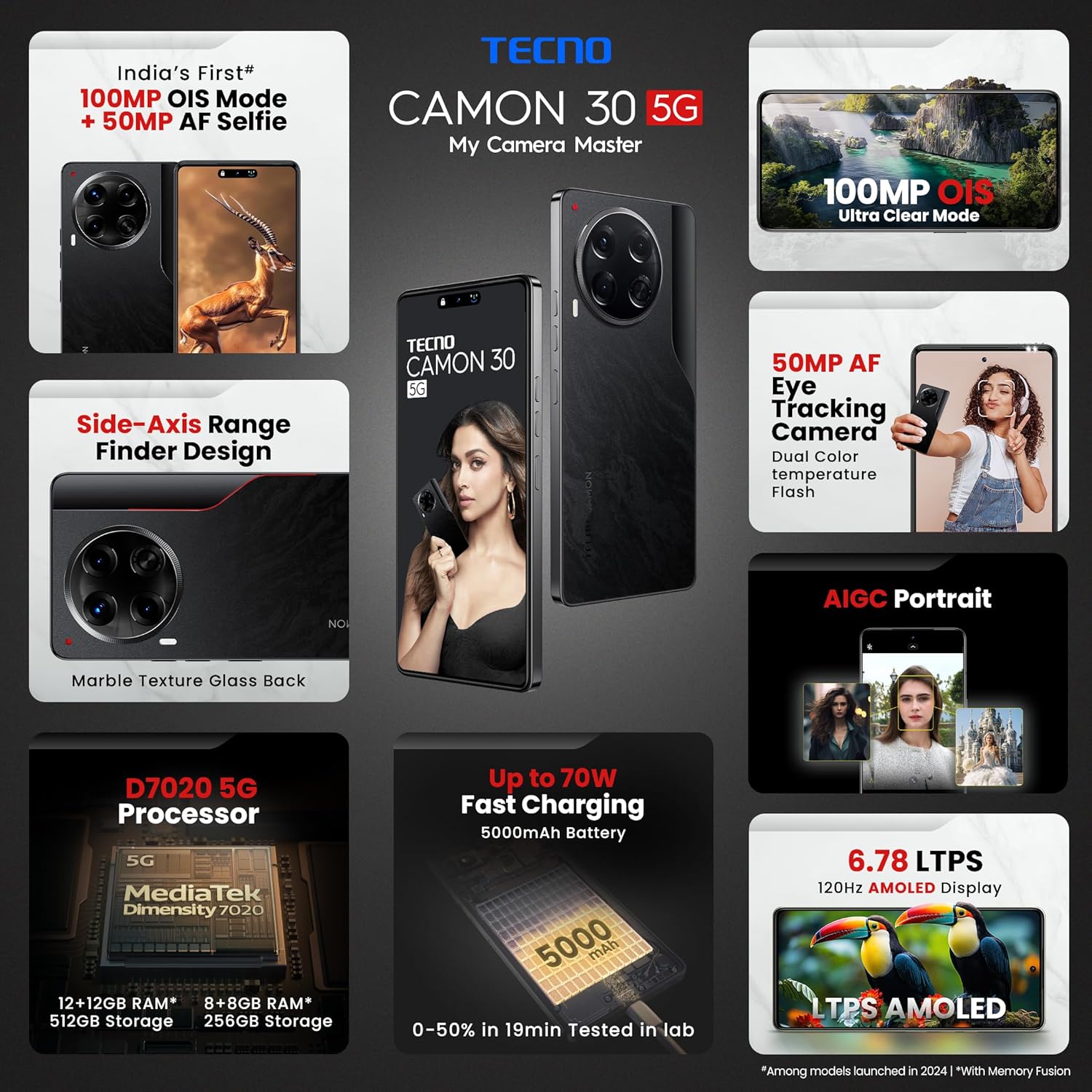
Figure 2.1: The Tecno CAMON 30 5G's vibrant LTPS AMOLED display.
2.2 表示機能
The device features a 6.78-inch FHD+ LTPS AMOLED Dot-in display with a resolution of 1080 x 2436 pixels. Key display features include:
- 1300 nits Peak Brightness: 明るい屋外環境でもクリアな視界を確保します。
- 120Hz Adaptive Refresh Rate: Automatically adjusts between 120Hz, 90Hz, and 60Hz for smooth scrolling and power efficiency.
- 2160Hz High-Frequency PWM Dimming: Reduces screen flicker for improved eye comfort.
- TÜV Rheinland Low Blue Light Emission Certified: Protects your eyes from harmful blue light.
- Wet Hand Touch Technology: Allows for smooth navigation even with wet hands.
2.3カメラシステム
The Tecno CAMON 30 5G is equipped with an advanced camera system for high-quality photography and videography.
- リアカメラ: 100MP OIS (Optical Image Stabilization) main sensor with a 2MP Depth Sensor. Features include Ultra Steady videos (OIS + EIS), 10X Zoom, Twinkle Portrait Filter, Super Night Photography Mode, Sky Shop, and Slow Motion Videos.
- フロントカメラ: 50MP Auto Focus Selfie camera with Dual Color Temperature Front Flash. Supports DSLR-level portrait system and Video HDR.
- AIGC Portrait (OTA): AI Generative Content for enhanced portrait photography.

Figure 2.2: The distinctive rear camera module of the Tecno CAMON 30 5G.
2.4 パフォーマンスとストレージ
Powered by the MediaTek Dimensity 7020 chipset with a 6nm processor, the device offers robust performance for gaming and multitasking.
- プロセッサ: MediaTek Dimensity 7020 (6nm) for Ultra 5G Performance.
- ラム: Up to 24GB* (12GB physical + 12GB Memory Fusion) LPDDR4x RAM.
- 内部ストレージ: 512GB UFS 3.1 Storage.
2.5 Audio and Smart Features
- ドルビーアトモス: 没入感のあるオーディオ体験を提供します。
- Ella with ChatGPT: さまざまなタスクのための統合 AI アシスタント。
- AI Eraser (OTA): Allows for intelligent object removal from photos.
- 赤外線リモコン: Supports control of up to 15 types of home appliances.
- Dynamic Pet AOD: Customizable Always-On Display with dynamic pet animations.
3. メンテナンス
3.1 デバイスのクリーニング
デバイスの外観と機能を維持するには:
- 柔らかく糸くずの出ない布を使用して、画面と本体を拭いてください。
- 強力な化学薬品、研磨剤入りの洗剤、圧縮空気の使用は避けてください。
- ポートにほこりやごみが付かないようにしてください。
3.2ソフトウェアアップデート
最適なパフォーマンス、セキュリティ、新機能へのアクセスを確保するため、ソフトウェアアップデートを定期的に確認し、インストールしてください。 設定 > システム > システムアップデート 更新を確認します。
3.3バッテリーケア
本製品には5000mAhのバッテリーが搭載されています。バッテリー寿命を延ばすには:
- 極端な温度を避けてください。
- Use only the official Tecno charger and cable.
- 頻繁にバッテリーを完全に消耗しないようにしてください。
3.4 ストレージ管理
Regularly manage your device's storage to ensure smooth operation. Delete unnecessary files、アプリのキャッシュをクリアし、使用していないアプリをアンインストールしてください。ストレージの使用状況は、 設定 > ストレージ.
4。 トラブルシューティング
This section addresses common issues you might encounter with your Tecno CAMON 30 5G.
4.1 デバイスの電源が入らない
- バッテリーが充電されていることを確認してください。充電器を接続し、数分間待ってから電源を入れてください。
- 強制的に再起動するには、電源ボタンを 10 ~ 15 秒以上押し続けます。
4.2 充電の問題
- Verify that the charger and USB cable are securely connected to both the phone and the power outlet.
- 別の電源コンセントを使用してみてください。
- 充電ポートにゴミや損傷がないか点検します。
4.3 ネットワーク接続の問題
- 機内モードが有効になっているかどうかを確認します(画面の上から下にスワイプしてクイック設定にアクセスします)。
- SIM カードが正しく挿入されていることを確認してください。
- デバイスを再起動します。
- へ移動 設定>ネットワークとインターネット>モバイルネットワーク モバイルデータが有効になっていることを確認してください。
4.4 アプリがクラッシュまたはフリーズする
- 問題のあるアプリを閉じて再度開きます。
- アプリのキャッシュをクリアする(設定 > アプリ > [アプリ名] > ストレージとキャッシュ > キャッシュを消去).
- アプリが最新バージョンに更新されていることを確認してください。
- 問題が解決しない場合は、アプリをアンインストールして再インストールすることを検討してください。
4.5 工場出荷時設定へのリセット
ソフトウェアの問題が継続的に発生する場合は、工場出荷時設定にリセットすると解決する場合があります。 警告: これにより、携帯電話のすべてのデータが消去されます。続行する前に、重要なデータをバックアップしてください。
- へ移動 設定 > システム > リセットオプション.
- 選択 すべてのデータを消去(工場出荷時設定にリセット).
- 決定を確認し、プロンプトが表示されたら PIN/パターン/パスワードを入力します。
5. 仕様
Below are the detailed technical specifications for the Tecno CAMON 30 5G (Model: CL7 512+12).
| 特徴 | 仕様 |
|---|---|
| オペレーティング·システム | Android 14 (HiOS) |
| プロセッサ | メディアテック ディメンシティ 7020 (6nm) |
| ラム | 12GB (expandable up to 24GB with Memory Fusion) |
| 内部ストレージ | 512GB UFS 3.1 |
| 画面 | 6.78" FHD+ LTPS AMOLED Dot-in Display, 1080 x 2436 resolution, 120Hz Adaptive Refresh Rate, 1300 nits Peak Brightness, 2160Hz PWM Dimming |
| リアカメラ | 100MP OIS Main Camera + 2MP Depth Sensor |
| フロントカメラ | 50MP Auto Focus Selfie Camera |
| バッテリー | 5000mAh |
| 充電 | 70Wフラッシュ充電、10Wリバース充電 |
| 寸法 | 16.54 x 0.76 x 0.78 cm |
| 重さ | 199グラム |
| 接続性 | 5G、Wi-Fi、Bluetooth、USB Type-C |
| センサー | In-display Fingerprint Sensor, Accelerometer, Gyroscope, Proximity, Compass |
| 箱の中身 | SIM Tray Ejector (other accessories like charger and cable are typically included but not explicitly listed in 'Whats in the box' field) |
6. 保証とサポート
6.1 保証情報
Your Tecno CAMON 30 5G comes with a limited manufacturer's warranty. Please refer to the warranty card included in your product package for specific terms, conditions, and duration of coverage. Keep your proof of purchase for warranty claims.
6.2 カスタマーサポート
For technical assistance, service, or any inquiries regarding your device, please contact Tecno customer support:
- フリーダイヤル番号: 18004190525
- メールアドレス: Service.india@carlcare.com
- メーカー: G mobiles, Ismartu India Private Limited, D-197 and 198, Sector 63, Noida, Gautam Buddha Nagar, Uttar Pradesh 201301, India.
Tecno provides a robust after-sales service network with over 1300 service centers across more than 1000 towns in India.


