導入
This manual provides detailed instructions for the installation, operation, and maintenance of your ANJIELO SMART Wired 1080P Video Door Phone Apartment Intercom System. Please read this manual thoroughly before installation and use to ensure proper functionality and safety. Keep this manual for future reference.
製品終了view
The ANJIELO SMART Video Door Phone Intercom System is designed to enhance home security and communication. It features a 10-inch touch monitor and a 1080P outdoor doorbell unit. The system supports multiple unlocking methods, motion detection, automatic recording, and two-way audio communication.

図1: システムコンポーネントview. This image displays the main components of the ANJIELO SMART Video Door Phone Intercom System, including the indoor monitor and outdoor doorbell unit, highlighting their design and key features.
パッケージ内容
パッケージにすべてのアイテムが揃っていることを確認します。
- 1 x 10-inch Indoor Touch Monitor
- 1 x 1080P Outdoor Doorbell Unit
- 1 x Rain Cover for Outdoor Doorbell
- 1 x 3m 4-core cable (for doorbell connection)
- 1 x 1.2m External Power Supply (for monitor)
- 5 x IC Cards (for unlocking)
- 1 x 32GBマイクロSDカード
- 取り付けネジとアンカー
- ユーザーマニュアル(このドキュメント)
仕様
屋外ドアベルユニット
- カメラセンサー: 1 / 2.7 CMOS
- 解決: 1080P
- レンズ: 3.2mm
- View 角度: 148°
- ナイトビジョン: 赤外線LED(120°)
- 消費電力: 最大200mA
- 電源: 室内機から供給
- 動作温度: -40℃~+50℃
- インストール: Surface mount with rain cover
- 寸法: 137mm x 85.5mm x 23.5mm
- 保護: IP65 Waterproof, dustproof, vandal resistant

Figure 2: IP65 Waterproof Outdoor Doorbell. This image illustrates the outdoor doorbell unit, highlighting its robust IP65 waterproof design, suitable for various weather conditions.
屋内タッチモニター
- 画面: 10インチTFT-LCDタッチスクリーン
- 解決: 1024×680
- 着メロ: 7コードのメロディーリング
- 調整可能: ボリューム、カラー
- 繋がり: 4-wires (to doorbell), WiFi (2.4GHz for Tuya App)
- パネル材質: アクリル/ABSカバー
- インストール: 表面実装
- 入力ボリュームtage: AC 100-240V 50/60Hz
- ワーキングVoltage: DC 12V、2A
- 寸法: 272mm x 180mm x 21mm (10.6×71×1インチ)
システム機能
- Max Doorbell Units: 2
- Max Indoor Monitors: 6
- Mobile Phone Sharing: Supports up to 5 mobile phones via Tuya App
- 電子ロックの互換性: Supports all 12V electronic locks
セットアップガイド
1. Wiring Diagram and Requirements
The indoor monitor and outdoor doorbell unit require a wired connection using a 4-core cable. The provided 3m 4-core cable is for base installation. You can extend the distance using RVV4/Cat5/Cat6 wires, with a maximum distance exceeding 300ft (approximately 90 meters).

Figure 3: 4-Wire Cable Connection Diagram. This diagram illustrates the wired connection between the indoor monitor, outdoor doorbell, and an optional electronic lock, showing the required 4-wire cable for communication and power.
重要な注意: While the monitor supports WiFi for app connectivity, the connection between the indoor monitor and the outdoor doorbell is always wired.
2. インストール手順
- 屋外ドアベルを取り付ける: Choose a suitable location near your entrance. Use the provided rain cover and mounting screws to securely attach the doorbell unit to the wall. Ensure it is at an appropriate height for visitors.
- 屋内モニターの取り付け: Select a convenient indoor location for the monitor. Use the provided mounting hardware to secure it to the wall.
- 配線を接続:
- Connect the 4-core cable from the outdoor doorbell to the indoor monitor. Ensure correct polarity if applicable (refer to specific wiring labels on devices).
- If connecting an electronic lock, wire it to the outdoor doorbell unit as per the lock's instructions and the system's wiring diagram. The system supports 12V electronic locks.
- 電源オン: Connect the 1.2m external power supply to the indoor monitor and plug it into a standard AC outlet. The system will power on.
3. WiFi and Tuya App Connection
The main indoor monitor can connect to your home's 2.4GHz WiFi network to enable remote access via the Tuya app.
- Tuya アプリをダウンロード: Download and install the "Tuya Smart" app from your smartphone's app store (iOS or Android).
- 登録/ログイン: アプリを開いて新しいアカウントを作成するか、すでにアカウントをお持ちの場合はログインします。
- デバイスを追加: On the indoor monitor, navigate to the WiFi settings. Follow the on-screen instructions to connect the monitor to your 2.4GHz WiFi network.
- アプリとペアリング: In the Tuya app, select "Add Device" and follow the prompts to pair your video intercom system. This typically involves scanning a QR code displayed on the monitor or entering a device ID.
- 共有アクセス: The system supports sharing access with up to 5 mobile phones. Follow the app's instructions to invite family members or other authorized users.
操作手順
1. 通話の応答と双方向オーディオ
When a visitor presses the doorbell, all connected indoor monitors and paired mobile phones will ring. You can see, hear, and speak to the visitor from any monitor or your mobile phone.
- モニターより: Touch the screen to answer the call. You can then speak to the visitor.
- モバイルアプリから: Receive a notification on your phone. Open the Tuya app to view the visitor and engage in two-way audio.

Figure 4: Two-Way Audio Interface. This image shows the indoor monitor and mobile app interfaces during a two-way audio call, demonstrating how users can communicate with visitors at the door.
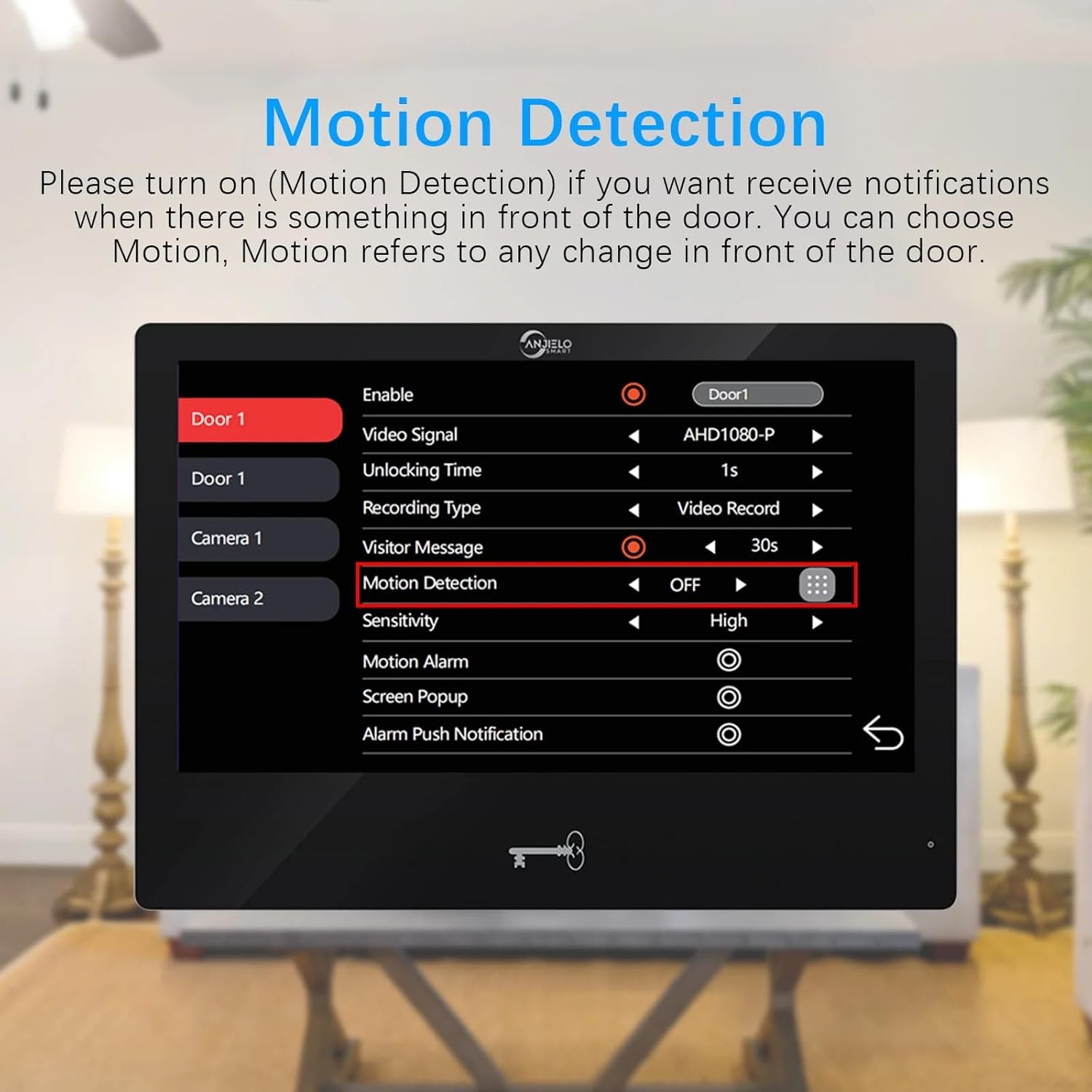
Figure 5: Real-time Two-Way Audio Interaction. This image depicts a user interacting with the indoor monitor, engaging in a conversation with a visitor, illustrating the practical application of the two-way audio feature.
2. ロック解除方法(5つ1つ)
The system offers five methods to unlock a connected 12V electronic lock:
- パスワード: Enter a pre-set password on the outdoor doorbell keypad.
- 指紋: Use a registered fingerprint on the outdoor doorbell's fingerprint reader.
- ICカード: Tap a registered IC card (5 included) on the outdoor doorbell's RFID reader.
- Tuyaアプリ: 携帯電話の Tuya Smart アプリを使用して、リモートでドアのロックを解除します。
- モニター: Press the unlock button on the indoor touch monitor.
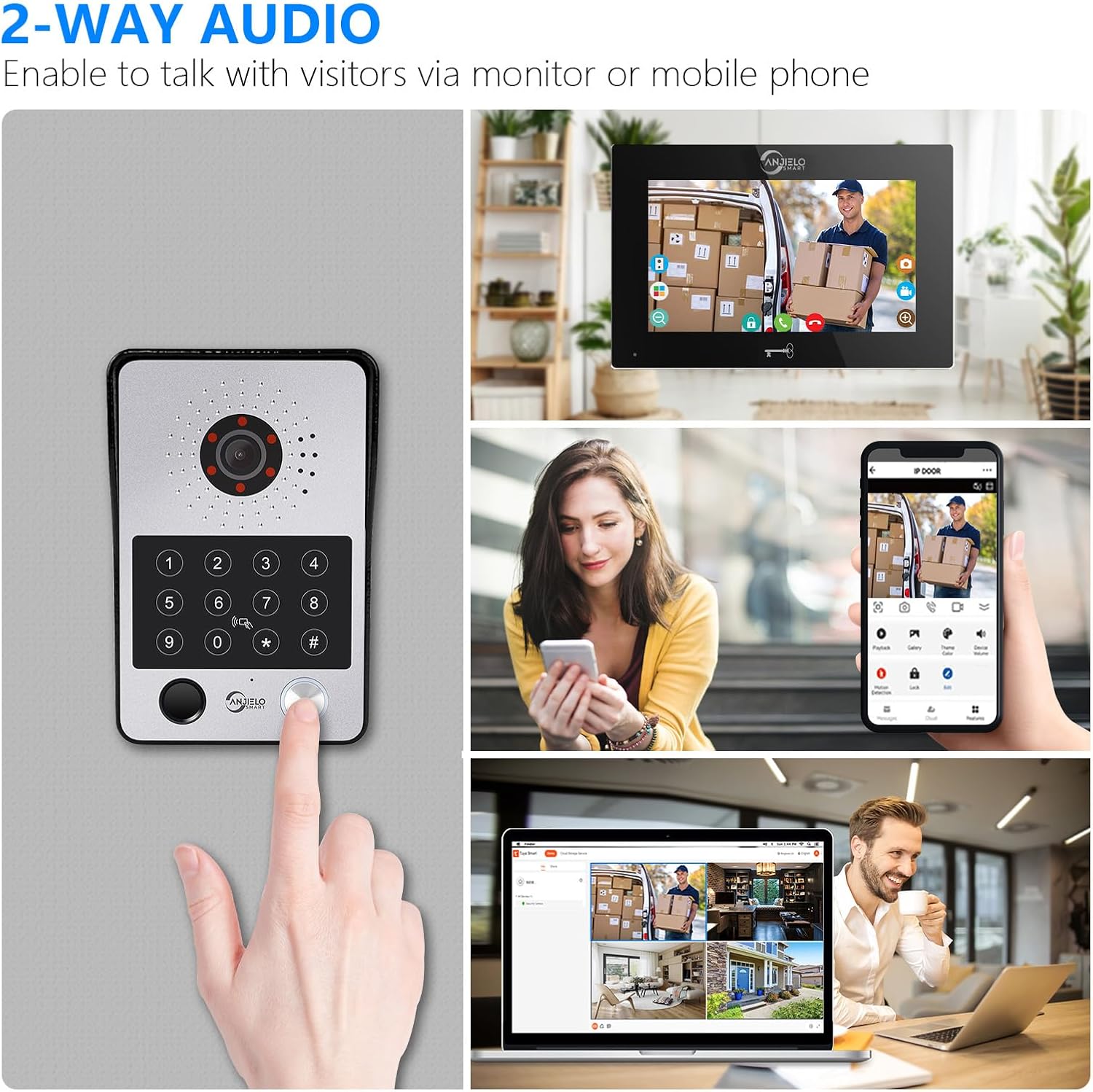
図6:以上view 5 in 1 ロック解除方法。 This image visually demonstrates the five different ways to unlock the door: Fingerprint, Password, IC Card, Monitor, and Tuya App, providing a comprehensive view of the system's access control features.
3. 動き検出と自動録画
The system is equipped with motion detection. When motion is detected in front of the doorbell or a visitor presses the doorbell, the camera will automatically record videos or capture snapshots.
- アクティベーション: Motion detection can be enabled or disabled via the indoor monitor settings.
- ストレージ: Recordings and snapshots are saved to the included 32GB Micro SD card.
- Viewing: 再view recorded events directly on the indoor monitor or through the Tuya app on your mobile phone.
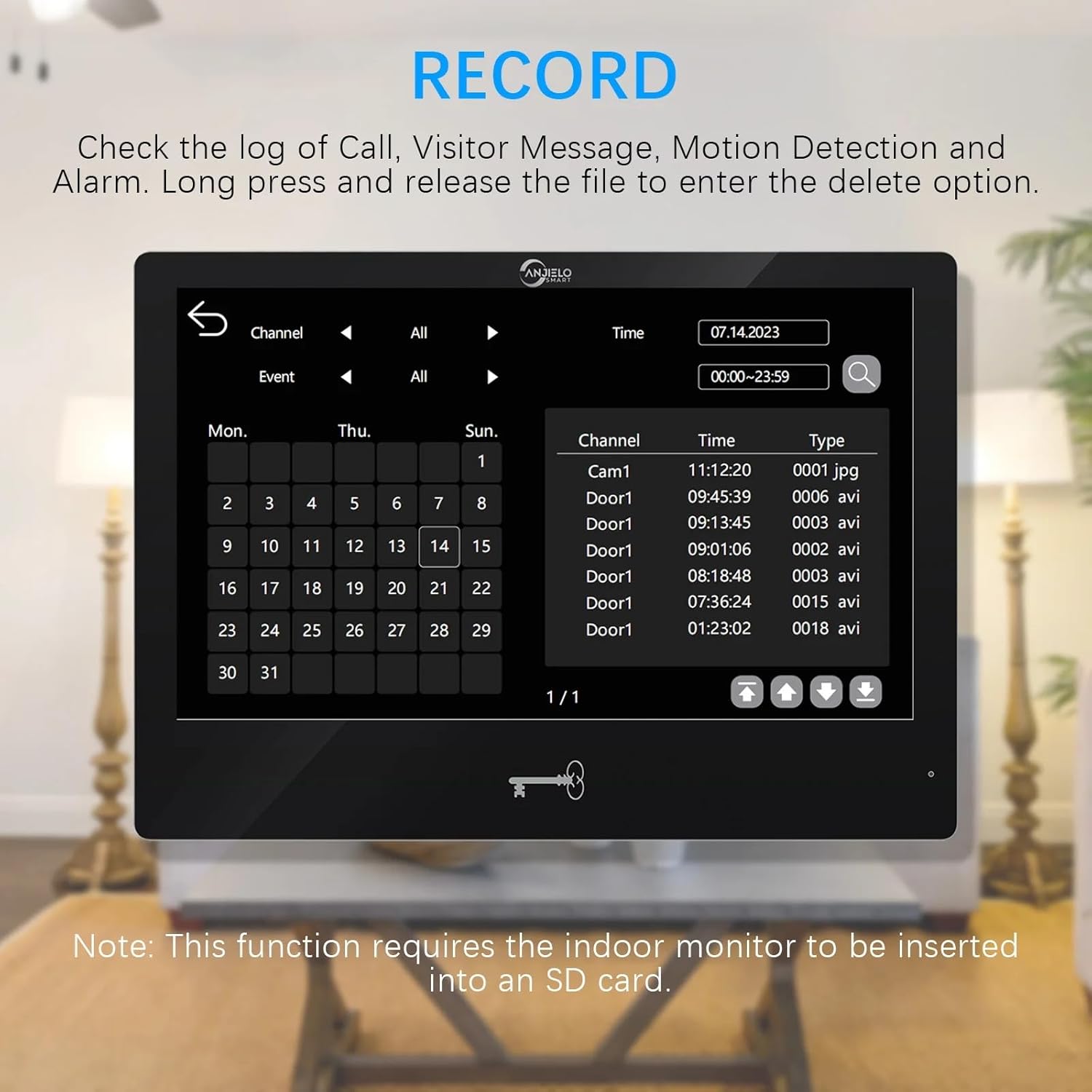
Figure 7: Motion Detection Settings. This image shows the motion detection configuration screen on the indoor monitor, allowing users to enable/disable the feature, adjust sensitivity, and set recording preferences.
4. 動体検知エリアの設定
When motion detection is enabled, you can define specific areas for detection to minimize false alarms. By default, the entire viewable area is active for motion detection.
- Access Setting: On the monitor, navigate to the motion detection settings.
- Adjust Area: Click the grid icon to enter the area selection mode. Click on squares within the grid to toggle them between active (motion detection enabled) and transparent (motion detection disabled) states.
5. Event Record Review
再view logs of calls, visitor messages, motion detection events, and alarms directly from the indoor monitor.
- アクセス記録: Navigate to the "Record" section on the monitor.
- Browse Events: Use the interface to browse events by date and type.
- レコードを削除: 長押しすると file to enter the delete option.

Figure 8: Event Record Log. This image displays the event log interface on the indoor monitor, showing a chronological list of recorded events such as calls, motion detections, and alarms, with options to filter and review.
6. Call Forwarding and Internal Speaking
If you have multiple indoor monitors, the system supports call forwarding and internal audio communication between them.
- 転送: When a visitor rings the doorbell, the call can be forwarded to other monitors if the primary one is not answered.
- Internal Speaking: You can initiate an audio-only call between different indoor monitors within your system.
メンテナンス
- クリーニング: Regularly wipe the indoor monitor screen and outdoor doorbell lens with a soft, damp 布。 研磨剤入りクリーナーは避けてください。
- ファームウェアの更新: Check for available firmware updates through the Tuya app or monitor settings to ensure optimal performance and security.
- SDカード管理: 定期的に再view and delete old recordings from the Micro SD card to free up space.
- 配線検査: Occasionally inspect all wired connections for any signs of wear or damage, especially for outdoor components.
トラブルシューティング
| 問題 | 考えられる原因 | 解決 |
|---|---|---|
| モニターに画像/ビデオが表示されない | Loose wiring connection; Power issue; Doorbell camera malfunction. | Check all 4-core cable connections. Ensure monitor is powered. Restart the system. |
| モニターがWiFiに接続できない | Incorrect WiFi password; Router is 5GHz only; Weak signal. | Verify WiFi password. Ensure router is 2.4GHz compatible. Move monitor closer to router or use a WiFi extender. |
| Doorbell not ringing on monitor/phone | Wiring issue; Monitor volume too low; App notifications disabled. | Check doorbell-to-monitor wiring. Adjust monitor volume. Enable notifications in Tuya app. |
| モーション検出が機能しない | Feature disabled; Sensitivity too low; SD card full. | Enable motion detection in settings. Increase sensitivity. Check/clear SD card. |
| Cannot unlock electronic lock | Incorrect wiring; Lock power issue; Incorrect password/card/fingerprint. | Verify lock wiring to doorbell. Ensure lock has power. Re-register unlocking credentials. |
保証とサポート
保証情報および技術サポートについては、ANJIELO SMARTの公式ウェブサイトをご覧ください。 webご購入いただいた店舗までお問い合わせいただくか、ウェブサイトをご覧ください。保証請求の際は購入証明としてレシートを保管してください。
メーカー: アンジェロスマート
モデル番号: 94218B-BK-95112BKX2


