1. はじめにview
The Ditec RM-L 1370 is a universal replacement remote control designed for a wide range of Sony Bravia televisions. This remote offers direct compatibility with various Sony LCD, LED, UHD, OLED, and QLED 4K Ultra HD Smart Android TV models, eliminating the need for complex programming or pairing. It features dedicated hotkeys for popular streaming services like YouTube and Netflix for convenient access.

Image: The Ditec RM-L 1370 remote control, highlighting its compatibility as a single remote solution for Sony TVs.
2. セットアップと初期使用
This remote control is designed for immediate use without any setup or programming. Simply insert the required batteries, and it will be ready to operate your compatible Sony TV.
2.1 バッテリーの取り付け
- リモコンの背面にある電池収納部を見つけます。
- バッテリーコンパートメントカバーをスライドさせて開きます。
- Insert two (2) AAA batteries (not included), ensuring correct polarity (+ and - terminals).
- 電池カバーをしっかりと閉じてください。

画像: 背面 view リモコンの電池ボックスの位置を示す図。
2.2 初回使用
Once batteries are installed, point the remote control towards your Sony TV and press the Power button. The remote should operate your TV without any further configuration.
3. 操作手順
The Ditec RM-L 1370 remote control provides all standard functions for your Sony Bravia TV, along with convenient shortcut buttons.
3.1 基本機能
- 電源ボタン: テレビの電源をオンまたはオフにします。
- 数字ボタン(0-9): 直接チャンネル選択用。
- 音量を上げる/下げる: テレビの音量を調整します。
- チャンネルアップ/ダウン: テレビのチャンネルを変更します。
- ナビゲーションパッド(上/下/左/右/Enter): メニューのナビゲーションと選択に使用します。
- ホームボタン: Accesses the TV's Smart Home screen or main menu.
- 戻る/戻るボタン: 前の画面またはメニューに戻ります。
- オプションボタン: 状況に応じたオプションを表示します。
3.2つの特別な機能
- YouTube Hotkey: YouTube アプリケーションを直接起動します。
- Netflix Hotkey: Netflix アプリケーションを直接起動します。
The remote features an enhanced infrared sensor for a farther transmitting distance, allowing effective control up to 50 feet.

Image: The remote control demonstrating its farther distance sensor, capable of operating up to 50 feet.
4. 互換性
The Ditec RM-L 1370 universal remote is compatible with a wide range of Sony Bravia LCD, LED, UHD, OLED, and QLED 4K Ultra HD Smart Android TVs. It is designed to replace many original Sony remote models, including but not limited to:
- RMT-TX100U, RMT-TX102U
- RMF-TX200U, RMF-TX201U, RMF-TX220U
- RMT-TX300U, RMF-TX310U
- RMT-TX500U, RMF-TX520U, RMF-TX600U
- And many other Sony TV remote models.
For a comprehensive list of compatible Sony TV remote models, please refer to the image below:
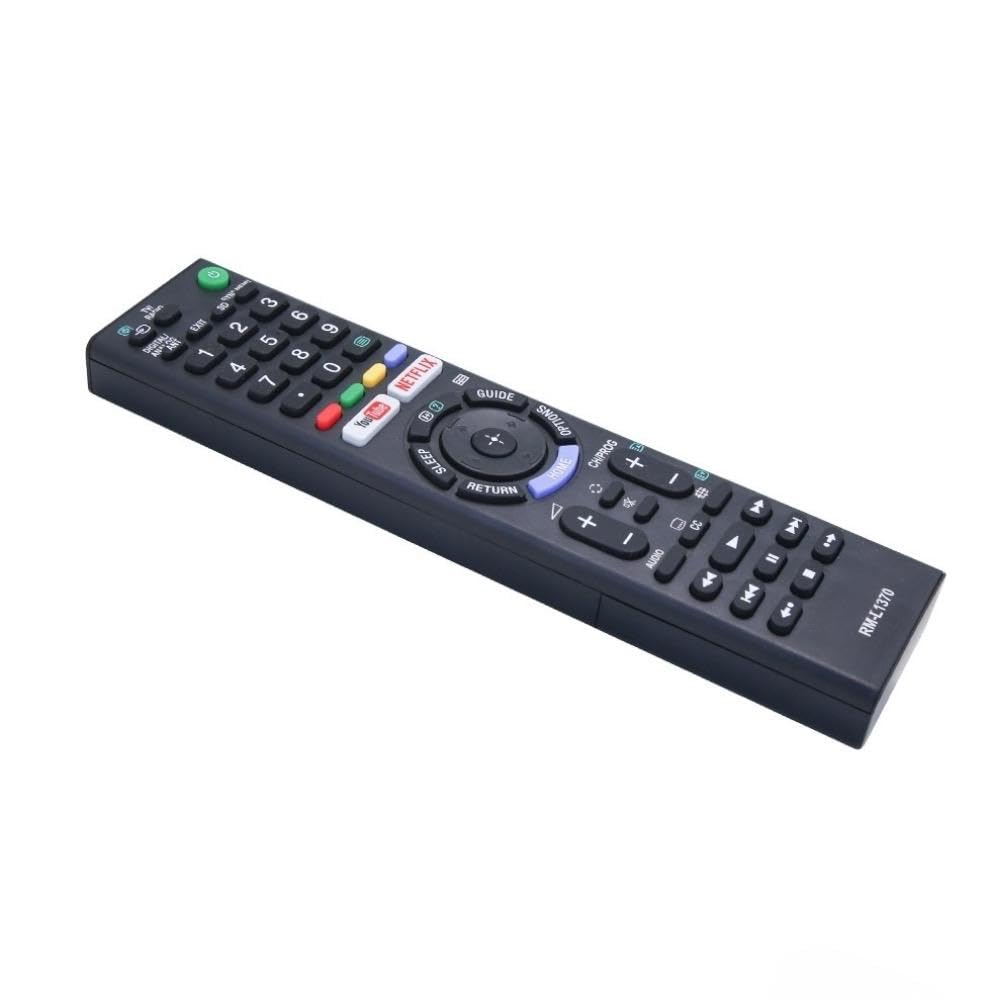
Image: A detailed list of Sony TV remote models that are compatible with the Ditec RM-L 1370.
It is recommended to compare the appearance of this remote with your original remote for visual confirmation of compatibility.
5. メンテナンス
5.1 電池の交換
When the remote control's performance degrades or it stops responding, replace the batteries with two new AAA alkaline batteries. Always replace both batteries at the same time. Do not mix old and new batteries or different types of batteries.
5.2 クリーニング
リモコンを清掃する際は、柔らかく乾いた布をご使用ください。液体クリーナー、スプレー、研磨剤は使用しないでください。リモコンの表面や内部部品を損傷する恐れがあります。
6。 トラブルシューティング
- リモコンが応答しない:
- 電池が正しい極性で正しく挿入されているかどうかを確認してください。
- 古い電池を新しいものと交換してください。
- リモコンとテレビの赤外線受信機の間に障害物がないことを確認してください。
- 有効な動作範囲(最大 50 フィート)内にいることを確認してください。
- 特定のボタンが機能しない:
- Some advanced functions or TV-specific features might not be supported by a universal replacement remote.
- Ensure the TV is powered on and functioning correctly.
7. 仕様
| 特徴 | 詳細 |
|---|---|
| ブランド | ダイテック |
| モデル | RM-L 1370 |
| 対応デバイス | Sony Bravia LCD, LED, UHD, OLED, QLED 4K Ultra HD Smart Android TVs |
| コネクタタイプ | 赤外線(IR) |
| 電池が必要 | 2 x AAA(含まれません) |
| 特集 | Ergonomic design, YouTube & Netflix Hotkeys |
| 製品寸法 | 3 x 3 x 12 cm |
| アイテム重量 | 80グラム |
| 原産国 | 中国 |
8. サポート
For assistance with compatibility or any questions regarding your Ditec RM-L 1370 remote control, you may contact support by sending a picture of your old remote or your device's brand name and model number to +91 9924350801. This will help in verifying compatibility or addressing specific queries.

Image: Information on how to contact support for compatibility checks or questions.