導入
Welcome to the DADA-TECH Cordless Water Flosser user manual. This advanced oral irrigator is designed to provide effective and comfortable oral hygiene, removing plaque and bacteria up to 99.9% more efficiently than traditional string floss. With its innovative features and multiple settings, it helps maintain a healthier mouth and brighter smile.
重要な安全情報
警告
This product is waterproof (IPX7-rated) and can be used in the bathtub or shower. However, to prevent damage, avoid completely immersing the device in water.

Image: The DADA-TECH Water Flosser is IPX7 waterproof, suitable for use in wet environments like the shower, but should not be fully submerged.
パッケージ内容
- DADA-TECH Cordless Water Flosser (1 unit)
- Dense Hydro Nozzles (3 units)
- U-shaped Nozzle (1 unit)
- Orthodontic Nozzle (1 unit)
- Periodontal Nozzle (1 unit)
- Tongue Scraper Nozzle (1 unit)
- USB充電ケーブル
- Travel Clip for nozzles
- ユーザーマニュアル
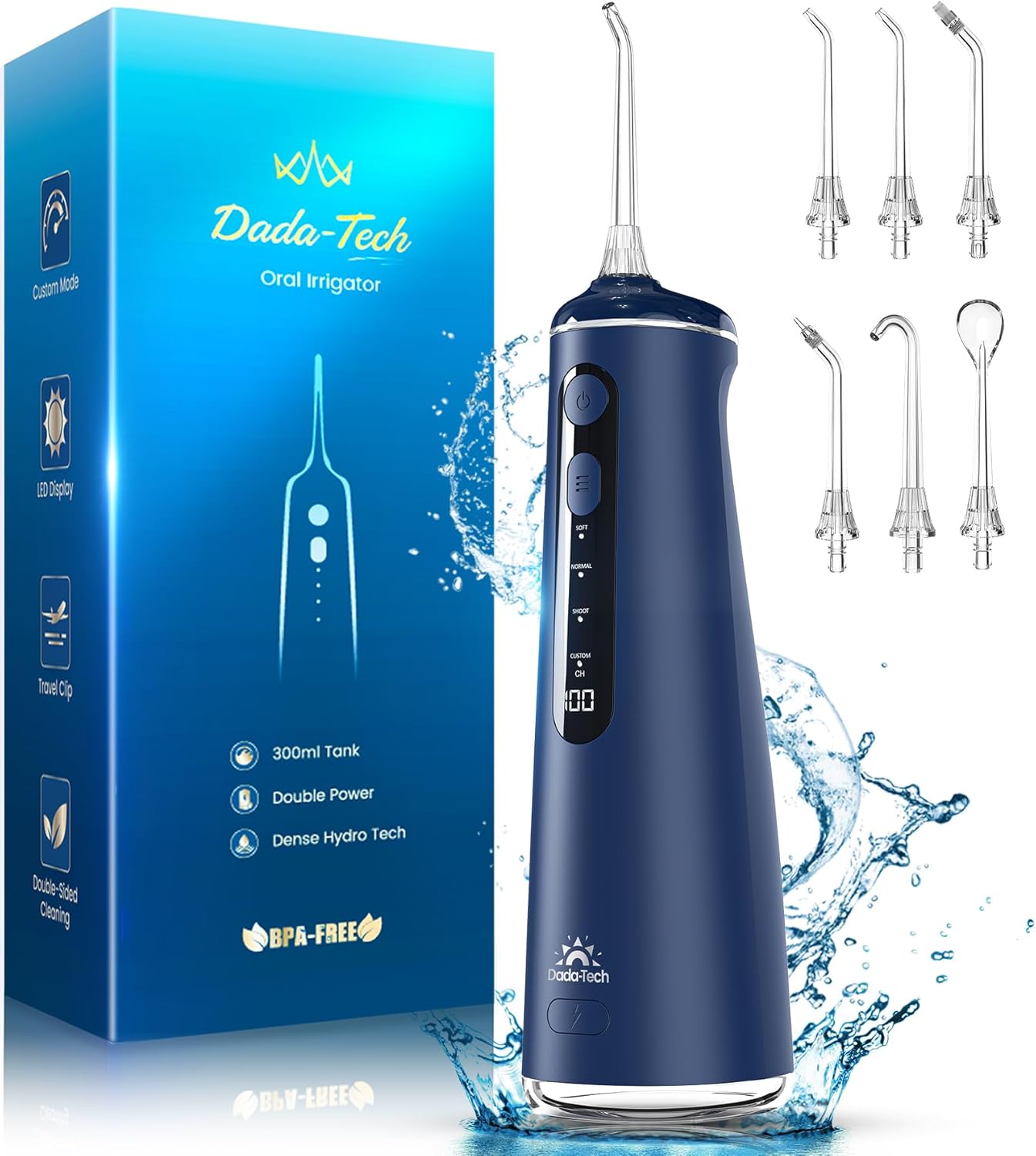
Image: The complete package includes the water flosser unit and a variety of specialized nozzles.
設定
- Remove the water flosser and all accessories from its packaging.
- Charge the water flosser for at least 4 hours before first use. A full charge provides up to 60 days of use.
- Fill the 300ML water tank with water or your preferred mouthwash. Ensure the detachable bottom cover is securely closed.
- Select the desired cleaning nozzle and firmly insert it into the top of the water flosser until it clicks into place.

Image: Visual guide for initial setup, including filling the tank and attaching the nozzle.
操作手順
電源のオン/オフ
Press the power button once to turn the device on. Press it again to turn it off.
クリーニングモード
The DADA-TECH Water Flosser offers four distinct cleaning modes and eight DIY water pressure levels to cater to various oral hygiene needs. Use the Mode button to cycle through the options.
- SOFT Mode: Gentle pressure, suitable for sensitive gums or new users.
- ノーマルモード: A balanced combination of cleaning power and comfort, ideal for daily use by most users.
- シュートモード: Designed for targeted cleaning of local discolorations. Press the button to spray, release to stop.
- カスタムモード: Recommended for experienced users, allowing adjustment of water pressure from 30-120 PSI across eight levels.

画像: 上view of the four cleaning modes and the LED display for battery status and custom settings.
Using Custom Mode
- Press the MODE button to select "CUSTOM" mode.
- Press and hold the MODE button for 3 seconds to activate the custom setting (do not release until activated).
- The LED display will blink; press the MODE button again to cycle through pressure levels 1 to 8.
- Once your desired pressure level is selected, press the POWER button to start flossing.

Image: Step-by-step guide for adjusting water pressure in Custom Mode.
ノズルの使用法
The device includes seven multifunctional nozzles, each designed for specific cleaning needs:
- Dense Hydro Nozzles (3x): For general interdental cleaning and 360-degree rotation.
- U-shaped Nozzle (1x): Specifically designed for effective cleaning of the back of the teeth.
- Orthodontic Nozzle (1x): Ideal for cleaning around braces and orthodontic appliances.
- Periodontal Nozzle (1x): For gentle and effective cleaning of periodontal pockets.
- Tongue Scraper Nozzle (1x): Helps remove bacteria from the tongue for fresher breath.

Image: A visual guide to the seven professional nozzles and their applications.
メンテナンス
水タンクの掃除
The 300ML water tank features a detachable bottom cover for thorough cleaning and drying. After each use, empty any remaining water and clean the tank with warm water. This design helps reduce bacterial growth by 28% compared to traditional tanks.

Image: The 300ML water tank with its easily detachable bottom for convenient cleaning.
ノズルの洗浄
Rinse all nozzles with warm water after each use. For convenient storage and travel, utilize the integrated storage clip within the water tank to keep nozzles secure and hygienic.

Image: The travel clip integrated into the water tank for secure nozzle storage, ideal for portability.
バッテリーケア
The water flosser is equipped with an eco-friendly, large-capacity battery that provides up to 60 days of use on a single 4-hour charge. To ensure IPX7 waterproofing, always make sure the DC charging port cover is securely closed before use.
トラブルシューティング
- 水の流れがない: Ensure the water tank is filled and the nozzle is securely attached. Check the battery level and charge if necessary.
- 水圧が弱い: Charge the device if the battery is low. If in Custom mode, select a higher pressure setting. Ensure the nozzle is not clogged.
- デバイスの電源が入らない: デバイスが完全に充電されていることを確認してください。それでも電源が入らない場合は、カスタマーサポートにお問い合わせください。
- 水漏れ: Check that the water tank is properly sealed and the nozzle is firmly inserted. Ensure the charging port cover is closed.
仕様
| 特徴 | 詳細 |
|---|---|
| ブランド | ダダテック |
| モデル番号 | W2 |
| 水タンク容量 | 300ML (10 Ounces) |
| パルステクノロジー | A+ Pulse Technology (1400-1800 impulses/minute) |
| 水圧 | 30-120 PSI |
| 付属のノズル | 7 multifunctional nozzles (3 Dense Hydro, 1 U-shaped, 1 Orthodontic, 1 Periodontal, 1 Tongue Scraper) |
| クリーニングモード | Soft, Normal, Shoot, Custom (8 DIY levels) |
| バッテリー寿命 | 1回の充電で最大60日間 |
| 充電時間 | 4時間 |
| 防水等級 | IPX7 |
| 電源 | 充電式バッテリー |
| 製品寸法 | 24.41 x 10.21 x 8.41 cm |
| 製品重量 | 472グラム |
| 特集 | Portable, LED Display, Multiple Pressure Settings, Rechargeable, Multiple Nozzles |
保証とサポート
DADA-TECH offers a 2年間のサポート for this product, ensuring peace of mind and reliable performance.
For any assistance or inquiries, please log into your Amazon account, navigate to "Your Orders," find the order ID for your DADA-TECH Water Flosser, and click "Contact Seller." This direct contact method ensures you receive prompt and efficient support tailored to your needs.
For more information about DADA-TECH products and our commitment to oral health, please visit the official DADA-TECH Store on Amazon.


