1. はじめに
The AiXun P3208 is a 320W smart regulated power supply designed for precision power delivery and testing. It features a 32V/8A output, advanced fast charging protocols, and specialized functions for mobile device repair and testing. This manual provides detailed instructions for the safe and efficient operation of your P3208 power supply.
主な機能は次のとおりです。
- 320W high power output with 60W single channel and 30W dual channel fast charging.
- Support for PD/QC fast charge protocols via Type-A/Type-C outputs.
- One-key boot functionality for iPhone 6-14 battery protocols, aiding in mobile phone motherboard testing.
- 3.0インチIPSフル view high-definition screen for clear display of parameters.
- Customizable three-channel current and voltage shortcut settings for quick adjustments.
- High precision current collection (0.1mA) with selectable curve or pointer display modes.
2. 安全情報
本製品をご使用になる前に、すべての安全に関する警告と取扱説明書をよくお読みになり、理解してください。これらの指示に従わない場合、感電、火災、または重傷を負う可能性があります。
- Always connect the ground lead before powering on the device.
- 濡れた状態や濡れた状態でデバイスを操作しないでください。amp 条件。
- 過熱を防ぐために適切な換気を確保してください。
- 本装置を分解または改造しないでください。修理は必ず資格のある専門家にご依頼ください。
- デバイスを可燃物から遠ざけてください。
- 正しいボリュームを確認するtage and current settings before connecting to any device.
3.製品オーバーview およびコンポーネント
Familiarize yourself with the various parts and controls of the P3208 Smart Regulated Power Supply.
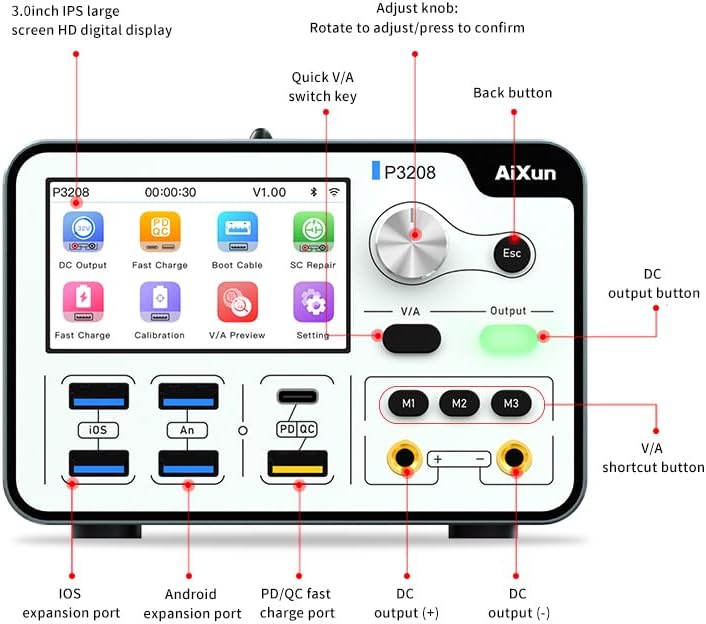
図3.1:フロントパネルのレイアウト
- 3.0-inch IPS HD digital display: 現在のボリュームを表示tage, settings, and other operational data.
- 調整ノブ: Rotate to adjust values, press to confirm selections.
- Quick V/A switch key: 音量を切り替えるtage および電流調整モード。
- Back button (Esc): 前のメニューに戻るか、操作をキャンセルします。
- DC output button: Activates or deactivates the DC power output.
- V/A shortcut buttons (M1, M2, M3): Quickly recall preset voltage と現在のパラメータ。
- iOS expansion port: For connecting iOS devices or specific test cables.
- Android expansion port: For connecting Android devices or specific test cables.
- PD/QC fast charge port: Type-C and Type-A ports supporting Power Delivery and Quick Charge protocols.
- DC output (+): Positive terminal for DC power output.
- DC output (-): Negative terminal for DC power output.
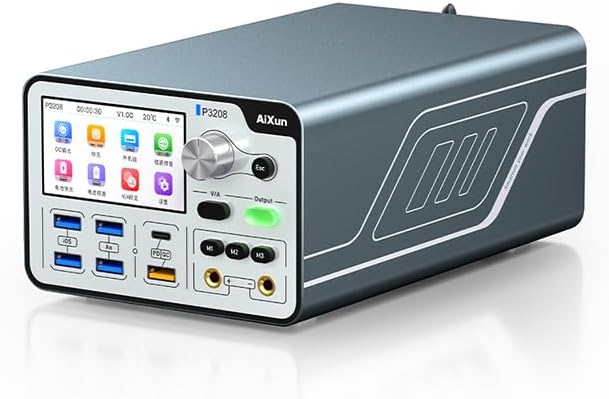
Figure 3.2: AiXun P3208 Main Unit
This image shows the overall design of the P3208 power supply, highlighting its compact and robust construction.
4. セットアップ
Follow these steps to set up your P3208 power supply for the first time.
- デバイスを開梱します。 Carefully remove the P3208 and all accessories from the packaging. Verify that all components listed in the packing list are present.

図4.1: 付属アクセサリ
The package includes the P3208 unit, 3 HUB cables, 1 Banana head cable, 1 Ground lead, 15 7-14 power on connectors, and 1 Power adapter.
- 接続電源: Connect the provided power adapter to the AC input port on the rear of the P3208. Plug the power adapter into a suitable AC outlet (AC110V±10%).
- Connect Ground Lead: For safety, connect the ground lead to the designated ground terminal on the P3208 and to a reliable earth ground.
- 初回電源オン: Press the power button to turn on the device. The 3.0-inch IPS display will illuminate, showing the boot-up sequence.
5. 操作手順
5.1 Basic Operation: Setting Voltageと現在
- From the main screen, use the adjust knob to navigate to the "DC Output" icon and press the knob to select.
- The display will show current voltage と現在の設定。
- Rotate the adjust knob to change the desired voltage or current value. Press the "Quick V/A switch key" to toggle between adjusting voltage と現在。
- Once the desired values are set, press the adjust knob to confirm.
- Press the "DC output button" to enable the power output. The button will illuminate green when active.
5.2 Fast Charging Protocols (PD/QC)
The P3208 supports Power Delivery (PD) and Quick Charge (QC) protocols for rapid device charging.

Figure 5.1: Dual Channel Fast Charging
The P3208 offers dual channel PD/QC simultaneous fast charge with a single channel power of 60W and dual channel power of 30W. It detects charging voltage and current in real-time.
- Connect your compatible device to the PD/QC fast charge port (Type-C or Type-A).
- The P3208 will automatically detect the device's charging protocol and deliver the appropriate voltage と現在。
- Monitor the charging status and real-time parameters on the display.
5.3 One-Key Boot for iPhone Batteries (6-14 Protocols)
This feature allows for convenient testing and repair of iPhone motherboards without needing a connected battery.

Figure 5.2: iPhone One-Key Boot Function
The P3208 supports iPhone 6-14 battery protocols, enabling one-key booting for convenient repair and testing of iPhone motherboards.
- Connect the appropriate iPhone power-on connector (7-14 series) to the iOS expansion port.
- Connect the other end of the cable to the iPhone motherboard.
- Navigate to the "Boot Cable" function on the P3208 display and select it.
- The device will initiate the one-key boot process, allowing you to test the motherboard.
5.4 Connecting to AiXun Platform for Data Analysis
The P3208 can connect to the AiXun platform for advanced data analysis and monitoring.

Figure 5.3: AiXun Platform Connectivity
Connect the P3208 to the AiXun platform via WiFi, Bluetooth, or Type-C for intuitive data analysis on a PC. Download the AiXun platform software from www.aixuntech.com.
- Via Type-C: Connect the P3208 to your computer using a Type-C cable.
- Via WiFi/Bluetooth: Enable WiFi or Bluetooth on the P3208 and connect to your network/device as per the on-screen instructions.
- Download and install the AiXun platform software from the official AiXun web地点 (www.aixuntech.com).
- Launch the software and follow the prompts to connect to your P3208 device.
- 接続すると、次のことができます view real-time data, analyze curves, and manage settings from your PC.
5.5 Shortcut Settings (M1, M2, M3)
The P3208 allows you to save and recall up to three custom voltage and current parameter sets.
- 希望の音量を設定するtage and current values as described in Section 5.1.
- Press and hold one of the M1, M2, or M3 shortcut buttons until the display indicates the parameters have been saved.
- To recall a saved setting, simply press the corresponding M1, M2, or M3 button. The device will instantly apply the stored voltage と現在。
5.6表示モード
The P3208 offers flexible display options for monitoring current and voltage.
- Navigate to the "Setting" menu on the display.
- Select "Display Mode" or a similar option.
- Choose between "Curve Display" (graphical representation of data over time) or "Pointer Display" (analog-style meter).
6. 仕様
Detailed technical specifications for the AiXun P3208 Smart Regulated Power Supply.
| 特徴 | 仕様 |
|---|---|
| モデル名 | P3208 |
| 入力ボリュームtage | AC110V±10% |
| 最大パワー | 320W |
| Max Fast Charge Power (Single Channel) | 60W |
| Max Fast Charge Power (Dual Channel) | 30W |
| 出力電流範囲 | 0-8A |
| Collecting Precision | 0.1mA |
| 急速充電プロトコル | PD, QC |
| コミュニケーション | Type-C, WiFi, Bluetooth |
| 画面サイズ | 3.0 inch IPS (640x360px) |
| 製品寸法(長さ x 幅 x 高さ) | 129 x 198.5 x 85 MM (5.08 x 7.81 x 3.35インチ) |
| アイテム重量 | 1230g(6.6ポンド) |
| メーカー | アイシュン |
7. メンテナンス
Proper maintenance ensures the longevity and reliable operation of your P3208 power supply.
- クリーニング: Use a soft, dry cloth to clean the exterior of the device. Do not use abrasive cleaners or solvents. Ensure the device is powered off and unplugged before cleaning.
- ストレージ: デバイスは直射日光や極端な温度を避け、涼しく乾燥した場所に保管してください。
- 換気: Ensure that the ventilation openings are not blocked during operation.
- ケーブル管理 ケーブルを急激に曲げたり、ねじったりしないでください。損傷を防ぐため、ケーブルはきちんと保管してください。
8。 トラブルシューティング
This section addresses common issues you might encounter with your P3208 power supply.
| 問題 | 考えられる原因 | 解決 |
|---|---|---|
| デバイスの電源が入りません。 | No power supply; faulty power adapter; power button not pressed correctly. | Check power cable connection; ensure outlet has power; try a different power outlet; press power button firmly. |
| 出力なしvoltage / current。 | Output not enabled; incorrect settings; overloaded circuit. | Press the DC output button to enable output; verify voltage/current settings; reduce load or check for short circuit. |
| ディスプレイが空白またはフリーズします。 | ソフトウェア エラー、一時的な不具合。 | Power off the device, wait 10 seconds, then power on again. If issue persists, contact support. |
| 急速充電が機能しません。 | Device not compatible with PD/QC; faulty cable; incorrect port used. | Ensure your device supports PD/QC; try a different USB cable; use the dedicated PD/QC fast charge port. |
9. 保証とサポート
AiXun provides support for its products. For warranty information, technical assistance, or service, please contact AiXun customer support.
To ensure the authenticity of your product and receive timely support, it is recommended to purchase directly from the official AiXun Amazon store or authorized resellers.
For the latest information and support resources, please visit the official AiXun webサイト: www.aixuntech.com

Figure 9.1: Authenticity and Support Tip
This image emphasizes the importance of purchasing from the official AiXun Amazon store to ensure product authenticity and access reliable customer support.


