導入
This manual provides detailed instructions for the safe and effective operation of your WOUXUN KG-R56 VHF Professional Radio. Please read this manual thoroughly before using the device to ensure proper function and to prevent damage.
製品終了view
The WOUXUN KG-R56 is a compact and robust professional VHF transceiver designed for authorized users, operating within the 66-88 MHz frequency range. It features 256 memory channels, advanced menu functions, and integrated USB Type-C charging. The device is compliant with current R&TTE RED CE standards.
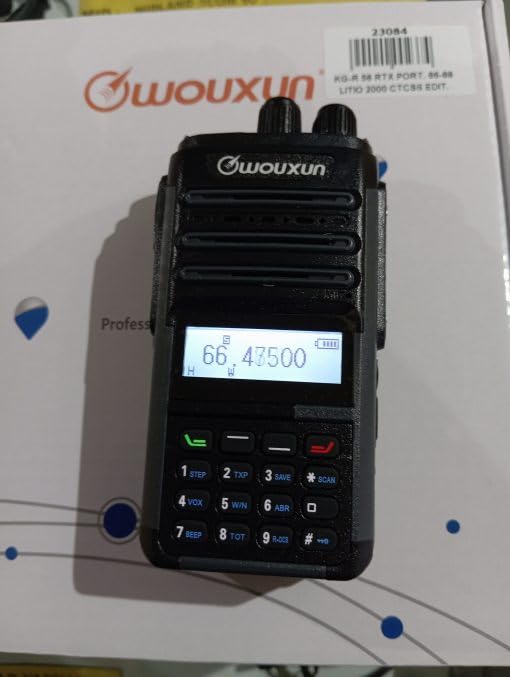
Image: WOUXUN KG-R56 VHF Professional Radio. This image shows the front view ラジオのディスプレイ、キーパッド、アンテナ接続を強調表示します。
パッケージ内容
以下にリストされているすべてのアイテムがパッケージに含まれていることを確認してください。
- KG-R56 Transceiver
- 7.4V - 2000 mAh Lithium-Ion Battery Pack
- 充電器
- 220V電源
- Flexible Rubber Antenna
- ベルトクリップ
- User Manual (in original language)
- 認定資格
設定
1. バッテリーの取り付け
- バッテリー パックをラジオの背面にある溝に合わせます。
- バッテリー パックをカチッと音がしてしっかりと固定されるまで上方にスライドします。
- 取り外すには、バッテリーリリースラッチ(ある場合)を押し、バッテリーを下方にスライドさせます。
2. バッテリーの充電
The KG-R56 features an integrated USB Type-C port for convenient charging.
- Connect a USB Type-C cable to the radio's USB-C port.
- Connect the other end of the cable to the provided charger or a compatible USB power source.
- The charging indicator light on the radio will show the charging status.
- フル充電には通常数時間かかります。バッテリーの過充電にご注意ください。
3. アンテナの取り付け
- Screw the flexible rubber antenna clockwise onto the antenna connector on top of the radio until it is finger-tight.
- アンテナを締めすぎないでください。
4.ベルトクリップの取り付け
- 付属のネジを使用して、ベルト クリップをラジオの背面の指定された場所に取り付けます。
操作手順
1. 電源のオン/オフ
Rotate the Power/Volume knob clockwise to turn the radio on. Rotate it counter-clockwise until a click is heard to turn it off.
2.音量の調整
After powering on, continue rotating the Power/Volume knob to adjust the audio output level to your preference.
3. チャンネルの選択
Use the Up/Down arrow keys or the rotary encoder (if present) to select the desired channel or frequency. The display will show the selected channel number, frequency, or channel name.
4. 送信と受信
- 送信するには、無線機側面のプッシュ・トゥ・トーク(PTT)ボタンを長押しします。マイクに向かってはっきりと話してください。
- PTTボタンを放すと受信します。
- Always ensure the channel is clear before transmitting to avoid interference.
5. メニューナビゲーション
The KG-R56 features an advanced menu system for managing various radio functions.
- を押す メニュー ボタンをクリックしてメインメニューに入ります。
- Use the Up/Down arrow keys to scroll through the available menu options.
- プレス メニュー もう一度または OK (if available) to select an option.
- Use the Up/Down keys to change settings within a selected option.
- プレス EXIT or 戻る to return to the previous menu or exit the menu system.
主な特徴
- DTMF エンコーディング/デコーディング: Supports DTMF tones for advanced signaling capabilities.
- CTCSS / DCS: Includes 50 CTCSS groups and 105 DCS groups for selective calling. These can be customized via PC programming software.
- CTCSS/DCS Scanner: Automatically detects CTCSS/DCS tones on a received signal.
- 音声ガイド: Provides audible prompts for menu navigation and function selection, enhancing user experience.
- Channel Name Display: Allows for editing and displaying custom channel names for easier identification.
- Battery Capacity Inquiry: Check the current battery level directly from the radio.
- PCプログラマブル: Customize radio settings, frequencies, and channels using dedicated PC software.
- Selectable Bandwidth: Choose between various channel spacing options (5K/6.25K/10K/12.5K/25K).
- Reverse Frequency Function: Quickly switch between transmit and receive frequencies for specific operations.
- Multiple Scan Modes (TO/CO/SE): Offers various scanning options for monitoring channels efficiently.
- 表示モード: Switch between displaying Frequency, Channel Number, or Channel Name.
- TOT(タイムアウトタイマー): Prevents excessively long transmissions by limiting transmission duration.
- ビジーチャネルロックアウト (BCLO): Prevents transmission on an occupied channel, avoiding interference.
- Keypad Lock (Automatic/Manual): Prevents accidental key presses and setting changes.
- Wired Clone Function: Copy settings and configurations from one radio to another using a cable.
- USB Type-C充電: Conveniently charge the radio via a standard USB-C port.
メンテナンス
クリーニング
ラジオの表面を柔らかくて乾いた布で拭いてください。amp 布で拭いてください。強い化学薬品、研磨剤入りの洗剤、溶剤は使用しないでください。asing. Ensure the USB-C port cover is closed when not charging to protect against dust and moisture.
バッテリーケア
- 初めて使用する前にバッテリーを完全に充電してください。
- バッテリーを極端な温度(高温または低温)にさらさないでください。
- ラジオを長期間使用しない場合は、電池を取り外して涼しく乾燥した場所に保管してください。
- Use only WOUXUN approved battery packs and chargers to ensure safety and optimal performance.
トラブルシューティング
| 問題 | 考えられる原因 | 解決 |
|---|---|---|
| ラジオの電源が入りません。 | バッテリー残量が少ないか、正しく取り付けられていません。 | バッテリーを充電するか、正しく取り付け直してください。 |
| 送信できません。 | Busy Channel Lockout (BCLO) active; incorrect frequency/channel; low battery. | Wait for the channel to clear; verify frequency/channel settings; charge battery. |
| No reception or weak signal. | Antenna not attached correctly; squelch level too high; out of range. | Check antenna connection; adjust squelch level; move closer to transmitting station. |
| キーパッドが反応しません。 | キーパッドロックがアクティブです。 | Disable keypad lock (refer to operating instructions for specific key combination). |
| USB-C充電が機能しません。 | Cable or charger faulty; port dirty. | Try a different USB-C cable/charger; carefully clean the port if visibly dirty. |
| Audio output is distorted. | Volume too high; weak signal; speaker damage. | Adjust volume; check signal strength; contact support if speaker is damaged. |
技術仕様
- モデル: KG-R56
- 周波数範囲: 66-88 MHz
- チャンネル数: 256
- チャネル間隔: 5K/6.25K/10K/12.5K/25K
- 変調: FM F3E
- 営業巻tage: 7.4V直流
- RF出力: 5W/1W (selectable)
- 受信感度: 0.25 µV (12 dB SINAD)
- スケルチ感度: <0.16µV
- オーディオ出力: 500 mW at 8 ohms
- 電池のタイプ: 7.4V - 2000 mAh Lithium-Ion Pack
- スタンバイ電流: 50mA
- 動作温度: -30°C ~ +60°C
- 寸法(高さ×幅×奥行き): 105 x 63 x 39 mm (without antenna and battery)
- 重さ: 250 g (with battery and antenna)
- 国際保護等級: IP54 (Protected from limited dust ingress and water spray from any direction)
- 耐水性レベル: Not designed for immersion in water.
- 特別な機能: Weather-resistant, USB rechargeable
注:仕様は予告なく変更される場合があります。
安全情報
- Do not operate the radio in explosive atmospheres (e.g., near flammable gases, dust particles, or metallic powders).
- Do not modify the radio. Unauthorized modifications can void your warranty and violate regulatory compliance.
- Keep the radio away from medical devices (e.g., pacemakers) to avoid potential interference.
- Use only WOUXUN approved accessories, including batteries and chargers.
- Do not expose the radio to direct sunlight for extended periods or to extreme heat sources.
- 地域の環境規制に従って電池を適切に廃棄してください。
- While rated IP54 for weather resistance, this device is not designed for immersion in water. Avoid exposing it to heavy rain or submersion.
保証とサポート
For warranty information or technical support, please contact your authorized WOUXUN dealer or the point of purchase. Keep your purchase receipt as proof of purchase.
For further assistance, you may visit the official WOUXUN website or consult the contact information provided in your original product packaging.