導入
The Outdoor Tech Turtle Shell 4.0 is a portable, rugged, and waterproof wireless Bluetooth speaker designed for outdoor adventures. It features 360-degree sound, a durable IPX7-rated construction, and an extended battery life, making it ideal for various environments from camping to poolside relaxation. This manual provides essential information for setting up, operating, and maintaining your speaker.

Figure 1: Turtle Shell 4.0 highlighting key features like waterproof, 18-hour battery, impressive sound, Siri/Power Bank, and simple controls.
箱の中身
- Turtle Shell 4.0 Wireless Bluetooth Speaker
- USB-C充電ケーブル
- キャリーポーチ
- Instructional manual (this document)
設定
1.スピーカーの充電
Before first use, fully charge your Turtle Shell 4.0. The charging port has been upgraded to USB-C for faster and more efficient charging.
- 付属のUSB-C充電ケーブルをスピーカーの充電ポートに接続します。
- ケーブルのもう一方の端を互換性のある USB 電源アダプター (別売) またはコンピューターの USB ポートに接続します。
- A full charge takes approximately 3 hours. The LED indicator will change to show charging status (refer to LED indicator section for details).
2.電源のオン/オフ
- 電源を入れるには: 電源ボタン (⏻) until you hear an audible cue or see the LED indicator light up.
- 電源を切るには: 電源ボタン (⏻) again until you hear an audible cue or the LED indicator turns off.
3.Bluetoothペアリング
The Turtle Shell 4.0 can be effortlessly paired with your smartphone or other Bluetooth-enabled devices from up to 65 feet away.
- スピーカーの電源がオンになっていて、ペアリング モードになっていることを確認します (通常、LED インジケーターが高速で点滅します)。
- デバイスで、Bluetooth 設定に移動します。
- Select "Turtle Shell 4.0" from the list of available devices.
- Once connected, the LED indicator will show a solid light, and you will hear a confirmation tone.
4. Daisy-Chaining Multiple Speakers
The Turtle Shell 4.0 features an upgraded daisy-chain function, allowing you to link up to 50 Shells together for a massive portable stereo sound experience.
- Ensure all speakers you wish to link are powered on and not currently paired to any device.
- Pair the first speaker (master speaker) to your device via Bluetooth as described above.
- On the master speaker, press the daisy-chain button (refer to button layout for specific icon).
- On the additional speakers, press their daisy-chain button. They will automatically connect to the master speaker.
- Repeat for up to 50 speakers.
操作手順
1. ボタンの機能

図2:側面 view of the Turtle Shell 4.0 with visible control buttons.
| ボタン | 機能(短押し) | 機能(長押し) |
|---|---|---|
| 力 (⏻) | バッテリーの状態を確認する | 電源オン/オフ |
| 音量を下げる(-) | 音量を下げる | 前のトラック |
| Multi-function (Bigfoot icon) | 再生/一時停止、通話の応答/終了 | Activate Siri/Google Assistant, Reject Call, Daisy-chain pairing |
| 音量を上げる(+) | 音量を上げる | 次のトラック |
2. 360-Degree Audio Experience
The Turtle Shell 4.0's patented Dual-Directional Sound technology produces an immersive 360-degree audio experience, ensuring powerful sound from all angles. This is achieved through two full-range drivers and a bass radiator housed within its unique polygonal design.
3. スマートアシスタントとの互換性
Activate your device's Siri or Google Assistant directly from the speaker by long-pressing the multi-function button (Bigfoot icon).
4. ハンズフリー通話
With the built-in microphone, you can answer and end calls directly through the speaker. Short press the multi-function button to answer or end a call. Long press to reject an incoming call.
5. パワーバンク機能
The 4K mAh battery allows you to charge small devices while enjoying your music. Connect your device to the speaker's USB-A output port (located under the sealed port cover) using your device's charging cable.
6. 取り付けオプション
The Turtle Shell 4.0 includes a standard 1/4"-20 camera threading mount and custom strap mounts for multiple easy carry and transport options, allowing you to secure it to various surfaces or gear.

Figure 3: The Turtle Shell 4.0 is versatile for various outdoor activities including camping, general outdoor use, beach, and pool.
メンテナンス
1. 防水性と耐久性
The Turtle Shell 4.0 is IPX7-rated waterproof, dustproof, and shockproof. This means it can be submerged in water up to 1 meter for 30 minutes. Ensure all port covers are securely sealed before exposing the speaker to water or dusty environments.

Figure 4: The Turtle Shell 4.0 demonstrating its IP67 waterproof capability.
2. 清掃
スピーカーを掃除するには、柔らかくて乾いた布で拭いてください。amp cloth. Do not use abrasive cleaners or solvents. If exposed to saltwater or chlorinated water, rinse thoroughly with fresh water and allow to air dry completely before charging or opening port covers.
3. ストレージ
Store the speaker in a cool, dry place away from direct sunlight and extreme temperatures. For long-term storage, ensure the battery is partially charged (around 50%) to preserve battery health.
トラブルシューティング
| 問題 | 考えられる原因 | 解決 |
|---|---|---|
| スピーカーの電源が入りません。 | バッテリー残量が少なくなりました。 | スピーカーを少なくとも30分間充電してください。 |
| Bluetooth経由でペアリングできません。 | スピーカーがペアリングモードになっていません。デバイスの Bluetooth がオフになっています。スピーカーから遠すぎます。 | Ensure speaker is in pairing mode (flashing LED). Turn device Bluetooth off and on. Move device closer to speaker (within 65 feet). Forget device on your phone and re-pair. |
| 音量を大きくすると音が歪む。 | Volume too high for audio source. | Reduce the volume on the speaker or your connected device. |
| Daisy-chaining not working. | Speakers not in correct mode; too many speakers. | Ensure all speakers are powered on and not paired to other devices before initiating daisy-chain. Confirm you are within the 50-speaker limit. |
| スピーカーが充電されません。 | Cable issue; port issue; power source issue. | 別のUSB-Cケーブルと電源アダプターをお試しください。充電ポートが清潔でゴミなどがないことを確認してください。 |
仕様
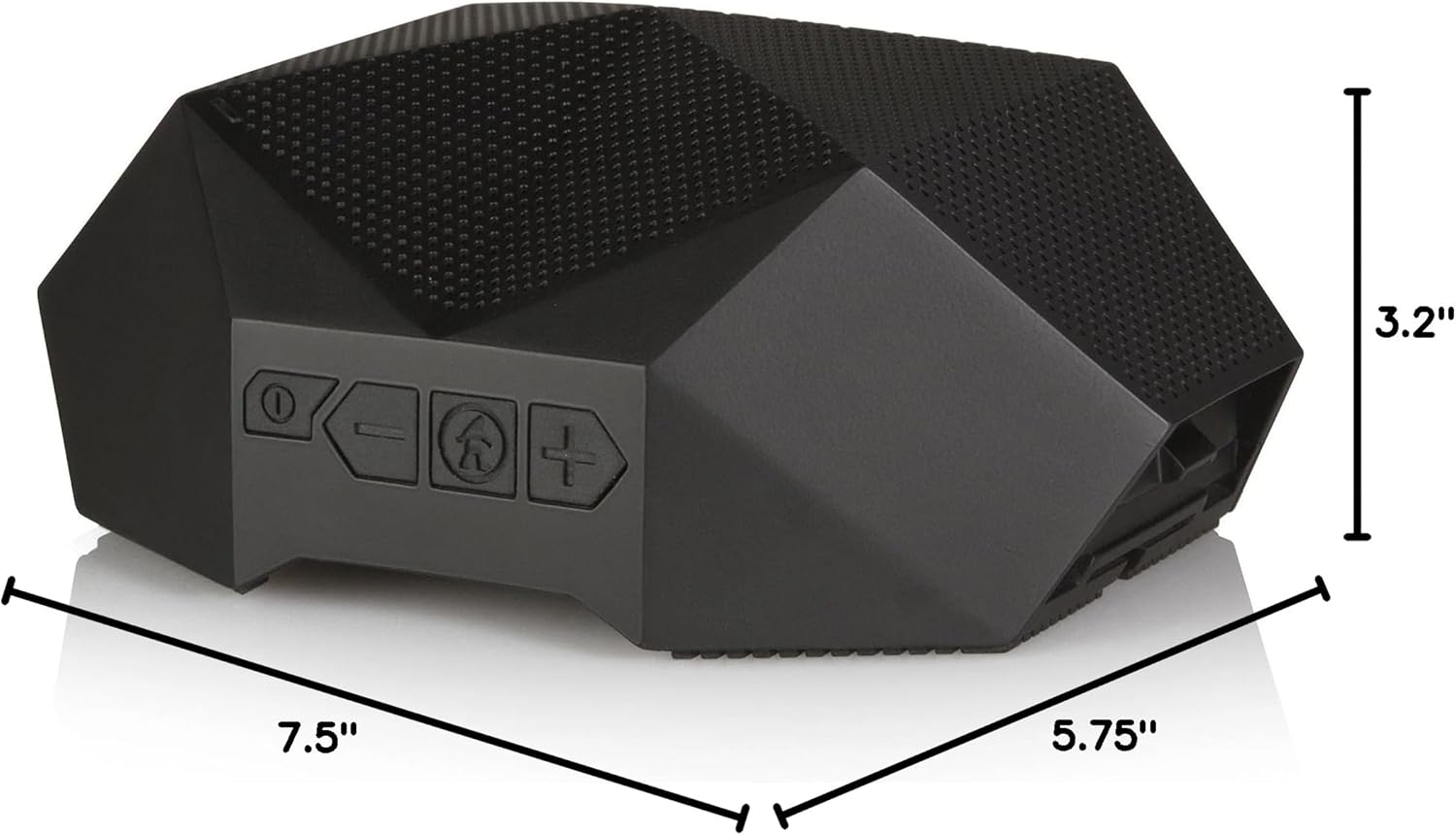
Figure 5: Physical dimensions of the Turtle Shell 4.0 speaker.
| 特徴 | 詳細 |
|---|---|
| モデル名 | OT4800-B |
| スピーカータイプ | 屋外 |
| 特集 | 防水 |
| 推奨用途 | 屋内/屋外 |
| 対応デバイス | スマートフォン、タブレット、ノートパソコン、デスクトップ |
| コントローラータイプ | 音声コントロール |
| 色 | 黒 |
| バッテリー寿命 | 最大18時間 |
| 含まれるコンポーネント | USB charging cable, carry pouch, instructional manual |
| 製品寸法 | 奥行き7.5インチ x 幅5.75インチ x 高さ3.2インチ |
| 防水等級 | IPX7 |
| バッテリー容量 | 4000mAh |
| 充電時間 | 3時間 |
| Bluetoothの最大範囲 | 65フィート |
| アイテム重量 | 1.37ポンド |
| 接続技術 | ブルートゥース |
| オーディオ出力モード | ステレオ |
| 材料 | Mixed Plastic/Silicone |
公式製品ビデオ
Watch this video to see the Turtle Shell speaker in action, demonstrating its ruggedness and suitability for outdoor activities like paddleboarding. Please note this video features the Turtle Shell 3.0, a previous model, but showcases similar core functionalities and durability relevant to the Turtle Shell 4.0.
Video 1: "SUP with the Turtle Shell 3.0 Speaker" by Outdoor Technology. This video demonstrates the speaker's use in a water environment.
保証とサポート
Outdoor Tech products are designed for durability and performance. For warranty information and customer support, please visit the official Outdoor Tech web公式サイトをご覧いただくか、カスタマーサービスに直接お問い合わせください。保証請求の際に必要となりますので、購入証明書を保管してください。
さらに詳しい情報については、 Outdoor Tech Store on Amazon.


