1. はじめに
The Pronomic DX-50 USB MKII is a professional 4-channel DJ mixer designed for a wide range of applications, including discos, parties, restaurants, and presentations. Its user-friendly design ensures that both experienced and less experienced users can fully utilize its features. This manual provides detailed instructions for setting up, operating, and maintaining your mixer.
Key features include a recording function, integrated Bluetooth interface, USB player with transport controls, and multiple input channels.
2. 重要な安全上の注意事項
- 手順を読む: 製品を使用する前に、すべての安全および操作手順をお読みください。
- 指示を保持する: 今後の参考のために、安全および操作に関する説明書を保管しておいてください。
- 警告に注意してください: 製品および取扱説明書のすべての警告を順守してください。
- 指示に従ってください: すべての操作および使用手順に従ってください。
- 水と湿気: この装置を水の近く(浴槽、洗面器、台所のシンク、洗濯槽、湿気の多い地下室、プールなど)で使用しないでください。
- 換気: 通気口を塞がないでください。メーカーの指示に従って設置してください。
- 熱: ラジエーター、暖房レジスター、ストーブ、その他の機器(以下を含む)などの熱源の近くに設置しないでください。 amp熱を発生する装置。
- 電源: Use only power sources specified by the manufacturer.
- 電源コード保護: 特にプラグ、コンセント、および装置から出ている部分で、電源コードが踏まれたり挟まれたりしないように保護してください。
- クリーニング: 乾いた布でのみ清掃してください。
- サービス: カバーを開けたり取り外したりすると危険な電圧にさらされる可能性があるため、この製品を自分で修理しようとしないでください。tagまたはその他の危険があります。すべての修理は資格のあるサービス担当者に依頼してください。
3. パッケージ内容
Please check that all items listed below are included in your package. If any items are missing or damaged, contact your dealer immediately.
- Pronomic DX-50 USB MKII DJ Mixer
- 電源アダプター(AC 12V)
- USB Stick (32 GB, if included in your specific bundle)
- ユーザーマニュアル(このドキュメント)
4.製品オーバーview
Familiarize yourself with the various controls and connections on your DX-50 USB MKII mixer.
4.1 フロントパネルコントロール
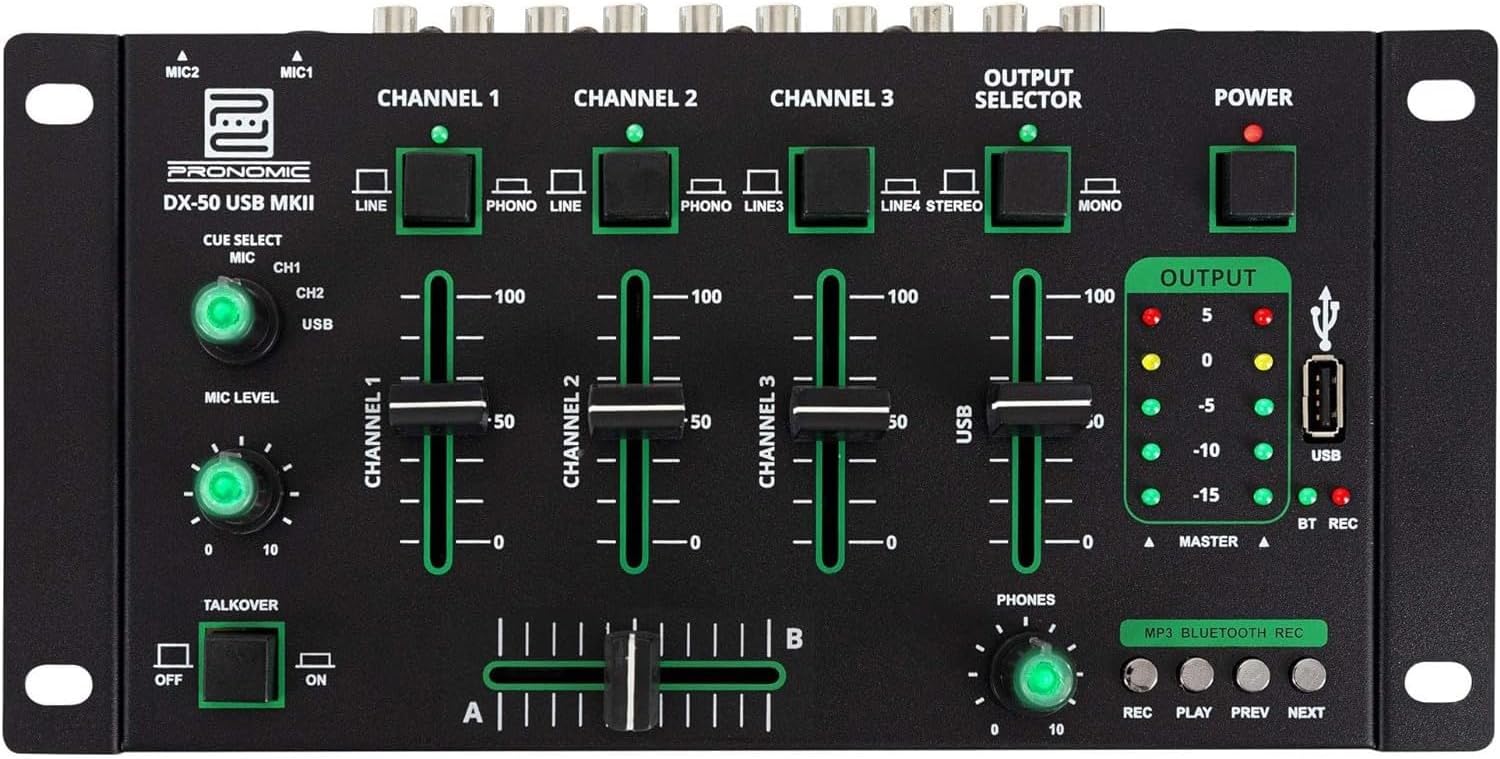
- MIC 1/2 入力: マイクを接続します。
- Channel 1-4 Input Selectors: Switch between LINE, PHONO, or USB/Bluetooth inputs for each channel.
- チャンネルフェーダー: Adjust the volume level for each channel.
- CUE Select Buttons: Route specific channels to the headphone output for monitoring.
- MICレベルノブ: Adjust the volume of the microphone inputs.
- Talkover Switch: Activates the talkover function, which automatically lowers music volume when speaking into the microphone.
- 出力セレクター: Choose between Stereo or Mono master output.
- 電源スイッチ: ミキサーのオン/オフを切り替えます。
- 出力レベルメーター: LED indicators showing the master output level.
- USBポート: Connect a USB drive for MP3 playback and recording.
- MP3/Bluetooth/REC Player Controls: Buttons for Play/Pause, Previous, Next, and Record functions for the integrated player.
- 電話レベルノブ: ヘッドホン出力の音量を調整します。
- Crossfader (A/B): Blends between channels assigned to A and B.
4.2 リアパネルの接続

- AC 12V電源入力: 付属の電源アダプターをここに接続します。
- PHONES出力: ヘッドホン接続用6.3mmジャック。
- MASTER OUT L/R (RCA): メインに接続 ampスピーカーまたはパワードスピーカー。
- Channel 1 & 2 Inputs (RCA Line/Phono): Connect turntables (Phono) or other line-level devices (CD players, media players). Use the front panel selector to switch.
- Channel 3 & 4 Inputs (RCA Line): Connect line-level devices.
- MIC 1 & 2 Inputs (6.3mm Jack): マイクを接続します。
5. セットアップ
Follow these steps to set up your Pronomic DX-50 USB MKII mixer:
- 電源接続: Ensure the mixer's power switch is in the OFF position. Connect the supplied AC 12V power adapter to the "AC 12V" input on the rear panel of the mixer. Plug the adapter into a suitable power outlet.
- Master Output Connection: Connect the "MASTER OUT L/R" RCA outputs on the rear panel to the inputs of your ampスピーカーまたはパワードスピーカー。
- 入力デバイスの接続:
- ターンテーブル: Connect turntables to the "CHANNEL 1" or "CHANNEL 2" RCA inputs. Set the corresponding input selector on the front panel to "PHONO".
- CD Players/Line Devices: Connect CD players, media players, or other line-level devices to "CHANNEL 1", "CHANNEL 2", "CHANNEL 3", or "CHANNEL 4" RCA inputs. Set the corresponding input selector on the front panel to "LINE".
- マイク: Connect microphones to the "MIC 1" or "MIC 2" 6.3mm jack inputs on the rear panel.
- ヘッドホン接続: Connect your headphones to the "PHONES" 6.3mm jack on the rear panel.
- USB Drive (Optional): If using a USB drive for playback or recording, insert it into the "USB" port on the front panel.
- 電源オン: Once all connections are made, switch the mixer's power switch to the ON position. The power indicator LED will illuminate.
6. 操作手順
6.1 基本的なミキシング
- 入力を選択します: For each channel, use the input selector switch (LINE/PHONO/USB/BT) to choose the desired audio source.
- チャンネル音量を調整する: Use the vertical faders for each channel to adjust its individual volume level.
- マスター出力: Monitor the "OUTPUT" LED meters and adjust the master volume knob (if present, otherwise rely on channel faders and amplifier volume) to achieve a suitable overall output level without clipping.
- クロスフェーダー: Use the crossfader to smoothly transition between channels assigned to A and B. Channels 1 and 2 are typically assigned to the crossfader.
6.2 マイクの使用
- Connect your microphone to one of the MIC inputs on the rear panel.
- Adjust the "MIC LEVEL" knob on the front panel to control the microphone's volume.
- Talkover Function: Activate the "TALKOVER" switch to automatically reduce the volume of the music when you speak into the microphone. This is useful for announcements.
6.3 USB再生と録音
- USB再生: MP3が入ったUSBドライブを挿入します files into the "USB" port. Select "USB" as the input source for the dedicated USB channel. Use the "PLAY/PAUSE", "PREV", and "NEXT" buttons to control playback.
- USB 録音: Press the "REC" button to start recording the master output to the connected USB drive. Press "REC" again to stop recording. Ensure your USB drive has sufficient free space and is formatted correctly (FAT32 is commonly supported).
6.4 Bluetooth接続
- Bluetooth を有効にする: Select "BT" as the input source for the dedicated Bluetooth channel. The mixer will enter pairing mode.
- ペアデバイス: On your Bluetooth-enabled device (smartphone, tablet, etc.), search for available Bluetooth devices. Select "Pronomic DX-50 USB MKII" (or similar name) from the list to pair.
- オーディオを再生: Once paired, you can play audio from your device through the mixer. Control playback from your device or using the mixer's transport controls (if supported by your device).
6.5 ヘッドフォンでのモニタリング
- Connect headphones to the "PHONES" output.
- Use the "CUE SELECT" buttons to choose which channels you want to monitor in your headphones without affecting the main output.
- Adjust the "PHONES" level knob to set your desired headphone volume.
7. メンテナンス
- クリーニング: 清掃する前に電源を切ってください。ミキサーの表面は、柔らかく乾いた布で拭いてください。液体洗剤、エアゾール、溶剤は使用しないでください。
- ストレージ: ミキサーは直射日光や極端な温度を避け、涼しく乾燥した場所に保管してください。
- フェーダーとノブのお手入れ: Avoid excessive force when operating faders and knobs. Periodically check for dust or debris accumulation around moving parts.
- ケーブル管理 Ensure cables are not kinked or strained, which can lead to damage.
8。 トラブルシューティング
| 問題 | 考えられる原因 | 解決 |
|---|---|---|
| 電源なし | Power adapter not connected; Power switch off; Faulty power outlet. | Check power adapter connection; Ensure power switch is ON; Try a different power outlet. |
| メイン出力から音が出ない | Master volume too low; Amplifier/speakers off or disconnected; Incorrect input selection; Channel faders down. | Increase master volume; Check amplifier/speaker connections and power; Verify correct input selected for channels; Raise channel faders. |
| ヘッドホンから音が出ない | Headphone volume too low; Headphones not connected; No CUE selected. | Increase PHONES level; Connect headphones properly; Press CUE button for desired channel. |
| Bluetoothがペアリングされない | Mixer not in pairing mode; Device too far; Interference. | Ensure BT input is selected; Bring device closer; Restart mixer and device. |
| USB再生が機能しない | USB drive not inserted correctly; Incorrect file フォーマット; USB ドライブが正しくフォーマットされていません。 | USBドライブを再度挿入し、 files are MP3; Format USB drive to FAT32. |
9. 仕様
| モデル | Pronomic DX-50 USB MKII |
| チャンネル数 | 4 |
| 接続技術 | ブルートゥース、USB |
| オーディオ入力 | RCA (line/phono), 6.3mm microphone, Bluetooth, USB |
| 出力コネクタタイプ | RCA (Master Out), 6.3mm (Phones) |
| 電源 | Electric Cable (AC 12V adapter) |
| Dimensions (without corner brackets and controls) | 222 x 129 x 28 mm(幅x奥行きx高さ) |
| Total Dimensions (with corner brackets and controls) | 267 x 136 x 51 mm(幅x奥行きx高さ) |
| 重さ | 790グラム |
10. 保証とサポート
保証情報およびテクニカルサポートについては、ご購入時に付属の説明書をご参照いただくか、販売店にお問い合わせください。保証請求の際に必要となるため、購入証明書は保管してください。
For further assistance, you may also visit the official Pronomic webサイトまたは顧客サービス部門に連絡してください。


