導入
ご購入ありがとうございますasing the SHARP XL-B530 Micro Component System. This system is designed to provide high-quality audio playback from various sources, including Bluetooth wireless streaming, CD, USB, AM/FM radio, and auxiliary input. This manual provides detailed instructions for setting up, operating, and maintaining your new audio system to ensure optimal performance and longevity.
重要な安全情報
- 使用前にすべての指示をよくお読みください。
- このマニュアルは将来の参照用に保管してください。
- ユニットを雨や湿気にさらさないでください。
- ユニット周囲の換気を良好に保ち、通気口を塞がないようにしてください。
- ラジエーター、暖房口、ストーブ、その他の機器(電気製品を含む)などの熱源の近くに本製品を置かないでください。 amp熱を発生する装置。
- 電源コードが踏まれたり挟まれたりしないように保護してください。
- メーカー指定のアタッチメント/アクセサリのみを使用してください。
- 雷雨のときや長期間使用しない場合は、この装置のプラグを抜いてください。
- すべてのメンテナンスは資格のあるサービス担当者に依頼してください。
パッケージ内容
パッケージに以下のすべてのアイテムが含まれていることを確認してください。
- Main Unit (Micro Component System)
- スピーカーユニット(x2)
- リモートコントロール
- 電源コード
- FMアンテナ
- AMループアンテナ
- ユーザーマニュアル(このドキュメント)
製品終了view
Familiarize yourself with the components and controls of your SHARP XL-B530 system.
Main Unit and Speakers

全体 view of the SHARP XL-B530 Micro Component System, including the main unit, two speakers, and the remote control.
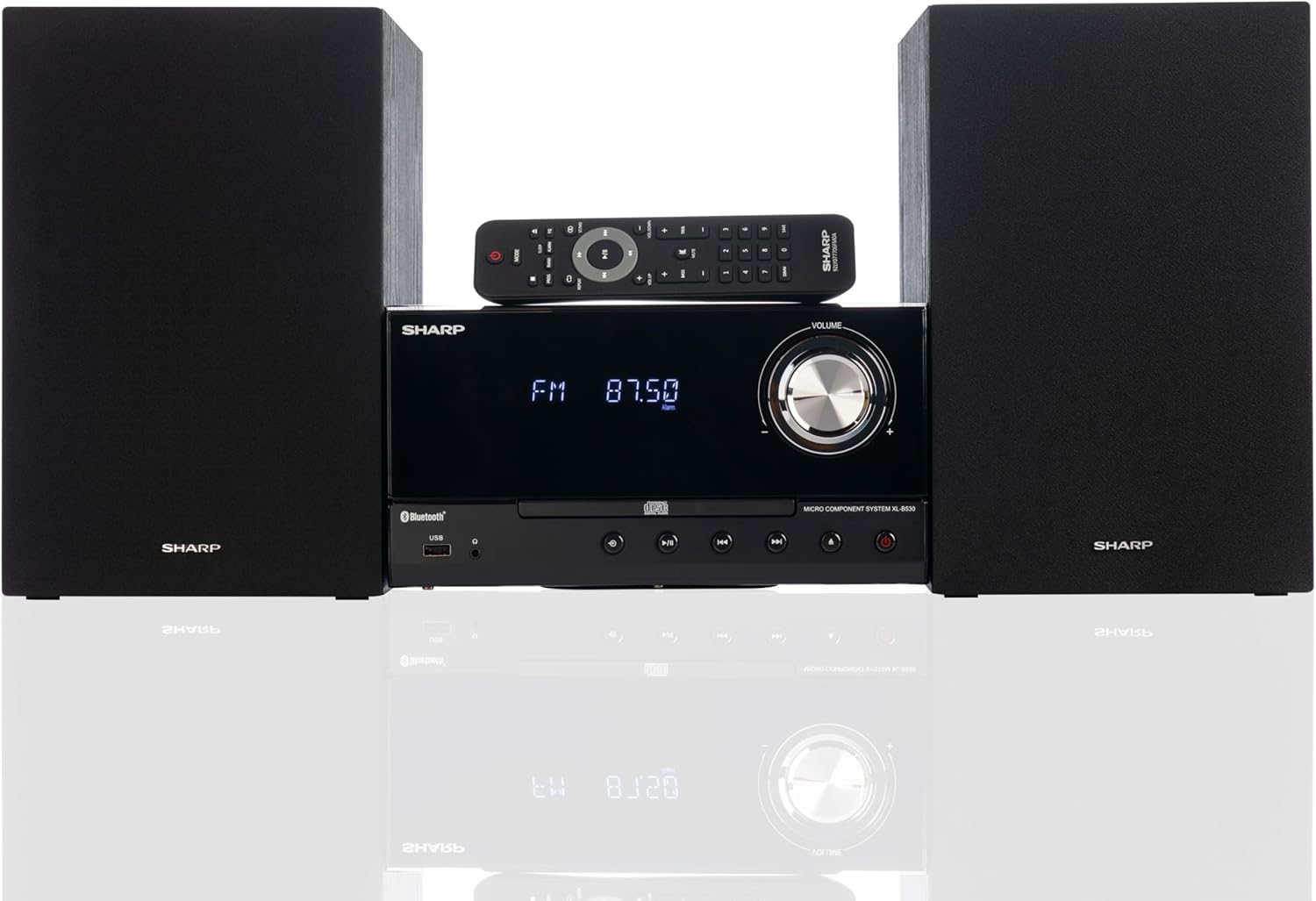
Front panel of the main unit, showing the LCD display, volume knob, CD tray, and control buttons.
背面パネルの接続

The rear panel of the main unit, featuring speaker terminals, FM antenna input, AM antenna input, and auxiliary input ports.
リモートコントロール
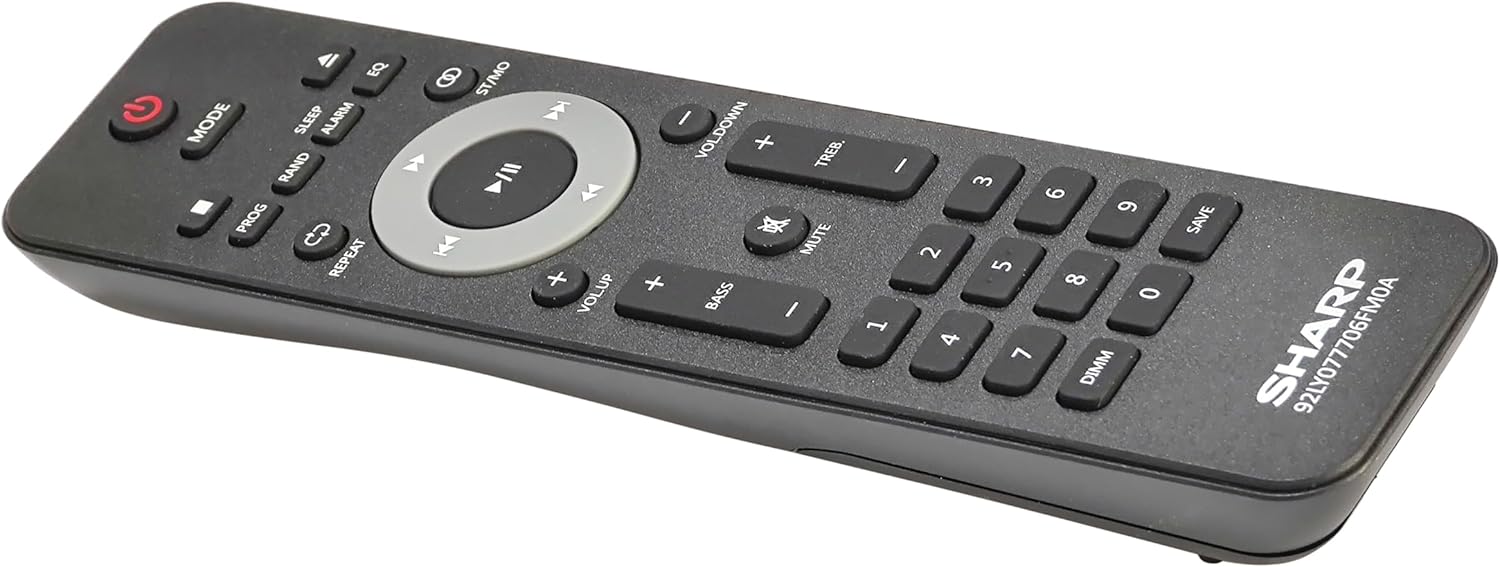
詳細 view of the remote control, showing various function buttons for power, mode, playback, volume, and sound adjustments.
設定
Follow these steps to set up your micro component system.
1. スピーカー接続
- Identify the left and right speaker cables.
- Connect the red (+) wire from each speaker to the red (+) terminal on the main unit's rear panel.
- Connect the black (-) wire from each speaker to the black (-) terminal on the main unit's rear panel.
- Ensure a secure connection for both speakers.
2.アンテナ接続
- FMアンテナ: Connect the supplied FM wire antenna to the FM antenna jack on the rear panel. Extend the wire fully for best reception.
- AMアンテナ: Assemble the AM loop antenna and connect its wires to the AM antenna terminals on the rear panel. Rotate the antenna for optimal AM reception.
3. 電源接続
- Ensure all other connections are made.
- Plug the power cord into the AC IN jack on the rear of the main unit.
- 電源コードのもう一方の端を壁のコンセントに差し込みます。
操作手順
This section details how to use the various functions of your SHARP XL-B530 system.
電源オン/オフ
- を押す 力 本体またはリモコンのボタンを押して、システムの電源をオンまたはオフにします。
ソースの選択
- を押す モード button on the main unit or remote control repeatedly to cycle through available sources: CD, Bluetooth, USB, FM, AM, AUX.
CD再生
- を押す モード button to select 'CD' mode.
- を押す 開く/閉じる ボタンをクリックしてCDトレイを開きます。
- Place a CD (CD/MP3/WMA/CD-R/CD-RW) with the label side up into the tray.
- を押す 開く/閉じる もう一度ボタンを押すとトレイが閉じます。再生が自動的に開始されます。
- 使用 再生/一時停止, 停止, スキップ (前進/後進)、そして 検索 制御用のボタン。
Bluetoothペアリング
- を押す モード button to select 'Bluetooth' mode. The display will show 'BT' and flash, indicating it's ready for pairing.
- Bluetooth デバイス (スマートフォン、タブレットなど) で Bluetooth を有効にし、利用可能なデバイスを検索します。
- Select 'SHARP XL-B530' from the list.
- Once paired, the display will stop flashing and show 'BT CONNECTED'. You can now stream audio from your device.
USB再生
- フロントパネルの USB ポートに USB フラッシュ ドライブを挿入します。
- を押す モード button to select 'USB' mode.
- システムは自動的に互換性のあるオーディオを検出し、再生を開始します。 file(MP3/WMA)。
- Use playback controls similar to CD mode.
AM/FMラジオ

The SHARP XL-B530 system displaying an FM radio frequency, highlighting its digital tuner capabilities.
- を押す モード button to select 'FM' or 'AM' mode.
- 自動スキャン: を押し続けます 再生/一時停止 ボタンを押すと、利用可能な放送局が自動的にスキャンされて保存されます。
- 手動チューニング: 使用 スキップ 希望する周波数に手動でチューニングするためのボタン。
- プリセットステーション: Use the number buttons on the remote to directly select saved preset stations.
音量とサウンドの調整

A close-up of one of the SHARP XL-B530 speakers, illustrating the adjustable bass and treble sound output.
- 音量: 回転する 音量 本体のノブまたは VOL + / VOL- リモコンのボタン。
- 低音/高音: 使用 BASS + / BASS- そして TREB+ / TREB- buttons on the remote control to adjust sound characteristics.
- ラウドネス: を押す ラウドネス button on the remote to enhance bass and treble at low volumes.
- EQ: を押す EQ button on the remote to cycle through preset equalizer modes.
メンテナンス
Proper care will ensure the longevity of your system.
- クリーニング: Use a soft, dry cloth to clean the exterior of the unit. For stubborn stains, damp布に水を軽く含ませて拭いてください。研磨剤入りの洗剤や溶剤は使用しないでください。
- CDケア: CDは端を持って扱ってください。汚れたCDは、柔らかく糸くずの出ない布で中心から外側に向かって拭いてください。
- 換気: Ensure the ventilation openings are not blocked by dust or debris.
- ストレージ: 長期間保管する場合は、電源コンセントからプラグを抜き、涼しく乾燥した場所に保管してください。
トラブルシューティング
システムに問題が発生した場合は、次の一般的な問題と解決策を参照してください。
| 問題 | 考えられる原因 | 解決 |
|---|---|---|
| 電源なし | 電源コードが接続されていません。電源コンセントがアクティブではありません。 | 電源コードがしっかりと差し込まれていることを確認してください。別のコンセントを試してください。 |
| 音が出ない | 音量が低すぎる、スピーカーが接続されていない、ソースが正しく選択されていない | 音量を上げる; スピーカーの接続を確認する; 正しい入力ソースを選択する |
| CDが再生されない | CD inserted incorrectly; CD is dirty or scratched; Incorrect mode | Insert CD correctly (label side up); Clean or replace CD; Select CD mode |
| Bluetoothがペアリングされない | Bluetooth mode not selected; Device too far; Device already paired to another unit | Select Bluetooth mode; Move device closer; Disconnect from other devices and try again |
| ラジオの受信状態が悪い | Antenna not connected or positioned poorly; Interference | アンテナを接続して位置を調整します。ユニットを他の電子機器から離します。 |
| リモコンが動作しない | Batteries are dead or inserted incorrectly; Obstruction between remote and unit | Replace batteries, check polarity; Remove any obstructions; Ensure remote is pointed at the unit's sensor |
仕様
| 特徴 | 仕様 |
|---|---|
| モデル番号 | XL-B530(BK) |
| 出力電力 | 最大200W(100W RMS) |
| 接続性 | Bluetooth, USB, Aux Input |
| ディスクの互換性 | CD、CD-R/RW、MP3、WMA |
| チューナー | AM/FM Stereo Digital Tuner (50 station presets) |
| スピーカータイプ | ステレオ |
| 製品寸法(長さ x 幅 x 高さ) | 25 x 11 x 9.6インチ |
| アイテム重量 | 18ポンド |
| 色 | ブラックオーク |
保証とサポート
For warranty information and technical support, please refer to the warranty card included with your product or visit the official SHARP webサイトでご確認ください。保証請求の際は購入証明として領収書を保管してください。
For further assistance, you may contact SHARP customer service through their official channels.


