導入
Welcome to the SENTRY Ultra-Light Bluetooth Earbuds user manual. These earbuds are designed to provide a seamless and immersive audio experience, perfect for active lifestyles. With an ultra-light design, LED power display, and intelligent touch controls, you can enjoy high-quality sound and convenient operation. Please read this manual carefully to ensure proper use and maintenance of your new earbuds.
パッケージ内容
- SENTRY Ultra-Light Bluetooth Earbuds (Left and Right)
- ポータブル充電ケース
- USB充電ケーブル
- ユーザーマニュアル
製品の特徴
- LED 電力表示: Transparent design on the charging case allows real-time battery monitoring.
- コンパクトなデザイン: Ultra-compact and space-saving, making them highly portable.
- Bass Acoustic Design: Advanced dynamic drivers deliver crystal-clear audio with enhanced bass and treble.
- インテリジェントタッチコントロール: Effortlessly manage volume, music tracks, calls, and voice assistants.
- 安定した接続: Advanced Bluetooth technology ensures lag-free and reliable performance.
製品終了view
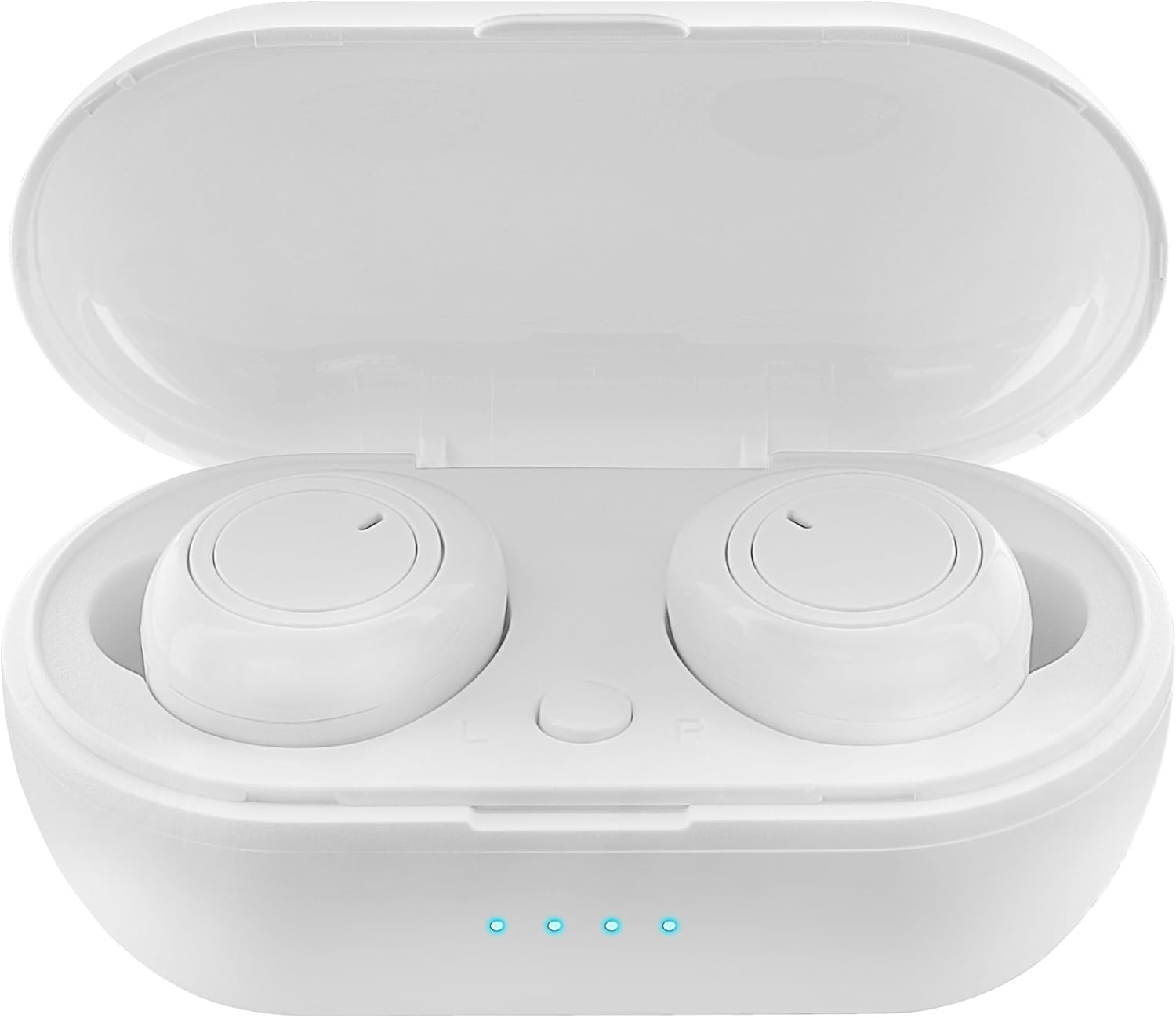
Figure 1: Earbuds in Charging Case with LED Indicators. The charging case features a transparent lid and three blue LED lights indicating battery status.

Figure 2: Individual Earbuds (Front View). Each earbud features a circular touch control area for easy operation.

Figure 3: Individual Earbuds (Side View). The ergonomic design ensures a comfortable and secure fit in the ear.
設定
1. イヤホンとケースの充電
- イヤホンを充電ケースに入れてください。正しく装着されていることを確認してください。
- USB 充電ケーブルをケースの充電ポートと電源 (USB 壁アダプター、コンピューターの USB ポートなど) に接続します。
- The LED display on the charging case will indicate the charging status. A full charge is indicated when all lights are solid.
- Allow approximately 1-2 hours for a full charge of both earbuds and the case.
2. デバイスとのペアリング
- 充電ケースを開けると、イヤホンは自動的にペアリングモードになります(イヤホンのライトが点滅します)。
- スマートフォンまたは Bluetooth 対応デバイスで、Bluetooth 設定に移動します。
- 検索する new devices and select "SENTRY Earbuds" (or similar name) from the list.
- 接続されると、イヤホンのライトの点滅が停止し、確認音が聞こえます。
- デバイスで Bluetooth が有効になっている場合、イヤホンはケースから取り出すと最後にペアリングしたデバイスに自動的に再接続されます。
操作手順
Your SENTRY Ultra-Light Bluetooth Earbuds feature intelligent touch controls for easy management of your audio and calls.
| 関数 | アクション |
|---|---|
| 音楽の再生/一時停止 | どちらかのイヤフォンをシングルタップ |
| 次のトラック | 右のイヤホンをダブルタップ |
| 前のトラック | 左のイヤホンをダブルタップ |
| 通話の応答/終了 | どちらかのイヤフォンをシングルタップ |
| 通話を拒否 | どちらかのイヤホンを 2 秒間押し続けます |
| 音声アシスタントを有効にする | どちらかのイヤホンをトリプルタップ |
| 音量を上げる | 右のイヤホンを長押し |
| 音量を下げる | 左のイヤホンを長押しします |
メンテナンス
- クリーニング: イヤホンと充電ケースのお手入れには、柔らかく乾いた糸くずの出ない布をご使用ください。刺激の強い化学薬品や研磨剤は使用しないでください。
- ストレージ: 使用しないときは、イヤホンを保護し、充電を保つために充電ケースに保管してください。直射日光や極端な温度を避け、涼しく乾燥した場所に保管してください。
- バッテリーのケア: バッテリー寿命を延ばすには、イヤホンと充電ケースを頻繁に完全に放電させないでください。頻繁に使用しない場合でも、定期的に充電してください。
- 耐水性: このイヤホンは防水仕様ではありません。水、汗、高湿度にさらさないでください。
トラブルシューティング
- イヤホンがペアリングされない: 両方のイヤホンが充電されていることを確認してください。ケースに戻し、蓋を閉めてから再度開けてペアリングモードを再度開始してください。デバイスのBluetooth設定を確認し、再接続をお試しください。
- イヤホンが片方しか動作しない: 両方のイヤホンを充電ケースに戻し、蓋を閉めてから取り出してみてください。これで再同期できる場合が多いです。
- 音が出ない: デバイスとイヤホンの両方の音量レベルを確認してください。イヤホンがデバイスに正しく接続されていることを確認してください。
- 充電に関する問題: Ensure the charging cable is securely connected to both the case and the power source. Try a different USB port or charger. Clean the charging contacts on the earbuds and inside the case.
- 音質が悪い: Ensure the earbuds are properly seated in your ears. Try cleaning any debris from the earbud grilles.
仕様
| 特徴 | 詳細 |
|---|---|
| モデル名 | 5002-407 |
| 接続技術 | ワイヤレス(Bluetooth) |
| 無線通信技術 | ブルートゥース |
| 年齢範囲(説明) | アダルト |
| 充電時間 | Approximately 1-2 Hours (for earbuds and case) |
| 対応デバイス | Smartphones, Apple Devices |
| コントロールタイプ | メディアコントロール |
| ケーブル機能 | ケーブルなし |
| 耐水性レベル | 耐水性はありません |
| 周波数範囲 | 20Hz~20kHz |
| 制御方法 | 触る |
| バッテリー寿命 | 最大12時間(充電ケース使用時) |
| オーディオドライバータイプ | ダイナミックドライバ |
| キャリングケースの色 | 白 |
| イヤーピースの形状 | 丸みを帯びた |
| ブランド | 歩哨 |
| 色 | 白 |
| 耳の位置 | 耳に装着 |
| フォームファクター | 耳に装着 |
| 騒音制御 | なし |
保証とサポート
SENTRY products are designed for reliability and performance. For information regarding warranty coverage and customer support, please refer to the warranty card included with your product or visit the official SENTRY webサイト。を訪問することもできます。 AmazonのSENTRYストア 追加の製品情報およびサポート リソースについては、こちらをご覧ください。


