1. はじめに
The FortiGate-120G is a robust network security appliance designed for comprehensive threat protection in diverse enterprise environments. This device integrates advanced security features with reliable support services to ensure network integrity and performance.
主な機能は次のとおりです。
- 包括的なハードウェアおよびサービス パッケージ: Includes the FortiGate-120G appliance with 3 years of FortiCare Premium and FortiGuard Unified Threat Protection (UTP).
- 統合脅威保護 (UTP) バンドル: Provides defense against web and DNS-based threats through advanced filtering and security features such as ATP, DNS filtering, URL filtering, video filtering, and anti-botnet services.
- 強化 Web 安全: Offers high-level web security suitable for various enterprise environments requiring strong protective measures against online threats.
- Extended Support and Service: FortiCare Premium ensures dependable technical support for seamless operation and efficient issue resolution.
- Optimal for Diverse Deployment: Suitable for organizations with complex network environments seeking comprehensive security solutions.
2.デバイスオーバーview
The FortiGate-120G appliance features multiple connectivity options and indicators for status monitoring.

図2.1: 前面と背面 view of the FortiGate-120G appliance, highlighting multiple GE RJ45, GE SFP, and 10 GE SFP+ slots, along with Universal ZTNA, Unparalleled Performance, Secure SD-WAN, and Dynamic Segmentation capabilities.

図2.2:詳細 view of the FortiGate-120G, illustrating the interfaces including RJ45 Console Port, HA and Management Ports, GE RJ45 Ports, 10GE SFP+ FortiLink Slots, and SFP Ports. Hardware features such as SP5, 1U form factor, AC Dual power, and 480GB storage are also depicted.
インターフェース:
- 1x RJ45 Console Port
- 2x RJ45 HA and Management Ports
- 16x GE RJ45 Ports
- 4x 10GE SFP+ FortiLink Slots
- 8x SFP Ports
3. セットアップ手順
Follow these steps to set up your FortiGate-120G Network Security Appliance.
3.1. デバイス登録
でデバイスを登録します fortinet.com/register to access cloud management, FortiGuard updates, firmware upgrades, technical support, and warranty coverage.
3.2. Initial Configuration Options
You can configure your FortiGate-120G using one of the following methods:
A. Local Setup
- Connect port 1 on the FortiGate to your computer.
- Ensure DHCP is enabled on your computer, or manually set your IP address to 192.168.1.1 with a subnet mask of 255.255.255.0.
- 開く web ブラウザを使用して、192.168.1.99に移動します。
B. Cloud Setup
- 訪問 フォーティクラウド.com で web ブラウザにアクセスし、FortiNetOne の資格情報を使用してログインします。
- Click 'Add FortiGate' and enter the FortiCloud Key. The FortiCloud Key is typically found on a sticker on the device.
C. iOS Setup
- Download and launch the FortiExplorer iOS App from the App Store.
- Connect the USB port of your iOS device to the FortiGate's USB port.
- FortiExplorer にデバイスが表示されたらタップします。
Note: For detailed video instructions, refer to fortinet.net/fg-setup.

図3.1:背面 view of the FortiGate-120G, showing the dual AC power inputs (100-240V AC, 50-60Hz, 1.5A Max) for redundant power supply.
4. アプライアンスの操作
Once configured, the FortiGate-120G provides continuous network security and management. The included FortiGuard Unified Threat Protection (UTP) and FortiCare Premium services enhance its operational capabilities.
4.1. 統合脅威保護(UTP)
The UTP bundle actively protects your network by:
- 高度な脅威保護 (ATP): Identifies and mitigates sophisticated threats.
- DNS フィルタリング: Blocks access to malicious domains.
- URL フィルタリング: アクセスを制御する webカテゴリと評判に基づいたサイト。
- ビデオフィルタリング: Manages access to streaming video content.
- Anti-Botnet Services: Detects and prevents communication with botnet command and control servers.
4.2. ステータスインジケーター
Monitor the LED indicators on the front panel for device status:
- PWR: 電源の状態を示します。
- 状態: General device operational status.
- ハ: High Availability status.
- リンク/アクション: Link and activity status for each port.
- スピード: Connection speed for each port.
5. メンテナンス
Regular maintenance ensures optimal performance and security of your FortiGate-120G appliance.
5.1. ファームウェアのアップデート
Periodically check for and apply the latest firmware updates from the Fortinet support portal. Firmware updates often include security patches and new features.
5.2. 監視とログ記録
Utilize the device's management interface to monitor network traffic, security events, and system logs. This helps in identifying potential issues and ensuring compliance.
5.3. 身体的ケア
- 過熱を防ぐために、デバイスが換気の良い場所に設置されていることを確認してください。
- デバイスにほこりやごみが付かないようにしてください。
- すべてのケーブル接続が安全であることを確認します。
6。 トラブルシューティング
This section provides basic troubleshooting steps for common issues. For advanced problems, refer to FortiCare Premium support.
6.1.ノーパワー
- Verify the power cables are securely connected to both the appliance and a working power outlet.
- Check the power LED indicator on the front panel. If it is off, try a different power outlet or power cable.
6.2. ネットワーク接続の問題
- Check the LINK/ACT LEDs for the connected ports. A solid green or amber light indicates a link, and a blinking light indicates activity.
- Ensure Ethernet cables are properly connected and not damaged.
- Verify network configuration settings (IP addresses, subnet masks, gateways) in the device's management interface.
6.3. パフォーマンスの低下
- Monitor CPU and memory usage through the management interface. High utilization may indicate heavy traffic or a configuration issue.
- Check for any active security policies that might be impacting performance.
- デバイスのファームウェアが最新であることを確認してください。
7. 仕様
FortiGate-120G ネットワーク セキュリティ アプライアンスの詳細な技術仕様。
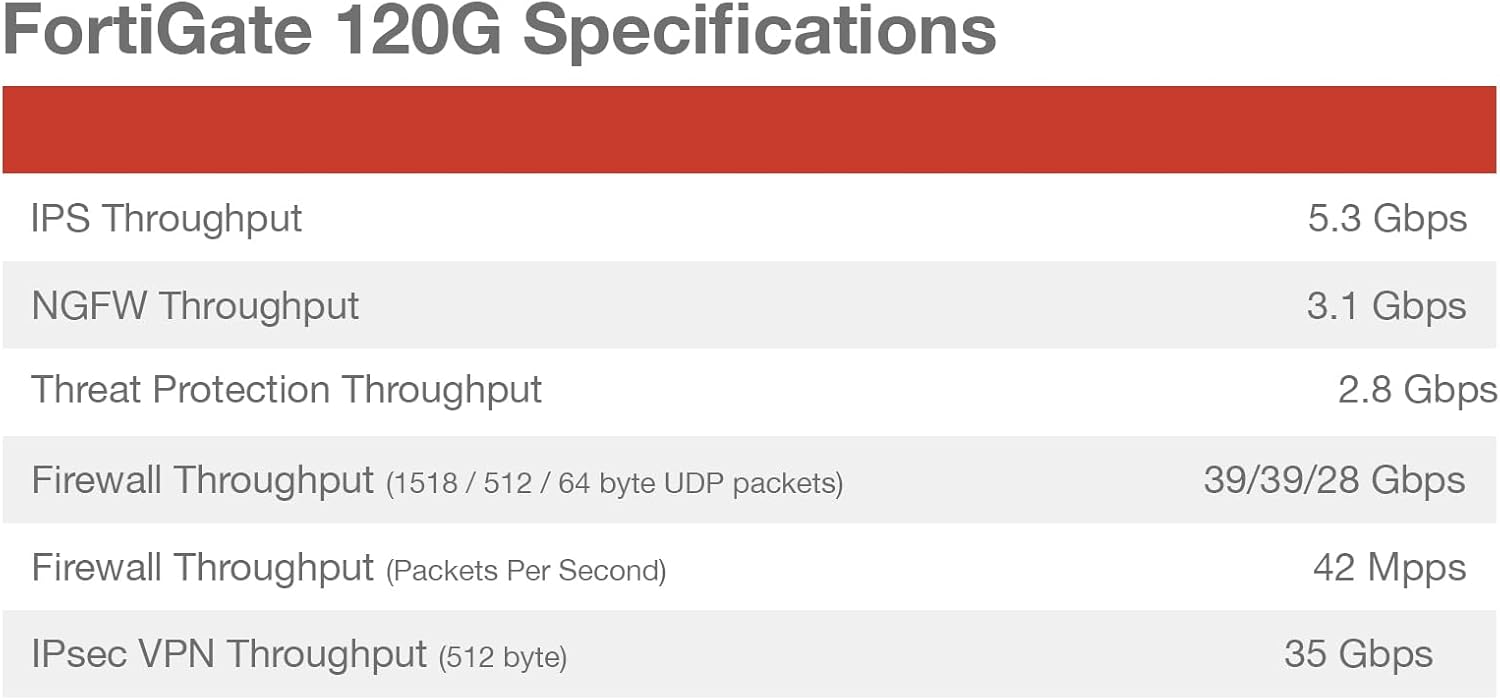
Figure 7.1: Performance specifications for the FortiGate 120G, including IPS Throughput, NGFW Throughput, Threat Protection Throughput, Firewall Throughput (1518 / 512 / 64 byte UDP packets), Firewall Throughput (Packets Per Second), and IPsec VPN Throughput (512 byte).
| 特徴 | 価値 |
|---|---|
| 製品寸法 | 21.5 x 16.75 x 6インチ |
| アイテム重量 | 12.5ポンド |
| 商品型番 | FG-120G-BDL-950-36 |
| メーカー | フォーティネット |
| 周波数帯域クラス | シングルバンド |
| 接続技術 | イーサネット |
| アンテナタイプ | 内部 |
| 含まれるコンポーネント | CD |

図7.2:側面 view of the FortiGate-120G, indicating its physical dimensions: Height x Width x Length: 1.73 x 17 x 10 inches, and Weight: 12.17 pounds.
8. 保証とサポート
Your FortiGate-120G appliance includes comprehensive support and protection services.
8.1. FortiGuard Unified Threat Protection (UTP)
The purchase includes 3 years of FortiGuard UTP, providing continuous updates for threat intelligence, web filtering, and other security services to keep your network protected against evolving threats.
8.2. FortiCare Premium
The package also includes 3 years of FortiCare Premium, offering enhanced technical support. This service provides:
- 24x7 technical support from Fortinet experts.
- Advanced hardware replacement options.
- Access to firmware updates and patches.
- Online support resources and documentation.
For detailed information on your warranty and support services, please visit the official Fortinet support webサイトをご覧いただくか、Fortinet の販売代理店にお問い合わせください。

Figure 8.1: Table outlining various FortiGuard Security Services, SD-WAN and SASE Services, NOC and SOC Services, and Hardware and Software Support options, indicating which are included in Enterprise Protection, Unified Threat Protection, and Advanced Threat Protection bundles.


