1. はじめに
This manual provides essential instructions for the safe operation, setup, and maintenance of your SwellPro FD3 Fisherman Waterproof Fishing Drone. The FD3 is designed for marine environments, featuring IP67 waterproofing, a 4K camera, and a dual bait release mechanism for fishing applications. Please read this manual thoroughly before operating the drone to ensure proper use and to prevent damage or injury.
安全ガイドライン
- ドローンは常に、人、動物、障害物から離れた広い場所で操作してください。
- 操作中はドローンから安全な距離を保ってください。
- Do not operate the drone in strong winds, heavy rain, or lightning.
- 飛行前に必ずすべてのバッテリーが完全に充電されていることを確認してください。
- 使用前と使用後にドローンに損傷がないか定期的に点検してください。
- ドローンの操作に関するすべての現地の規制と法律を遵守してください。
2. パッケージ内容
Verify that all items listed below are present in your package. If any items are missing or damaged, please contact SwellPro support.
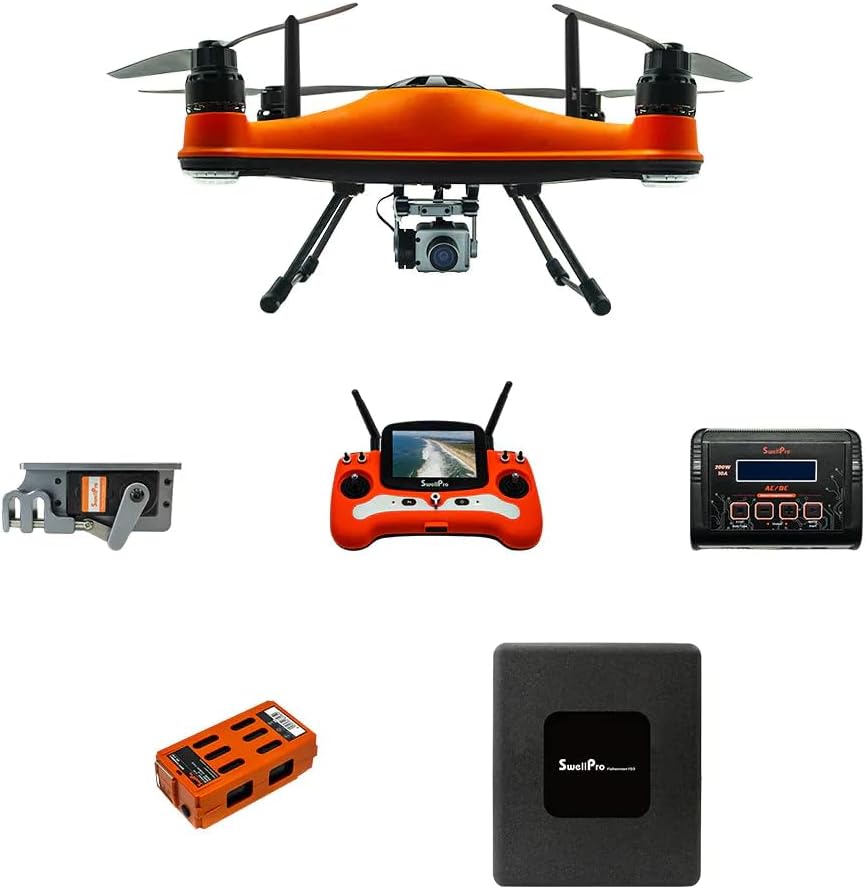
図2.1: The SwellPro FD3 Fisherman drone shown with its primary accessories, including the remote control, flight battery, charger, and bait release mechanism.
- SwellPro FD3 Fisherman Drone (x1)
- リモコン(1個)
- インテリジェントフライトバッテリー(1個)
- バッテリー充電器(1個)
- Propellers (sets)
- Dual Bait Release Mechanism (x1)
- ユーザーマニュアル(このドキュメント)
- Other accessories (e.g., cables, tools)
3. セットアップ
3.1 ドローンの組み立て
- プロペラを取り付ける: Carefully attach the propellers to the motor shafts. Ensure correct propeller type (CW/CCW) matches the corresponding motor. Tighten securely.
- Install Flight Battery: Insert the intelligent flight battery into the drone's battery compartment until it clicks into place.
- Attach Bait Release Mechanism: Secure the dual bait release mechanism to the drone's underside according to the provided diagrams. Ensure it is firmly attached and cables are connected.
- カメラをインストールします: Mount the 4K camera onto its designated gimbal or mounting point, ensuring all connections are secure.

図3.1: トップダウン view of the SwellPro FD3 drone, illustrating the propeller and motor configuration. Ensure propellers are correctly installed for safe flight.
3.2 バッテリーの充電
Charge both the intelligent flight battery and the remote controller battery before first use and after each flight.
- バッテリー充電器を電源コンセントに接続します。
- Connect the flight battery to the charger. The indicator light will show charging status.
- Connect the remote controller to its charger (usually via USB).
- Charge until all indicator lights show a full charge.
3.3 リモートコントロールの設定
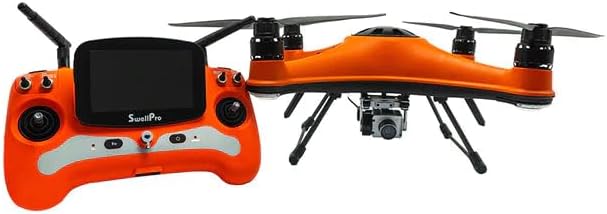
図3.2: The SwellPro FD3 drone positioned next to its remote control, which features a built-in display for real-time flight data and camera feed.
Power on the remote controller. If it does not automatically connect to the drone, follow the binding procedure outlined in the quick start guide or the full manual (if available separately) to establish a connection.
3.4 アプリのインストール(オプション)
For advanced features and real-time telemetry, download the official SwellPro app from your device's app store. Follow the in-app instructions to connect your drone and remote controller.
4. ドローンの操作
4.1 飛行前チェックリスト
- すべてのバッテリー(ドローンとリモコン)が完全に充電されていることを確認します。
- プロペラに損傷がないか確認し、しっかりと取り付けられていることを確認します。
- Verify the bait release mechanism and camera are properly installed.
- Check the weather conditions (wind speed, rain).
- Ensure sufficient GPS signal (if operating in GPS mode).
- Clear the flight area of any obstacles, people, or animals.

図4.1: The SwellPro FD3 drone in flight over water, demonstrating its waterproof capabilities. Always perform a pre-flight check before launching.
4.2 基本的な飛行制御
Refer to the remote controller diagram (usually found in the quick start guide) for specific stick and button functions. Common controls include:
- 左スティック: スロットル(上下)、ヨー(左右回転)
- 右スティック: Pitch (forward/backward), Roll (left/right)
- 帰還ボタン(RTH): 離陸地点への自動帰還を開始します。
- Bait Release Button: Activates the bait release mechanism.
- カメラコントロール: Buttons for photo capture and video recording.
4.3 Bait Release Operation
- Securely attach your fishing line with bait to the dual bait release mechanism. Ensure the weight does not exceed the drone's maximum payload capacity (4.4 lbs).
- Fly the drone to your desired casting location.
- Once in position, press the dedicated bait release button on the remote controller. The mechanism will open, dropping the bait.
- Confirm the bait has been released via the camera feed or visual observation.
4.4 4K Camera Operation
- Ensure a compatible microSD card is inserted into the camera.
- Use the dedicated buttons on the remote controller to start/stop video recording or take photos.
- The live video feed will be displayed on the remote controller's screen or connected mobile device.
4.5 Auto Drop & Return
The FD3 features intelligent flight functions:
- Auto Drop: This refers to the automated bait release function, triggered by the remote controller.
- 帰宅(RTH): When activated, the drone will automatically fly back to its recorded takeoff point and land. This feature is also triggered automatically if the battery level is critically low or if the control signal is lost.
5. メンテナンス
5.1 クリーニング
- After use, especially in saltwater environments, rinse the drone thoroughly with fresh water.
- Wipe the drone dry with a soft cloth. Ensure all ports and connectors are free of moisture before charging or storing.
- カメラのレンズをマイクロファイバークロスで拭いてください。
5.2 ストレージ
- ドローンとバッテリーは、直射日光や極端な温度を避け、涼しく乾燥した場所に保管してください。
- For long-term storage, discharge batteries to approximately 50-60% capacity.
- Remove propellers if storing in a compact case.
5.3バッテリーケア
- バッテリーを過充電または過放電しないでください。
- バッテリーが膨張したり損傷しているように見える場合は、直ちに使用を中止し、適切に廃棄してください。
- Avoid puncturing or exposing batteries to extreme heat.
6。 トラブルシューティング
| 問題 | 考えられる原因 | 解決 |
|---|---|---|
| ドローンの電源が入らない | Low battery; Battery not properly inserted; Power button not pressed correctly. | Charge battery; Reinsert battery; Press and hold power button for 2 seconds. |
| GPS信号なし | Operating indoors; Obstructions (buildings, trees); Magnetic interference. | Move to an open outdoor area; Avoid areas with strong magnetic fields. |
| Remote controller loses connection | Out of range; Interference; Low remote battery. | Fly drone closer; Avoid areas with strong radio interference; Charge remote battery. |
| カメラが録画/写真を撮らない | No microSD card; Full microSD card; Card error. | Insert microSD card; Format or replace microSD card. |
| Bait release not working | Mechanism jammed; Cable disconnected; Overloaded payload. | Inspect mechanism for obstructions; Check cable connections; Reduce payload weight. |
7. 仕様
| 特徴 | 詳細 |
|---|---|
| ブランド | スウェルプロ |
| モデル名 | FD3 |
| 防水等級 | IP67 |
| ビデオキャプチャ解像度 | 4K |
| 光センサー技術 | シーモス |
| Max Bait Release Payload | 4.4ポンド(2kg) |
| バッテリー容量 | 4200mAh |
| 電池のタイプ | リチウムポリマー |
| Item Weight (Drone) | (Specific drone weight not provided, package weight is 30 lbs) |
| リモートコントロール | Included, with display |
| メーカー部品番号 | SWP-FD3-ADV_1 |
| 欧州連合 | 880591956814 |
8. 保証とサポート
For warranty information, please refer to the warranty card included with your product or visit the official SwellPro website. For technical support, troubleshooting assistance, or spare parts, please contact SwellPro customer service.
SwellPro Official Webサイト: www.swellpro.com
Amazonストア: Visit the SwellPRO Store on Amazon


