1.製品オーバーview
The RODOT WiFi Smart Switch is a versatile home automation device designed to provide remote control and smart scheduling for your electrical appliances and lighting. It combines Wi-Fi connectivity with 433MHz RF remote control capabilities, offering multiple ways to manage your home devices.

Image: The RODOT WiFi Smart Switch module shown with its accompanying 433MHz RF remote control and a smartphone displaying the Smart Life app interface.
含まれるもの:
- 1 x Tuya Smart Wi-Fi & RF Receiver (Smart Switch Module)
- 1 x Long-distance 433Mhz RF Remote Control
2. セットアップとインストール
2.1 配線図
Proper wiring is crucial for safe and effective operation. Ensure power is disconnected before proceeding with any wiring. The smart switch module connects between your power source (AC 90-250V) and the appliance or light fixture.

Image: A clear diagram illustrating the input (AC 90-250V) and output connections for the RODOT WiFi Smart Switch module, showing how it integrates with a light bulb circuit.
2.2 App Download and Wi-Fi Pairing
To enable smart control features, download the free スマートライフ or TUYAスマートアプリ from your device's app store (iOS App Store or Google Play Store). Follow the in-app instructions to add your RODOT WiFi Smart Switch to your home Wi-Fi network. Ensure your Wi-Fi network is 2.4GHz, as the device does not support 5GHz networks during initial pairing.
2.3 RFリモートペアリング
The included 433MHz RF remote control can be paired with the smart switch module for direct control without Wi-Fi. The video below demonstrates the pairing process for different modes:
Video: This video demonstrates the unboxing of the RODOT Smart Switch and the various RF remote pairing modes, including toggle, latching, jog, and reset procedures. It visually guides users through the button press sequences for each mode.
RF Pairing Modes:
- モードの切り替え: Click the button on the smart switch module twice, then press any button on the RF remote once. Each press of the remote button will toggle the connected device on/off.
- ラッチモード: Click the button on the smart switch module three times, then press button 'A' on the RF remote once (for ON) and button 'B' once (for OFF).
- ジョグモード: Click the button on the smart switch module four times, then press any button on the RF remote once. The connected device will turn on only while the remote button is held down.
- Reset RF Pairing: Click the button on the smart switch module eight times to clear all paired RF remote controls.
3. スマートスイッチの操作
3.1 アプリリモートコントロール
Once paired with the Smart Life or TUYA Smart App, you can remotely control your connected appliances from anywhere with an internet connection. The app allows for instant on/off control, status feedback, and advanced automation.

Image: A smartphone screen displaying the Smart Life app, showing device controls and options for smart home automation.
3.2 RFリモコン
Use the included 433MHz RF remote control for convenient local control of your smart switch. Depending on the pairing mode (Toggle, Latching, or Jog), the remote buttons will perform different actions as described in the RF Remote Pairing section.

画像: 詳細な view of the 433MHz RF remote control, highlighting its compact design and two control buttons (A and B).
3.3 音声制御
The RODOT WiFi Smart Switch is compatible with popular voice assistants like Amazon Alexa and Google Home. After linking your Smart Life/TUYA Smart account with your voice assistant, you can control your devices using simple voice commands, such as "Alexa, turn on the living room light" or "Hey Google, turn off the fan."
3.4 タイマーとスケジュール機能
Utilize the Smart Life/TUYA Smart App to set up various timing schedules for your connected appliances. This includes countdown timers, scheduled on/off times, and recurring schedules, allowing for automated control and energy efficiency.
3.5 幅広い応用
The smart switch is designed for broad compatibility with various household appliances and lamps. It can be used to control ceiling lamps, cabinet lights, wall lamps、デスクlamps, fans, electric kettles, LED spotlights, and more, making it a versatile solution for smart home integration.

Image: An illustration showing various applications of the smart switch, including controlling ceiling fans, wall lamps, cabinet lights, and desk lamps, demonstrating its flexibility in expanding a lighting system.
4. メンテナンス
The RODOT WiFi Smart Switch is designed for durability and requires minimal maintenance. To ensure optimal performance and longevity:
- デバイスは湿気や極端な温度を避け、乾燥した環境に保管してください。
- 外側は柔らかく乾いた布で拭いてください。刺激の強い化学薬品や研磨剤入りの洗剤は使用しないでください。
- 密閉された空間に設置する場合は、適切な換気を確保してください。
- For the RF remote, replace the 12V 23A battery when its performance degrades. (Battery not included with product).
5。 トラブルシューティング
If you encounter issues with your RODOT WiFi Smart Switch, consider the following common solutions:
- デバイスが応答しない:
- Check power supply to the smart switch module.
- Verify the connected appliance or light fixture is working correctly.
- Ensure the RF remote battery is not depleted.
- Wi-Fi 接続の問題:
- Confirm your Wi-Fi network is 2.4GHz. The device does not support 5GHz.
- Ensure the smart switch is within range of your Wi-Fi router.
- Restart your Wi-Fi router and the smart switch module.
- Attempt to re-pair the device with the Smart Life/TUYA Smart App.
- RF Remote Not Pairing/Working:
- Ensure the RF remote has a fresh 12V 23A battery.
- Repeat the RF pairing steps carefully as shown in the video in Section 2.3.
- If multiple remotes are causing interference, try resetting the smart switch's RF pairing (click button 8 times) and re-pairing only the desired remote.
For more detailed troubleshooting steps, please refer to the official User Guide PDF: RODOT WiFi Smart Switch User Guide (PDF).
6. 仕様
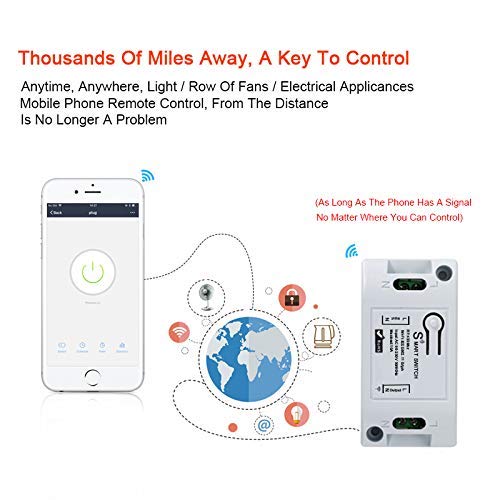
Image: An infographic detailing the dimensions of the smart switch module and RF remote, along with key features like 433MHz RF and various applications.
| 特徴 | 詳細 |
|---|---|
| 受信機モデル番号 | KR2201W-4 |
| 入力ボリュームtage | 交流90-250V |
| 最大電流 | 10A |
| ワイヤレスタイプ | Wi-Fi 2.4GHz(IEEE 802.11 b/g/n) |
| Receiver Product Size | 3.19 x 1.64 x 1.01インチ |
| Transmitter Model Number | KT1002-AB-4 |
| Operating RF Frequency | 433MHz |
| Coded System | 1527 学習コード |
| 送信機ワーキングVoltage | DC12V |
| ワイヤレス動作距離 | 400m(フリースペース) |
| 連絡先 | 銅 |
| メーカー | ロッド |
| 初回利用可能日 | 1年2021月XNUMX日 |
7. 保証とサポート
For comprehensive warranty information and customer support, please refer to the official product documentation. A detailed User Guide is available in PDF format:
You can also visit the official RODOT Store on Amazon for more products and support: RODOT Store.