1. はじめに
This manual provides essential instructions for the safe and efficient operation of your Tera Level 2 J1772 48A Electric Vehicle (EV) Charger. Please read this manual thoroughly before installation and use, and retain it for future reference.
The Tera EV Charger is designed to provide reliable and fast charging for both J1772 compatible electric vehicles and Tesla vehicles (with the included adapter). It features adjustable current settings, scheduling options, and robust safety protections.
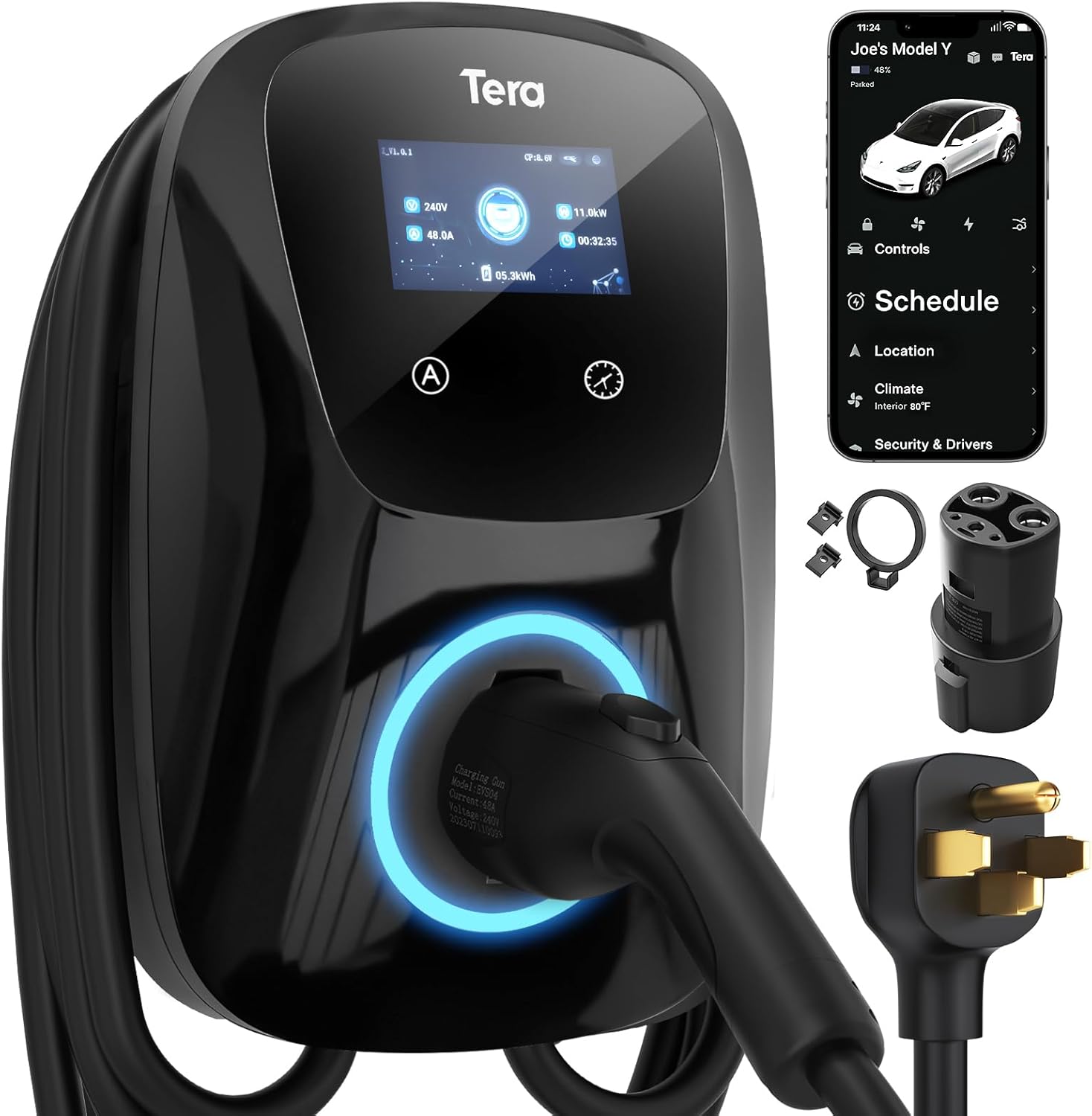
Image 1.1: Tera Level 2 EV Charger with included accessories.
2. 安全情報
怪我や損傷を防ぐために、常に次の安全ガイドラインに従ってください。
- 専門家による設置: 設置は、すべての地域および国の電気規則に従って、資格のある電気技師が行う必要があります。
- 接地: Ensure the charger is properly grounded to prevent electrical shock.
- 水と湿気: Do not operate the charger if it is visibly damaged or exposed to excessive moisture. While the unit is IP65 rated for outdoor use, avoid submerging it.
- ケーブルの完全性: Regularly inspect the charging cable for any signs of wear, cuts, or damage. Do not use a damaged cable.
- 子供とペット: 充電中は、子供やペットを充電エリアから遠ざけてください。
- 緊急停止: Familiarize yourself with the location of your electrical panel's circuit breaker for the charger in case an emergency shutdown is required.
- 換気: 操作中は充電器の周囲に十分な換気を確保してください。
The Tera EV Charger is ETL Certified, indicating compliance with North American safety standards. This certification is equivalent to UL for home insurance requirements, signifying the manufacturer's commitment to high safety standards.

Image 2.1: ETL Certification and integrated safety protections.
3. パッケージ内容
インストールを続行する前に、パッケージにすべてのアイテムが揃っていることを確認してください。
- Tera Electric Vehicle Charger Unit
- ユーザーマニュアル(このドキュメント)
- 取り付けプレート
- ネジセット
- Tools (for installation)
- J1772 to Tesla Adapter with Lock
- Cable Holder for Tesla

Image 3.1: Contents of the Tera EV Charger package.
4. セットアップとインストール
The Tera EV Charger is designed for wall-mounted installation. Follow these general steps:
- 場所を選択してください: Select a suitable location near your parking area, ensuring it is within reach of your vehicle's charging port and a dedicated 240V outlet (NEMA 14-50). The 25-foot cable provides flexibility.
- 取付板: Unscrew the mounting plate from the charger unit. Position the mounting plate on the wall at the desired height and mark the drilling points.
- 安全な取り付けプレート: Drill pilot holes and securely fasten the mounting plate to the wall using the provided screws and anchors.
- Attach Charger Unit: Carefully align the charger unit with the mounted plate and slide it into place. Secure it with the anti-theft screw.
- 接続電源: Plug the charger's NEMA 14-50 plug into the dedicated 240V outlet.
- ケーブル管理 Use the provided cable holder to neatly store the charging cable when not in use.
For detailed electrical wiring and circuit breaker requirements, consult a certified electrician. The unit is IP65 rated, making it suitable for both indoor and outdoor installation, capable of withstanding temperatures from -22°F to 122°F.

Image 4.1: Installation steps for the Tera EV Charger.

Image 4.2: The charger's IP65 rating ensures durable performance in various weather conditions.
5. 操作手順
The Tera EV Charger offers both manual and app-based control for charging sessions.
5.1. 初期設定と充電
Before plugging the charger into your vehicle, it is recommended to configure the desired current and schedule settings on the unit or via the app. Plugging it in first will activate a plug-and-play mode, which may not utilize scheduled settings.

Image 5.1: Configure settings before connecting to the vehicle.
5.2. Manual Current Adjustment and Scheduling
The charger unit features a touch screen interface for direct control:
- 現在の調整: Use the 'A' button on the unit to cycle through available current settings (e.g., 24A, 32A, 40A, 48A). Select the appropriate amperage for your vehicle and electrical circuit.
- スケジュール設定: Use the clock icon button to set a charging schedule, allowing you to define charging start times for up to 12 hours in advance.

Image 5.2: Touch screen controls for current and schedule.
5.3. App-Based Control and Scheduling
For enhanced convenience, the Tera EV Charger can be controlled via a dedicated mobile application. This allows for remote management of charging sessions:
- 充電の開始/停止: Initiate or terminate charging remotely.
- 電流を調整: 充電を変更する amperage from your mobile device.
- 充電スケジュール: Set detailed charging schedules to optimize for off-peak electricity rates or specific departure times.
- モニター充電: View real-time charging status and energy consumption.

Image 5.3: App interface for remote charging control.

Image 5.4: Visual representation of scheduled charging for cost efficiency.
5.4. 車両への接続
- Ensure the charger is powered on and any desired settings (current, schedule) are configured.
- For Tesla vehicles, attach the J1772 to Tesla adapter to the charger's J1772 connector.
- Insert the charging connector (or adapter) firmly into your vehicle's charging port.
- The charger will begin the charging process according to your settings or immediately if in plug-and-play mode.
注記: Hybrid vehicles may automatically reduce charging current based on their maximum allowable current, regardless of the charger's setting.
6. 特徴
- ユニバーサル互換性: Fully upgraded for seamless compatibility with all Tesla models (using the included adapter) and J1772 standard electric vehicles.
- 急速充電: Delivers up to 48A output, providing rapid Level 2 charging at approximately 46 miles of range per hour.
- 調整可能な電流: Manually select charging current from 24A, 32A, 40A, or 48A to suit your vehicle's needs and home electrical capacity.
- 延長ケーブル長: A 25-foot premium charging cable offers ample reach for convenient charging in various locations.
- 耐久性と耐候性: IP65 rated for water and dust resistance, ensuring reliable operation in diverse environmental conditions, from extreme cold (-22°F) to high heat (122°F).
- 総合的な安全性: ETL certified with multiple protection features including overvoltage、undervoltage, overload, overtemperature, ground fault, earth leakage, and short circuit protection.

Image 6.1: High-speed Level 2 charging capabilities.

Image 6.2: The 25-foot cable provides extensive reach for charging.
7. 仕様
| 仕様 | 価値 |
|---|---|
| ブランド | テラ |
| モデル番号 | ZB04-U011K series |
| Amp怒る | 48 Amps(調整可能) |
| 出力巻tage | 240ボルト(AC) |
| ワットtage | 11.5kWh |
| ケーブル長さ | 25フィート |
| コネクタタイプ | J1772 (with Tesla adapter included) |
| コンセント | NEMA 14-50 |
| IP 定格 | IP65 |
| 動作温度 | -22°F ~ 122°F (-30°C ~ 50°C) |
| 認定資格 | ETL, CE, TÜV, FCC |
| アイテム重量 | 20ポンド(約9.1kg) |
| 製品寸法 | 22 x 16 x 12インチ(約56 x 41 x 30 cm) |
8。 トラブルシューティング
If you encounter issues with your Tera EV Charger, consider the following common troubleshooting steps:
- 電源なし: Check the circuit breaker for the outlet. Ensure the NEMA 14-50 plug is fully inserted.
- 充電が開始されない: Verify that the charging connector is securely plugged into the vehicle's port. Check the charger's display for error messages. Ensure the vehicle is ready to accept a charge.
- 遅い充電: Confirm the current setting on the charger or app. Ensure your vehicle is not limiting the charging rate.
- エラーインジケータ: The charger features LED indicators to communicate status and errors. Refer to the table below for common indicator meanings.
| インジケーターのステータス | 意味 |
|---|---|
| Blue (Always on) | 待機する |
| Green (Always on) | Insert the Charger |
| Green (Flashes every 1S) | 充電 |
| Red (Always on) | CP異常 |
| Red (Flashes every 1S) | オーバー/アンダーVoltage |
| Red (Flashes every 2S) | 地絡 |
| Red (Flashes 3S ON, 3S OFF) | 過電流保護 |
| Purple (Flashes every 1S) | 漏洩防止 |
| Purple (Flashes every 2S) | 過熱保護 |
| Purple (Flashes every 4S) | 癒着防止 |

Image 8.1: LED indicator light meanings for troubleshooting.
問題が解決しない場合は、カスタマー サポートにお問い合わせください。
9. メンテナンス
Regular maintenance helps ensure the longevity and optimal performance of your EV charger:
- クリーニング: Periodically wipe the charger unit and cable with a soft, damp 布。 刺激の強い化学薬品や研磨剤の入ったクリーナーの使用は避けてください。
- ケーブル検査: Routinely check the charging cable and connector for any signs of damage, fraying, or discoloration. Replace if damaged.
- ストレージ: When not in use, store the charging cable neatly using the provided cable holder to prevent kinks or damage.
- 環境保護: While the unit is weatherproof, ensure it is not continuously exposed to extreme conditions beyond its operating limits.
10. 保証とサポート
The Tera EV Charger comes with a 2年間保証, reflecting the manufacturer's commitment to quality and reliability. For warranty claims or technical assistance, please contact Tera customer support.
連絡先:
- メールアドレス: cs@tera-innovation.com
- Webサイト: https://www.tera-innovation.com
- 電話: +1 (626)438-1404

Image 10.1: Certifications and 2-year warranty information.


