1. はじめに
This manual provides essential instructions for the safe and efficient operation of your SHARP SMC1169KS Countertop Microwave Oven. Please read all instructions thoroughly before using the appliance and retain this manual for future reference. This microwave oven features a 1.1 cubic feet capacity, 1000 watts of cooking power, and is compatible with Alexa for voice control. It also includes a removable 12.4-inch carousel turntable and a child lock function.
2. 重要な安全情報
電気製品を使用するときは、次のような基本的な安全上の注意事項に従う必要があります。
- 使用前にすべての指示をお読みください。
- オーブンが破損または誤動作している場合は、オーブンを操作しないでください。
- 電子レンジの周囲に適切な換気を確保してください。
- 爆発する恐れがあるので、密封した容器を加熱しないでください。
- このアプライアンスでは、腐食性の化学物質や蒸気を使用しないでください。
- 電子レンジを使用するときは、子供から目を離さないでください。
- オーブンの修理やメンテナンスはご自身で行わないでください。資格のあるサービス担当者にご相談ください。
- 必ず電子レンジ対応の調理器具を使用してください。
- 電子レンジで加熱した液体は、予期せず吹きこぼれることがあります。容器を取り出す際はご注意ください。
3.製品オーバーview
The SHARP SMC1169KS is a stainless steel countertop microwave oven designed for convenient food preparation. Key features include:
- 容量: 1.1立方フィート
- 出力: 1000ワット
- ターンテーブル: Removable 12.4-inch glass carousel for even cooking
- コントロール: Digital display with touch controls and Alexa voice compatibility
- インテリア: Gray interior with LED lighting
- 安全性: Child Safety Lock function
- 調理機能: 10 power levels, 2-stage cooking, Auto Cook menus, Weight and Time Defrost, Express Cook, +30 seconds key.

フロント view of the SHARP SMC1169KS Countertop Microwave Oven, showcasinステンレス仕上げとコントロールパネルを備えています。
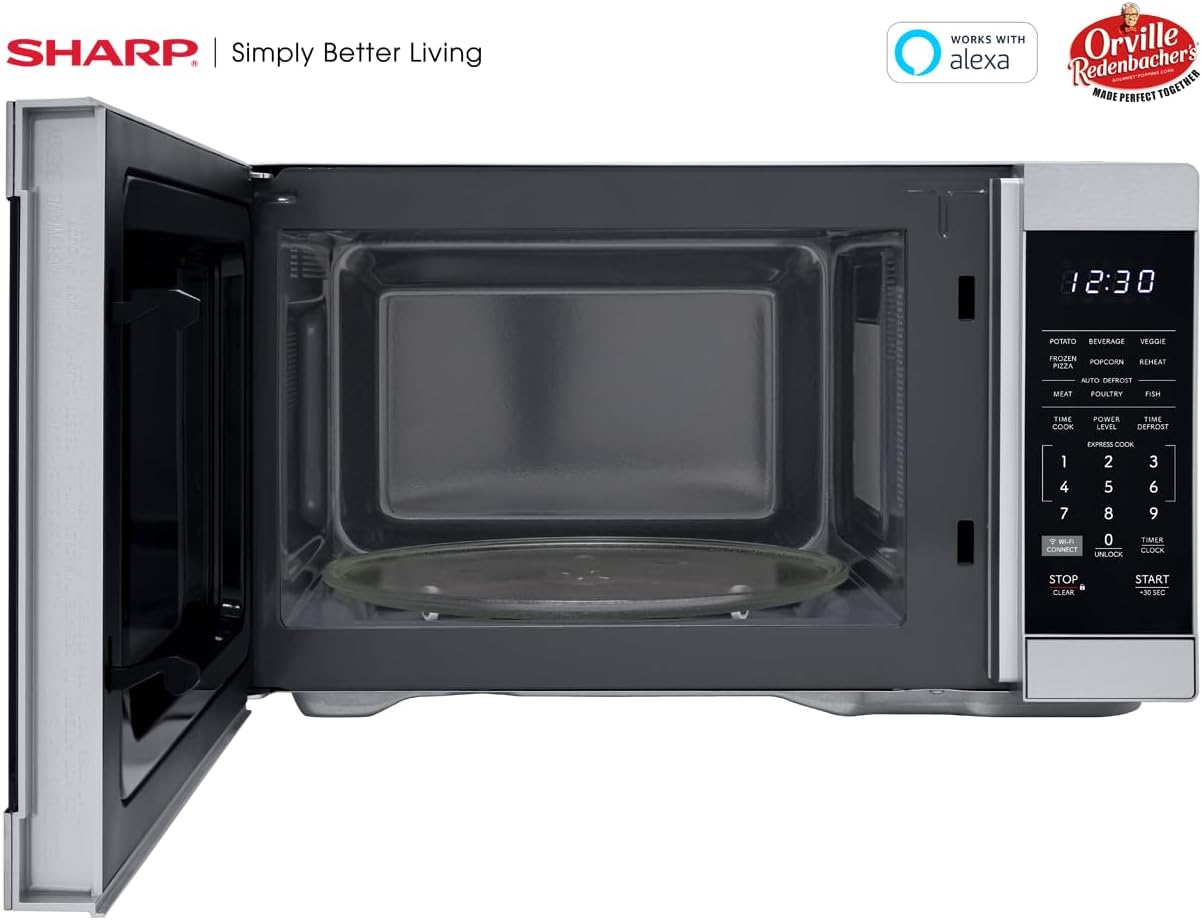
インテリア view of the SHARP SMC1169KS microwave oven, highlighting the removable glass carousel turntable for uniform heating.

Close-up of the SHARP SMC1169KS microwave oven control panel, featuring the digital display, number pad, and dedicated function buttons.
4. セットアップ
4.1開梱と配置
- Remove all packing materials from inside and outside the microwave oven.
- Place the microwave on a flat, stable surface that is strong enough to hold the oven and the food being cooked.
- Ensure there is at least 4 inches (10 cm) of space on the top, back, and sides for proper ventilation. Do not block any ventilation openings.
- 電子レンジを熱源や強い磁場から遠ざけてください。
4.2 ターンテーブルの取り付け
- ターンテーブルリングを電子レンジの空洞内に置きます。
- Position the glass turntable plate securely on top of the turntable ring. Ensure it is centered and sits properly on the coupler.
4.3電源接続
Plug the power cord into a standard 3-prong, 120V AC, 60Hz grounded electrical outlet. Do not use an extension cord or adapter.
4.4 Initial Setup (Clock & Wi-Fi/Alexa)
- 時計の設定: を押す タイマー/時計 button once. Use the number pad to enter the current time. Press タイマー/時計 再度確認します。
- Connecting to Wi-Fi/Alexa: Refer to the separate Alexa setup guide or the Sharp Home Appliances app for detailed instructions on connecting your microwave to your home Wi-Fi network and linking it with your Amazon Alexa account. Press the WI-FI接続 button to initiate pairing mode.
5. 操作手順
5.1 電子レンジ調理の基本(時間調理)
- 電子レンジ対応容器に入った食品をターンテーブルの上に置きます。
- ドアを閉める。
- を押す タイムクック ボタン。
- 数字キーを使って希望の調理時間を入力します。
- プレス START / + 30 SEC.
5.2 電力レベルの調整
- After entering cooking time (Step 3 of Basic Cooking), press パワーレベル.
- 希望する電力レベルを 1 ~ 10 で入力します (10 は 100% の電力)。
- プレス START / + 30 SEC.
5.3 エクスプレスクック
For quick cooking at 100% power, simply press the number pad (1-6) for 1 to 6 minutes of cooking time. The oven will start immediately.
5.4つの自動調理メニュー
The microwave includes preset cooking options for common food items:
- じゃがいも: ベイクドポテト用。
- 飲み物: 飲み物を温めるため。
- 野菜: 野菜の調理に。
- 冷凍ピザ: For heating frozen pizza.
- ポップコーン: Optimized for Orville Redenbacher's popcorn (3.3 oz Classic or 1.16 oz Mini Bag).
- リヒート: 各種食品の温め直しに。
- MEAT, POULTRY, FISH: For specific meat types.
To use an Auto Cook menu: Press the desired menu button, then follow the display prompts (e.g., enter quantity) and press START / + 30 SEC.
5.5 解凍
電子レンジには 2 つの解凍方法があります。
- 重量霜取り: プレス タイムデフロスト, enter the food's weight, then press START / + 30 SEC.
- 時間の霜取り: プレス タイムデフロスト twice, enter the desired defrosting time, then press START / + 30 SEC.
5.6チャイルドロック機能
チャイルド ロックを有効にするには:
- を押し続けます 停止/クリア ボタンを3秒間押し続けます。ディスプレイにロックインジケーターが表示されます。
チャイルド ロックを無効にするには:
- を押し続けます ロック解除 button (0) for 3 seconds. The lock indicator will disappear.
5.7 Alexa音声コントロール
Once connected to Alexa, you can use voice commands for various functions. Examp含まれるもの:
- "Alexa, microwave for 1 minute."
- "Alexa, defrost 1 pound of chicken."
- "Alexa, microwave Classic Popcorn."
Refer to the Alexa app or Sharp's online resources for a comprehensive list of voice commands.
6. メンテナンス
6.1 内部の清掃
Regularly clean the interior of the oven to prevent food particles from accumulating. Use a mild detergent and a soft cloth. For stubborn stains, place a cup of water with lemon juice in the microwave and heat for 2-3 minutes, then wipe clean.
6.2 外装の清掃
外側の表面を柔らかい布で拭きます。amp 布で拭いてください。研磨剤入りの洗剤や研磨パッドはステンレスの表面を傷つける可能性があるため、使用しないでください。
6.3 ターンテーブルのお手入れ
ガラス製のターンテーブルとターンテーブルリングは取り外して、ぬるま湯と石鹸で洗うか、食器洗い機で洗うことができます。オーブンに戻す前に、完全に乾いていることを確認してください。
7。 トラブルシューティング
電子レンジで問題が発生した場合は、以下の表で一般的な問題と解決策を参照してください。
| 問題 | 考えられる原因 | 解決 |
|---|---|---|
| オーブンが起動しない | ドアがきちんと閉まっていない、電源コードが外れている、ヒューズが切れている、または回路ブレーカーが落ちている。 | ドアがしっかりと閉まっていることを確認します。電源コードの接続を確認します。家庭用ヒューズ/回路ブレーカーを確認します。 |
| 食品が均等に調理されない | Food not stirred/rotated; Turntable not rotating. | Stir or rearrange food during cooking; Ensure turntable and ring are correctly placed and free of obstructions. |
| ディスプレイに「LOCK」と表示される | チャイルドロックが有効になっています。 | を押し続けます ロック解除 button (0) for 3 seconds to deactivate. |
| Alexa commands not working | No Wi-Fi connection; Microwave not linked to Alexa; Incorrect command. | Check Wi-Fi connection; Re-link microwave in Alexa app; Use correct voice commands. |
これらの解決策を試しても問題が解決しない場合は、カスタマー サポートにお問い合わせください。
8. 仕様
| 特徴 | 仕様 |
|---|---|
| モデル番号 | SMC1169KS |
| 容量 | 1.1 立方フィート |
| ワットtage | 1000ワット |
| 巻tage | 120ボルト |
| 製品寸法(奥行き×幅×高さ) | 14.7インチ x 20.6インチ x 11.8インチ |
| アイテム重量 | 34.9ポンド |
| 材料 | ステンレス鋼 |
| 特集 | Child Safety Lock, Alexa Compatible |

Dimensional diagram of the SHARP SMC1169KS microwave oven.
9. 保証情報
SHARP products are manufactured to high-quality standards. For specific warranty details, including coverage period and terms, please refer to the warranty card included with your product or visit the official Sharp webサイトでご確認ください。保証請求の際は購入証明として領収書を保管してください。
10. カスタマーサポート
For further assistance, technical support, or service inquiries, please visit the official Sharp webメーカーのウェブサイトをご覧いただくか、カスタマーサービス部門にお問い合わせください。連絡先は通常、メーカーのウェブサイトに記載されています。 webサイトまたは製品のパッケージ内。


