導入
Thank you for choosing the Hbada Ergonomic Office Chair. This manual provides detailed instructions for assembly, operation, maintenance, and troubleshooting to ensure you get the most comfortable and productive experience from your new chair. Designed for optimal support and adjustability, this chair features 3D adjustable armrests, adjustable lumbar support, a high back, and a breathable mesh seat cushion, making it ideal for long hours of computer work or home office use.
安全情報
- 使用前にすべてのコンポーネントがしっかりと固定されていることを確認してください。
- 椅子の上に立ったり、踏み台として使用したりしないでください。
- Avoid placing heavy objects on the chair that exceed its maximum weight recommendation (150 kg / 330 lbs).
- 調整中は可動部分に手や指を近づけないでください。
- 転倒を防ぐため、椅子は平らで安定した場所で使用してください。
- Regularly inspect the chair for loose screws or damaged parts and address them promptly.
パッケージ内容
Before assembly, please verify that all parts are present and undamaged. The package should contain:
- 椅子の背もたれ
- 機構付きシートクッション
- アームレスト (2)
- ヘッドレスト
- 基地(スターベース)
- キャスター(5)
- ガスリフトシリンダー
- Footrest (if included with specific model variant)
- ハードウェアキット(ネジ、六角レンチ)
- 取扱説明書(本書)
セットアップと組み立て
Assembly typically takes about 30 minutes and requires only the included Allen wrench. All screws and pieces are clearly labeled for ease of installation.
- ベースを組み立てる: Start by attaching the legs to the central hub of the chair base.

Image: The chair's five-star base with casters being attached to each leg.
- キャスターを取り付ける: Insert the five casters (wheels) into the designated holes at the end of each leg of the base.
- ガスリフトシリンダーを挿入します: Place the air pneumatic cylinder into the center hole of the assembled base.
- Install Footrest (if applicable): If your model includes a footrest, it can be easily attached and slides under the seat cushion.
- アームレストを取り付ける: Screw both armrests securely to the underside of the seat cushion.

Image: Underside of the chair seat showing attachment points for armrests.
- 背もたれを座席に接続します。 Screw the backrest support onto the back of the chair seat. Then, connect the entire backrest and seat assembly together.

Image: The chair's backrest being connected to the seat assembly.
- Assemble Chair: Carefully place the assembled seat and backrest onto the gas lift cylinder, ensuring it is firmly seated.
- ヘッドレストを取り付ける: Slide the headrest onto the top of the backrest until it clicks into place.

Image: The headrest being slid into position on top of the chair's backrest.
操作手順
Your Hbada Ergonomic Office Chair offers multiple adjustment features to customize your seating experience for maximum comfort and support.
1. 椅子の高さ調整
椅子の高さを調節するには、座面の右側にあるレバーを回してください。座った状態でレバーを上に引くと椅子が下がり、立ち上がってレバーを上に引くと椅子が上がります。お好みの高さでレバーを離してください。
2. 背もたれのリクライニングとロック
The chair features a 135° reclining function. To recline, pull the lever on the left side, beneath the seat, outwards. Lean back to your desired angle. To lock the recline, push the lever inwards. To return to an upright position, pull the lever outwards again and lean forward.

Image: Visual representation of the chair's recline angles, from 90° to 135°.
3. Adjustable Backrest (Lumbar Support)
The ergonomic backrest can be adjusted vertically by 4.5 cm with 3 levels of adjustment to better fit your waist and back. To adjust the lumbar support, gently lift the backrest upwards. You will hear clicking sounds as it moves through the gears. To reset to the lowest gear, simply lift the backrest to its highest position, then allow it to drop down. Repeat the lifting process to select your desired gear.

Image: Diagram illustrating the four adjustable gears for the backrest's vertical movement.
4. 3D調節可能なアームレスト
The armrests offer three-dimensional adjustment for optimal elbow pressure relief and comfort:
- 高さ調整: Press the button on the side of the armrest to move it up and down by 2.95 inches.
- 前方/後方調整: Slide the armrest pad forward or backward by 1.97 inches.
- 回転: Rotate the armrest pad up to 45 degrees left or right.
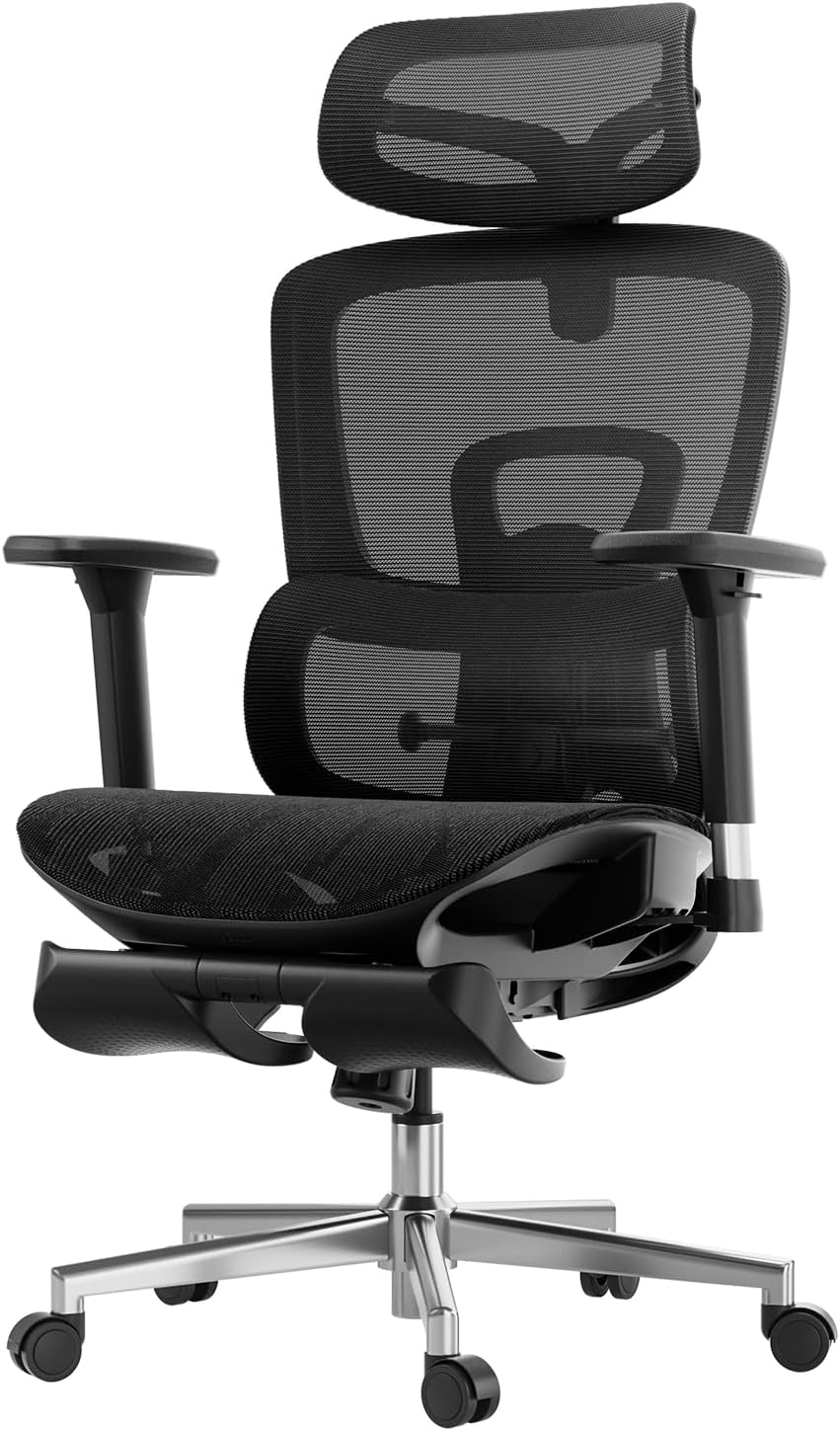
画像: 詳細 view of the armrests highlighting their 3D adjustment capabilities.
5. 2D調節式ヘッドレスト
The headrest provides precise neck support and can be adjusted in two ways:
- 高さ調整: Adjust up and down by 3.93 inches.
- 角度調整: Rotate back and forth by 38 degrees.
Image: Diagram illustrating the headrest's adjustable height and rotation.
6. Footrest Operation (if applicable)
If your chair model includes a footrest, pull it out from beneath the seat. You can then flip it over to position it for leg support when reclining. Push it back under the seat when not in use.
メンテナンス
Regular maintenance will extend the life and appearance of your Hbada office chair.
- クリーニング: For the mesh and plastic components, wipe with a soft, damp 布で拭いてください。研磨剤入りの洗剤や刺激の強い化学薬品は使用しないでください。
- 検査: すべてのネジとボルトがしっかりと締まっているか定期的に確認してください。必要に応じて締め直してください。
- キャスター: スムーズな動きを妨げる可能性のあるほこりやごみを取り除くため、キャスターを定期的に清掃してください。
- ガスリフト: ガスリフトシリンダーを分解しないでください。
トラブルシューティング
椅子に問題が発生した場合は、次の一般的な問題と解決策を参照してください。
| 問題 | 考えられる原因 | 解決 |
|---|---|---|
| 椅子の高さは調節できません。 | ガスリフトシリンダーが故障しているか、レバーが作動していません。 | Ensure the height adjustment lever is fully pulled. If the issue persists, contact customer service for gas lift replacement. |
| 椅子がぐらついたり、不安定に感じたりします。 | ネジが緩んでいる、または床が平らでない。 | すべての組み立てネジを確認し、締め付けてください。椅子が平らな面にあることを確認してください。 |
| キャスターがスムーズに回転しません。 | キャスターにゴミが挟まっているか、キャスターが破損しています。 | Clean any hair or debris from the casters. If damaged, casters may need replacement. |
| Backrest recline mechanism is stuck. | Recline lock engaged or mechanism obstruction. | Ensure the recline lock lever is disengaged. Check for any obstructions around the mechanism. |
仕様
| ブランド | ハバダ |
| モデル名 | ハバダ E208 |
| 商品型番 | E208BMA/CB |
| 色 | 黒 |
| 製品寸法 | 奥行き23.74インチ x 幅17.52インチ x 高さ22.64インチ |
| アイテム重量 | 49.6ポンド |
| 最大重量の推奨 | 150キログラム(約330ポンド) |
| バックスタイル | ソリッドバック |
| 特集 | 調節可能な腰椎 |
| スタイル | モダンな |
| 仕上げタイプ | ナイロン |
| 推奨用途 | オフィス |
| シート高 | 18.25インチ |
| 傾ける | はい |
保証とサポート
Hbada は、高品質の製品と優れた顧客サービスの提供に尽力しています。
- 保証: Your Hbada E2 Ergonomic Office Chair comes with a worry-free 3-year warranty.
- 戻り値: 30 日間の無料返品ポリシーをお楽しみください。
- 価格マッチ: 15 日間の価格保証が提供されます。
- 到着時の破損: 到着時に破損した商品については、修理・交換が保証されます。
- 顧客サービス: For any questions, concerns, or warranty claims, please contact Hbada customer service. Refer to the contact information provided with your purchase or visit the official Hbada webサイト。
For more information and support, you may also refer to the official インストールマニュアル(PDF).


