導入
The MOUNTUP MU0062 Ultra Slim Full Motion TV Wall Mount offers a sleek, space-saving solution for mounting your television. Its design allows the TV to sit only 1.3 inches from the wall when fully retracted, blending seamlessly into your living space. This mount is engineered for durability and flexibility, providing a wide range of motion for optimal view角度を変える。
- Ultra Slim & Discreet Design: Retracts to just 1.3 inches from the wall.
- フルモーション機能: Features 10° tilt, 45° left/right swivel, and 3° leveling adjustment.
- ユニバーサル互換性: Supports most 26"-60" flat TVs up to 88lbs, with VESA patterns from 75x75mm to 400x400mm.
- 丈夫で安全: Constructed from heavy-duty alloy steel with a strong six-arm design for enhanced stability.
- 簡単な組み立て: Includes an installation manual, bubble level, and necessary hardware for quick setup.

Image: The MOUNTUP MU0062 Ultra Slim Full Motion TV Wall Mount, showcasin堅牢な設計と関節式アームを備えています。
セットアップとインストール
Before beginning installation, ensure you have all components and tools as listed in the included packing list. It is highly recommended to review the full installation manual for detailed steps and safety precautions. This mount is suitable for wood studs (12-16 inches spacing), concrete walls, and brick walls. 乾式壁専用ではありません。
壁タイプの互換性

Image: Diagram illustrating compatible wall types: wood stud (max 16" spacing), concrete wall (requires anchor), and brick wall (requires anchor). Drywall alone is not supported.
For concrete or brick wall installations, concrete anchors are required and can be requested from the manufacturer. Always use a stud finder to locate wood studs accurately.
Quick 3-Step Assembly Overview
- テレビブラケットを取り付ける: Secure the mounting brackets to the back of your TV using the appropriate screws and spacers from the kit. Ensure the VESA pattern matches the mount's compatibility (75x75mm to 400x400mm).
- 壁プレートの取り付け: Position the wall plate on your chosen wall location, ensuring it is level. Mark and drill pilot holes into the wood stud(s) or concrete/brick, then secure the wall plate using the provided lag bolts.
- Hang and Secure TV: Carefully lift the TV and hook the attached brackets onto the wall plate. Secure the TV to the mount using the safety screws or locking mechanisms to prevent accidental dislodgement.

Image: Visual representation of the three main steps for installing the TV mount: attaching brackets to TV, mounting the wall plate, and hanging/securing the TV.
For a complete guide, please refer to the official インストールマニュアル(PDF).
操作と調整
The MOUNTUP MU0062 mount provides full motion capabilities to optimize your viewing experience from various positions in the room.
Extension and Tilt
The mount allows your TV to extend up to 14 inches from the wall, providing flexibility for viewing. It also features a 10° downward tilting angle, which helps reduce glare and improve view快適さを。

Image: A TV mounted on the wall, extended forward and tilted downwards, demonstrating the mount's extension and tilt capabilities.
スイベル調整
You can swivel your TV up to 45° to the left or right, depending on your TV size and wall proximity. This feature is ideal for viewing from different seating areas.

Image: A TV mounted on a wall, swiveled to the side, illustrating the mount's swivel range. The maximum swivel angle depends on the TV size.
レベリング調整
After installation, the mount allows for a ±3° leveling adjustment to ensure your TV is perfectly horizontal.

Image: A diagram showing a TV mount with arrows indicating a ±3° leveling adjustment capability after installation.
メンテナンス
To ensure the longevity and safe operation of your MOUNTUP TV wall mount, follow these simple maintenance guidelines:
- 定期点検: Periodically check all screws and connections to ensure they remain tight and secure. Over time, vibrations or frequent adjustments can loosen fasteners.
- クリーニング: ほこりを取り除くには、柔らかく乾いた布でマウントを拭いてください。頑固な汚れには、軽くこすってamp cloth can be used, followed by drying. Avoid abrasive cleaners or solvents that could damage the finish.
- 潤滑: The articulating joints are designed for smooth movement. If you notice any stiffness or squeaking, a small amount of silicone-based lubricant can be applied to the moving parts.
- 重量制限の遵守: Never exceed the maximum weight capacity of 88lbs (40kg) for the mount. Overloading can lead to structural failure and damage to your TV or property.
トラブルシューティング
If you encounter any issues with your MOUNTUP TV wall mount, consider the following common solutions:
- テレビが水平でない: Use the built-in leveling adjustment feature (±3°) to fine-tune the TV's horizontal position. Ensure the wall plate itself was installed level.
- Mount Feels Flimsy/Wobbly:
- Verify all wall plate lag bolts are securely fastened into solid wood studs or appropriate concrete/brick anchors.
- Ensure the TV brackets are properly seated and locked onto the wall plate.
- Confirm your TV's weight and size are within the mount's specified limits (up to 88lbs, 26"-60").
- Check that all articulating arm bolts are tightened.
- Difficulty Adjusting Movement (Tilt/Swivel/Extension):
- Check for any obstructions behind the TV or mount.
- ケーブルが引っかかったり動きを妨げたりしていないことを確認します。
- Apply a small amount of silicone lubricant to the joints if they feel stiff.
- TV Not Sitting Flush to Wall (when retracted):
- Ensure all cables are neatly managed and not creating bulk behind the TV.
- Verify that the TV's VESA mounting holes are not recessed in a way that prevents full retraction without additional spacers (which should be used if needed).
If problems persist, please contact MOUNTUP customer support for assistance.
製品仕様
| 特徴 | 詳細 |
|---|---|
| ブランド | マウントアップ |
| モデル番号 | MU0062 |
| 対応テレビサイズ | 26インチ~60インチ |
| 重量容量 | 最大 88 ポンド (40 kg) |
| VESA互換性 | 75x75mmから400x400mm |
| Distance from Wall (Retracted) | 1.3インチ |
| 壁からの最大延長 | 14インチ |
| 傾斜角度 | +5° / -10° |
| スイベル角度 | ±45° (Max, depends on TV size) |
| レベリング調整 | ±3° |
| 材料 | 耐久性の高い合金鋼 |
| 色 | 黒 |
| アイテム重量 | 11.38ポンド |
| 製品寸法 | 17.1 x 16 x 1.3インチ |
VESAパターンの互換性
The VESA (Video Electronics Standards Association) pattern refers to the spacing of the four mounting holes on the back of your TV. This mount supports a wide range of VESA patterns, ensuring compatibility with many TV models.
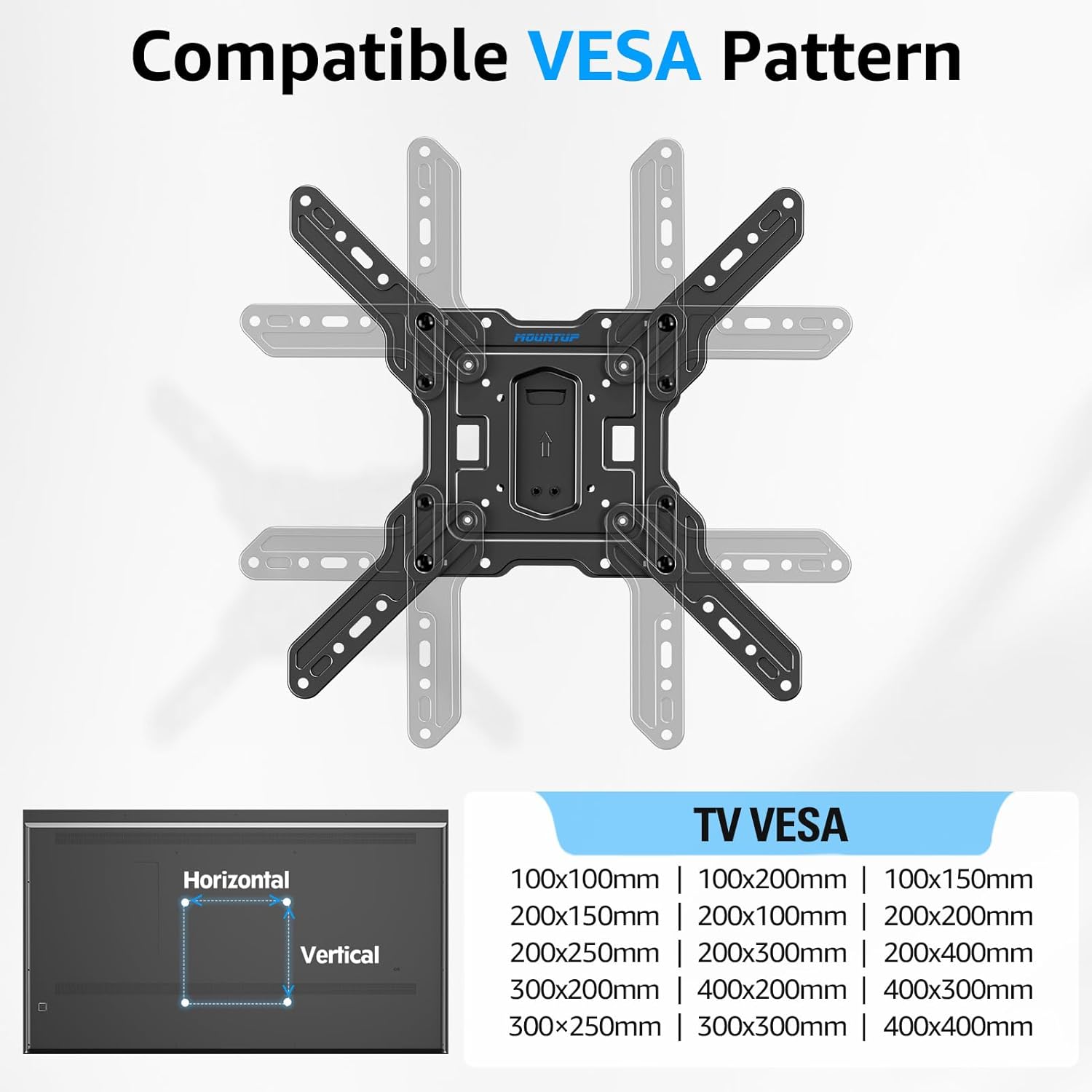
Image: A diagram showing various compatible VESA mounting patterns (e.g., 100x100mm, 200x200mm, 400x400mm) supported by the TV mount.
保証情報
MOUNTUP products are designed for durability and reliability. For specific warranty terms and conditions applicable to your MU0062 Ultra Slim Full Motion TV Wall Mount, please refer to the warranty card included with your product or visit the official MOUNTUP webサイト。通常、メーカーの保証は通常の使用における材料および製造上の欠陥をカバーします。
カスタマーサポート
For further assistance, technical support, or inquiries regarding your MOUNTUP TV wall mount, please contact MOUNTUP customer service. You can find more information and contact details by visiting the official MOUNTUP store:


