1. はじめに
Thank you for choosing the ADE CK2310 Digital Radio Alarm Clock. This device offers precise timekeeping via DCF radio signal, dual alarm settings, temperature and humidity display, and a convenient backlight function. Its compact design makes it suitable for both home use and travel. Please read this manual carefully to ensure proper use and optimal performance of your new alarm clock.

Image 1.1: The ADE CK2310 Digital Radio Alarm Clock is designed for portability, making it an ideal travel companion.
2. 安全情報
- デバイスを水や高湿度に近づけないでください。
- デバイスを極端な温度や直射日光にさらさないでください。
- デバイスを落としたり、強い衝撃を与えたりしないでください。
- ご自身でデバイスの分解や修理を試みないでください。資格のあるサービス担当者にご連絡ください。
- 使用済みバッテリーは、地域の規制に従って廃棄してください。
- 電池はお子様の手の届かないところに保管してください。
3. パッケージ内容
開梱したらパッケージの内容を確認してください:
- ADE CK2310 Digital Radio Alarm Clock
- 単2電池XNUMX本
- 取扱説明書

Image 3.1: The package includes the ADE CK2310 alarm clock and two AAA batteries.
4.製品オーバーview
Familiarize yourself with the various components and display elements of your alarm clock.
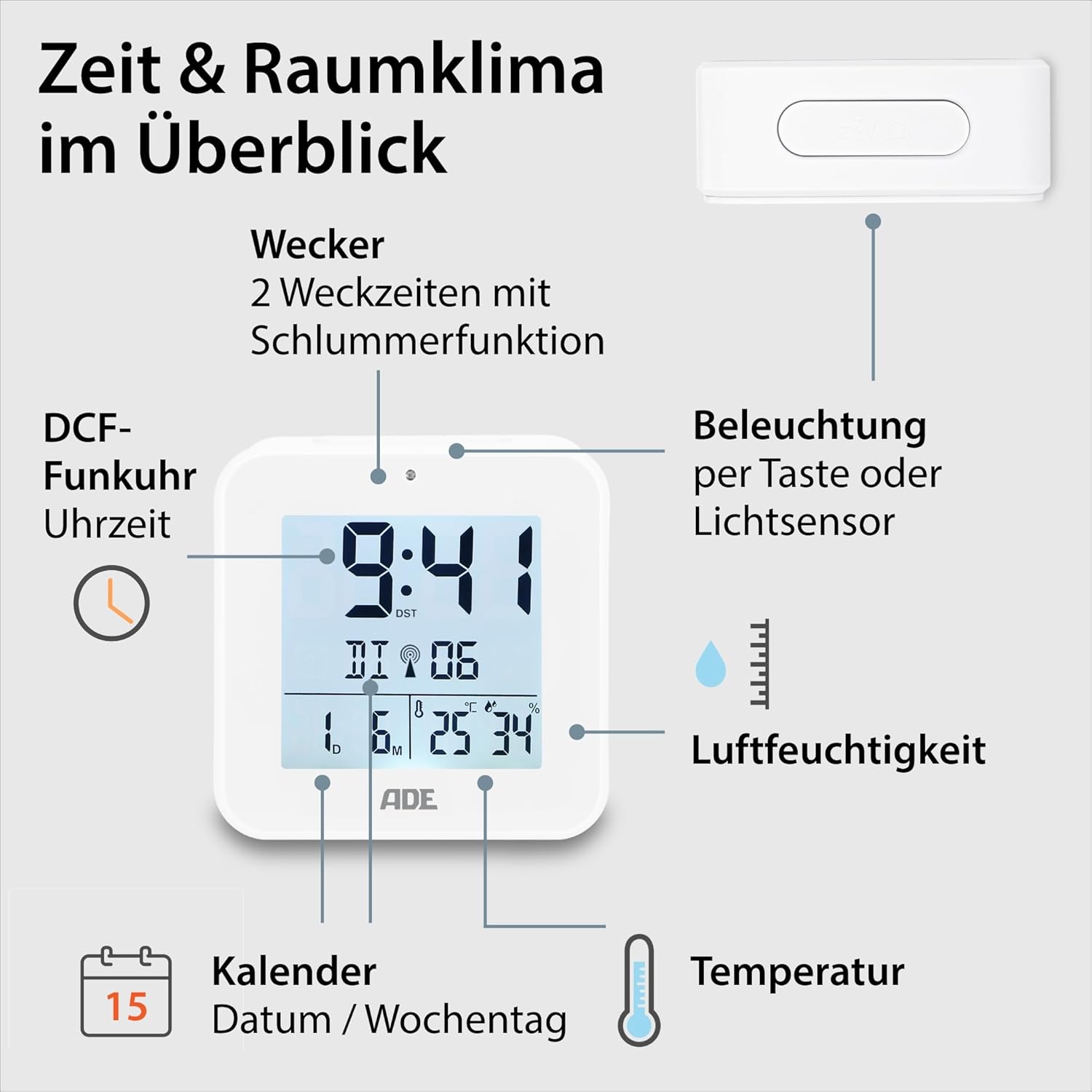
Image 4.1: Front display and key features of the ADE CK2310.
- 時間表示: 現在の時刻(時間、分)を表示します。
- DCF Signal Indicator: 電波時計信号の受信に成功したことを示します。
- アラームインジケータ: Shows if Alarm 1 or Alarm 2 is active.
- 日付と曜日: Displays the current date and day.
- 温度表示: 周囲の温度を摂氏または華氏で表示します。
- 湿度表示: Shows ambient relative humidity.
- スヌーズ/ライトボタン: Activates snooze during an alarm or backlight manually.
- 機能ボタン: Buttons for setting time, alarms, and other functions (located on the back/side).
- 光センサー: Automatically activates backlight in dark environments.

画像4.2:リア view with controls and battery compartment.
The compact dimensions of the alarm clock are approximately 7.2 x 3.8 x 7.2 cm (width x depth x height).

Image 4.3: Dimensions of the ADE CK2310 alarm clock.
5. セットアップ
5.1. バッテリーの取り付け
- Open the battery compartment cover on the back of the alarm clock (refer to Image 4.2).
- 正しい極性 (+ と -) を確認して、単 4 電池 2 本を挿入します。
- 電池カバーをしっかりと閉じてください。
The alarm clock will power on automatically and begin searching for the DCF radio signal.
5.2. DCF Radio Signal Reception
Upon initial power-on or after battery replacement, the alarm clock will automatically attempt to receive the DCF radio time signal. This process can take several minutes. During reception, a signal icon may flash on the display. Once the signal is successfully received, the time will be set automatically, and the signal icon will appear steadily. For best reception, place the alarm clock near a window and away from electronic devices that may cause interference.
The DCF signal also ensures automatic adjustment for daylight saving time (summer/winter time).
5.3. Manual Time Setting (Optional)
If the DCF signal is not available or you prefer to set the time manually:
- Press and hold the "SET" button (or equivalent, refer to specific button labels on your device) for a few seconds until the time display starts flashing.
- Use the "+" or "-" buttons to adjust the hours.
- Press "SET" again to confirm the hours and move to minutes.
- 「+」または「-」ボタンを使用して分を調整します。
- Press "SET" to confirm and exit manual setting mode.
- Repeat similar steps to set the date and year if necessary.
6. 操作手順
6.1. アラームの設定(アラーム1とアラーム2)
The ADE CK2310 features two independent alarm times. This is useful for different wake-up times on weekdays and weekends.

Image 6.1: The alarm clock supports two independent alarm times.
- Press the "ALARM 1" or "ALARM 2" button (usually located on the side or back) once to display the current alarm time.
- Press and hold the respective "ALARM" button until the alarm time starts flashing.
- Use the "+" or "-" buttons to adjust the alarm hours.
- Press the "ALARM" button again to confirm hours and move to minutes.
- 「+」または「-」ボタンを使用して、アラームの分数を調整します。
- Press the "ALARM" button to confirm and exit alarm setting mode.
- To activate or deactivate an alarm, use the dedicated ON/OFF switch for Alarm 1 and Alarm 2 (refer to Image 6.1 for typical switch location). An alarm icon will appear on the display when active.
6.2. スヌーズ機能
When an alarm sounds, press the large "SNOOZE/LIGHT" button on top of the alarm clock. The alarm will pause for approximately 5 minutes and then sound again. To turn off the alarm completely, press any other button or let it ring for its full duration.
6.3. 温度と湿度の表示
The alarm clock continuously displays the indoor temperature and relative humidity. You can switch between Celsius (°C) and Fahrenheit (°F) for temperature display by pressing a dedicated button (often labeled "°C/°F" or integrated with another setting button).
6.4. バックライト機能
The backlight can be activated in two ways:
- 手動アクティベーション: Press the "SNOOZE/LIGHT" button on top. The backlight will illuminate for approximately 8 seconds.
- Automatic Activation (Light Sensor): Slide the "AUTO LIGHT" switch on the back of the device to the "ON" position (refer to Image 4.2). The built-in light sensor will detect low ambient light conditions and automatically activate a soft backlight, making the display visible in the dark. Slide the switch to "OFF" to disable this feature.
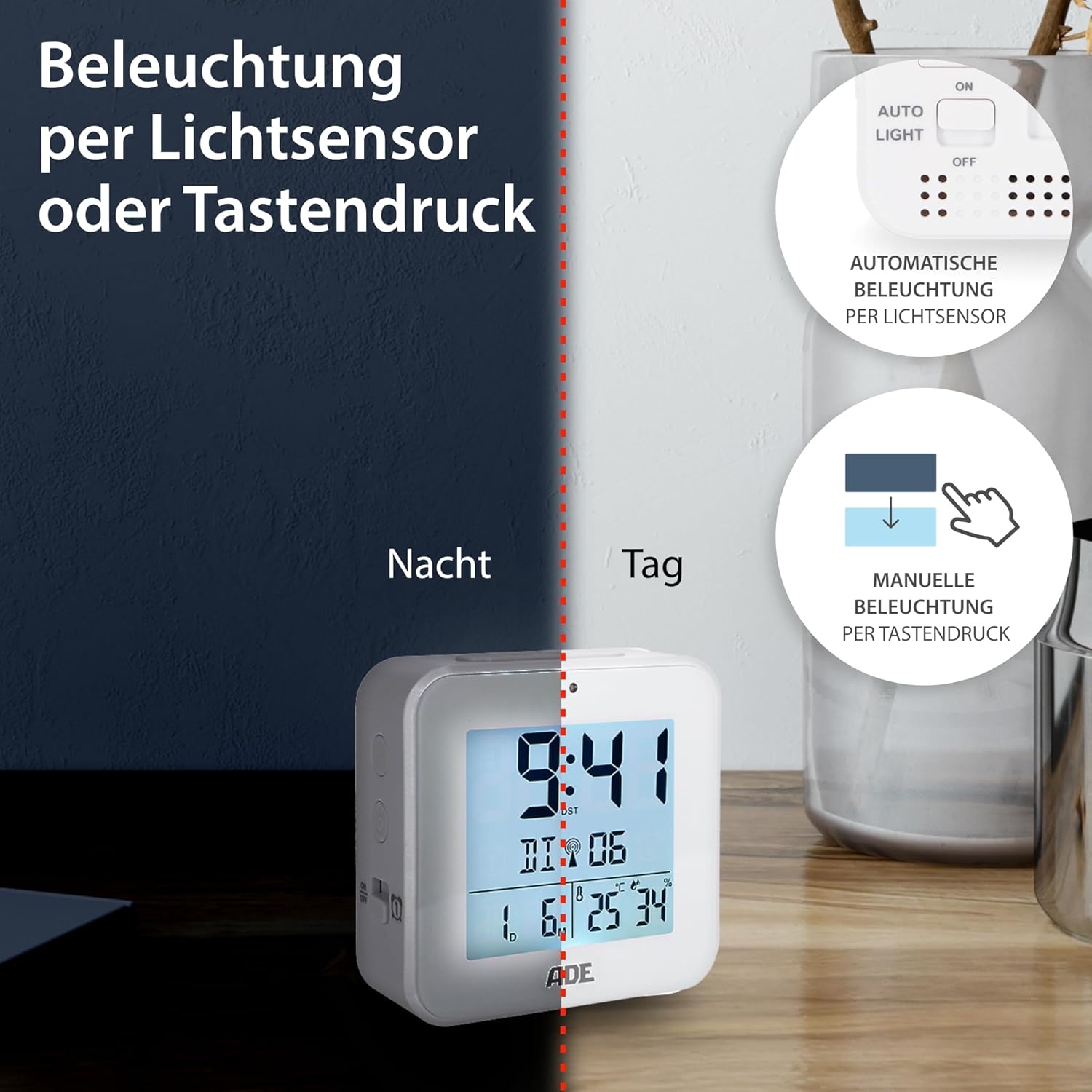
Image 6.2: Backlight can be activated manually or automatically via the light sensor.
7. メンテナンス
- クリーニング: 柔らかく乾いた布で拭いてください。研磨剤入りの洗剤や溶剤は使用しないでください。
- バッテリー交換: When the display becomes dim or functions are erratic, replace both AAA batteries. Ensure correct polarity. If the device will not be used for an extended period, remove the batteries to prevent leakage.
8。 トラブルシューティング
| 問題 | 考えられる原因 | 解決 |
|---|---|---|
| ディスプレイが空白または暗い。 | 電池残量が少ないか、正しく挿入されていません。 | 正しい極性を確認して、新しい電池と交換してください。 |
| 時刻が正しくないか、自動的に設定されません。 | DCF 信号の受信状態が悪いか、干渉があります。 | Move the alarm clock to a location with better reception (e.g., near a window, away from electronics). Allow time for signal acquisition. Manually set the time if necessary. |
| アラームは鳴りません。 | アラームが作動していないか、または誤って設定されています。 | Ensure the alarm is switched "ON" and the alarm time is set correctly. Check for the alarm icon on the display. |
| バックライトが機能しません。 | AUTO LIGHT switch is OFF, or batteries are low. | Check if the "AUTO LIGHT" switch is in the "ON" position. Press the SNOOZE/LIGHT button manually. Replace batteries if needed. |
9. 仕様
- モデル: CK2310
- 寸法: 8 x 3.81 x 8 cm (approx. W x D x H)
- 重さ: 100グラム
- 電源: 単2電池XNUMX本(付属)
- 表示タイプ: デジタル
- 材料: ABSプラスチック
- 特別な機能: DCF Radio Signal, 2 Alarm Times, Snooze Function, Temperature Display (°C/°F), Humidity Display, Calendar Display, Automatic Backlight (Light Sensor), Manual Backlight.
- 屋内/屋外での使用: 屋内
10.保証とサポート
ADE products are manufactured with quality and reliability in mind. For information regarding warranty terms and conditions, please refer to the warranty card included with your purchase or visit the official ADE website. For technical support or service inquiries, please contact your retailer or the ADE customer service department.
メーカー: ADE


