導入
This manual provides detailed instructions for the installation, operation, and maintenance of your Daytech Freezer Door Alarm, Model USR-1. This device is designed to alert you when a refrigerator or freezer door is left open, helping to preserve food and save energy. Please read this manual thoroughly before using the product to ensure proper function and safety.
製品終了view
The Daytech Freezer Door Alarm consists of a main unit and a magnetic sensor. When the magnetic sensor is separated from the main unit (indicating an open door), the alarm will activate after a set delay. The device features adjustable volume and multiple delay modes.

Figure 1: Main Unit Components and Dimensions
- ブザー: Emits the alarm or chime sound.
- LEDインジケーター: Provides visual feedback for status and mode selection.
- チャイム/アラーム/オフスイッチ: Selects between chime mode, alarm mode, or turns the device off.
- 音量コントロール: 音のレベルを調整します。
- Work Mode Set Key: Selects the delay duration before the alarm activates.
パッケージ内容
パッケージにすべてのアイテムが含まれていることを確認します。
- 製品の梱包箱
- Refrigerator Door Alarm (Main Unit and Magnet)
- ユーザーマニュアル
- AAA batteries (quantity depends on the set purchased)
- Screws (quantity depends on the set purchased)
Video 1: Product Unboxing and Package Contents. This video demonstrates the items included in the package, such as the alarm units, user manual, and batteries.
インストール
The alarm can be installed on various types of refrigerators and freezers. Ensure the installation surface is clean and dry.
インストール手順:
- Clean the desired installation area on your refrigerator or freezer door frame.
- Peel off the protective film from the double-sided adhesive tape on the back of the main unit and the magnet.
- Attach the main unit to the door frame and the magnet to the door, ensuring the triangular markings on both parts are aligned. The gap between the main unit and the magnet should be less than 0.98 inches (2.5 cm) when the door is closed.
- Press firmly for a few seconds to secure.

図2: インストールプロセス
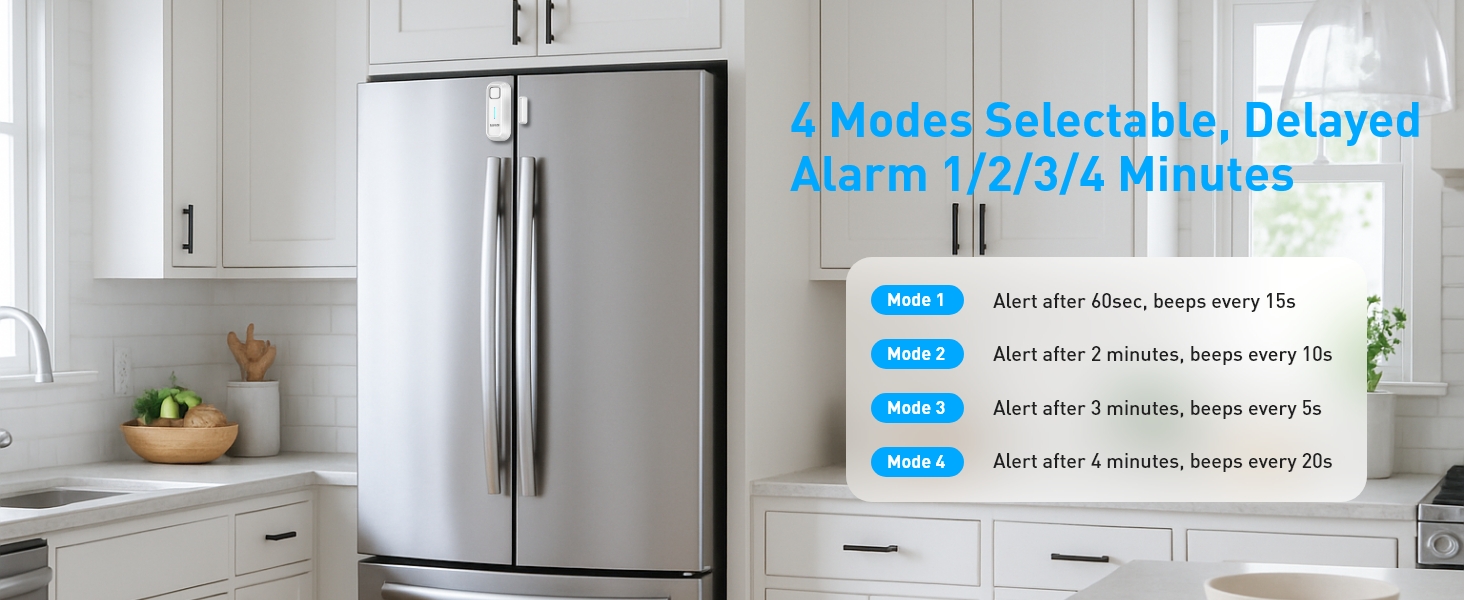
Figure 3: Recommended Installation Positions and Gap Requirements
操作手順
1. Ringtone and Mode Selection:
Use the 'Chime/Alarm/OFF' switch on the side of the main unit to select the desired sound mode:
- チャイムモード: A gentle reminder sound.
- アラームモード: A loud alert sound.
- OFF: Turns the device off, no sound will be made.
2.音量調整:
The alarm features 5 adjustable volume levels (0-120dB). Use the 'Volume' button on the side to cycle through the volume settings until you reach your preferred level.

図4: 調整可能な音量レベル
3. Delay Mode Selection:
The alarm offers four delay modes, allowing you to choose how long the door can remain open before the alert sounds. Press the 'SET Key' button to cycle through the modes.
Video 2: Functional Adjustment Demonstration. This video illustrates how to switch between chime and alarm modes, adjust volume, and select different delay modes.
動作モード
The Daytech Freezer Door Alarm offers four distinct working modes, each with a different delay duration and alert pattern:
| モード | 遅延時間 | Alert Pattern |
|---|---|---|
| モード1 | 1 minute (60 seconds) | Alarm/Chime sounds for 5 seconds every 15 seconds. |
| モード2 | 2分(120秒) | Alarm/Chime sounds for 10 seconds every 10 seconds. |
| モード3 | 3分(180秒) | Alarm/Chime sounds for 15 seconds every 5 seconds. |
| モード4 | 4分(240秒) | Alarm/Chime sounds for 20 seconds every 15 seconds. |

図5:以上view of Working Modes
バッテリー交換
The Daytech Freezer Door Alarm requires 2 AAA batteries. When the batteries are low, the alarm's performance may be affected. Replace batteries as follows:
- Slide the battery cover on the back of the main unit downwards to open.
- 古い単4電池を取り外します。
- 正しい極性 (+/-) を確認して、新しい AAA 電池 2 本を挿入します。
- バッテリーカバーをカチッと音がするまで所定の位置に戻します。

Figure 6: Battery Replacement Steps
トラブルシューティング
If you encounter issues with your Daytech Freezer Door Alarm, refer to the following troubleshooting guide:
| 問題 | 考えられる原因 | 解決 |
|---|---|---|
| ドアが開いているときはアラームは鳴りません。 | 1. Device is OFF. 2. Batteries are low or incorrectly installed. 3. Magnet and main unit are too far apart. | 1. Ensure the 'Chime/Alarm/OFF' switch is set to Chime or Alarm mode. 2. 電池を交換し、極性を確認します。 3. Re-position the main unit and magnet to ensure the gap is less than 0.98 inches (2.5 cm) when the door is closed. |
| Alarm sounds too frequently or falsely triggers. | 1. Magnet and main unit are too close or misaligned. 2. Delay mode is set too short. | 1. Adjust the position of the magnet and main unit to ensure proper alignment and a slight gap when the door is closed. 2. Select a longer delay mode using the 'SET Key'. |
| 音量が低すぎるか高すぎます。 | 音量設定が最適ではありません。 | Adjust the volume using the 'Volume' button on the side of the main unit. |
仕様
| 特徴 | 詳細 |
|---|---|
| モデル番号 | USR-1 |
| 寸法 | 3.9 x 1.6 x 0.86 インチ (100 x 40 x 22 mm) |
| アイテム重量 | 3.34オンス |
| 電源 | 電池駆動 |
| 電池が必要 | 単2電池XNUMX本(付属) |
| 電池のタイプ | アルカリ |
| 騒音レベル | 最大120デシベル |
| 取り付けタイプ | ドアマウント |
| センサー技術 | 接触センサー |
| 対応デバイス | Home Security System (general) |
| 色 | 白 |
保証とサポート
Daytech products are manufactured to high-quality standards. For warranty information or technical support, please refer to the contact details provided with your purchase or visit the official Daytech webサイトでご確認ください。購入証明として購入レシートを保管してください。


