導入
Thank you for choosing the HOTUT Toilet Night Light. This device is designed to provide convenient and colorful illumination for your toilet bowl, enhancing safety and comfort during nighttime use. Featuring a motion sensor, USB rechargeable battery, 16 color options, and an optional projector light, it offers a practical and enjoyable experience. Please read this manual thoroughly before installation and operation to ensure proper use and longevity of your product.
安全情報
- Keep the device away from excessive moisture or direct water spray to prevent damage, although it is designed for bathroom use.
- Do not attempt to disassemble or repair the device yourself. Refer to the troubleshooting section or contact support for assistance.
- Ensure the charging cable is handled carefully to avoid damage.
- This product contains a lithium-polymer battery. Do not expose it to extreme temperatures or dispose of it in fire.
- 小さな部品による窒息の危険を防ぐため、小さなお子様の手の届かないところに保管してください。
パッケージ内容
パッケージに以下の項目が含まれているか確認してください。
- 1 x HOTUT Toilet Night Light
- USB充電ケーブル x 1
- ユーザーマニュアル (本書) x 1
製品終了view
Familiarize yourself with the components of your HOTUT Toilet Night Light:
- Human Sensing Head: The motion sensor that detects presence in the dark.
- フレキシブルアーム: Allows for easy adjustment and secure attachment to the toilet rim.
- LEDライト: Illuminates the toilet bowl with 16 color options.
- Projector Light: An additional light feature that projects patterns onto the floor.
- スイッチボタン: Used for power control, color selection, and projector activation.
- 充電ポート: 内部バッテリーを充電するための USB ポート。
- 充電インジケータランプ: 充電状態を表示します(充電中は赤、充電完了は緑)。

Figure 1: Product Components (Charging Port, Switch Button, Human Sensing Head, Charging Indicator Light)

図2:製品の構成部品と寸法
セットアップとインストール
The HOTUT Toilet Night Light is designed for easy installation and fits most toilet types.
- インストール場所を選択してください: Select a suitable spot on the rim of your toilet bowl.
- Bend the Flexible Arm: Gently bend the PVC arm to conform to the shape of your toilet rim. This ensures a snug and secure fit.
- ライトを吊るす: Place the flexible arm over the toilet rim, ensuring the main unit with the sensor faces outwards and the LED light is positioned inside the bowl.
- 安定性のために調整する: Adjust the arm as needed to ensure the light is stable and the sensor has a clear line of sight.

Step 1: Bend the arm

Step 2: Hang on rim

Step 3: Adjust position

Step 4: Final placement
操作手順
モーションセンサー機能
The toilet night light is equipped with a high-quality light and motion sensor. It will automatically activate when motion is detected in a dark environment, illuminating your toilet bowl and the surrounding floor with a soft light. The light will remain on for approximately 90 seconds after motion ceases. The sensor only activates in dark conditions to conserve battery life.
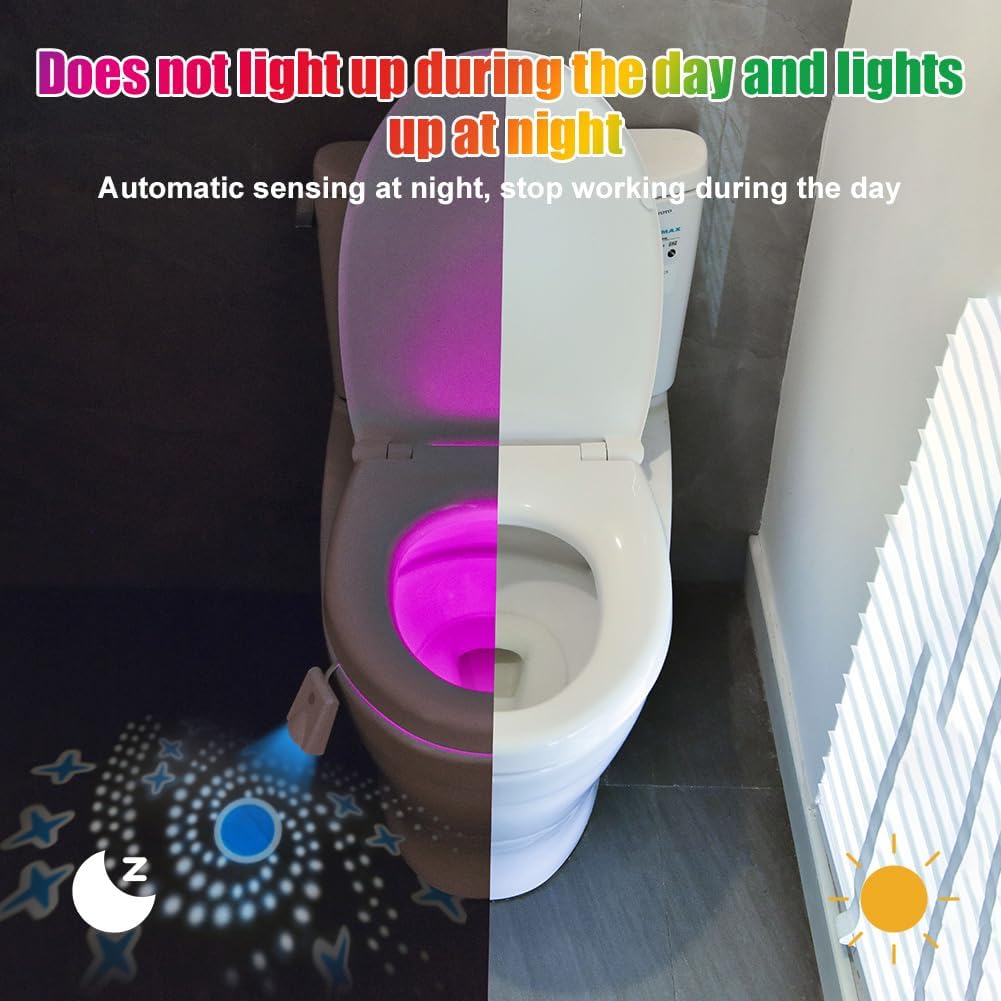
Figure 3: Automatic sensing at night, stops working during the day.
Color Selection and Projector Light
The device offers 16 different colors and a projector light feature:
- Color Gradient Mode: Upon initial activation, the night light will cycle through 16 colors in a gradient mode.
- 固定カラーモード: To select a specific color, press the switch button briefly while the light is cycling through colors. The light will then remain on that color. Press the button again to cycle to the next color.
- ライトを消す: To turn off the light, press the switch button three consecutive times.
- Projector Light Control: To turn the projector light on or off, press and hold the switch button for an extended period.

Figure 4: Turn on color light gradient and fixed color options.
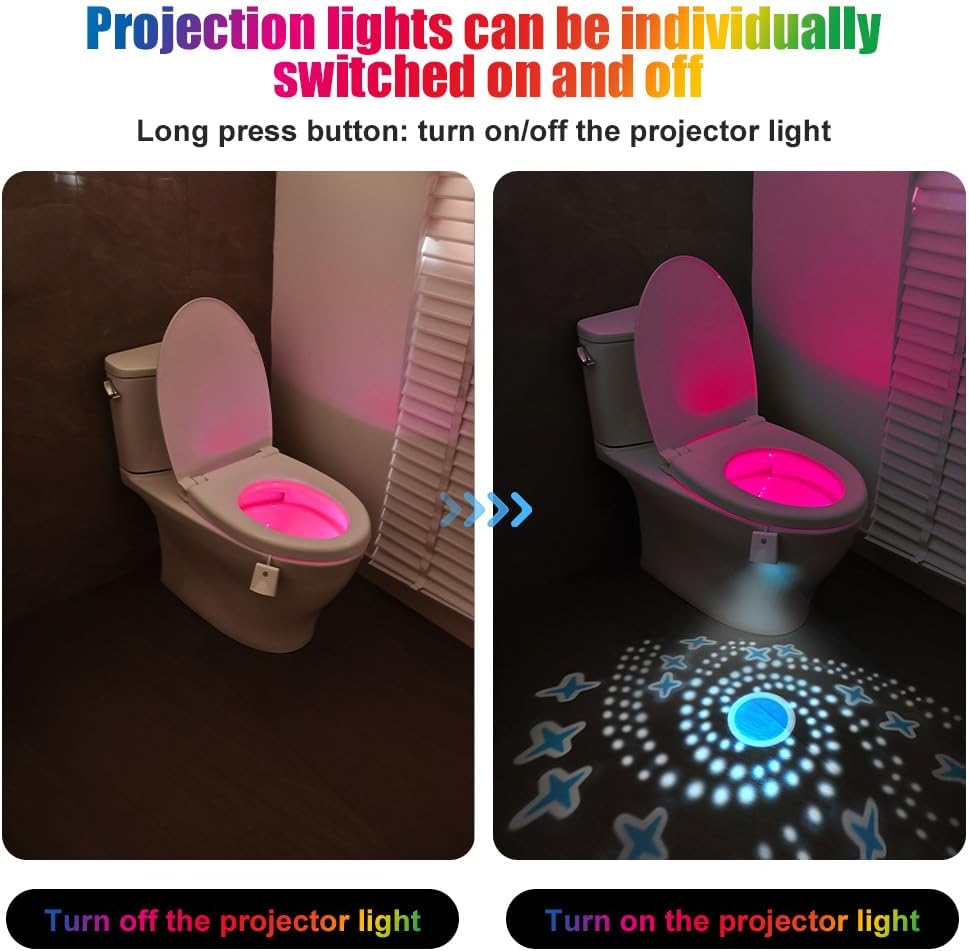
Figure 5: Projector lights can be individually switched on and off.
充電
The HOTUT Toilet Night Light features a built-in 500 mAh lithium-polymer battery, eliminating the need for disposable batteries. A single charge can provide extended use.
- 付属の USB 充電ケーブルをデバイスの充電ポートに接続します。
- USB ケーブルのもう一方の端を標準の USB 電源アダプタ (別売) またはコンピュータの USB ポートに差し込みます。
- 充電インジケーターライトが点灯します 赤 デバイスの充電中。
- 完全に充電されると、インジケータライトが点灯します 緑.
- 充電が完了したら充電ケーブルを外します。
The battery life is approximately 60 days, depending on usage frequency.
メンテナンス
To ensure optimal performance and longevity of your toilet night light, follow these maintenance guidelines:
- クリーニング: ソフトでデバイスを拭いてください、damp 布で拭いてください。研磨剤入りの洗剤を使用したり、本体を水に浸したりしないでください。充電する前に、充電ポートが乾いていることを確認してください。
- ストレージ: 長期間使用しない場合は、デバイスを涼しく乾燥した場所に保管してください。
- バッテリーのケア: 頻繁に使用しない場合でも、バッテリーの状態を維持するために定期的にバッテリーを充電してください。
トラブルシューティング
| 問題 | 考えられる原因 | 解決 |
|---|---|---|
| ライトが点灯しません。 | 電池が消耗しています。 | USBケーブルを使用してデバイスを充電します。 |
| 暗闇ではライトは点灯しません。 | Motion sensor is obstructed or faulty. | Ensure the sensor is clean and has a clear line of sight. If the issue persists, contact customer support. |
| 日中はライトが点灯したままになります。 | Environment is not dark enough for sensor activation. | The light is designed to only activate in dark conditions. This is normal operation. |
| Colors are not changing or fixed. | ボタンの押し方が間違っています。 | Briefly press the switch button to cycle through colors or select a fixed color. |
| Projector light is not working. | Projector light is turned off. | Press and hold the switch button to toggle the projector light on/off. |
仕様
| 特徴 | 詳細 |
|---|---|
| モデル番号 | V7-230906MDD-FBA |
| 寸法(長さ×幅×高さ) | 10 x 6 x 3.6 cm |
| 重さ | 56グラム |
| 電池のタイプ | リチウムポリマー電池1個(付属) |
| バッテリー容量 | 500mAh |
| バッテリー寿命 | 約 60日 |
| 材料 | Polystyrene, Acrylonitrile Butadiene Styrene (ABS), Polyvinyl Chloride (PVC), Polyethylene Terephthalate (PET) |
| 光源 | 導かれた |
| 色の数 | 16 |
| 特集 | Color Changing, Motion Detector, Projector |
| 電源 | Cable Electric (USB Rechargeable) |
| 巻tage | 3.7ボルト |
| 明るさ | 150ルーメン |
保証とサポート
This product is covered by a standard manufacturer's warranty. For specific warranty details, please refer to the product packaging or the retailer's policy where you purchased the item. If you encounter any issues or have questions not addressed in this manual, please contact HOTUT customer support through the retailer's platform or the official brand webサポートサイト。


