1.製品オーバーview
The charmast 20000mAh Portable Charger (Model C2065) is a high-capacity power bank designed to charge multiple devices on the go. It features built-in USB-C, Lightning, and Micro-USB cables, along with additional USB-A and USB-C ports, providing versatile charging options for a wide range of electronic devices. A digital display indicates the remaining battery percentage.

Image 1.1: The charmast 20000mAh Portable Charger (Model C2065) in Navy.
2. 箱の中身
パッケージを開封したら、すべてのアイテムが揃っていることを確認してください。
- 1 x charmast 20000mAh Portable Charger (Model C2065)
- ユーザーマニュアル x 1
- 1 xトラベルポーチ
3. 仕様
| 特徴 | 詳細 |
|---|---|
| モデル番号 | C2065 |
| バッテリー容量 | 20000ミリamp 時間 (mAh) |
| 製品寸法 | 6.3 x 2.85 x 0.75インチ |
| アイテム重量 | 12オンス |
| 出力ポート | Built-in USB-C, Lightning, Micro-USB cables; 2x USB-A ports; 1x USB-C port (Input/Output) |
| 急速充電 | 22.5W PD急速充電 |
| 特集 | Built-in cables, Digital Display, Fast Charging, High Capacity, Slim design |
4. セットアップ
4.1 パワーバンクの初期充電
Before first use, fully charge the power bank. The digital display will show the charging progress from 0% to 100%.
- 内蔵USB-Cケーブルの使用: Connect the built-in USB-C cable to a compatible USB wall adapter (not included). Charging time is approximately 6 hours.
- 内蔵USB-Aケーブルの使用: Connect the built-in USB-A cable to a compatible USB wall adapter (not included). Charging time is approximately 12 hours.
- Using an External Cable (USB-C Input): Connect a USB-C cable (not included) to the power bank's USB-C input port and a compatible 18W PD/QC wall adapter. Charging time is approximately 6 hours.
- Using an External Cable (Micro-USB Input): Connect a Micro-USB cable (not included) to the power bank's Micro-USB input port and a compatible 18W PD/QC wall adapter. Charging time is approximately 6 hours.

Image 4.1: Methods for recharging the power bank.
5. 操作手順
5.1 充電装置
パワーバンクは、デバイスを充電するための複数の方法を提供します。
- 内蔵ケーブルの使用: The power bank includes built-in Lightning, USB-C, and Micro-USB cables. Simply pull out the appropriate cable and connect it directly to your device.
- USB-A ポートの使用: Connect your device's USB-A charging cable to one of the two USB-A output ports on the power bank.
- USB-Cポートの使用: Connect your device's USB-C charging cable to the USB-C output port on the power bank. This port also supports input for recharging the power bank.

Image 5.1: Built-in cables for various devices.
5.2 同時充電
The power bank can charge up to six devices simultaneously using a combination of its built-in cables and external USB ports.

Image 5.2: Charging multiple devices.
5.3 急速充電
The power bank supports 22.5W PD fast charging. When connected to a compatible device, it can charge up to 50% in approximately 30 minutes. Ensure your device and cable support fast charging for optimal performance.
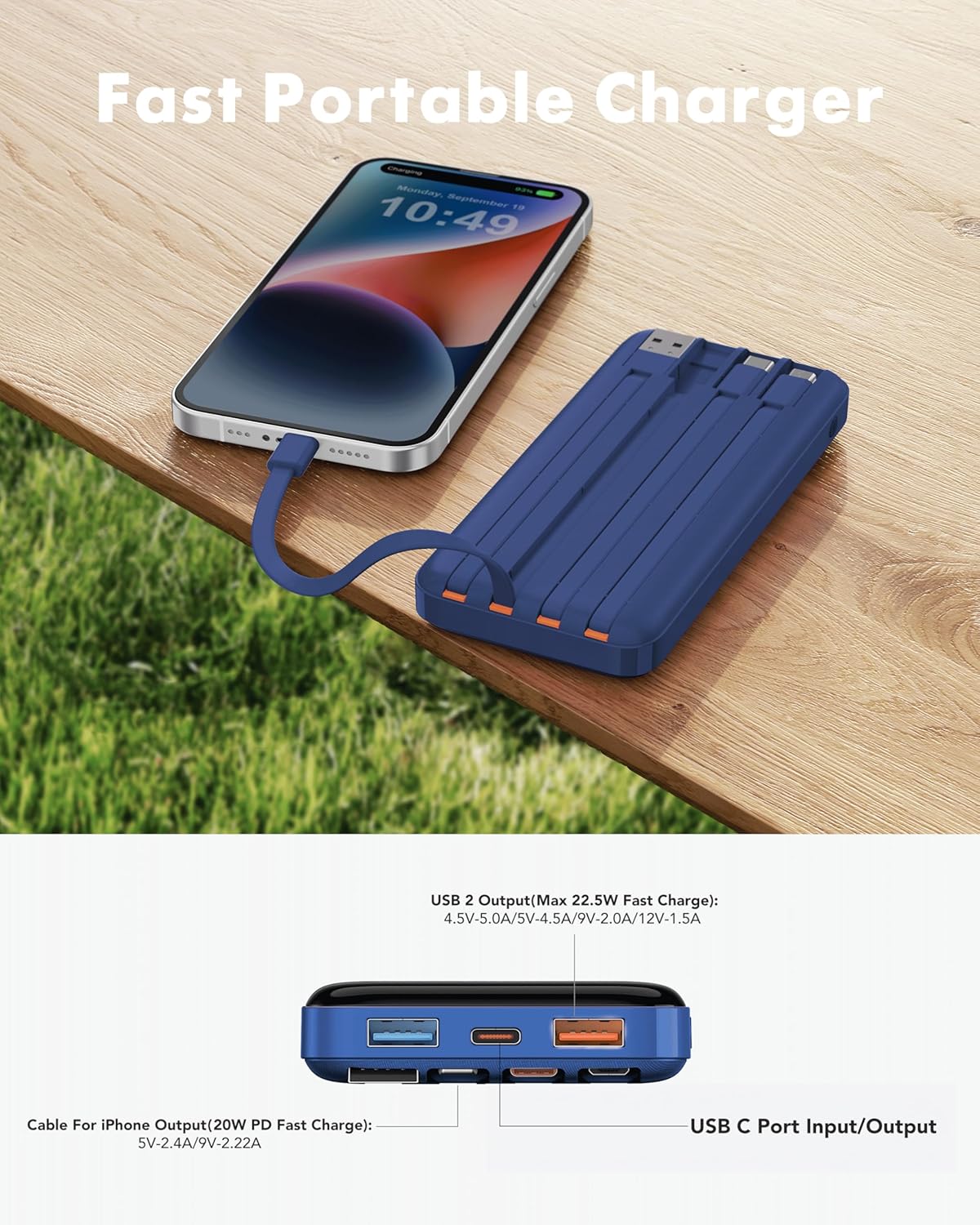
Image 5.3: Fast charging in action.
5.4デジタルディスプレイ
The integrated digital display shows the precise remaining battery percentage (0-100%) of the power bank. This allows for accurate monitoring of the power bank's charge level.

Image 5.4: Digital display showing battery percentage.
5.5 低電流モード
For charging low-power devices such as Bluetooth earphones, smartwatches, or fitness trackers, activate the low-current mode. Press and hold the power button for 5 seconds to engage this mode, ensuring safe and efficient charging for smaller electronics.
6. 安全情報
- パワーバンクを極端な温度(高温または低温)、直射日光、火気にさらさないでください。
- デバイスの落下、分解、改造は避けてください。
- 水や湿気の多い場所には置かないでください。
- 使用しないときは涼しく乾燥した場所に保管してください。
- お子様の手の届かない場所に保管してください。
- Flight Travel: This power bank meets airline safety standards for carry-on luggage. Always pack it in your carry-on bag; never place it in checked luggage.

Image 6.1: The power bank is flight-friendly.
7. メンテナンス
- パワーバンクは柔らかく乾いた布で拭いてください。刺激の強い化学薬品や研磨剤は使用しないでください。
- パワーバンクを長期間使用しない場合は、バッテリーの状態を維持するために、3 か月ごとに約 50 ~ 75% まで充電してください。
- Avoid storing the power bank in extreme temperatures or direct sunlight.
8。 トラブルシューティング
8.1 パワーバンクが充電されない
- Ensure the charging cable is securely connected to both the power bank's input port/built-in cable and the wall adapter.
- 壁のアダプタが正しく機能しており、通電している電源コンセントに接続されていることを確認します。
- 別の充電ケーブルまたは壁のアダプターを試してください。
8.2 デバイスがパワーバンクから充電されない
- パワーバンクに十分な充電があるかどうかを確認します(デジタルディスプレイを参照)。
- デバイスとパワーバンクを接続するケーブルが両端ともしっかりと差し込まれていることを確認します。
- Try a different output port or built-in cable on the power bank.
- デバイスの充電ポートが清潔でゴミなどがないことを確認してください。
- If charging a low-power device, ensure Low-Current Mode is activated (press and hold power button for 5 seconds).
8.3 充電が遅い
- パワーバンクとデバイスの両方が急速充電プロトコルをサポートしていることを確認してください。
- 高品質で急速充電に対応したケーブルを使用してください。
- 1 台のデバイスに最大速度が必要な場合は、複数のデバイスを同時に充電しないでください。
9. 保証とサポート
The charmast 20000mAh Portable Charger comes with 24 months of support and lifetime technical support. For assistance, please refer to the contact information provided in your product packaging or visit the official charmast webサイト。