導入
This manual provides essential information for the setup, operation, maintenance, and troubleshooting of your Star Micronics mC-Label3 MCL32CBI Direct Thermal Printer. Please read this manual thoroughly before using the printer to ensure proper and safe operation.
パッケージ内容
以下にリストされているすべてのアイテムがパッケージに含まれていることを確認してください。
- mC-Label3 Multifunctional Printer
- ACアダプター
- 電源ケーブル
- USB Cables (C-C 1.0m and C-A 1.8m)
- LANケーブル(1m)
- Simple Setup Sheet Safety Guide

画像: 正面 view of the Star Micronics mC-Label3 printer, showcasing its compact design and label output slot.
設定
1. プリンタの接続
The mC-Label3 MCL32CBI printer offers multiple connectivity options:
- USB-C: Connect the printer directly to your PC, Android, or iOS device using the provided USB-C to USB-C or USB-C to USB-A cables.
- イーサネット(LAN): For network connectivity, connect the printer to your router or network switch using the supplied LAN cable.
- ブルートゥース: The MCL32CBI model supports Bluetooth connectivity for iOS and Android devices. Ensure Bluetooth is enabled on your device and pair with the printer.

画像: 背面 view of the mC-Label3 printer, highlighting the LAN, USB, and power ports for various connection types.
2.メディアの読み込み
The printer supports various media types, including linerless labels, die-cut labels, continuous labels, and thermal receipt paper.
- Open the top cover of the printer by lifting the latch.
- Place the media roll into the media compartment, ensuring the leading edge feeds out from the top.
- Pull a small amount of media past the print head and close the top cover securely.
- Ensure the media is properly aligned within the guides.

画像: トップダウン view of the mC-Label3 printer with its cover open, illustrating the internal mechanism for loading thermal paper or label rolls.
操作手順
1.電源のオン/オフ
Connect the power cable to the printer and a power outlet. Press the power button located on the front of the printer to turn it on. The status indicator light will illuminate.
2. ラベルとレシートの印刷
The mC-Label3 MCL32CBI printer is designed for efficient label and receipt printing. It supports various applications and cloud services.
- ソフトウェアの互換性: Works seamlessly with PC, Android, and iOS applications.
- クラウドサービス: Utilize Star Micronics Cloud Services to design and manage labels.
- One Touch Label: This feature allows storing pre-made receipts and labels for quick and easy printing directly from the printer.
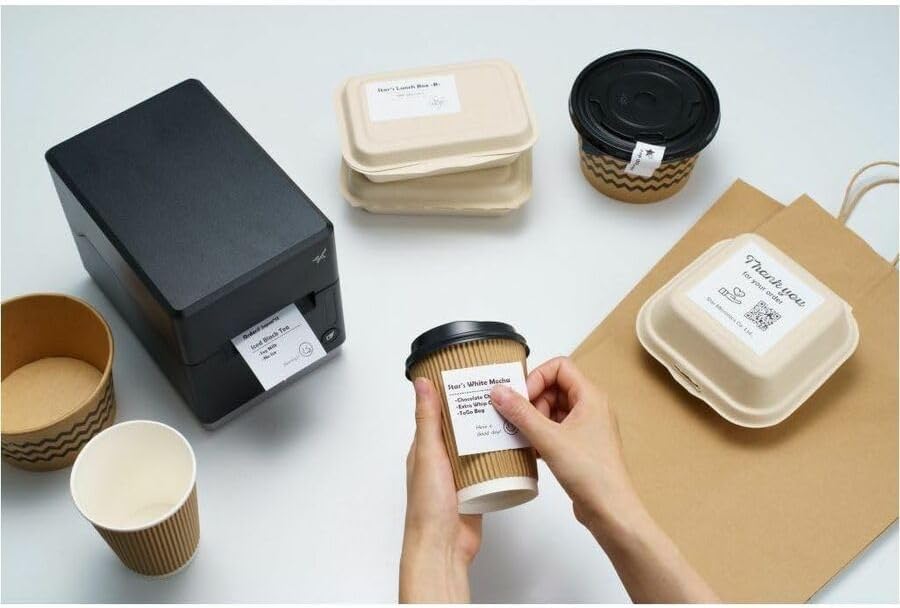
Image: A hand pressing the feed button on the mC-Label3 printer, demonstrating the printing of a 'Thank you' label.

Image: The mC-Label3 printer shown in a practical setting, printing labels for food containers and coffee cups, illustrating its versatility.
メンテナンス
1. プリンターの清掃
Regular cleaning ensures optimal performance and extends the life of your printer.
- 柔らかく糸くずの出ない布を使用してください。ampプリントヘッドをクリーニングするにはイソプロピルアルコールを使用します。
- Wipe down the exterior of the printer with a soft, dry cloth.
- 研磨剤入りのクリーナーや溶剤の使用は避けてください。
2. メディアの置き換え
When the media roll is depleted, follow the media loading instructions in the Setup section to replace it.
3. Effortless Repairs
The mC-Label3 is designed for effortless, no-tools-required repairs with minimal upkeep, simplifying any necessary component replacements.
トラブルシューティング
このセクションでは、発生する可能性のある一般的な問題に対する解決策を示します。
| 問題 | 考えられる原因 | 解決 |
|---|---|---|
| プリンターの電源が入らない | 電源ケーブルが接続されていない; 電源コンセントの問題 | 電源ケーブルがしっかりと接続されていることを確認し、別の電源コンセントを試してください。 |
| 印刷出力なし | Out of media; Media loaded incorrectly; Driver issue | Load new media; Re-load media correctly; Reinstall printer drivers. |
| 印刷品質が悪い | Dirty print head; Low quality media | Clean the print head; Use recommended thermal media. |
| 接続の問題 | Incorrect cable connection; Bluetooth not paired; Network configuration | Check USB/Ethernet cables; Re-pair Bluetooth; Verify network settings. |
仕様
| 特徴 | 詳細 |
|---|---|
| モデル名 | mC-ラベル3 |
| 商品型番 | MCL32CBI |
| 印刷技術 | ダイレクトサーマル |
| プリンタ出力 | モノクロ |
| 最大印刷速度 モノクロ | 23ppm |
| 最大白黒印刷解像度 | 203 DPI (203 x 203 DPI) |
| 印刷メディア | Labels (Linerless, Die-Cut, Continuous), Thermal Receipt |
| 接続技術 | Bluetooth, Wired (USB, Ethernet) |
| ハードウェアインターフェイス | USB、イーサネット |
| 対応デバイス | PC、Android、iOS |
| コントローラータイプ | iOS、Android 対応 |
| 製品寸法 | 奥行き6.7インチ x 幅5.6インチ x 高さ8.3インチ (17.0 x 14.2 x 21.1 cm) |
| アイテム重量 | 7.2ポンド(3.27kg) |
| メモリストレージ容量 | 64MB |
| 色 | 黒 |
| メーカー | STAR MICRONICS |
| 原産国 | 中国 |
保証情報
The Star Micronics mC-Label3 MCL32CBI printer comes with a manufacturer's warranty. For specific terms and conditions, please refer to the warranty card included in your package or visit the official Star Micronics webサイト。
保証の種類: メーカー
サポート
For further assistance, technical support, or to download the latest drivers and firmware, please visit the official Star Micronics support webサイトにアクセスするか、カスタマーサービスにお問い合わせください。
スターマイクロニクス公式 Webサイト: スターマイクロニクス
サポートリンク: サポート


