1. はじめに
Thank you for choosing the WORKPRO 1500W Rotary Hammer Drill. This heavy-duty tool is designed for demanding tasks such as drilling in concrete, wood, and steel, as well as chiseling applications. This manual provides essential information for the safe and efficient operation, maintenance, and troubleshooting of your rotary hammer drill. Please read it thoroughly before first use and keep it for future reference.

Image 1.1: WORKPRO 1500W Rotary Hammer Drill and included accessories.
2.一般的な安全上の注意
火災、感電、および人身傷害のリスクを軽減するため、常に基本的な安全上の注意事項を守ってください。これらの指示に従わない場合、重傷を負う可能性があります。
- 作業エリアの安全性: 作業場は清潔に保ち、十分な明るさを確保してください。雑然とした場所や暗い場所は事故を招きます。可燃性の液体、ガス、粉塵など、爆発性雰囲気下では電動工具を使用しないでください。
- 電気安全: 電動工具のプラグはコンセントに適合している必要があります。プラグを改造しないでください。アースされた表面や接地面に身体が触れないようにしてください。電動工具を雨や湿気の多い場所に放置しないでください。
- 個人の安全: Always wear eye protection. Use hearing protection when operating the tool for extended periods. Wear a dust mask if drilling in dusty conditions. Dress properly; avoid loose clothing or jewelry.
- ツールの使用と手入れ: 電動工具に無理な力を加えないでください。用途に適した電動工具を使用してください。電動工具の調整、アクセサリの交換、保管を行う前には、必ず電源プラグを電源から抜いてください。
- メンテナンス: 電動工具を保守します。 可動部品の位置ずれや結合、部品の破損、および電動工具の動作に影響を与える可能性のあるその他の状態がないか確認してください。
3. Product Components and Included Items
Familiarize yourself with the parts of your WORKPRO Rotary Hammer Drill and the accessories provided.

Image 3.1: Key components of the rotary hammer drill, including SDS-PLUS Chuck, Four Functions Switch, Grease Pot, Shock Absorber, On/Off Switch, Cushioned Handle, Variable Speed Control, 360° Rotatable Handle, and Heat Outlet.
付属品:

Image 3.2: The complete set of accessories includes a carrying case, rotary hammer drill, SDS-plus point flat bit (250mm), SDS-plus point chisel bit (250mm), wrench, grease, SDS-plus drill bits (8mm, 10mm, 12mm), and a dust collector.
- 1 x Heavy-duty Rotary Hammer Drill
- 3 x SDS-plus Drill Bits (8 mm, 10 mm, 12 mm)
- 1 x Round Shank Chisel (Φ14 × 250 mm)
- 1 x Flat Chisel (Φ14 × 250 mm)
- 1 x Grease container
- 1 x Carbon Brush set
- 1xダストカバー
- レンチ×1
- キャリングケース x 1
4. セットアップと組み立て
4.1 補助ハンドルの取り付け
The 360° rotatable handle provides better control and comfort. Loosen the handle clampハンドルを希望の角度に調整し、締め付けます。amp 安全に。
4.2 SDSプラスビットの挿入と取り外し
The SDS-plus chuck allows for quick and secure bit changes.
- 挿入: Clean the bit shank. Pull back the chuck collar, insert the bit into the chuck until it clicks into place. Release the collar. Pull on the bit to ensure it is securely locked.
- 削除: Pull back the chuck collar and pull the bit out.

Image 4.1: Illustration of the auto-lock SDS-plus chuck for secure bit clamping。
4.3 Attaching the Dust Collector
For cleaner operation and to protect the user, attach the dust collector to the front of the tool when drilling.

Image 4.2: The anti-dust cover protects users and the machine from dust and debris.
5. 操作手順
The WORKPRO Rotary Hammer Drill features four operating modes and variable speed control for versatile applications.
5.1 モード選択
Use the four-function switch located on the side of the tool to select the desired operating mode:
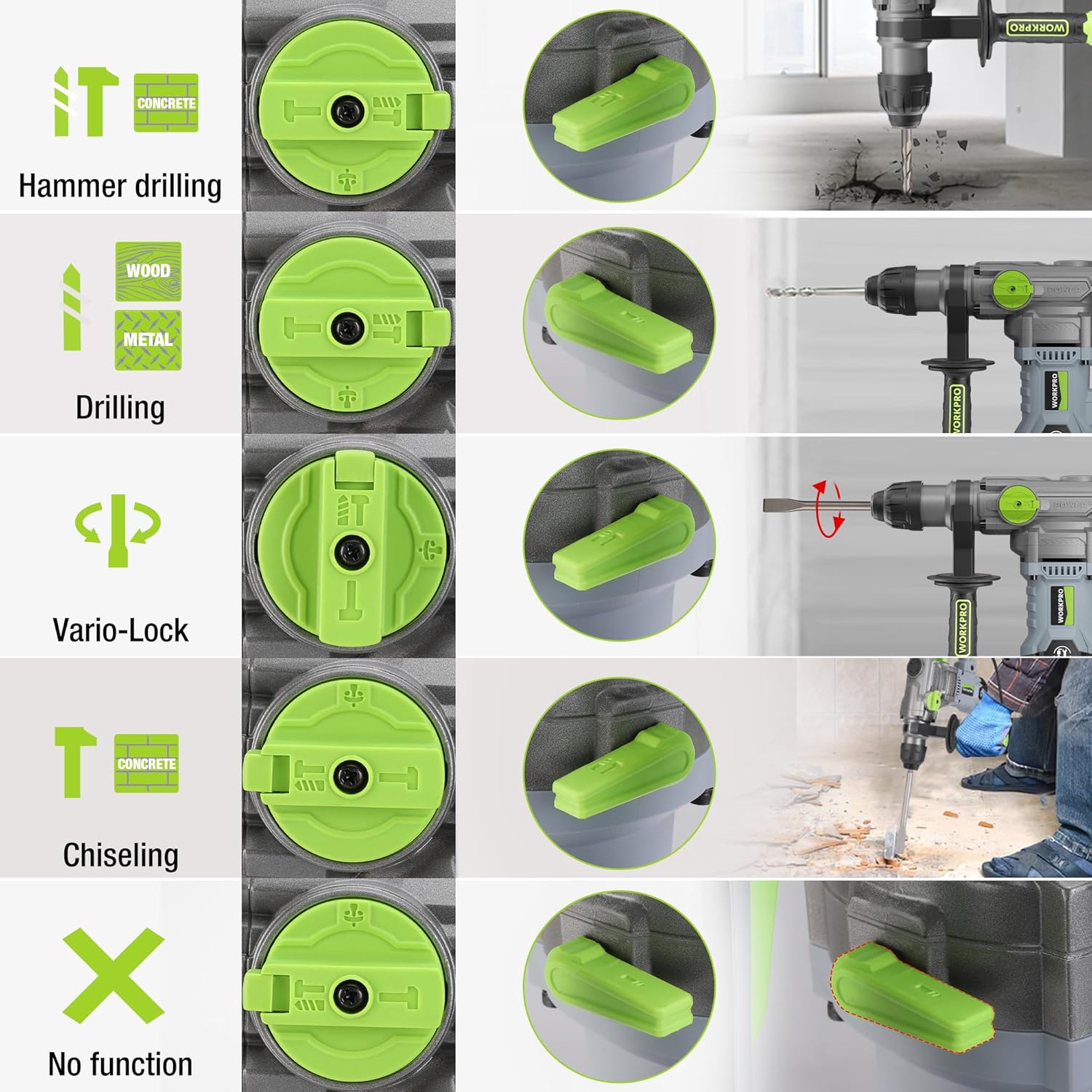
Image 5.1: The four-function switch allows selection between Hammer Drilling, Drilling, Vario-Lock (Chisel Adjust), and Chiseling modes.
- ハンマードリル: 衝撃によるコンクリートや石材への穴あけ作業用。
- 掘削: 衝撃を与えずに木材、金属、プラスチックに穴を開けます。
- Chiseling (Hammer Only): コンクリートや石材の軽いハツリ作業用。
- Vario-Lock (Chisel Adjust): Allows you to rotate and lock the chisel in various positions to optimize the working angle.

Image 5.2: Visual representation of the hammer drilling, drilling, hammer, and chisel adjust modes.
5.2 可変速度制御
The variable speed control allows you to adjust the rotation speed (0-930 RPM) and impact frequency (0-4300 BPM) to match the material and application.
- Rotate the speed adjustment dial to increase or decrease the speed.
- Start with a lower speed for precise drilling and increase as needed.
5.3 Drilling Capacities
The tool offers excellent drilling performance across various materials:
- コンクリート: 最大32mm
- 木材: 最大42mm
- 鋼鉄: 最大13mm
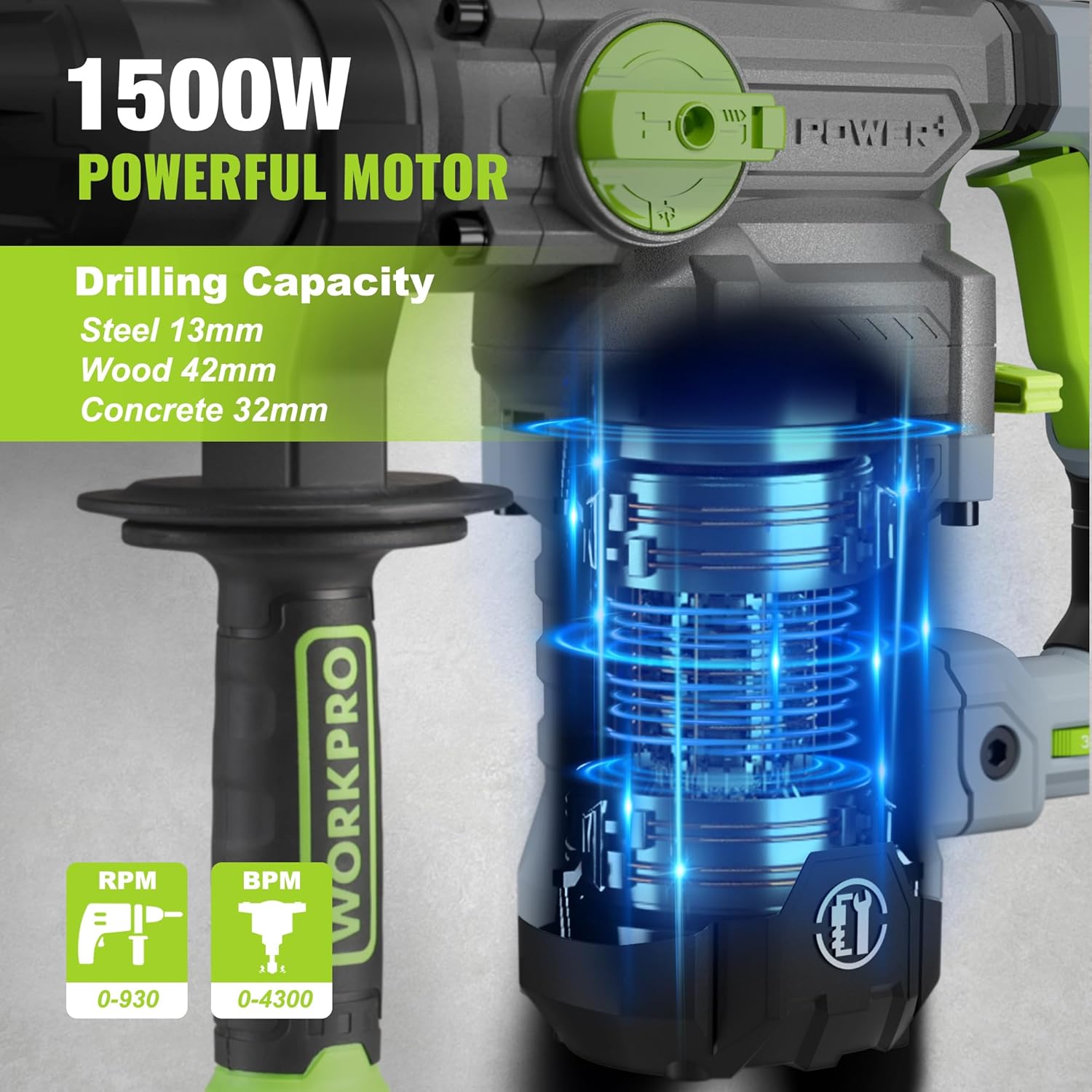
Image 5.3: The 1500W motor provides sufficient power for drilling in steel, wood, and concrete.
5.4アプリケーション例ampレ

Image 5.4: The tool is suitable for various tasks including chiseling concrete, removing tiles, concrete drilling, and floor breaking.
6. メンテナンス
定期的なメンテナンスにより、ツールの寿命が長くなり、最適なパフォーマンスが確保されます。
6.1 クリーニング
- 清掃する前に必ずツールを電源から外してください。
- 過熱を防ぐために、通気口を定期的に掃除してください。
- ツールハウジングを柔らかくて乾いた布で拭いてください。amp 布で拭いてください。強力な化学薬品や研磨剤入りの洗剤は使用しないでください。
- The tool features a dust-proof design and anti-dust bottom structure to extend its service life.
6.2 Grease Replenishment
To maintain optimal performance and durability, replenish the grease every 30-40 hours of cumulative use.
- Use the provided wrench to open the grease pot.
- Apply the advanced lubricant (grease) as instructed.
- Securely close the grease pot after replenishment.
Image 6.1: Instructions for grease replenishment using the provided spanner and grease.
6.3 カーボンブラシの交換
Carbon brushes are wear parts and should be checked periodically. Replace them when they are worn down to their limit to ensure consistent motor performance.
7。 トラブルシューティング
このセクションでは、発生する可能性のある一般的な問題について説明します。ここに記載されていない問題については、カスタマーサポートにお問い合わせください。
| 問題 | 考えられる原因 | 解決 |
|---|---|---|
| ツールが起動しない | 電源なし、スイッチ故障、カーボンブラシ摩耗 | Check power connection; Test switch; Replace carbon brushes |
| 掘削性能の低下 | Dull drill bit; Incorrect mode selected; Insufficient grease | Replace or sharpen drill bit; Select correct mode; Replenish grease |
| 過度の振動/騒音 | Loose components; Damaged bit; Internal issue | Check all connections; Replace bit; Contact service center |
| 過熱 | 通気口が塞がれている;長時間の過度の使用 | Clean ventilation slots; Allow tool to cool down |
8. 技術仕様
| 特徴 | 仕様 |
|---|---|
| モデル番号 | W125244A |
| 入力ボリュームtage | 230-240V |
| 頻度 | 50Hz |
| 定格入力電力 | 1500ワット |
| 無負荷速度 | 0-930 rpm ±10% |
| 衝撃頻度 | 0-4300 bpm ±10% |
| Single Impact Force | 5.5 ジェフ |
| 掘削能力(コンクリート) | 32ミリメートル |
| 掘削能力(木材) | 42ミリメートル |
| 掘削能力(鋼) | 13ミリメートル |
| チャックタイプ | SDSプラス |
| 製品寸法(長さ x 幅 x 高さ) | 38.6 x 10.4 x 26.4 cm |
| 重さ | 8.34キロ |
| 電源 | コード式電気 |
| ギア数 | 6 (Variable Speed) |
9. 保証およびサポート情報
For warranty details, product support, or service inquiries, please refer to the warranty card included with your purchase or contact WORKPRO customer service directly. Keep your proof of purchase for any warranty claims.


