1. はじめに
Thank you for choosing the MARS HYDRO iFresh 6-Inch Smart Inline Fan Set. This product is designed to provide efficient and intelligent ventilation for indoor growing environments. It features a variable speed controller and can be managed remotely via the MarsPRO app, offering precise control over your climate.
Please read this manual thoroughly before installation and operation to ensure proper use and to maximize the performance and lifespan of your device.
2. 安全情報
- 設置、メンテナンス、清掃を行う前に必ず電源を切ってください。
- Ensure the fan is installed in a dry environment, away from water or excessive humidity.
- 電源コードやプラグが損傷している状態でファンを操作しないでください。
- 作動中はファンブレードに手や異物を近づけないでください。
- この製品は屋内使用のみを目的としています。
- デバイスの電源を入れる前に、すべての接続が安全であることを確認してください。
3. パッケージ内容
開梱時にすべてのコンポーネントが揃っていて損傷がないことを確認します。
- 1 x MARS HYDRO iFresh 6-Inch Inline Duct Fan
- 1 x Variable Speed Controller
- 活性炭フィルター x 1
- 1 x Machine Washable Pre-filter Cloth
- 1 x Flexible Ducting (double-layer Aluminum film)
- 3 x Duct Clamps
- ストラップ x 1
- 1 x Vent Cover
- 電源アダプター x 1
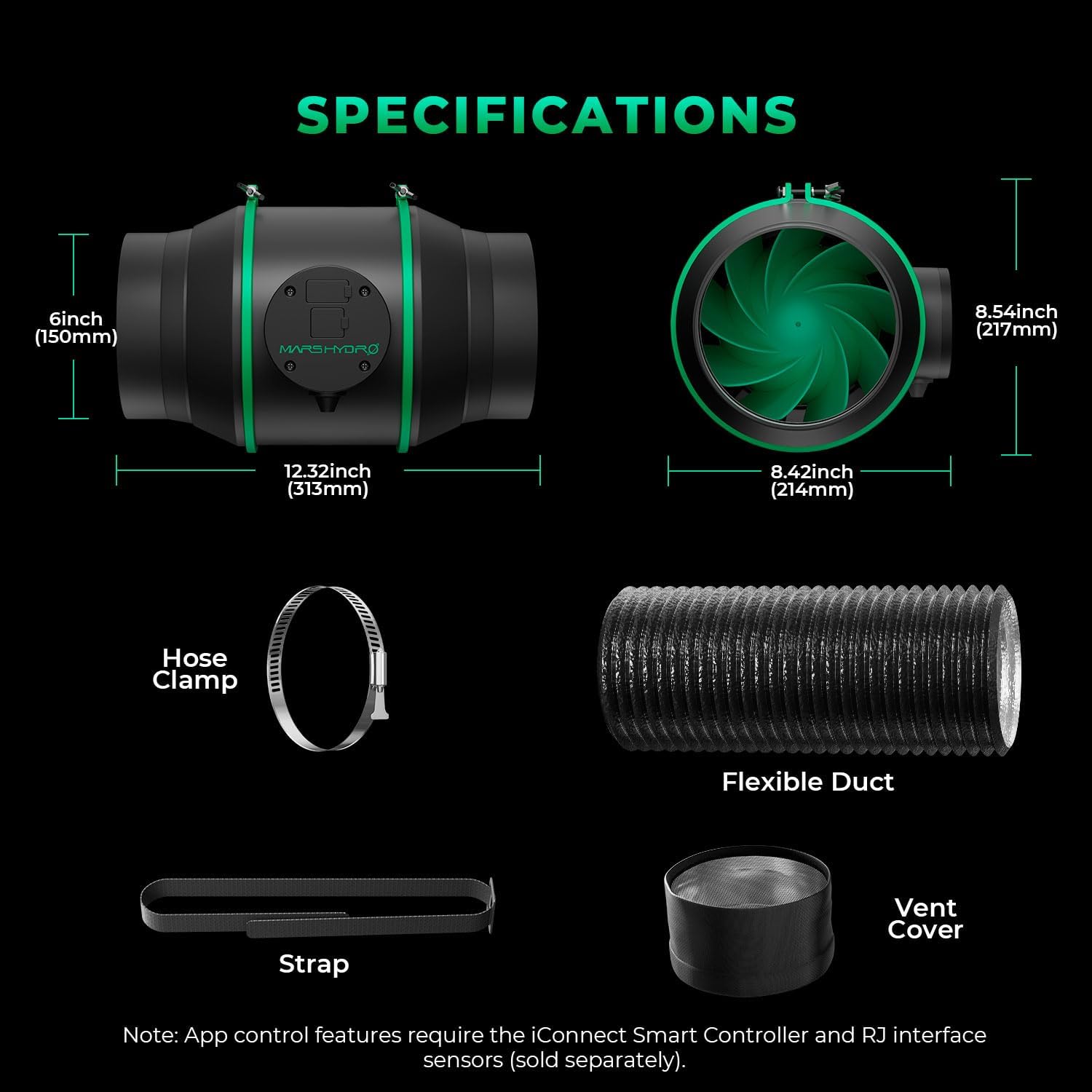
A diagram illustrating the dimensions of the MARS HYDRO iFresh 6-inch inline fan and its accompanying accessories, including hose clamps, flexible duct, strap, and vent cover.
4. セットアップとインストール
4.1 Fan and Filter Assembly
- Unpack the inline fan and carbon filter.
- Slide the pre-filter cloth over the carbon filter.
- Connect one end of the flexible ducting to the exhaust port of the inline fan using a duct clamp。 しっかりと締めます。
- Connect the other end of the flexible ducting to the carbon filter using another duct clamp. Ensure a tight seal to prevent air leaks.

This image displays the MARS HYDRO iFresh 6-inch inline duct fan connected to a carbon filter, illustrating the complete ventilation unit.

A cross-section diagram of the MARS HYDRO iFresh carbon filter, detailing its components: pre-filter, outer mesh, activated carbon, and inner mesh.
4.2 ファンの取り付け
- The fan can be hung using the included strap or placed on a flat surface.
- Ensure the fan is positioned to draw air from the grow space through the carbon filter and exhaust it effectively.
- Maintain proper airflow direction as indicated by arrows on the fan housing.

An illustration of the MARS HYDRO iFresh inline fan's high-efficiency EC motor system, demonstrating the mixed-flow design and airflow direction.
4.3 コントローラの接続
- Connect the variable speed controller to the fan's USB or RJ interface port.
- Plug the power adapter into the fan and then into a suitable power outlet.

This image highlights the USB and RJ interface ports on the MARS HYDRO iFresh inline fan, indicating connection points for the iConnect Smart Controller and other sensors.
5. 操作手順
5.1手動制御
- Use the physical knob on the variable speed controller to adjust the fan speed.
- Turn the knob clockwise to increase speed and counter-clockwise to decrease speed.
- The controller also features an on/off switch.
5.2 App Control (MarsPRO APP)
- Download the MarsPRO APP from your smartphone's app store.
- Follow the in-app instructions to connect your iFresh inline fan to the app.
- Once connected, you can remotely control fan speed, turn the fan on/off, and set advanced features.
- The app allows for setting alarms, climate triggers, and loop timers for automated operation.
- Monitor real-time environment data such as fan speed (RPM) and airflow (CFM) directly on the app screen.

This image shows the MARS HYDRO iFresh inline fan with its manual control knob and a smartphone displaying the MarsPRO app interface, illustrating both control methods.

This image shows a smartphone running the MarsPRO app, demonstrating remote control and monitoring capabilities for the MARS HYDRO iFresh inline fan within a grow tent setup.
6. メンテナンス
6.1 ファンの掃除
- 清掃する前に電源を切ってください。
- Use a soft, dry cloth to wipe down the exterior of the fan.
- For internal cleaning, carefully remove the fan housing (if applicable and safe to do so) and gently clean the blades with a soft brush or compressed air. Do not use water or liquid cleaners directly on electrical components.
6.2 カーボンフィルターのメンテナンス
- The pre-filter cloth is machine washable. Remove it from the carbon filter and wash as needed to maintain optimal airflow and filtration.
- The activated carbon inside the filter is refillable/replaceable. Replace the carbon when odor absorption efficiency decreases.
7。 トラブルシューティング
- ファンが作動しない: Check power connections, ensure the power adapter is securely plugged in, and verify the on/off switch on the controller is in the 'on' position.
- 空気の流れが悪い: Check for obstructions in the ducting or filter. Ensure the pre-filter cloth is clean. Verify fan speed settings.
- 過度のノイズ: Ensure the fan is securely mounted and not vibrating against surfaces. Check for loose components or debris in the fan blades.
- アプリの接続の問題: Ensure your smartphone's Bluetooth/Wi-Fi is enabled and the fan is within range. Restart the app and the fan if necessary. Refer to the MarsPRO app's help section for specific connectivity troubleshooting.
- Odor not being removed: The carbon filter may be saturated. Clean the pre-filter or replace the activated carbon.
8. 仕様
| 特徴 | 仕様 |
|---|---|
| ブランド | マースハイドロ |
| モデル名 | MH-6iFreshkit |
| 製品寸法 | 12.32 x 8.42 x 8.54インチ |
| アイテム重量 | 7.42 キログラム (16.32 ポンド) |
| 電源 | AC/DC |
| ワットtage | 75ワット |
| 巻tage | 220ボルト(AC) |
| 騒音レベル | 32デシベル |
| 風量(最大) | 最大402CFM |
| モータータイプ | PWM-controlled EC-powered motor |
| Carbon Filter Material | 1050+ Virgin Australian Activated Charcoal |
| Ducting Material | Double-layer Aluminum film |
9. 保証とサポート
MARS HYDRO products are manufactured to high-quality standards. For warranty information, please refer to the warranty card included with your purchase or visit the official MARS HYDRO webサイトでご確認ください。保証請求に備えて購入証明書を保管してください。
For technical support, troubleshooting assistance, or replacement parts, please contact MARS HYDRO customer service through their official webサイトまたは製品ドキュメントに記載されている連絡先情報を参照してください。


