導入
The Phrozen Cure Mega S is an advanced resin curing station designed for post-processing 3D printed models. It features both drying and UV curing functions, a 360-degree transparent turntable, and dual high-speed fans to ensure efficient and uniform curing of large and small models. This manual provides essential information for the safe and effective operation, setup, and maintenance of your Phrozen Cure Mega S.
安全情報
Please read all safety instructions carefully before operating the device to prevent injury or damage.
- Always wear appropriate personal protective equipment (PPE), such as gloves and eye protection, when handling uncured resin or models that have not been fully cured.
- Ensure the device is placed on a stable, level surface away from direct sunlight and flammable materials.
- Do not look directly at the UV light source during operation.
- 感電を防ぐため、デバイスを水やその他の液体から遠ざけてください。
- 清掃やメンテナンスを行う前に、デバイスのプラグを電源コンセントから抜いてください。
- お子様やペットの手の届かない場所に保管してください。
製品終了view
The Phrozen Cure Mega S is a robust curing station designed for large-scale and high-volume post-processing. Its intuitive design allows for easy access and efficient operation.

画像: 正面 view of the Phrozen Cure Mega S curing station, showcasing its compact, black enclosure with a transparent orange-tinted door.
主要コンポーネント
- Main Curing Chamber: The enclosed space where models are dried and cured.
- Transparent Turntable: Rotates models 360 degrees for even curing.
- 紫外線光源: Emits 405nm UV light for resin solidification.
- High-Speed Fans: Two fans for efficient drying of models.
- タッチパネル: User interface for controlling drying and curing settings.
- Removable Rack: Allows for flexible curing of various model sizes.
- Side-Swing Door: Provides easy access to the curing chamber.
- Built-In Interior Light: Illuminates the chamber for monitoring progress.

Image: Visual representation of the Phrozen Cure Mega S's smart design, highlighting the side-swing door, interior lighting, and the touch panel interface.
設定
Follow these steps for the initial setup of your Phrozen Cure Mega S.
- デバイスを開梱します。 Carefully remove the Phrozen Cure Mega S from its packaging. Retain all packaging materials for future transport or storage.
- 場所を選択: Place the curing station on a flat, stable, and heat-resistant surface in a well-ventilated area. Ensure there is sufficient space around the unit for air circulation.
- 接続電源: Plug the power cord into the power input port on the back of the unit, then plug the other end into a grounded electrical outlet.
- Install Turntable: Place the transparent turntable securely onto the rotating mechanism inside the curing chamber.
- Optional Rack Installation: If curing smaller or multiple models, install the removable rack at the desired height within the chamber.
- 電源オン: Press the power button on the touch panel to turn on the device.
手術
The Phrozen Cure Mega S offers versatile drying and curing options for your 3D printed models.
Drying and Curing Functions
The device allows you to select between drying, curing, or a combined dry and cure cycle.
- 乾燥モード: Utilizes dual high-speed fans (1700 RPM) to quickly dry models, removing residual alcohol or moisture after washing.
- Curing Mode: Activates the 405nm UV light source to solidify resin models, enhancing their hardness and durability. The 360-degree light source and rotating turntable ensure uniform exposure.
- Dry & Cure Mode: Performs a drying cycle followed by a curing cycle automatically, streamlining the post-processing workflow.

Image: Depicts the Phrozen Cure Mega S in operation, highlighting its dual-action drying (1700 RPM) and 360-degree curing capabilities.
タッチパネルを使う
The touch panel provides intuitive control over the device's functions.
- モードの選択: On the main screen, tap the desired mode: Fan + Cure (Dry & Cure), UV Cure、 または ファン (Drying).
- 時間設定: Use the '+' and '-' buttons to adjust the duration for the selected mode. Recommended curing times vary based on resin type and model size.
- 開始サイクル: Press the 'Start' button to begin the process. The interior light will activate, and the turntable will begin to rotate.
- 進捗状況を監視する: Use the built-in interior light to observe the drying or curing state of your models through the transparent door.
- サイクル終了: The device will automatically stop once the set time has elapsed. You can also manually stop the cycle by pressing the 'Stop' button.
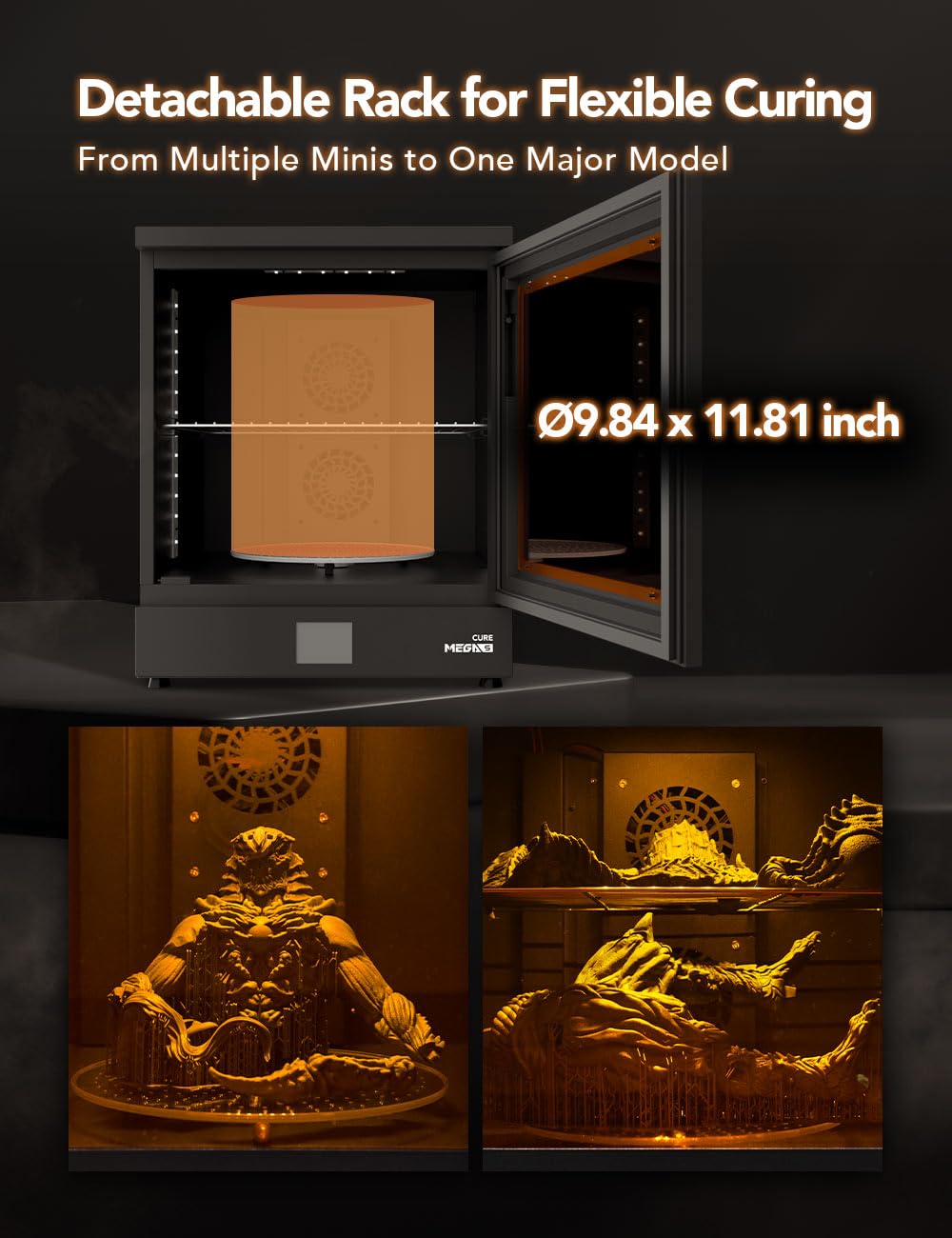
Image: Illustrates the detachable rack feature, showing how it accommodates both large single models and multiple smaller models for flexible curing.
メンテナンス
Regular maintenance ensures optimal performance and longevity of your Phrozen Cure Mega S.
- チャンバーのクリーニング: After each use, especially if resin spills occur, wipe down the interior of the curing chamber with a soft cloth dampened with isopropyl alcohol (IPA). Ensure the device is unplugged.
- ターンテーブルのクリーニング: Remove the turntable and clean it with IPA. Ensure it is completely dry before placing it back into the unit.
- 外装清掃: 外装面は柔らかく乾いた布で拭いてください。研磨剤入りの洗剤や溶剤の使用は避けてください。
- 紫外線光源: Periodically check the UV LEDs for any dust or residue and gently clean them with a soft, dry cloth if necessary.
- ストレージ: 長期間使用しない場合は、直射日光を避け、涼しく乾燥した場所に保管してください。
トラブルシューティング
This section addresses common issues you might encounter with your Phrozen Cure Mega S.
| 問題 | 考えられる原因 | 解決 |
|---|---|---|
| デバイスの電源が入りません。 | 電源コードが正しく接続されていないため、コンセントから電力が供給されません。 | 電源コードの接続を確認してください。別の機器でコンセントをテストしてください。 |
| UVライトが作動しません。 | Curing mode not selected; door not fully closed. | Ensure 'UV Cure' or 'Fan + Cure' mode is selected. Close the door securely. |
| ターンテーブルが回転しません。 | Turntable not properly seated; obstruction. | Re-seat the turntable. Check for any debris obstructing rotation. |
| Models not curing evenly. | Insufficient curing time; models too close together. | Increase curing time. Ensure models are spaced adequately on the turntable. |
| Models not drying effectively. | Drying mode not selected; fans obstructed. | Ensure 'Fan' or 'Fan + Cure' mode is selected. Check for obstructions near fan vents. |
仕様
Technical specifications for the Phrozen Cure Mega S.
| 特徴 | 詳細 |
|---|---|
| モデル番号 | キュアメガス00US |
| 製品寸法 | 15.6"D x 18.7"W x 19.1"H (39.5cm W x 47.5cm D x 48.6cm H) |
| アイテム重量 | 15キログラム(33.07ポンド) |
| 材料 | 金属 |
| Curing Wavelength | 405nm紫外線ライト |
| ファン速度 | 1700 RPM (Dual Fans) |
| Turntable Rotation | 360度 |
| メーカー | フローズンテック株式会社 |
| 初回利用可能日 | 9年2023月XNUMX日 |

Image: Diagram showing the physical dimensions of the Phrozen Cure Mega S: 47.5cm depth, 39.5cm width, and 48.6cm height.
保証とサポート
For warranty information, technical support, or service inquiries, please contact Phrozen customer support through their official web製品を購入したサイトまたは小売店。
オンラインリソース: Visit the official Phrozen website for FAQs, updated drivers, and additional support materials.
連絡先: Refer to your purchase documentation or the Phrozen web具体的な連絡先の詳細については、サイトをご覧ください。


