1. はじめに
1.1 製品終了view
The SPL BIG 500 Series Stereo Image Processor is a module designed for the 500 series rack format, engineered to enhance the stereo width and depth of audio signals. It features intuitive controls for Range, Stage, Bass, and Bigness, allowing for precise manipulation of the stereo field to achieve a more expansive and engaging sound.
1.2 主な特徴
- 500 Series Stereo Image Processor with Range control
- Dedicated Bass Controls for low-end enhancement
- Bigness control for overall stereo width adjustment
- Stage control for perceived depth manipulation
2. 安全に関する注意事項
2.1重要な安全情報
- 後で参照できるように、これらの手順を読んで保管してください。
- この機器を雨や湿気にさらさないでください。
- 適切な換気を確保し、換気口を塞がないようにしてください。
- メーカー指定のアタッチメント/アクセサリのみを使用してください。
- すべてのサービスを資格のあるサービス担当者に依頼してください。 装置が何らかの形で損傷した場合は、修理が必要です。
- Disconnect the 500 series rack from power before installing or removing the module.
3. セットアップ
3.1 Installation into a 500 Series Rack
The SPL BIG module is designed for installation into a compatible 500 series rack chassis. Follow these steps for proper installation:
- Ensure the 500 series rack is powered off and disconnected from the mains power supply before beginning installation.
- Carefully slide the BIG module into an available slot in your 500 series rack, ensuring the edge connector aligns correctly with the rack's backplane.
- Secure the module using the mounting screws provided with your 500 series rack. Do not overtighten.
- Once the module is physically installed, connect your audio input and output cables to the appropriate connectors on your 500 series rack.
- Reconnect the 500 series rack to the mains power supply and power it on.
3.2 フロントパネルオーバーview
The front panel of the SPL BIG module provides all controls and indicators for operation. Refer to the image below for a visual guide to the controls.
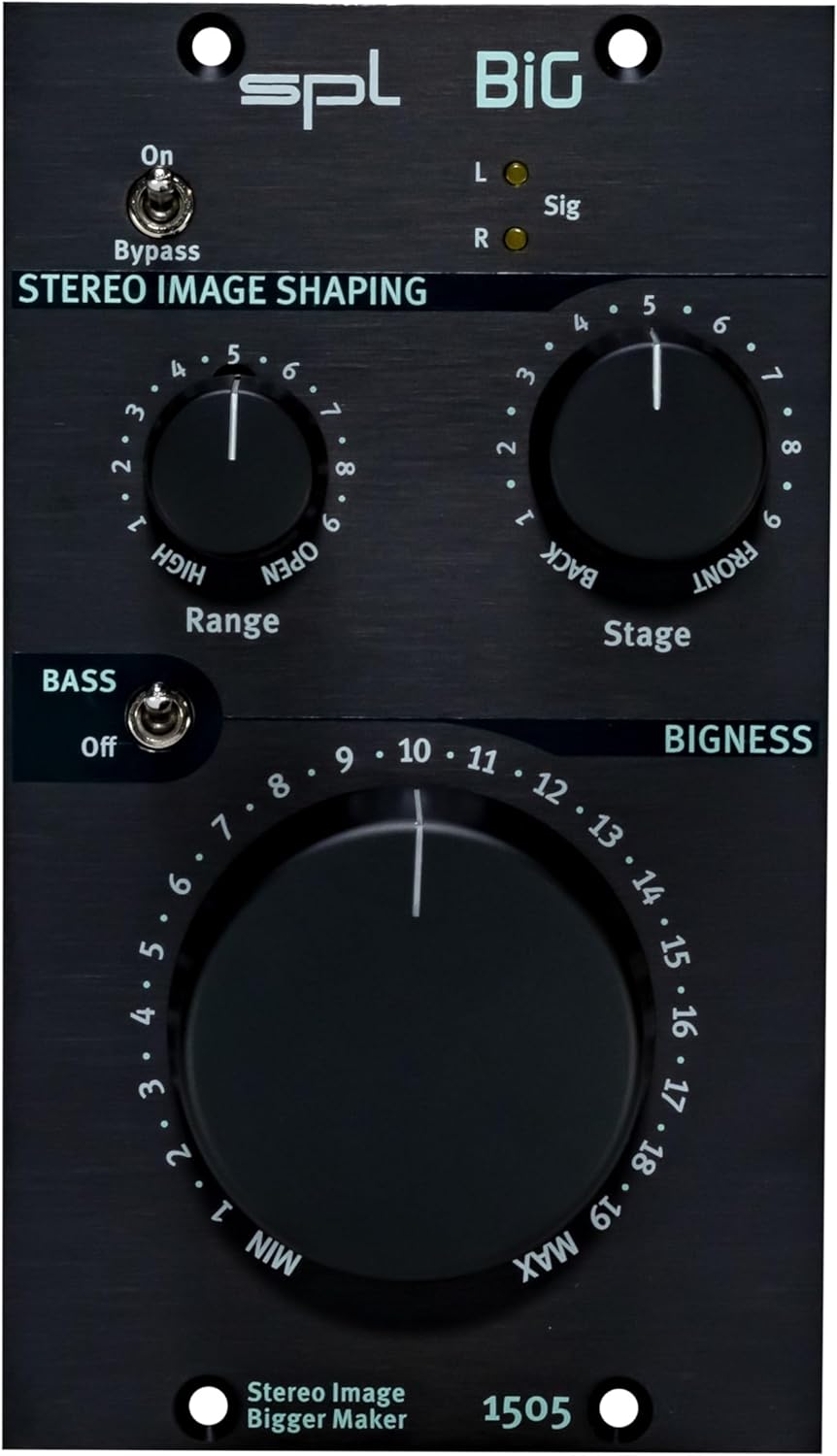
Description: Close-up front view of the SPL BIG 500 Series Stereo Image Processor, highlighting the Range, Stage, and Bigness control knobs, along with the Bass switch and Bypass toggle. The model number 1505 is visible at the bottom.
4. 操作手順
4.1 基本操作
The SPL BIG module allows for intuitive control over stereo imaging. Experiment with the controls to achieve the desired sonic effect for your audio material.
4.2コントロールとインジケーター
- バイパススイッチ: This toggle switch engages or disengages the stereo image processing. When engaged (ON), the audio signal passes through the unit without any processing. When disengaged (OFF), the BIG module's effects are active.
- 範囲制御: This rotary knob adjusts the frequency range that is primarily affected by the stereo image processing. Turning the knob clockwise increases the frequency range, allowing for broader or more focused stereo enhancement.
- Stage コントロール: This rotary knob modifies the perceived depth of the stereo image. Settings towards 'BACK' tend to narrow the soundstage, while settings towards 'FRONT' expand the perceived depth and width.
- ベーススイッチ: This toggle switch activates or deactivates the dedicated bass processing. Engaging this switch can enhance the low-end presence and impact without necessarily affecting the stereo width of the higher frequencies.
- Bigness Control: This large rotary knob is the primary control for adjusting the overall stereo width and spaciousness. Turning it clockwise increases the intensity of the stereo widening effect, making the sound appear larger and more expansive.
- L/R Sig LEDs: These indicator lights illuminate to show the presence of audio signals in the left (L) and right (R) channels, confirming that audio is passing through the module.
5. メンテナンス
5.1 クリーニング
To clean the unit, use a soft, dry, and lint-free cloth. Avoid using abrasive cleaners, solvents, or chemical sprays, as these can damage the finish or internal components.
5.2 ストレージ
When not in use for extended periods, store the SPL BIG module in a dry, dust-free environment, ideally within its original packaging or a protective case, to prevent damage from dust, moisture, or physical impact.
6。 トラブルシューティング
6.1 一般的な問題と解決策
- オーディオ出力なし:
- Check all cable connections between the 500 series rack and your audio interface/mixer.
- Ensure the 500 series rack is powered on and receiving power.
- Verify that the Bypass switch on the SPL BIG module is not engaged if you expect processed audio.
- Confirm that an input signal is present and routed correctly to the 500 series rack slot.
- No Stereo Imaging Effect:
- Ensure the Bypass switch on the module is disengaged (OFF).
- Adjust the Range, Stage, and Bigness controls to higher settings to hear the effect more prominently.
- Verify that the input signal being fed to the module is indeed a stereo signal. Mono signals will not exhibit stereo imaging effects.
- Unwanted Noise or Distortion:
- すべてのケーブル接続が適切に装着され、整合性があるかどうかを確認します。
- Ensure input levels are not too high, causing clipping in the 500 series rack or the BIG module.
- Test the module in a different slot of the 500 series rack or a different rack if available, to rule out rack-related issues.
7. 仕様
7.1 技術データ
| アイテム重量 | 2.29ポンド |
| 製品寸法 | 8.9 x 6.75 x 4.3インチ |
| 材質タイプ | ステンレス鋼 |
| ASIN | B0CBLBSP2H |
| 初回利用可能日 | 7年2022月XNUMX日 |
8. 保証とサポート
8.1 製品サポート
For technical assistance, warranty information, or service inquiries regarding your SPL BIG 500 Series Stereo Image Processor, please visit the official SPL website or contact your authorized dealer. Detailed warranty terms and conditions are typically available on the manufacturer's webサイト。
また、 SPL Store on Amazon 追加の製品情報とリソースについては、こちらをご覧ください。
9. 追加リソース
9.1 製品画像

Description: Angled view of the SPL BIG 500 Series Stereo Image Processor, showing the front panel and the side of the module, illustrating its compact 500 series form factor.

Description: Side view of the SPL BIG 500 Series Stereo Image Processor, showing the depth of the module and the typical rear connections for a 500 series unit.
9.2 製品ビデオ
Description: An official product video demonstrating the features and capabilities of the SPL BIG 500 Series Stereo Image Processor.
Description: An official product video providing further insights into the operation and sound shaping possibilities of the SPL BIG 500 Series module.
Description: An official product video showcasing advanced applications and sonic examples of the SPL BIG 500 Series Stereo Image Processor.


