導入
The Thermalright HR10 2280 is a high-performance passive heatsink designed to cool M.2 2280 NVMe Solid State Drives. It features a double-sided heat sink design with four copper heat pipes and pure aluminum electroplating fins, providing a large heat dissipation area to prevent thermal throttling and maintain optimal SSD performance during intensive operations. This manual provides essential information for the proper installation, operation, and maintenance of your HR10 2280 SSD Cooler.
パッケージ内容
インストールを続行する前に、すべてのコンポーネントが揃っていることを確認してください。
- Thermalright HR10 2280 SSD Heatsink
- Double-sided thermal pads (14.8 W/m.k)
- 取り付け金具(ネジ、クリップ)
インストールガイド
Follow these steps to install the Thermalright HR10 2280 SSD Cooler onto your M.2 2280 SSD and motherboard.
- SSD を準備します。 Gently clean the surface of your M.2 2280 SSD to ensure it is free from dust or debris.
- サーマルパッドを貼り付ける: The HR10 2280 includes double-sided thermal pads. Carefully remove the protective film from both sides of the thermal pads. Apply one thermal pad to the top surface of your M.2 SSD and another to the bottom surface, ensuring full coverage of the NAND flash and controller chips. The heatsink is compatible with M.2 SSDs that have components on single or dual sides.
- Attach Heatsink Base: Place the M.2 SSD with the thermal pads onto the heatsink's base plate. Ensure the mounting holes on the SSD align with the corresponding holes on the heatsink base.
- Assemble Heatsink: Position the main heatsink body over the SSD and base plate. Align the screw holes on the heatsink body with those on the base plate. Apply gentle mounting pressure and secure the assembly using the provided screws. Tighten screws evenly to ensure proper contact and pressure across the thermal pads.
- マザーボードへのインストール: Insert the assembled SSD and heatsink into the M.2 slot on your motherboard. Secure the SSD into the motherboard's M.2 standoff using the motherboard's retention screw.

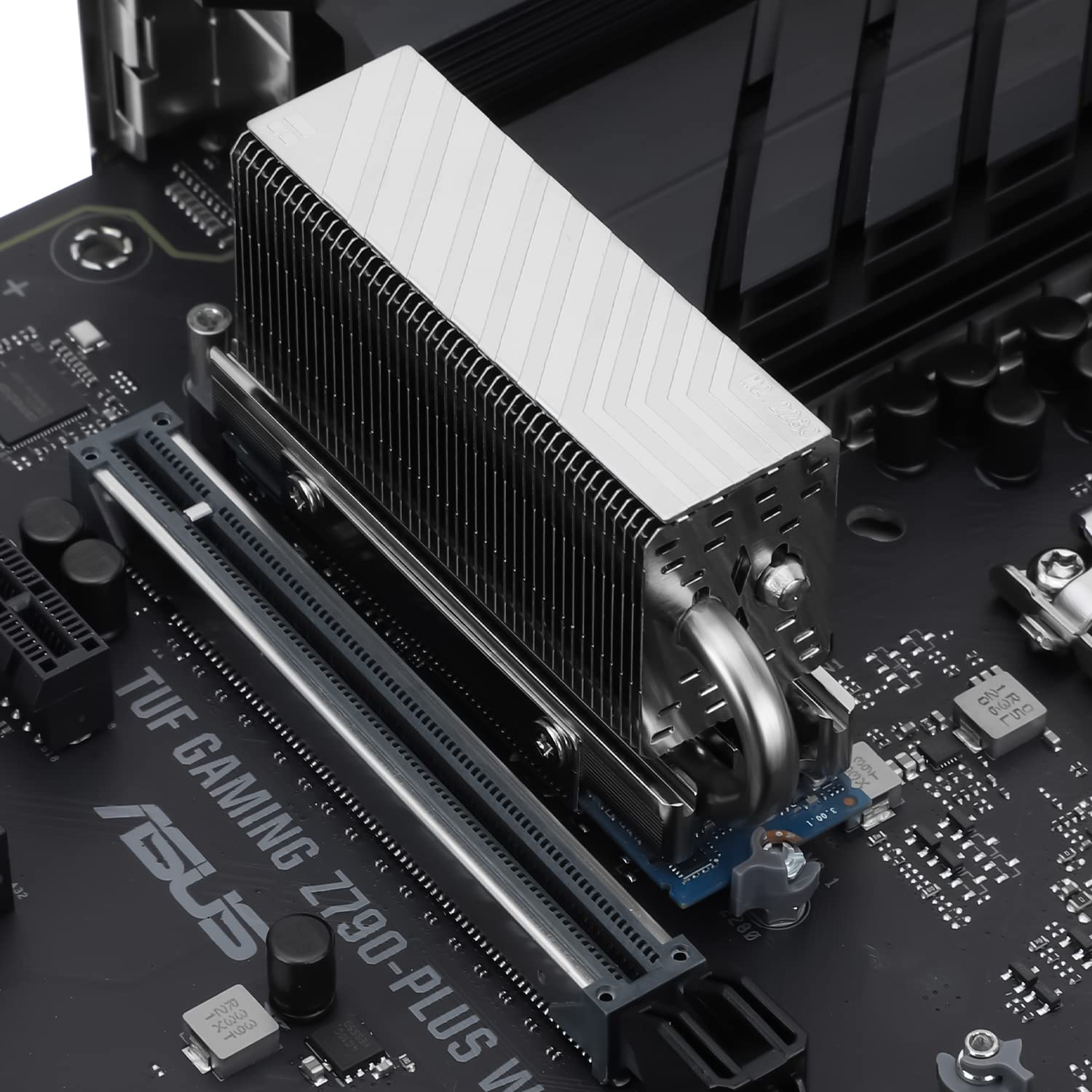
手術
The Thermalright HR10 2280 is a passive cooling solution, meaning it operates without a fan. Once installed, it continuously dissipates heat from your M.2 SSD through its copper heat pipes and aluminum fins. This process is automatic and requires no user intervention during operation. The effectiveness of the cooler is enhanced by good airflow within your computer case.
メンテナンス
To ensure optimal performance and longevity of your Thermalright HR10 2280 SSD Cooler, periodic maintenance is recommended:
- ほこりの除去: Over time, dust can accumulate on the heatsink fins, reducing its cooling efficiency. Periodically use compressed air or a soft brush to gently remove dust from the fins. Ensure your system is powered off before performing any cleaning.
- サーマルパッドの完全性: The thermal pads are designed for long-term use. However, if you remove and re-install the heatsink multiple times, inspect the thermal pads for any damage or degradation. Replace them if necessary to maintain effective heat transfer.
トラブルシューティング
If you experience higher than expected SSD temperatures after installing the HR10 2280, consider the following:
- インストールチェック: Verify that the heatsink is securely mounted and that the thermal pads are making full contact with both the SSD and the heatsink surfaces. Uneven pressure can lead to poor heat transfer.
- ケースのエアフロー: Ensure your computer case has adequate airflow. Passive heatsinks rely on ambient air movement to dissipate heat. Improve case fan configuration if necessary.
- Thermal Pad Condition: Confirm that the protective films were completely removed from the thermal pads during installation.
仕様
| 特徴 | 詳細 |
|---|---|
| ブランド | サーマルライト |
| モデル | HR10 2280 |
| クーラーヒートシンク素材 | Copper Heatpipe + Aluminum Fins |
| 製品寸法(長さ x 幅 x 高さ) | 90.3mm x 23.7mm x 43.8mm (長さ3.56インチ x 幅0.93インチ x 高さ1.72インチ) |
| クーラーヒートシンクの互換性 | M.2 2280 SSD |
| ヒートパイプ | 2 x 5mm AGHP Generation 3 Reverse Gravity Heat Pipes |
| Thermal Pad Conductivity | 14.8 W/m.k (Odyssey Silicone Pad) |
| 熱放散エリア | 60000mm² |
| アイテム重量 | 0.15キログラム(5.3オンス) |
保証とサポート
Specific warranty details and direct support contact information are not provided in this manual. For warranty claims, technical support, or further inquiries, please refer to the official Thermalright webサイトをご覧いただくか、販売店にお問い合わせください。


