1. はじめに
Thank you for choosing the HOMEPILOT RolloTron Pure Electric Belt Winder. This device is designed to provide comfortable and automated control for your roller blinds. It allows for both manual operation directly on the unit and extensive automatic functions, enhancing the convenience of your home.

Figure 1: HOMEPILOT RolloTron Pure Electric Belt Winder. This image shows the front of the white belt winder with its large up and down buttons, and the HomePilot logo. A brown cardboard-like background on the left highlights key features such as 45 kg output power and 23 mm belt width.
2. 安全に関する注意事項
Please read these safety instructions carefully before installation and operation to ensure safe and proper use of the device. Keep this manual for future reference.
- Installation must be performed by a qualified electrician or a person with appropriate technical knowledge, in accordance with local electrical codes and regulations.
- Ensure the power supply is disconnected before beginning any installation or maintenance work.
- デバイスを湿気、極端な温度、直射日光にさらさないでください。
- ご自身でデバイスを開けたり修理したりしないでください。すべての修理は資格のある専門家にご依頼ください。
- このデバイスは屋内専用に設計されています。
- 窒息の危険を防ぐため、梱包材は子供の手の届かないところに保管してください。
3. パッケージ内容
パッケージにすべてのコンポーネントが含まれていることを確認します。
- HOMEPILOT RolloTron Pure Electric Belt Winder (1 unit)
- 取扱説明書(本書)
- Mounting Screws (if included, refer to packaging)
- Tape collector (as per specifications)
If any parts are missing or damaged, please contact your retailer or HOMEPILOT customer support.
4. セットアップとインストール
The RolloTron Pure is designed for easy installation in existing roller blind inserts, making it ideal for renovations and home updates. Follow these steps for installation:
- 準備: Ensure the power supply to the roller blind area is turned off. Remove the old manual belt winder from the wall.
- Belt Insertion: Carefully feed the roller blind belt into the new RolloTron Pure device. Ensure it is properly seated in the belt guide.
- 取り付け: Position the RolloTron Pure into the wall opening. Secure it firmly using the provided mounting screws. Ensure the device is level and flush with the wall surface.
- 電源接続: Connect the power cable of the RolloTron Pure to a suitable power outlet.
- 初期プログラミング: Once powered, follow the specific instructions in the detailed manual (not included here, but typically provided with the product) to program the upper and lower end points of your roller blind. This is crucial for correct operation.

Figure 2: Installation Process. This image shows a four-step visual guide for installing the RolloTron Pure. Step 1 shows the old belt winder being removed. Step 2 shows the new device being inserted into the wall opening. Step 3 shows the device being pushed fully into place. Step 4 shows the power cable being plugged into a wall socket.
For detailed programming instructions, refer to the comprehensive manual supplied with your product.
5. 操作手順
The RolloTron Pure offers both manual and automatic control options:
5.1手動操作
- 上ボタン (▲): Press this button to raise the roller blind. Release to stop.
- 下ボタン (▼): Press this button to lower the roller blind. Release to stop.
5.2 自動機能
The device features extensive automatic functions for convenient control:
- Time-Automatic: Program specific times for the roller blind to open and close daily.
- アストロ機能: Utilize the built-in astro function to automatically control the roller blind based on sunrise and sunset times in your location.
- スマートホーム統合(オプション): While the RolloTron Pure can operate independently, it can also be integrated into a broader HomePilot smart home system for advanced automations, including weather or solar sensor integration and fire protection features.
Refer to the full product manual for detailed instructions on setting up and customizing these automatic functions.
6. メンテナンス
The HOMEPILOT RolloTron Pure is designed for low maintenance. Follow these general guidelines:
- クリーニング: Clean the surface of the device with a soft, dry cloth. Do not use abrasive cleaners, solvents, or excessive moisture, as these can damage the unit.
- ベルトの検査: Periodically inspect the roller blind belt for any signs of wear, fraying, or damage. A damaged belt can affect the performance and safety of the device.
- ユーザーが修理可能な部品はありません: The internal components of the device are not user-serviceable. Do not attempt to open the casing.
7。 トラブルシューティング
If you encounter issues with your RolloTron Pure, try the following common troubleshooting steps:
| 問題 | 考えられる原因 | 解決 |
|---|---|---|
| デバイスが応答しません。 | 電源がありません。 | Check if the device is properly plugged into a working power outlet. Check circuit breaker. |
| Roller blind does not move or moves partially. | End points not programmed correctly; Obstruction in roller blind path; Belt is stuck or damaged. | Reprogram the end points according to the full manual. Check for any physical obstructions. Inspect the belt for damage or entanglement. |
| Automatic functions not working. | Incorrect time settings; Automatic mode not activated. | Verify the current time and programmed times. Ensure the automatic mode is enabled on the device. |
| 動作中に異常な音がする。 | Internal mechanical issue; Obstruction. | Ensure there are no obstructions. If noises persist, discontinue use and contact customer support. |
If these steps do not resolve the issue, please contact HOMEPILOT customer support for further assistance.
8. 技術仕様
| 特徴 | 詳細 |
|---|---|
| モデル番号 | RolloTron pure |
| 部品番号 | 10112345 |
| ブランド | ホームパイロット |
| 寸法(長さ×幅×高さ) | 21.08 x 6.06 x 16.6 cm |
| 重さ | 800グラム |
| 色 | 白 |
| 材料 | プラスチック |
| ワットtage | 70ワット |
| 営業巻tage | 230ボルト |
| 現在の評価 | 1 Amps |
| スイッチタイプ | Rocker (1-way) |
| プラグプロfile | 壁掛け |
| 含まれるコンポーネント | Tape collector |
| 認定資格 | CE |
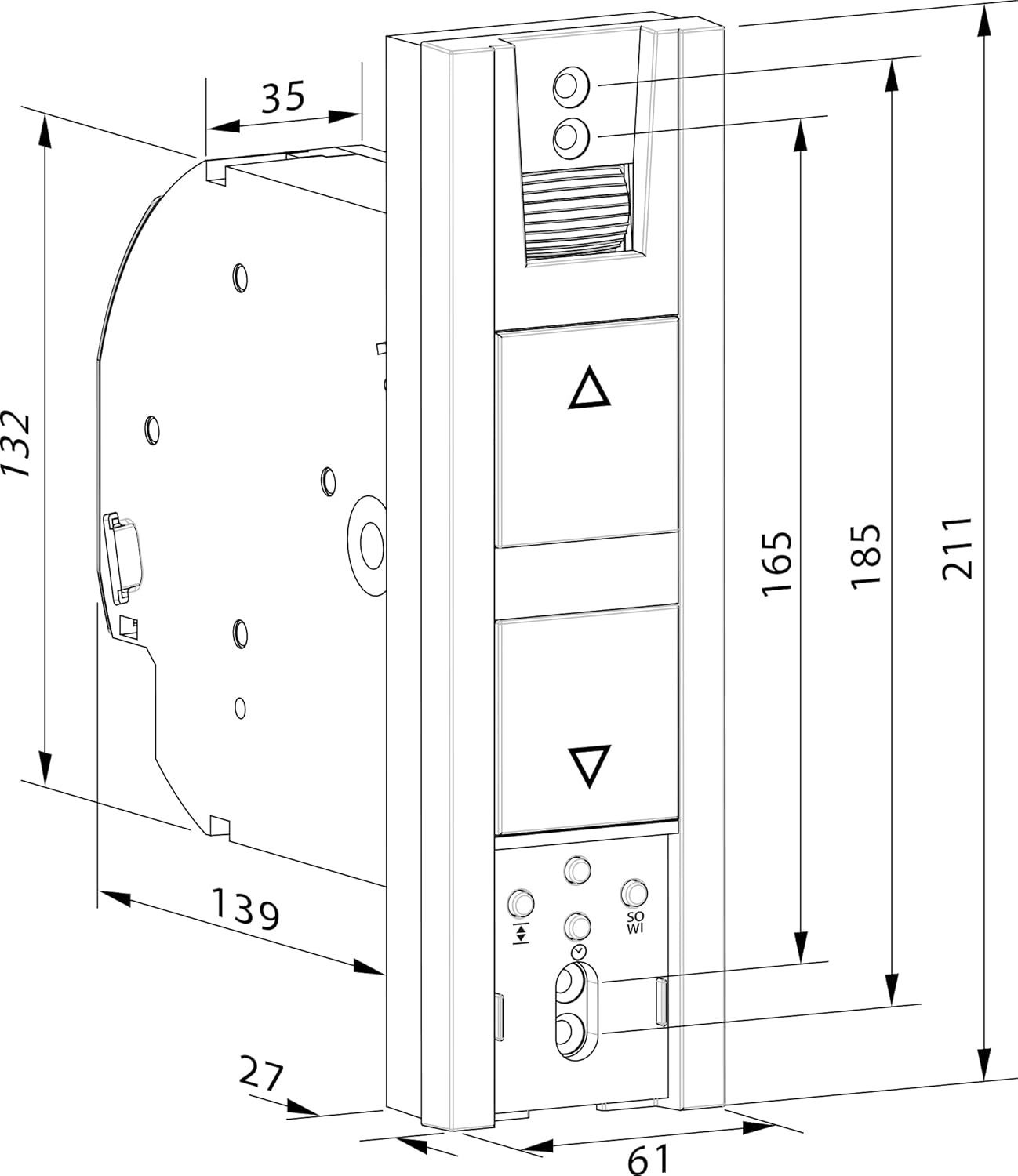
Figure 3: Technical Dimensions. This image displays a detailed line drawing of the RolloTron Pure with various dimensions in millimeters, including height, width, and depth measurements, crucial for installation planning.
9. 保証とサポート
For information regarding warranty terms and conditions, please refer to the warranty card included with your product or visit the official HOMEPILOT website. For technical support, troubleshooting assistance beyond this manual, or spare parts, please contact HOMEPILOT customer service directly.
メーカー: Homepilot
Webサイト: Please refer to the official HOMEPILOT web連絡先の詳細とサポート リソースについては、サイトをご覧ください。


