導入
This manual provides essential instructions for the safe operation, maintenance, and troubleshooting of your Hisense RVCG144AB Robot Vacuum Mop. Please read this manual thoroughly before using the product and retain it for future reference.
安全に関する注意事項
怪我や損傷のリスクを軽減するために、次の安全上の注意事項を守ってください。
- 初めて使用する前にロボットが完全に充電されていることを確認してください。
- 火気や可燃物の近くでロボットを操作しないでください。
- 髪の毛、ゆったりとした衣服、指、および体のすべての部分を開口部や可動部分から遠ざけてください。
- お子様にロボットを操作させないでください。ロボットが作動中は、お子様やペットから目を離さないでください。
- Use only the original charging adapter and dock provided by Hisense.
- Remove power cords, small objects, and fragile items from the floor before cleaning to prevent entanglement or damage.
- ロボットを使用して、大きな破片、液体、燃えている物体を拾い上げないでください。
- 最適なパフォーマンスを維持するために、ブラシとフィルターを定期的に清掃してください。
製品終了view
The Hisense RVCG144AB is a versatile robot vacuum mop designed for efficient floor cleaning. It features gyroscopic mapping for systematic navigation, adjustable power and water levels, and convenient control via a mobile application.
パッケージ内容
開梱したら、すべてのコンポーネントが揃っていることを確認してください。
- Hisense RVCG144AB Robot Vacuum Mop
- 充電ステーション
- 充電ケーブル
- リモートコントロール
- HEPA Filter (1 piece)
- Cleaning Pad (Mop Cloth)
- サイドブラシ(2個)
- 取扱説明書(このマニュアル)
ロボット コンポーネント
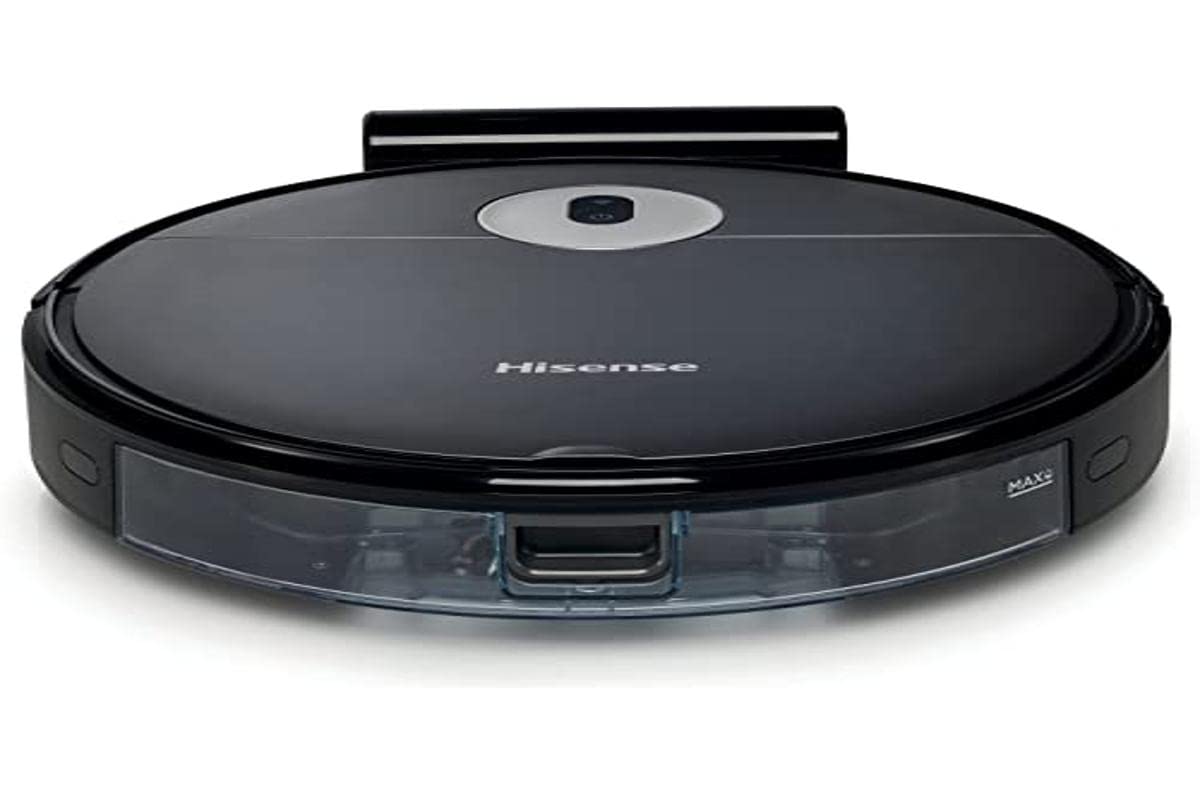
Image: The Hisense RVCG144AB Robot Vacuum Mop, showcasin洗練された黒のデザインとコンパクトなフォームファクターが特徴です。
The robot includes a floating roller brush for adapting to different floor conditions and dual-sided brushes for edge cleaning and preventing hair entanglement.
設定
1. 充電ステーションの配置
Place the charging station against a wall in an open area, ensuring there are no obstacles within 1 meter (3 feet) to the sides and 2 meters (6 feet) in front of the station. Connect the charging cable to the station and plug it into a power outlet.

Image: Illustration of the charging station, showing its power connection and recommended clear space around it.
2. 初期充電
Place the robot onto the charging station. Ensure the charging contacts on the robot align with those on the station. The robot will begin charging automatically. For first use, allow the robot to charge completely, which typically takes several hours.
3.サイドブラシを取り付けます
サイドブラシをロボットの下部にある支柱にカチッと音がするまで押し付けます。
4. アプリ接続(Wi-Fi)
- スマートフォンのアプリストアからHisense ConnectLifeアプリをダウンロードしてください。
- アカウントを登録してログインします。
- Follow the in-app instructions to add your RVCG144AB robot vacuum. This typically involves connecting the robot to your home Wi-Fi network.
- 最適な接続のために、Wi-Fi ネットワークが 2.4GHz であることを確認してください。
操作手順
1. クリーニングの開始と停止
- 手動スタート: ロボットの電源ボタンを1回押すと掃除が始まります。もう一度押すと一時停止します。
- アプリコントロール: Use the Hisense ConnectLife app to start, pause, or stop cleaning from anywhere.
- リモートコントロール: Use the provided remote control to initiate or stop cleaning.
2. クリーニングモード
ロボットはさまざまなニーズに合わせてさまざまな掃除モードを提供します。
- 自動クリーニング: ロボットはアクセス可能なエリア全体をインテリジェントに移動して清掃します。
- Selective Room/Zone Cleaning: Use the app to define specific rooms or areas for cleaning.
- ディープクリーニング: For thorough cleaning of a specific area.
- ジグザグクリーニング: A systematic cleaning pattern to cover large areas efficiently.
- エッジクリーニング: ロボットは壁や家具の端に沿って掃除します。
3. Adjusting Suction Power and Water Flow
The robot features 3 levels of suction power and water flow. These can be adjusted via the mobile app to match your cleaning requirements and floor type.
4. 清掃のスケジュール
Set up cleaning schedules through the Hisense ConnectLife app. This allows the robot to automatically clean at preferred times and days.
メンテナンス
Regular maintenance ensures optimal performance and extends the lifespan of your robot vacuum mop.
1. ゴミ箱を空にする
Open the top cover of the robot and remove the dustbin. Empty its contents into a trash bin. It is recommended to empty the dustbin after each cleaning cycle.

画像: クローズアップ view of the robot's dustbin being removed for emptying, highlighting its capacity.
2. HEPAフィルターの清掃
Remove the HEPA filter from the dustbin. Tap it gently to remove dust. Do not wash the HEPA filter with water; replace it every 3-6 months depending on usage.
3. メインブラシの清掃
Remove the main brush cover and then the main brush. Use the cleaning tool to remove hair and debris tangled around the brush. Reinstall the brush and cover.
4. サイドブラシの掃除
Periodically check the side brushes for tangled hair or debris. Remove them by pulling gently and clean as needed. Replace if damaged.
5. 水タンクとモップパッドの清掃
Detach the water tank and empty any remaining water. Clean the mop pad by hand or machine wash. Allow all components to dry completely before reassembly.

Image: The water tank and mop pad assembly, illustrating how to detach and clean them.
6. センサーと充電接点のクリーニング
正常に機能することを確認するために、ロボットと充電ステーションの両方にある崖センサー、壁センサー、充電接点を清潔で乾いた布で拭いてください。
トラブルシューティング
一般的な問題とその解決策については、このセクションを参照してください。
| 問題 | 考えられる原因 | 解決 |
|---|---|---|
| ロボットがオンにならない、または充電されません。 | Battery depleted; charging contacts dirty; charging station not powered. | Ensure robot is on charging station; clean charging contacts; check power to charging station. |
| ロボットが頻繁に動けなくなります。 | Obstacles on floor; robot caught on wires or rugs. | Clear floor of obstacles, wires, and thick rugs before cleaning. |
| 洗浄性能が悪い。 | ゴミ箱がいっぱい、ブラシが絡まっている、フィルターが詰まっている。 | Empty dustbin; clean main and side brushes; clean or replace HEPA filter. |
| アプリはロボットに接続できません。 | Incorrect Wi-Fi password; robot out of Wi-Fi range; 5GHz Wi-Fi network. | Wi-Fi パスワードを確認し、ロボットをルーターに近づけ、2.4GHz Wi-Fi が使用されていることを確認します。 |
仕様
Technical specifications for the Hisense RVCG144AB Robot Vacuum Mop:
| 特徴 | 詳細 |
|---|---|
| ブランド | ハイセンス |
| モデル番号 | RVCG144AB |
| 色 | 黒 |
| 力 | 55ワット |
| 吸引力 | 4000パ |
| Number of Speeds/Levels | 3 (Power and Wash) |
| 電池のタイプ | リチウムイオン |
| バッテリー容量 | 2600mAh |
| ランタイム | 最大90分 |
| ゴミ箱容量 | 500ml |
| 水タンク容量 | 250ml |
| フィルタータイプ | ヘパ |
| ナビゲーション | Gyroscopic Mapping |
| コントロールタイプ | App Control (Wi-Fi), Remote Control |
| 製品寸法 | 35L×35W×4Hcm |
| アイテム重量 | 5.4キログラム |
| 推奨される表面 | Marble, laminate, linoleum, carpet, wood |
保証とサポート
For warranty information, please refer to the warranty card included with your product packaging or visit the official Hisense web当サイトでは、技術サポートやサービスに関するお問い合わせは、Hisenseの公式チャネルを通じてカスタマーサービスまでご連絡ください。
詳しい情報とサポートリソースについては、 Hisense official webサイト.


