製品終了view
The WOLFBOX i05 Dash Cam is a high-performance front and rear dash camera system designed to provide comprehensive road coverage and enhanced driving safety. It captures crystal-clear panoramic footage with its front 4K and rear 1080p cameras, offering wide viewing angles to minimize blind spots. Equipped with advanced features such as GPS, Wi-Fi, WDR, HDR, Night Vision, and Loop Recording, the i05 ensures reliable performance in various driving conditions.
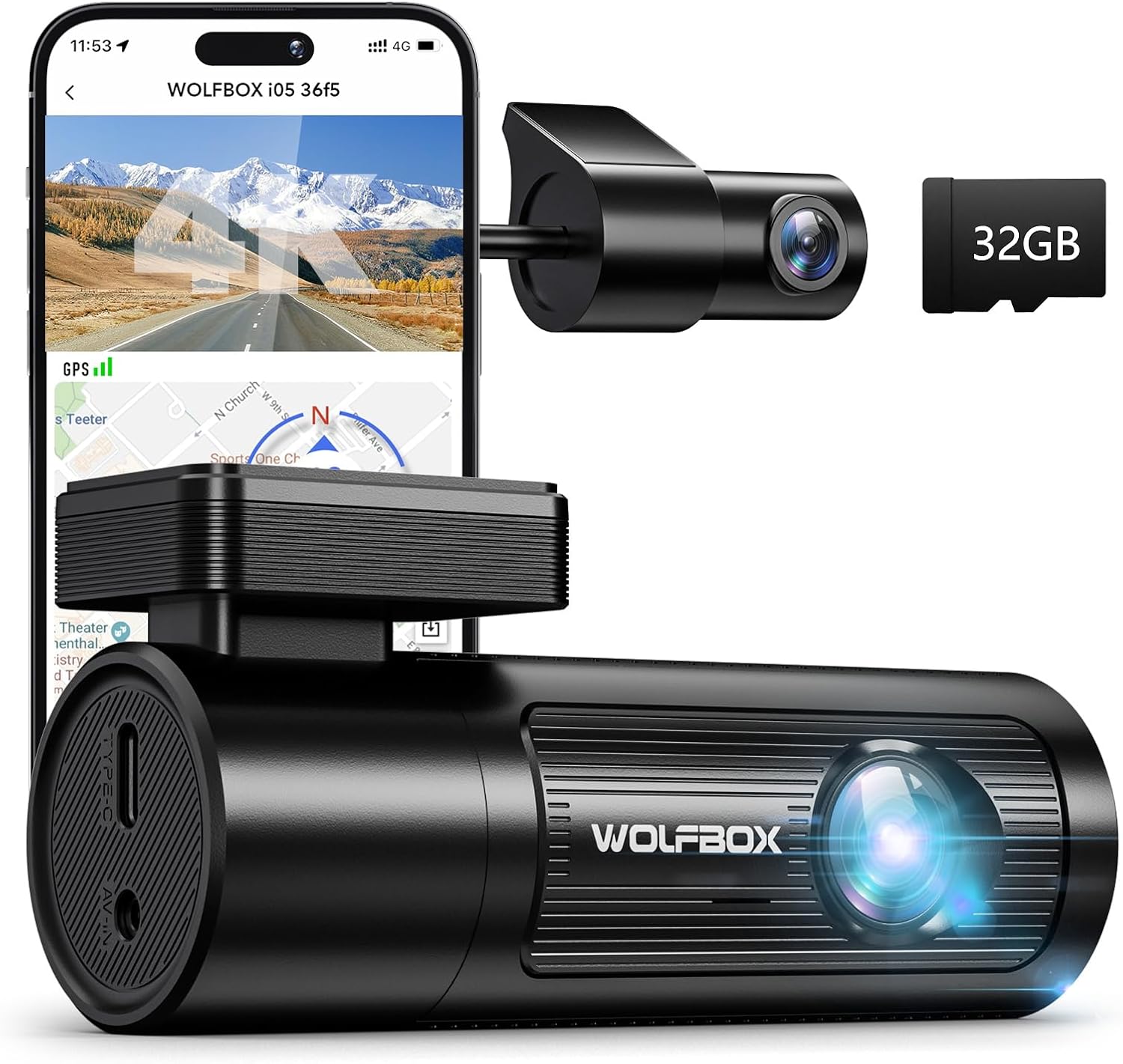
Figure 1: WOLFBOX i05 4K Dash Cam with included 32GB SD card and rear camera.
箱の中身
Upon unboxing your WOLFBOX i05 Dash Cam, please verify that all the following components are included:
- i05 Dash Cam * 1
- 1080P Rear Camera * 1
- 11.5ft Power Supply Cable with Car Charger * 1
- 3M Sticker * 2
- ユーザーマニュアル
セットアップとインストール
The WOLFBOX i05 Dash Cam is designed for straightforward installation. Follow these steps for optimal setup:
1. ダッシュカムの取り付け
- ドライブレコーダーを取り付けるフロントガラス部分をきれいにし、ほこりや油脂が付着していないことを確認してください。
- Attach one of the 3M stickers to the dash cam mount.
- Carefully position the dash cam on the windshield, ensuring it does not obstruct your view. Use the built-in level (if available on your model) for precise alignment.
- Press firmly to secure the adhesive mount to the windshield.

Figure 2: The i05 dash cam features a center point scale for quick measurement and layout, and can be installed with an electrostatic sticker to prevent residual marks.
2. リアカメラの接続
- Attach the 1080P rear camera to the rear window.
- リアカメラケーブルをメインのダッシュ カメラ ユニットに接続します。
- Route the rear camera cable neatly along the vehicle's interior trim.
Figure 3: The rear camera attaches to the rear window with a simple one-wire connection.
3. ドライブレコーダーの電源を入れる
- Connect the 11.5ft power supply cable to the dash cam.
- Plug the car charger end into your vehicle's 12V power outlet (cigarette lighter socket).
- Route the power cable along the edge of the windshield and dashboard to keep it tidy and out of the way.
4. Hardwire Kit Installation (Optional)
For continuous power and parking monitoring features, a hardwire kit (sold separately, ASIN: B09X1L1GMX) is recommended. The installation process involves connecting three wires to your vehicle's fuse box.
Video 1: WOLFBOX Hardwire Kit Installation Guide. This video demonstrates the process of installing the hardwire kit for continuous power supply to the dash cam.
Hardwire Kit Connection Steps:
- ヒューズボックスを見つけます。 The fuse box location varies by vehicle. For BMWs, it's typically in the trunk. Consult your vehicle's manual for the exact location.
- Route the Hardwire Kit Cable:
- Reserve a section of wire near the dash cam.
- Use a crowbar tool to hide the remaining wire along the gap of the front windshield.
- Continue routing the cable through the A-pillar.
- Hide the cable along the gap between the car body and the ceiling on the passenger side.
- Route the cable between the rear seat and the ceiling.
- Remove the door rubber strips, plastic housing, and interior trunk trim to thread the hardwire kit to the trunk.
- Connect the Wires to the Fuse Box: The hardwire kit includes three wires: red, yellow, and black.
- レッドワイヤー(ACC): Connect to an ACC (Accessory) terminal in the fuse box. This terminal receives power only when the car's ignition is on. Examples of ACC terminals include DOME, RADIO, TAIL, EFI, TEL, ECU-IG, ECU-B.
- 黄色のワイヤー(B+): Connect to a B+ (Battery Positive) terminal. This terminal provides constant power, even when the car is off. Examples of B+ terminals include POWER, CB DOOR.
- 黒線(アース): Connect to a metal part of the car's chassis for grounding.
Note: Some car models have a delayed power-off feature for the ACC terminal. Wait until power is completely cut off before testing. Refer to your fuse box diagram for specific current information for each terminal.
操作手順
1. 電源のオン/オフ
- The dash cam will automatically power on and begin recording when connected to a power source and the vehicle's ignition is turned on.
- It will automatically power off when the vehicle's ignition is turned off (unless hardwired for parking monitoring).
2.ビデオ録画
The i05 dash cam records simultaneously from both front and rear cameras, providing comprehensive coverage.
- フロントカメラ: Records in 4K UHD (2160p) with a 170° wide-angle field of view.
- リアカメラ: Records in 1080p with a 150° wide-angle field of view.
- ループ録音: The camera continuously records, overwriting the oldest unlocked footagメモリカードがいっぱいになったとき。

Figure 4: The WOLFBOX i05 offers dual-channel recording with a 4K front camera (170° FOV) and a 1080P rear camera (150° FOV).
3. Night Vision and Image Enhancement
Advanced WDR (Wide Dynamic Range) and HDR (High Dynamic Range) technologies, combined with a large F1.5 aperture, ensure clear video capture in low-light conditions and challenging lighting environments.

Figure 5: Superior night vision capabilities with WDR and HDR technology for clear recordings in various lighting conditions.
4. Built-in WiFi and GPS
The dash cam features built-in Wi-Fi and GPS for convenient access to recordings and tracking capabilities.
- Wi-Fi接続: Use the dedicated WOLFBOX software (available for iOS and Android) to connect to the dash cam via Wi-Fi. This allows you to view ライブfootage, retrieve recorded videos, and adjust settings directly from your smartphone.
- GPS追跡: The GPS feature records your driving route, speed, and other relevant data, which can be reviewed later via the app.

Figure 6: Conveniently download and review recordings on the WOLFBOX App, which also displays GPS route and speed tracking.
5.駐車監視
When connected to a hardwire kit (ASIN: B09X1L1GMX), the i05 dash cam offers two parking monitoring modes:
- Collision Sense Mode (G-sensor): レコードfootage automatically when an impact is detected while parked.
- タイムラプスモード: Continuously records at 1 frame per second (1FPS) for extended coverage, allowing hours of surveillance video to be played back in minutes.

Figure 7: The dash cam supports two parking modes for 24-hour surveillance: Time Lapse Mode for continuous recording and G-sensor Mode for impact-triggered recording.
メンテナンス
- メモリーカードのフォーマット: It is recommended to format the included 32GB SD card periodically (e.g., once a month) to maintain optimal performance and prevent data corruption. If using a larger capacity card, the frequency may be reduced.
- レンズクリーニング: 鮮明なビデオ品質を確保するために、前面カメラと背面カメラのレンズを柔らかく糸くずの出ない布で定期的に清掃してください。
- ファームウェアの更新: Check the WOLFBOX official webダッシュ カメラに最新の機能とバグ修正が適用されていることを確認するには、サイトまたはアプリで利用可能なファームウェア アップデートを確認してください。
トラブルシューティング
If you encounter any issues with your WOLFBOX i05 Dash Cam, please refer to the following common solutions:
- カメラの電源が入らない:
- 電源ケーブルがダッシュ カメラと車両の電源コンセントの両方にしっかりと接続されていることを確認します。
- Check the vehicle's 12V power outlet for power.
- If hardwired, verify all fuse box connections are correct and fuses are intact.
- Video Quality Issues (Blurry/Unclear):
- カメラのレンズを清掃します。
- レンズから保護フィルムが取り除かれていることを確認してください。
- ダッシュ カメラがしっかりと取り付けられており、振動していないことを確認します。
- App Connectivity Issues (Wi-Fi/GPS):
- Ensure Wi-Fi is enabled on your smartphone and you are connected to the dash cam's Wi-Fi network.
- ダッシュ カメラとスマートフォンの両方を再起動します。
- Update the WOLFBOX app to the latest version.
- If GPS data is inaccurate, ensure the dash cam has a clear view 空の。
- メモリカードエラー:
- Format the SD card using the dash cam's settings or the WOLFBOX app.
- Try a different high-speed (Class 10 or U3 recommended) SD card.
For further assistance, please contact WOLFBOX customer service.
仕様
| 特徴 | 詳細 |
|---|---|
| 製品寸法 | 2.76 x 5.12 x 4.33インチ |
| アイテム重量 | 1.13オンス |
| モデル名 | 05 円 |
| 色 | 黒 |
| ビデオキャプチャ解像度 | フロント: 2160p (4K)、リア: 1080p |
| 分野 View (FOV) | フロント:170°、リア:150° |
| 接続技術 | Wi-Fi |
| GPS | ルートと速度を追跡するための内蔵GPS |
| 特集 | 4K+1080P Dual Dash Cams, Built-In WiFi & GPS, Compact Design, Free APP Control, Dual Parking Monitor (G Sensor Trigger Record & Time-lapse), Night Vision, Loop Recording, G-sensor, WDR, HDR, Super Capacitor |
| 取り付けタイプ | 接着マウント |
| 含まれるコンポーネント | i05 Dash Cam, 1080P Rear Camera, 11.5ft Power Supply Cable with Car Charger, 3M Stickers (2), User Manual |

Figure 8: The compact size of the WOLFBOX i05 dash cam, similar to a lipstick, making it small and convenient.
保証とサポート
WOLFBOX stands behind the quality of its products. Your i05 Dash Cam comes with:
- 1-Year Unconditional Warranty: 製造上の欠陥をカバーし、製品の信頼性を保証します。
- 生涯にわたるテクニカルサポート: Assistance is available for any usage problems or technical queries you may have throughout the product's lifespan.
For customer service and technical support, please reach out to:
メールアドレス: service_us@wolfbox.com
電話: +1 888 296 8399


