1. はじめに
The ANJIELO SMART F8 is a 7-inch touch control panel designed to centralize smart home device management. It integrates features such as lighting control, dimmer functions, background music playback, and two-way video doorbell intercom. This manual provides detailed instructions for setting up, operating, and maintaining your smart home control panel.
2. 主な特徴
- 7-inch Multi-Touch LCD Screen with Rotary Switch: Features a main 7-inch multi-touch LCD screen complemented by a 1.2-inch LCD touch screen on the rotary switch, ideal for thermostat and dimmer control.
- All-in-One Control Center: Manage up to 100 USB devices directly from the screen, including lighting, locks, thermostats, and scenes, without needing a mobile application for every action.
- 統合されたオーディオ: Built-in speakers support two-way intercom with Tuya devices and synchronous music playback from connected cell phones or panels.
- App Installation Support: Supports 16GB TF card (not included) for downloading preferred music players or other applications.
- シーンのカスタマイズ: Create and activate different smart home scenes to match your lifestyle, automating multiple appliances with a single tap.
3. セットアップとインストール
The ANJIELO SMART F8 control panel is designed for straightforward installation, replacing existing dimmers. The process typically takes about 10 minutes.
3.1 配線と取り付け
Connect the wires hidden in the wall directly to the dimmer. The unit is compatible with a standard 86 bottom box, eliminating the need for rerouting or rebuilding walls.

後方 view of the ANJIELO SMART F8 control panel, illustrating the wiring terminals and network port for installation.
3.2初期構成
Upon powering on, the device will guide you through initial setup steps, including connecting to your Wi-Fi network and pairing with the Tuya Smart Life app.
Video demonstrating the initial setup of the ANJIELO SMART F8 control panel, including Wi-Fi connection and device pairing via QR code scan using a smartphone.
To connect the device to your smartphone, scan the QR code displayed on the panel using the Smart Life or Tuya app. This will link the panel to your smart home ecosystem.
4. 操作手順
The ANJIELO SMART F8 offers intuitive control over your smart home devices through its touch screen and rotary switch.
4.1 スマートホームコントロール
The panel serves as a central hub for managing various smart devices. You can control lighting, adjust thermostats, manage curtains, and activate pre-set scenes with a single touch.
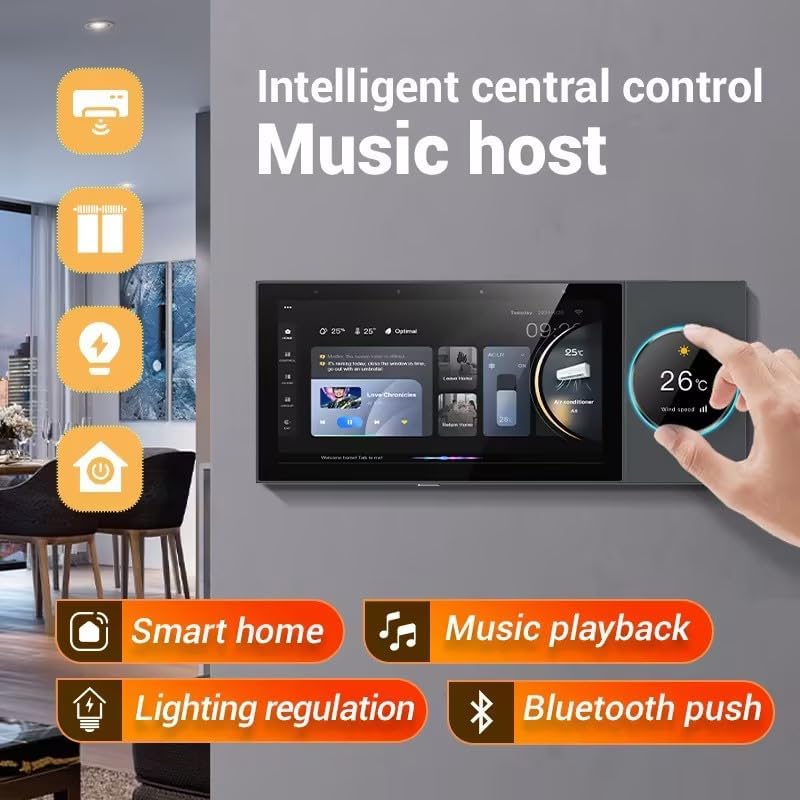
The ANJIELO SMART F8 control panel interface, showing options for music playback, lighting regulation, and other smart home functions.
4.2 Music Playback and Dimmer Function
Utilize the rotary switch for precise control over volume and lighting dimmer settings. The panel supports background music playback and can sync with your mobile device via Bluetooth.

The ANJIELO SMART F8 panel demonstrating mobile app music push, syncing audio from a smartphone to the panel and connected speakers.
4.3 ビデオドアベルとインターホン
The panel supports two-way intercom functionality with compatible video doorbells, allowing you to see and communicate with visitors directly from the control panel.

The ANJIELO SMART F8 panel showing a video doorbell feed, enabling intelligent central control for unlocking doors.
ビデオショーasing various smart home scenarios and the ANJIELO SMART F8 panel's role in controlling lights, curtains, air conditioning, and displaying live feeds from surveillance and doorbell cameras.
4.4 Customizing Your Experience
The panel allows for extensive customization, including setting up different scenes for various moods or activities, and installing additional applications to enhance functionality.

The ANJIELO SMART F8 panel showcasing its 'All in One Function' interface, with screens for light, curtain, and air conditioning control, among others.
5. メンテナンス
To ensure optimal performance and longevity of your ANJIELO SMART F8 control panel, follow these general maintenance guidelines:
- クリーニング: Gently wipe the screen and exterior with a soft, dry, lint-free cloth. Avoid using abrasive cleaners or solvents.
- ソフトウェアアップデート: デバイスに最新の機能とセキュリティ強化が適用されるように、ソフトウェア アップデートを定期的に確認してインストールしてください。
- 環境条件: デバイスを乾燥した環境に保管し、極端な温度や直射日光にさらさないでください。
6。 トラブルシューティング
If you encounter any issues with your ANJIELO SMART F8 control panel, consider the following basic troubleshooting steps:
- 電源なし: Ensure the device is correctly wired and receiving power. Check circuit breakers if necessary.
- タッチスクリーンが反応しない: Try restarting the device. If the issue persists, check for any physical damage or contact support.
- 接続の問題: Verify your Wi-Fi network is active and the device is within range. Re-pair the device with the app if needed.
- デバイスが応答しない: For specific smart devices, ensure they are properly connected to the Tuya ecosystem and are online.
For persistent problems, refer to the official ANJIELO SMART support resources or contact customer service.
7. 仕様
| 特徴 | 詳細 |
|---|---|
| メーカー | アンジェロ・スマート |
| 部品番号 | F8 |
| アイテム重量 | 1.2ポンド |
| 製品寸法 | 9 x 1 x 5インチ |
| 商品型番 | F8 |
| 色 | 黒 |
| 材料 | 銅 |
| 含まれるコンポーネント | 充電器 |
| 電池付属 | いいえ |
| 電池が必要 | いいえ |
| 初回利用可能日 | 17年2023月XNUMX日 |
8. 保証とサポート
For warranty information, product registration, or technical assistance, please visit the official ANJIELO SMART web公式サイトをご覧いただくか、カスタマーサポートチームにお問い合わせください。保証請求のために購入時のレシートを保管してください。


