Poly Edge E220 IP デスクフォン ユーザーマニュアル
Your guide to setting up and using your Poly Edge E220 IP Desk Phone.
1. はじめに
The Poly Edge E220 is a versatile IP desk phone designed for modern office environments, offering advanced communication features. It supports up to 16 lines with 4-line keys and includes integrated Bluetooth for seamless mobile phone and headset pairing. This manual provides detailed instructions for setup, operation, and maintenance of your device.
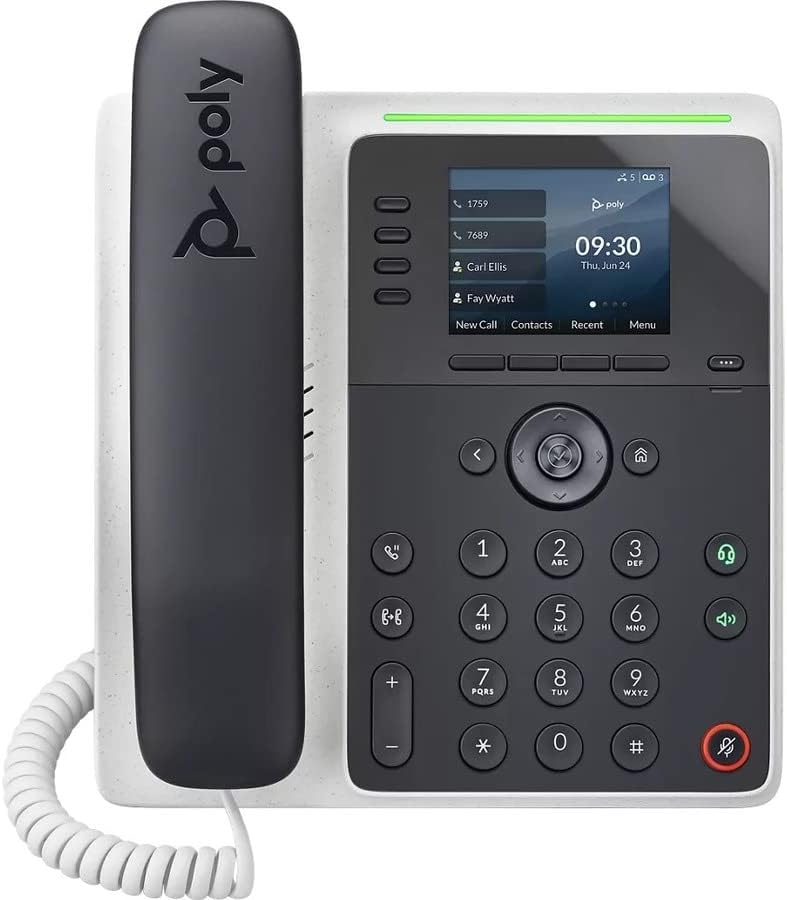
画像: 正面 view of the Poly Edge E220 IP Desk Phone, showcasing its display, keypad, and handset.
2. 箱の中身
パッケージに以下のすべてのコンポーネントが含まれていることを確認してください。
- Poly Edge E220 IP Desk Phone Unit
- ハンドセット
- ハンドセットコイルコード
- Cat5E Ethernet Cable
- Integrated Wall Mount (pre-attached or separate)
- ベーススタンド
Note: A power supply is NOT included with this renewed product and must be acquired separately if Power over Ethernet (PoE) is not available.
3 製品の特徴
- 4-Line Keys: Supports up to 16 lines for flexible call management.
- 統合Bluetooth: Allows for seamless pairing with mobile phones and Bluetooth headsets.
- 高解像度ディスプレイ: Provides clear visibility for call information and menu navigation.
- HDボイス: Delivers superior audio quality for clearer conversations.
- マルチライン操作: Manage multiple active calls simultaneously.
- 電話会議機能: Supports 3-way conferencing.
4. セットアップとインストール
4.1 電話機の組み立て
- Attach the Base Stand: Align the tabs on the base stand with the slots on the back of the phone unit. Slide the stand into place until it clicks securely.
- Connect the Handset: Plug one end of the coil cord into the handset and the other end into the handset port on the side of the phone unit.
4.2ケーブルの接続
Locate the ports on the back and side of the phone unit.

画像: サイド view of the Poly Edge E220 IP Desk Phone, highlighting the various connection ports and the adjustable stand.
- ネットワーク接続: Connect one end of the Cat5E Ethernet cable to the LAN port on the phone and the other end to your network switch or router. If your network provides Power over Ethernet (PoE), the phone will power on automatically.
- Power Connection (if no PoE): If PoE is not available, connect an appropriate power adapter (not included) to the power port on the phone and then to a power outlet.
- Optional Headset Connection: If using a wired headset, connect it to the dedicated headset port.
4.3初期電源オン
Once connected, the phone will power on and begin its boot sequence. This may take a few moments. The display will show the Poly logo, followed by network configuration and registration status. If prompted, enter your network credentials or contact your IT administrator for setup assistance.
5. 操作手順
5.1 電話をかけたり受けたりする
- 電話をかけるには: Pick up the handset, press the Speaker button, or press a line key. Dial the number and press the Dial soft key or wait for the call to connect.
- 電話に出るには: Pick up the handset, press the Speaker button, or press the flashing line key.
- 通話を終了するには: Replace the handset, or press the End Call soft key.

Image: A man engaged in a phone call using the Poly Edge E220 IP Desk Phone in a professional office environment.
5.2Bluetoothの使用
The Poly Edge E220 allows you to pair your mobile phone or Bluetooth headset for enhanced flexibility.
- Bluetoothを有効にする: Navigate to the phone's menu, select Settings, then Bluetooth, and ensure Bluetooth is enabled.
- デバイスのペアリング: Put your Bluetooth device (mobile phone or headset) into pairing mode. On the phone, select 'Add New Device' or 'Scan for Devices'. Select your device from the list and follow the on-screen prompts to complete pairing.
- 接続中: Once paired, your device should automatically connect when in range. You can manually connect/disconnect from the Bluetooth menu.

Image: A woman working at a desk, utilizing the Poly Edge E220 IP Desk Phone alongside her laptop, demonstrating its integration into a modern workspace.
5.3つの高度な機能
- 所有: During a call, press the Hold soft key to place the call on hold. Press it again to resume.
- 転送: During a call, press the Transfer soft key, dial the new number, and then press Transfer again to complete.
- 会議: During an active call, press the Conference soft key, dial the number of the third party, and then press Conference again to join all parties.
- ボイスメール: Press the Voicemail button to access your voicemail messages.
6. メンテナンス
To ensure the longevity and optimal performance of your Poly Edge E220 IP Desk Phone, follow these maintenance guidelines:
- クリーニング: 柔らかく乾いた糸くずの出ない布で、携帯電話の表面とディスプレイを拭いてください。頑固な汚れには、軽く拭いてください。amp布を水で濡らしてください。刺激の強い化学薬品、研磨剤入りの洗剤、エアゾールスプレーの使用は避けてください。
- 環境: 携帯電話は、直射日光、過度の熱、湿気を避け、乾燥した環境に保管してください。
- ケーブル管理 ポートやケーブルの損傷を防ぐために、すべてのケーブルがきちんと整理され、張力がかかっていないことを確認してください。
- ソフトウェアアップデート: Periodically check with your IT administrator for available software updates to ensure your phone has the latest features and security enhancements.
7。 トラブルシューティング
If you encounter issues with your Poly Edge E220, refer to the table below for common problems and solutions.
| 問題 | 考えられる原因 | 解決 |
|---|---|---|
| 電話の電源が入らない | No power supply or PoE connection | Ensure Ethernet cable is connected to a PoE-enabled port, or connect a compatible power adapter. |
| 発信音なし | Network issue or phone not registered | Check network cable connection. Verify network status on the phone display. Contact IT support if registration fails. |
| 発信者の声が聞こえない / 発信者は私の声が聞こえない | Volume too low, faulty handset/headset, or network audio issue | Adjust volume. Test with speakerphone. Check handset/headset connection. Restart phone. |
| Bluetoothデバイスがペアリングされない | デバイスがペアリングモードになっていないか、範囲外です | Ensure Bluetooth device is in pairing mode and within range. Restart both devices. |
If the problem persists after attempting these solutions, please contact your IT department or the product support team for further assistance.
8. 仕様
Key technical specifications for the Poly Edge E220 IP Desk Phone:
| 特徴 | 詳細 |
|---|---|
| 製品寸法 | 12.1 x 10.3 x 3.4インチ |
| アイテム重量 | 2.55ポンド |
| 電話の種類 | 有線IP電話 |
| 電源 | Corded Electric (Power Supply NOT Included) / Power over Ethernet (PoE) |
| ダイヤラの種類 | シングルキーパッド |
| 留守番電話システムの種類 | Digital (requires service provider support) |
| 電話会議機能 | 3ウェイ |
| 複数行操作 | Yes, supports up to 16 lines with 4-line keys |
| ブルートゥース | Integrated for mobile phone and headset pairing |
9. 保証とサポート
As a renewed product, the Poly Edge E220 IP Desk Phone typically comes with a limited warranty provided by the refurbisher or seller. Please refer to your purchase documentation for specific warranty terms and conditions. For technical support, troubleshooting beyond this manual, or warranty claims, please contact the seller or your IT administrator.


