1. はじめに
Thank you for choosing the Sharp SumoBox CP-LS100. This high-performance portable speaker is designed to deliver powerful and clear audio for various applications, from personal entertainment to small events. This manual provides essential information for setting up, operating, and maintaining your SumoBox CP-LS100 to ensure optimal performance and longevity.

Figure 1.1: Sharp SumoBox CP-LS100 Portable Speaker
2. 安全情報
製品をご使用になる前に、すべての安全に関する注意事項をお読みください。このマニュアルは、今後の参考のために保管してください。
- Do not expose the speaker to rain, moisture, or extreme temperatures. The CP-LS100 model is not IPX rated and is not designed for use in damp または濡れた状態。
- スピーカー周囲の換気を良好に保ち、通気口を塞がないようにしてください。
- ユニットに付属の電源アダプタのみを使用してください。
- スピーカーの筐体を開けないでください。修理は必ず資格のあるサービス担当者にご依頼ください。
- Avoid placing the speaker on unstable surfaces.
- スピーカーをラジエーター、暖房口、ストーブ、その他の機器(電気製品を含む)などの熱源から遠ざけてください。 amp熱を発生する装置。
- 特にプラグ、コンセント、および装置から出ている部分で、電源コードが踏まれたり挟まれたりしないように保護してください。
3. パッケージ内容
Carefully unpack your SumoBox CP-LS100 and ensure all items are present and in good condition. The package should contain:
- Sharp SumoBox CP-LS100 Portable Speaker
- 電源ケーブル
- Eight (8) Round Protective Corners
- Hex Driver and Screws for protective corners
- 取扱説明書(本書)
4.製品オーバーview
The Sharp SumoBox CP-LS100 is a robust portable speaker designed for powerful audio output and versatile connectivity. It features a durable construction with a heavy-duty metal grill and integrated handles for easy transport.
4.1 主な特徴
- ハイパワー出力: Delivers 125W RMS (105dB) through 2 x 8-inch woofers and 2 x 2-inch tweeters.
- 取り外し可能なバッテリー: Provides up to 10 hours of playing time on a single charge. Additional batteries are available separately.
- Duo Mode (True Wireless Stereo): Pair two SumoBox speakers for a true stereo sound experience.
- 3-Channel Pro Panel: Features XLR/TRS combo inputs for microphones, instruments (keys, guitar), and other audio sources, with individual volume, treble, bass, and reverb controls.
- Amplified Speaker Link: Connect multiple SumoBox speakers via daisy chain for expanded sound coverage.
- SAM by Devialet: Utilizes Speaker Active Matching (SAM) technology for optimized speaker driver performance.
- USB充電ポート: Conveniently charge mobile devices.
- Indoor/Outdoor Mode: Optimizes sound for different environments.
- Speaker Stand Mount: Integrated 35mm mount for use with compatible speaker stands (minimum 25kg weight handling).
- スマートライフアプリコントロール: Manage settings and controls via the dedicated mobile application.
4.2 コントロールとポート
The rear panel of the SumoBox CP-LS100 provides access to all controls and input/output ports.

Figure 4.1: 3-Channel Pro Panel
- CH1/CH2 XLR/TRS Combo Inputs: For connecting microphones or instruments.
- Volume, Treble, Bass, Reverb Knobs: Individual controls for each channel.
- Ducking Button: Automatically lowers music volume when a microphone input is detected.
- Bluetoothペアリングボタン: Bluetoothペアリングモードを開始します。
- Duo Mode Button: Activates True Wireless Stereo pairing with another SumoBox.
- Indoor/Outdoor Mode Selector: サウンドプロを調整file 最適なパフォーマンスを実現します。
- 補助入力(3.5mm): For connecting external audio devices. Note: Using this port will override any active Bluetooth connection.
- Speaker Link IN/OUT: XLR ports for connecting multiple SumoBox units.
- USB充電ポート: 外部機器の充電に。
- DC18V 入力: For charging the battery when it is not in the SumoBox.
- Power Input (AC 100-240V): For main power supply and charging.
5. セットアップ
5.1 Attaching Protective Corners
The SumoBox CP-LS100 comes with eight protective corners to enhance durability and allow for stable positioning. Use the provided hex driver and screws to attach these corners to the designated points on the speaker.
5.2 バッテリーの充電
Before first use, fully charge the speaker's battery. Connect the power cable to the speaker's power input and then to a wall outlet. The battery indicator lights will show the charging status. A full charge provides approximately 10 hours of playback.

Figure 5.1: Removable Battery
5.3 電源のオン/オフ
Press and hold the Power button on the rear panel to turn the speaker on or off.
6.運用
6.1Bluetoothペアリング
- Turn on the SumoBox CP-LS100.
- Press the Bluetooth pairing button on the rear panel. The Bluetooth indicator will flash.
- On your Bluetooth-enabled device (smartphone, tablet, laptop), search for "SumoBox CP-LS100" in the Bluetooth settings.
- Select the speaker to pair. Once connected, the Bluetooth indicator will glow solid.
6.2 Duo Mode (True Wireless Stereo)
To achieve true wireless stereo sound, you can pair two SumoBox CP-LS100 speakers.

Figure 6.1: Duo Mode Setup
- Ensure both SumoBox speakers are powered on and not connected to any other Bluetooth device.
- On the first speaker (which will be the primary/left channel), press the Duo Mode button. The Duo Mode indicator will flash.
- On the second speaker (which will be the secondary/right channel), press the Duo Mode button.
- The two speakers will automatically connect. Once connected, the Duo Mode indicators on both speakers will glow solid.
- 次に、セクション6.1の説明に従って、Bluetoothデバイスをメインスピーカーに接続します。両方のスピーカーからステレオで音声が再生されます。
6.3 マイクと楽器の接続
Use XLR or 1/4-inch TRS cables to connect microphones or instruments to the CH1 and CH2 combo inputs. Adjust the individual Volume, Treble, Bass, and Reverb knobs for each channel to achieve the desired sound.

Figure 6.2: XLR/TRS Combo Inputs
6.4 Speaker Linking (Daisy Chain)
For larger venues or events, you can connect multiple SumoBox speakers using the Speaker Link IN/OUT XLR ports. This allows you to expand your sound system.

図6.3: Amplified Speaker Link
Connect the Speaker Link OUT of the first speaker to the Speaker Link IN of the second speaker, and so on. Note that daisy-chaining speakers via this method may introduce a slight latency (approximately 35ms per additional speaker).
6.5 Indoor/Outdoor Mode
Toggle the Indoor/Outdoor mode selector to optimize the speaker's sound profile for your environment. The outdoor mode typically enhances bass and projection for open spaces.
6.6 スマートライフアプリ
Download the Smart Life app to control your SumoBox CP-LS100 from your mobile device. The app provides access to most of the rear panel controls for convenience.
7. メンテナンス
- クリーニング: スピーカーの外装を清掃する際は、柔らかく乾いた布をご使用ください。液体クリーナーやエアゾールは使用しないでください。
- バッテリーのケア: For optimal battery life, avoid fully discharging the battery frequently. If storing the speaker for an extended period, charge the battery to about 50% and store in a cool, dry place.
- ストレージ: Store the speaker in a cool, dry environment away from direct sunlight and extreme temperatures.
8。 トラブルシューティング
| 問題 | 考えられる原因 | 解決 |
|---|---|---|
| スピーカーの電源が入りません。 | バッテリーが消耗しているか、電源ケーブルが接続されていません。 | Connect the power cable and charge the battery. Ensure the power outlet is functional. |
| 音声出力がありません。 | Volume is too low, input source not connected, or incorrect input selected. | Increase volume. Check all cable connections. Ensure the correct input channel is active. |
| Bluetooth接続の問題。 | Device is out of range, not in pairing mode, or already connected to another device. | Move device closer to speaker. Ensure speaker is in Bluetooth pairing mode. Disconnect from other devices. |
| 歪んだ音。 | Volume too high, input signal too strong, or speaker placed on an unstable surface. | Reduce volume on speaker and/or input device. Check input signal level. Ensure speaker is on a stable surface. |
| Duo Mode not connecting. | Speakers are too far apart or already paired to other devices. | Ensure speakers are within close proximity. Disconnect both speakers from any other Bluetooth devices before initiating Duo Mode. |
9. 仕様
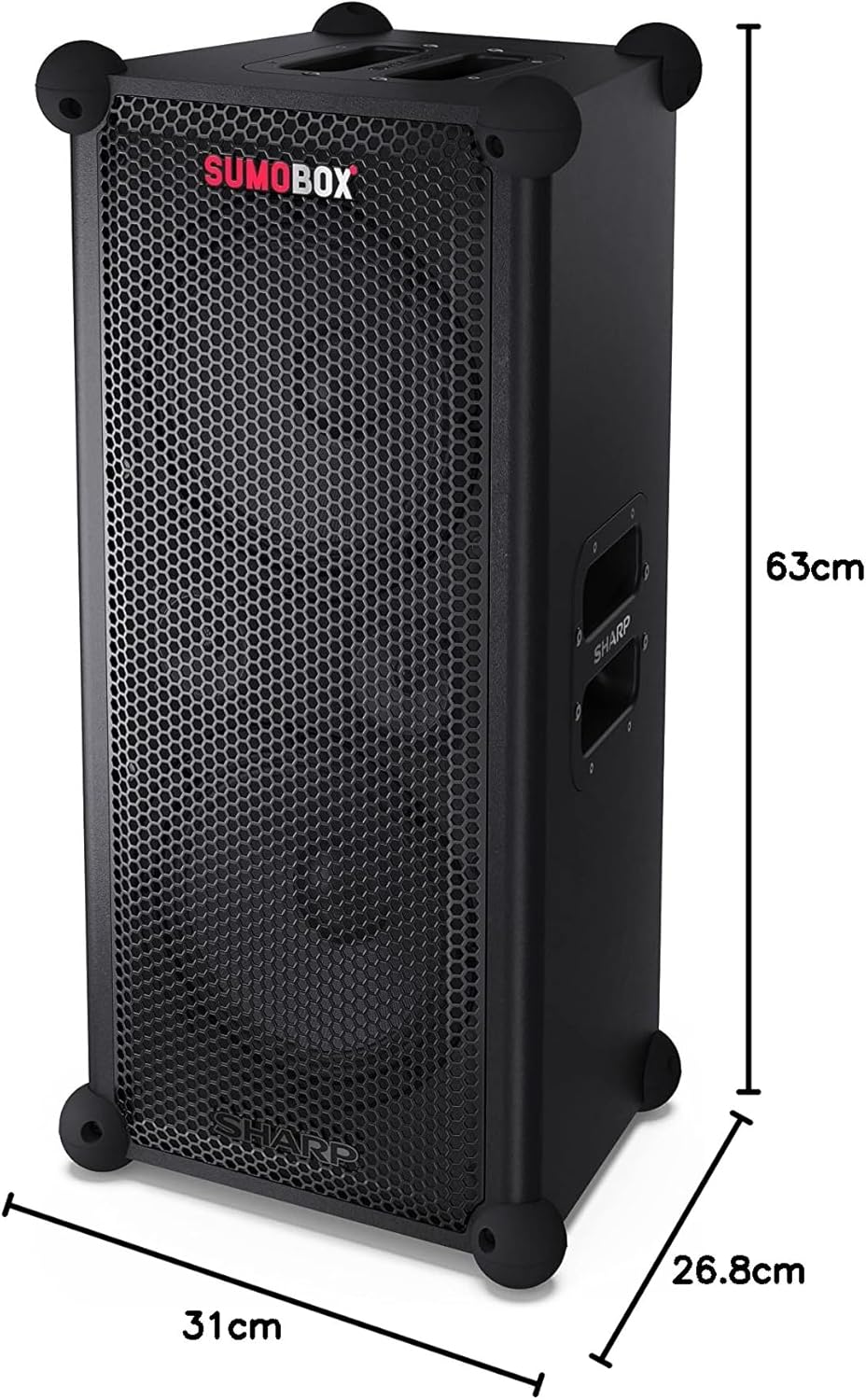
図9.1: 製品寸法
| 特徴 | 詳細 |
|---|---|
| モデル名 | SumoBox CP-LS100 |
| スピーカータイプ | Tower, Portable |
| スピーカー出力 | 120ワット(RMS) |
| 音圧レベル (SPL) | 105デシベル |
| サブウーファーの直径 | 8インチ(×2) |
| 接続技術 | ブルートゥース |
| オーディオ出力モード | Stereo (with Duo Mode) |
| コントローラータイプ | Pro panel with advanced control and Sharp Life app |
| バッテリー寿命 | 最大10時間 |
| バッテリー容量 | 5 Amp 営業時間 |
| アイテム重量 | 9.7キログラム |
| 製品寸法(長さ x 幅 x 高さ) | 26.8 x 31 x 63 cm |
| 色 | 黒 |
| 防水等級 | Not IPX Rated (Not waterproof) |
10. 保証とサポート
保証情報およびテクニカルサポートについては、製品に付属の保証書を参照するか、シャープの公式ウェブサイトをご覧ください。 website. You can also contact Sharp customer service for assistance with product registration, troubleshooting, and service inquiries.
Sharp Customer Support: www.sharp.ca


