1. はじめに
This manual provides instructions for the installation, operation, and maintenance of your AMOCAM Wireless Video Doorbell Intercom System. This system includes a 1080P HD metal camera doorbell and a 7-inch monitor with a 32GB SD card for recording. It supports 2.4G WiFi connectivity and integrates with the Tuya APP for remote access and control.
2. パッケージ内容
下記のすべての品目がパッケージに含まれていることをご確認ください。不足または破損している品目がある場合は、カスタマーサポートまでご連絡ください。
- 1x 1080P HD Metal Doorbell Camera (IP65 rated)
- 1x 7-inch TFT Touch WiFi Monitor
- 1x 32GB Micro SD Card (pre-installed in monitor)
- 1x Power Adapter for Monitor
- 取り付けネジと壁プラグ
- 配線ハーネス
- ユーザーマニュアル(このドキュメント)

図2.1: System components including the doorbell, indoor monitor, smartphone interface, and a 32GB SD card.
3. セットアップとインストール
3.1 システムの配線
The doorbell camera connects to the indoor monitor using an RVV4 cable or Ethernet cable (up to 300 ft). The indoor monitor powers the doorbell, eliminating the need for separate doorbell batteries. Ensure all connections are secure before powering on the system.

図3.1: Wiring connections for the doorbell, monitor, optional electric lock, and WiFi router.
3.2 ドアベルカメラの取り付け
The doorbell camera is designed for wall mounting and features an IP65 waterproof rating with a rain cover. Select a suitable location at your entrance, ensuring clear visibility and protection from direct heavy rain if possible. Use the provided screws and wall plugs for secure installation.

図3.2: Doorbell camera dimensions and component identification, including built-in mic, 2MP HD lens, IR lights, doorbell button, and speaker.
3.3 Indoor Monitor Placement
Install the 7-inch TFT touch monitor indoors in a convenient location. Ensure it is within range of your 2.4G WiFi network for optimal performance with the Tuya APP. The monitor supports wall mounting.

図3.3: Indoor monitor dimensions and key features like the 7-inch touch screen and built-in microphone.
3.4 Tuya APP接続
The monitor supports 2.4G WiFi connectivity. Download the Tuya APP from your smartphone's app store (Google Play or Apple App Store). Follow the in-app instructions to add the monitor to your account. This enables remote communication, unlocking, and notifications.

図3.4: System connectivity with 2.4G WiFi and Tuya APP for remote access.
4. 操作
4.1 Answering a Visitor
When a visitor presses the doorbell, both the indoor monitor and your smartphone (via Tuya APP) will ring. You can answer the call from either device. The system provides two-way audio for communication.

図4.1: Simultaneous ringing on the indoor monitor and smartphone when a visitor arrives.
4.2 Two-Way Audio and Remote Unlock
Engage in real-time conversation with visitors using the built-in microphone and speaker on both the doorbell and monitor. If an electronic lock is connected, you can remotely unlock the door via the indoor monitor or the Tuya APP.

図4.2: The 7-inch TFT display monitor interface showing various functions.
4.3 録画と動体検知
The system records video to the 32GB micro SD card (smart loop storage) when the doorbell is rung or motion is detected. Notifications are sent to your mobile phone via the Tuya APP.
4.4 ナイトビジョン
The doorbell features 6-IR LEDs that automatically activate for night vision, providing clear visibility of visitors in low-light conditions.
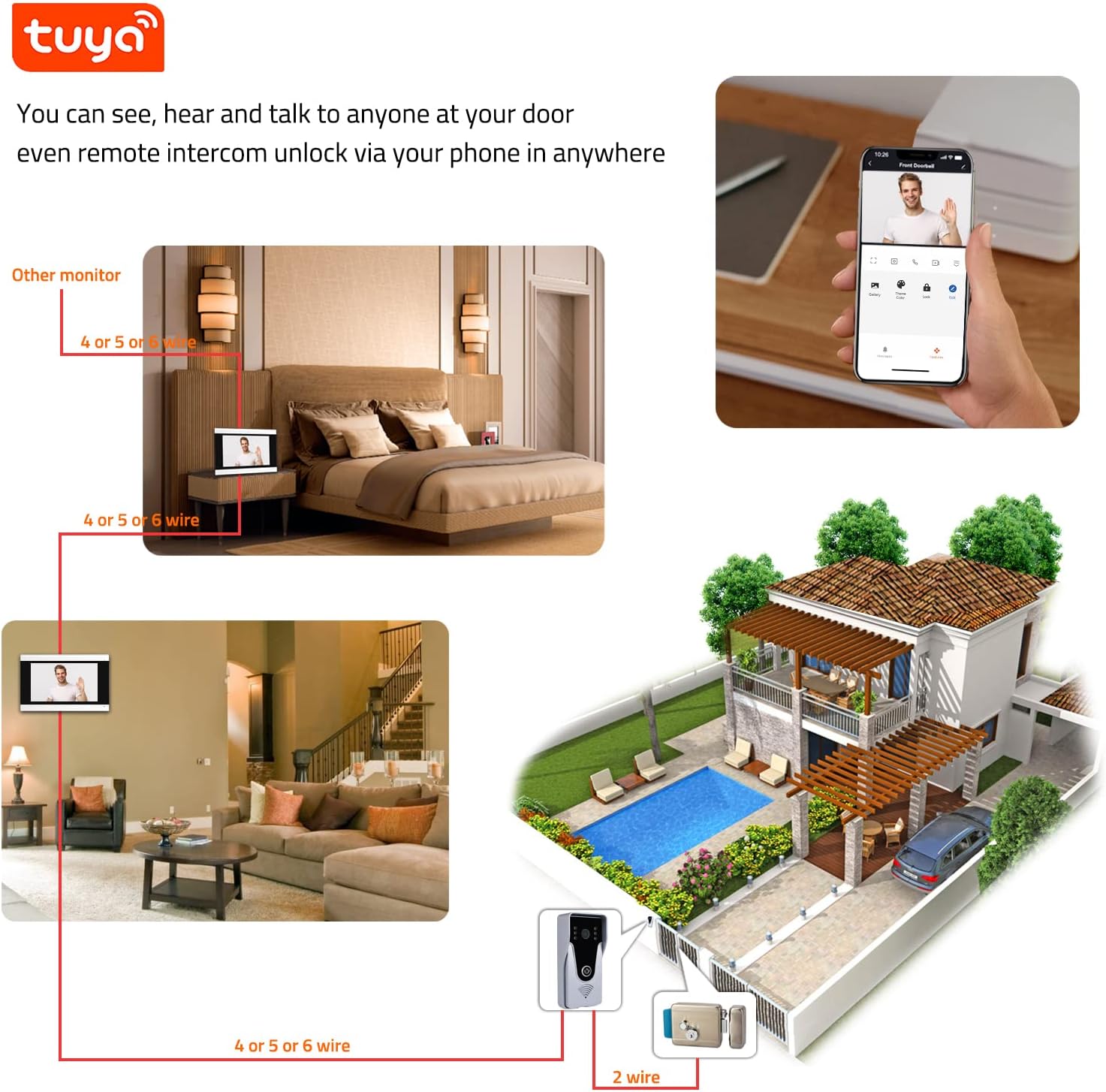
図4.3: IP65 waterproof doorbell with IR night vision capability.
5. メンテナンス
5.1 クリーニング
Wipe the doorbell camera and indoor monitor with a soft, damp cloth. Do not use harsh chemicals or abrasive cleaners. Ensure the camera lens is clean for optimal image quality.
5.2ファームウェアアップデート
Periodically check the Tuya APP for available firmware updates for your system. Keeping the firmware updated ensures optimal performance and security.
5.3 SD カードの管理
The system uses smart loop storage on the 32GB micro SD card. Regularly review 記録されたfootage and back up important clips. If the card becomes full, older recordings will be overwritten.
6。 トラブルシューティング
| 問題 | 考えられる原因 | 解決 |
|---|---|---|
| モニター/アプリに画像が表示されない | Loose wiring; Power issue; Camera malfunction. | Check all cable connections. Ensure monitor is powered. Restart the system. |
| 双方向オーディオ中に音が出ない | Microphone/speaker blocked; Volume too low; Connection issue. | Check for obstructions. Adjust volume settings on monitor/app. Verify wiring. |
| Tuya APP not receiving notifications | Monitor not connected to 2.4G WiFi; App notification settings disabled; Poor WiFi signal. | Ensure monitor is connected to 2.4G WiFi. Check app notification permissions. Improve WiFi signal strength. |
| Doorbell rings without visitor (false alarms) | 動きの検出感度が高すぎる。環境要因(例:動く枝)。 | Adjust motion detection sensitivity in monitor settings or Tuya APP. |
| リモートでドアのロックを解除できない | Electric lock not properly connected; Lock malfunction; System communication error. | Verify electric lock wiring. Test the lock manually. Restart the system. |
7. 仕様
- ブランド: アモカム
- モデル番号: 352-505-SR
- 接続プロトコル: Wi-Fi(2.4Gのみ)
- ビデオキャプチャ解像度: 1080p
- Doorbell IP Rating: (防水)IP65
- モニターサイズ: 7インチTFTタッチスクリーン
- ストレージ: 32GB Micro SDカード(付属)
- オーディオ: 双方向オーディオ
- ナイトビジョン: 6-IR LED automatic activation
- 電源: Indoor monitor powered, no doorbell batteries required
- 寸法(ドアベル): Approximately 5.2" H x 2.4" W x 1.0" D
- 寸法(モニター): Approximately 5.0" H x 7.9" W
- 対応アプリ: トゥヤアプリ
- 営業巻tage: 240 Volts (for power adapter)
- 商品の重量: 2.01ポンド(システム全体)
8. 保証とサポート
8.1 保証情報
AMOCAM Technology Inc. provides after-sales support and services. Specific warranty details may vary; please refer to your purchase documentation or contact AMOCAM customer service for precise warranty terms.
8.2 カスタマーサポート
For technical assistance, troubleshooting, or warranty inquiries, please contact AMOCAM customer support. You can find contact information on the official AMOCAM webサイトまたは小売店を通じてご購入いただけます。
AMOCAM Technology Inc. is committed to protecting your privacy and ensuring data security.


