1. はじめに
This manual provides detailed instructions for the safe and effective operation of your VETEK A06-2 8K Camcorder. Please read this manual thoroughly before using the device to ensure proper functionality and to prevent damage. This camcorder is designed for amateur use and may not include advanced professional features such as autofocus or optical zoom.

Image: The VETEK A06-2 8K Camcorder, showcasing its 8K Ultra HD video resolution, 48.0 megapixels still image recording, 3.0-inch IPS touch screen, and WiFi capabilities. The camera is positioned against a backdrop of mountains.
2. パッケージ内容
以下にリストされているすべてのアイテムがパッケージに含まれていることを確認してください。
- VETEK A06-2 8K Camcorder
- リチウムポリマー電池 2 個
- USBケーブル
- ユーザーマニュアル(このドキュメント)
3.製品オーバーview
3.1 カメラコンポーネント

Image: A diagram illustrating the front and top controls of the VETEK A06-2 camcorder. Key components include the Power/OK button, Mode button, UP/WiFi button, Menu button, DOWN button, Built-in flash, Built-in microphone sound, and IR Night Vision Function.
- 電源/ OKボタン: Used to power on/off the camera and confirm selections. Short press to display night vision or built-in flash functions. Long press to shut down.
- モードボタン: Switches between different camera modes.
- UP/WiFiボタン: Navigates up in menus or activates WiFi function.
- メニューボタン: Accesses the camera's menu settings.
- 下ボタン: メニュー内を下に移動します。
- 内蔵フラッシュ: Provides illumination for photos and videos in low light.
- 内蔵マイク: オーディオをキャプチャします。
- IRナイトビジョン機能: 暗い場所や暗い場所でも録画できます。

Image: A diagram illustrating the side ports and controls of the VETEK A06-2 camcorder. Key components include the Zoom Key, Quick photo key, Hot boots, Fast video key, Microphone interface, HDMI interface, and USB interface.
- ズームキー: デジタルズームのレベルを調整します。
- Quick Photo Key: 静止画を撮影します。
- ホットシュー: マイクやライトなどの外部アクセサリを取り付けます。
- Fast Video Key: Quickly starts video recording.
- マイクインターフェース: Connects an external microphone for improved audio.
- HDMIインターフェース: Connects the camera to a TV or monitor for playback.
- USBインターフェース: Connects to a computer for charging, data transfer (storage mode), or webcam functionality (PC camera mode).
4. セットアップ
4.1 バッテリーの取り付けと充電
The camcorder uses Lithium Polymer batteries. Ensure batteries are fully charged before first use.

Image: A visual representation of the two charging methods for the VETEK A06-2 camcorder batteries. One method shows batteries being charged in an external dual charger, and the other shows a battery installed in the camera being charged via a USB cable.
- バッテリーの取り付け: Open the battery compartment and insert the battery according to the polarity indicators.
- 充電方法:
- Use the dual charger to charge the batteries directly.
- Install a battery in the camera and connect the camera to a power source using the provided USB cable.
4.2 メモリカードのインストール
The camcorder supports SD flash memory cards (4-128GB SD Card Class 10 or higher recommended). A memory card is required for recording.
- カメラのメモリカードスロットを見つけます。
- 金属接点を正しい方向に向けて、カチッと音がするまで SD カードを挿入します。
- For first-time use, format the memory card through the camera's menu settings. This ensures compatibility and optimal performance.
5. 操作手順
5.1 基本操作
- 電源オン/オフ: Long press the Power/OK button to turn the camera on or off.
- モード選択: Press the MODE button to switch between video recording, photo taking, and playback modes.
- メニューナビゲーション: Use the MENU button to access settings. Use the UP/WiFi and DOWN buttons to navigate, and the Power/OK button to confirm.
5.2 ビデオの録画
カメラがビデオ録画モードになっていることを確認します。
- Press the Fast Video Key or the Power/OK button to start recording.
- 録音を停止するには、同じボタンをもう一度押します。
- The camcorder records in 8K video resolution.

Image: A visual demonstrating the ULTRA HD 8K video resolution and 48MP image resolution capabilities of the VETEK A06-2 camcorder. It also highlights the 18x digital zoom feature with comparative shots.
5.3 写真を撮る
Ensure the camera is in photo taking mode.
- Press the Quick Photo Key to capture a still image.
- The camcorder supports 48MP image resolution.

Image: Three sequential images demonstrating time-lapse photography with the VETEK A06-2 camcorder, showing options for 2-second, 5-second, and 10-second intervals.
5.4 ナイトビジョン
The camera features IR Night Vision for recording in low-light conditions.
- Short press the Power/OK button to activate the night vision function.
- The camera will record in black and white in night vision mode.

Image: The VETEK A06-2 camcorder displaying an image captured using its IR Night Vision feature, showing a vivid black and white scene in the dark.

画像: 分割画像を比較 view from the VETEK A06-2 camcorder in Night Vision mode (left, monochrome) versus Normal mode (right, color) of a city skyline at night.
5.5 WiFi接続
The camcorder features built-in WiFi for remote control and sharing.
- Press the UP/WiFi button to activate the WiFi function.
- スマートフォンまたはタブレットをカメラの WiFi ネットワークに接続します。
- Use the dedicated app to control the camera remotely and share photos/videos.

Image: The VETEK A06-2 camcorder on a tripod, being controlled remotely by a smartphone and a physical remote control, demonstrating its WiFi connectivity for sharing content on social media.

Image: A user interacting with the VETEK A06-2 camcorder's touch screen while a smartphone displays the camera's WiFi connection interface and live view, illustrating remote control via an app.
5.6 Webカム機能
ビデオカメラは、 webビデオ通話やライブストリーミング用のカメラ。
- USBケーブルを介してカメラをコンピューターに接続します。
- Select "PC camera mode" when prompted on the camera screen.
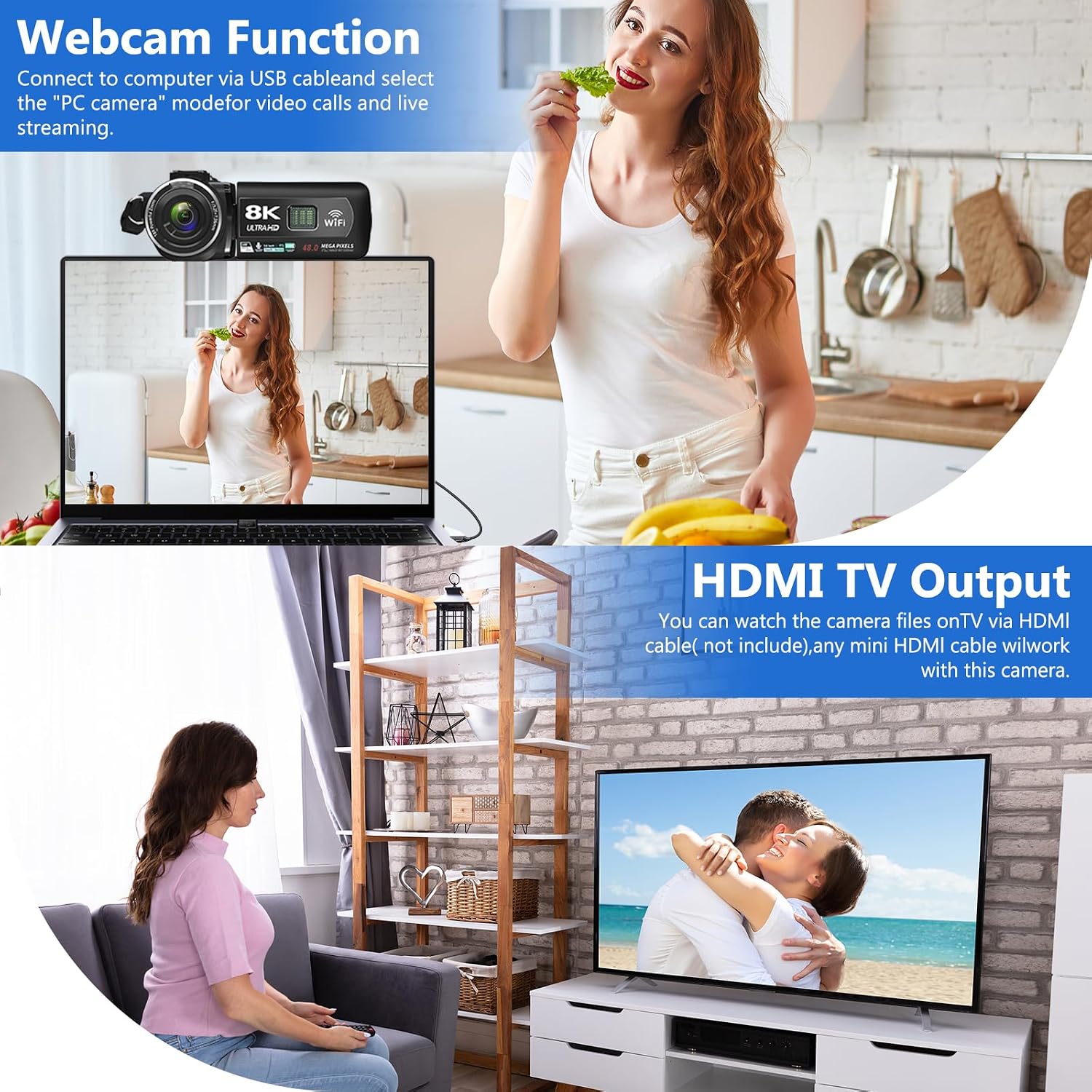
Image: The VETEK A06-2 camcorder connected to a laptop via USB, demonstrating its webcam function for video calls. Below, the camera is connected to a television via HDMI for view録画したコンテンツを再生します。
5.7 HDMI TV Output
View your recorded videos and photos on a larger screen.
- Connect the camera to a TV or monitor using an HDMI cable (not included).
- テレビで適切な HDMI 入力を選択します。

Image: The VETEK A06-2 camcorder connected to a large television screen via an HDMI cable, showing content from the camera being displayed on the TV for a family to watch.
5.8ノイズリダクション
The camcorder includes a built-in noise reduction function to improve audio quality.
- Activate the noise reduction function in the camera's settings menu.
- For enhanced audio, an external microphone can be connected to the microphone interface.

Image: A woman playing a guitar, with a VETEK A06-2 camcorder recording her. Text indicates that the camera's built-in noise reduction and external microphone support help improve audio quality.
6. メンテナンス
6.1 クリーニング
- カメラ本体を清掃する際は、柔らかく乾いた布を使用してください。
- レンズには専用のレンズクリーニングクロスと洗浄液を使用してください。レンズに直接触れないようにしてください。
6.2 ストレージ
- カメラは直射日光や極端な温度を避け、涼しく乾燥した場所に保管してください。
- カメラを長期間使用しない場合は電池を取り外してください。
7。 トラブルシューティング
ビデオカメラで問題が発生した場合は、次の一般的な問題と解決策を参照してください。
| 問題 | 考えられる原因 | 解決 |
|---|---|---|
| カメラの電源が入りません。 | バッテリーが消耗しているか、正しく取り付けられていません。 | バッテリーを充電するか、正しく取り付け直してください。 |
| ビデオを録画したり、写真を撮ったりできません。 | メモリカードがいっぱいか、挿入されていないか、フォーマットされていません。 | Insert a memory card, format it, or delete unnecessary files. |
| 画像/ビデオの品質が悪い。 | Insufficient lighting, dirty lens, or shooting too close. | Ensure adequate lighting, clean the lens, and maintain a shooting distance of over 1.5m/4ft. |
| WiFi接続の問題。 | Incorrect password or app issues. | Verify WiFi password, restart camera and device, or reinstall the app. |
問題が解決しない場合は、カスタマー サポートにお問い合わせください。
8. 仕様
| 特徴 | 詳細 |
|---|---|
| ブランド | ベテック |
| モデル番号 | A06-2 |
| ビデオキャプチャ解像度 | 8K |
| フォトセンサー技術 | シーモス |
| 画像解像度 | 48メガピクセル |
| 画面サイズ | 3インチ |
| 接続技術 | USB、WiFi |
| フラッシュメモリタイプ | SD (Supports 4-128GB Class 10 or higher) |
| 特集 | Face Detection, Night Vision, Anti-Shake, Image Stabilization, Time Lapse, Low Light, Noise Reduction |
| バッテリー | 2 リチウムポリマー電池 (付属) |
| 製品寸法 | 5.12 x 2.36 x 2.17インチ |
| アイテム重量 | 2.2ポンド |
9.重要な注意事項
- This camcorder is designed for amateurs and does not feature autofocus or optical zoom.
- The camera does not have a focus function. Maintain a shooting distance above 1.5m (4ft) for clear pictures or videos.
- After recording video, check the video effect on a computer. Checking it on the camera reduces the resolution of the video.
- To connect to a computer, use the digital cable provided, select the storage method, and then view the video on the computer.

Image: A graphic titled 'Warm Tips' reiterating key usage instructions such as reading the manual, the camera being for amateurs, lack of autofocus, checking video on a computer, maintaining shooting distance, and formatting the memory card.
10. カスタマーサポート
For any questions, technical assistance, or warranty claims, please contact VETEK customer service. All products are eligible for a free return within 30 days of purchase.

Image: A smiling customer service representative wearing a headset, indicating 24-hour customer service availability.


