1.製品オーバーview
The Sharp RP-TT70 is a 12-inch vinyl record player turntable designed to deliver a rich audio experience with modern convenience. It features a classic wooden cabinet and comes with stereo bookshelf speakers. This belt-drive turntable supports multiple playback speeds and offers versatile connectivity options, including dual Bluetooth functionality.

Figure 1.1: Sharp RP-TT70 Turntable and Speakers. The turntable features a stylish wooden finish and a clear dust cover, flanked by two matching stereo bookshelf speakers.
2. 含まれるもの
パッケージの内容をチェックして、すべてのアイテムが揃っていることを確認してください。
- Sharp RP-TT70 Turntable Unit
- Stereo Bookshelf Speakers (2 units)
- ダストカバー
- 電源アダプター
- ユーザーマニュアル(このドキュメント)
3. セットアップ手順
Follow these steps to set up your Sharp RP-TT70 turntable:
- 配置: Place the turntable on a stable, level surface away from direct sunlight, heat sources, and excessive dust. Ensure adequate ventilation around the unit.
- スピーカー接続: Connect the included stereo bookshelf speakers to the "SPEAKER OUT" terminals on the rear of the turntable. Ensure correct polarity (positive to positive, negative to negative).
- 電源接続: Connect the power adapter to the "POWER IN DC 12V" port on the rear of the turntable, then plug the adapter into a wall outlet.
- ダストカバー: Carefully attach the dust cover to the hinges on the back of the turntable.

Figure 3.1: Rear Panel Connections. This image highlights the AUX-IN Jack, RCL (R&L) Speaker Out, Pitch (+)(-) Speed Calibration, and Power In DC 12V ports, crucial for proper setup.
4. 操作手順
4.1 レコードの再生
- 電源オン: Turn the power knob to activate the turntable.
- 速度を選択します: Adjust the speed selector to match the record's RPM (33 1/3, 45, or 78 RPM). For 45 RPM records, place the included 45 RPM adapter on the spindle.
- 順位記録: ビニールレコードをターンテーブルのプラッターに慎重に置きます。
- リフトトーンアーム: キューイングレバーを使用してトーンアームをゆっくりと持ち上げます。
- スタイラスの位置: トーンアームをレコードの希望する開始溝の上に移動します。
- 下部トーンアーム: キューイングレバーを使ってトーンアームをゆっくりと下げます。針がレコードに接触し、再生が始まります。
- 音量調整: Adjust the volume using the volume knob on the turntable.
- 自動停止機能: The turntable features an auto-stop function that will automatically stop the platter rotation when the record reaches its end.
4.2 Bluetooth接続
The Sharp RP-TT70 supports dual Bluetooth connectivity, allowing you to stream music in two ways:
- Streaming Vinyl to External Bluetooth Device:
- ターンテーブルの電源がオンになっていることを確認します。
- Activate Bluetooth pairing mode on your external Bluetooth speaker or headphones.
- The turntable will automatically search for and connect to nearby Bluetooth devices. The Bluetooth indicator light will illuminate when connected.
- Once connected, audio from your vinyl record will play through the external Bluetooth device.
- Streaming Music from Your Phone to Turntable Speakers:
- ターンテーブルの電源がオンになっていることを確認します。
- On your smartphone or other Bluetooth-enabled device, search for "Sharp RP-TT70" in the Bluetooth settings.
- Select the turntable to pair. The Bluetooth indicator light will illuminate when connected.
- Once connected, audio from your phone will play through the turntable's included stereo speakers.
4.3 Auxiliary Input (AUX-IN)
Connect external audio devices such as smartphones, tablets, or MP3 players using a 3.5mm audio cable (not included) to the AUX-IN jack on the rear of the turntable. Switch the input mode to AUX to play audio through the turntable's speakers.
4.4ヘッドフォンジャック
For private listening, connect headphones to the headphone jack located on the front panel of the turntable.
5. メンテナンス
Proper maintenance ensures the longevity and optimal performance of your turntable:
- ダストカバー: Always keep the dust cover closed when the turntable is not in use to prevent dust accumulation on the platter and stylus.
- スタイラスのクリーニング: Gently clean the stylus regularly using a soft brush designed for turntable styli. Brush from back to front.
- Cleaning the Turntable: Wipe the turntable and speakers with a soft, dry cloth. Do not use abrasive cleaners or solvents.
- Cartridge and Stylus Replacement: The RP-TT70 uses a changeable ceramic cartridge and stylus. If sound quality degrades or the stylus is damaged, replace it with a compatible Sharp replacement part.
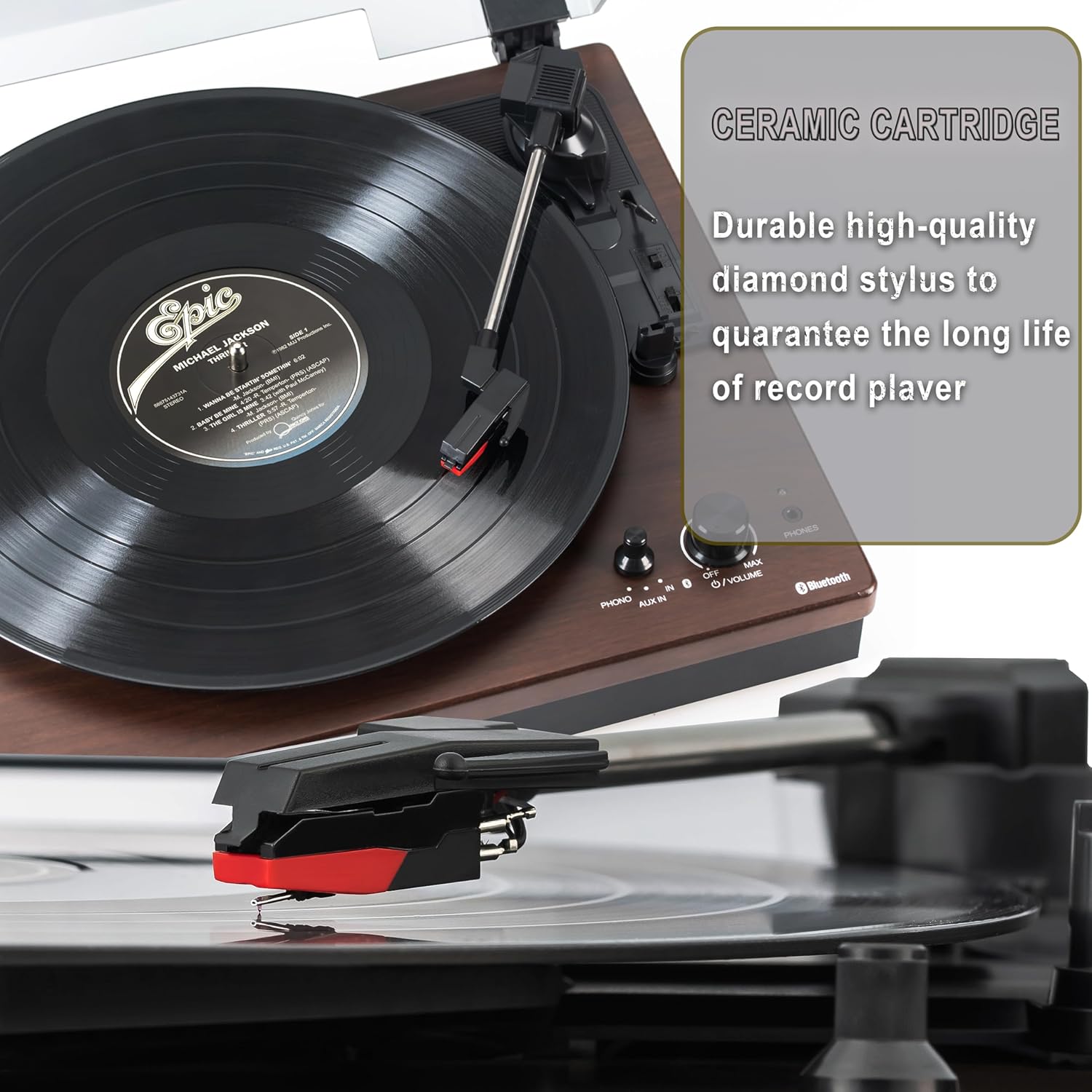
Figure 5.1: Ceramic Cartridge. The turntable is equipped with a durable high-quality diamond stylus designed for extended record playback life.
6。 トラブルシューティング
If you encounter issues with your Sharp RP-TT70, refer to the following common problems and solutions:
| 問題 | 考えられる原因 | 解決 |
|---|---|---|
| 電源なし | 電源アダプタが接続されていないか、コンセントがアクティブではありません。 | Ensure power adapter is securely plugged into the turntable and a working wall outlet. |
| スピーカーから音が出ない | Speakers not connected correctly; Volume too low; Incorrect input mode. | Check speaker cable connections and polarity. Increase volume. Ensure turntable is in PHONO or AUX mode as appropriate. |
| Poor Sound Quality / Skipping | Dirty or worn stylus; Dirty record; Turntable not level. | Clean the stylus and record. Ensure the turntable is on a stable, level surface. Consider replacing the stylus if worn. |
| Bluetoothペアリングの問題 | Device too far; Bluetooth not enabled on external device; Interference. | Ensure devices are within range (approx. 30 ft). Confirm Bluetooth is enabled on the external device. Try restarting both devices. |
| Platter Not Spinning | Belt dislodged; Auto-stop engaged prematurely. | Check if the drive belt is properly seated around the platter and motor pulley. If auto-stop is causing issues, ensure the record is placed correctly. |
7. 仕様
| 特徴 | 詳細 |
|---|---|
| モデル番号 | RP-TT70 |
| ブランド | シャープ |
| 製品寸法 | 16.8 x 13.5 x 2.8インチ |
| アイテム重量 | 18.6ポンド |
| 接続技術 | Bluetooth (Bi-directional) |
| サポートされている速度 | 33 1/3、45、78 回転 |
| 含まれるコンポーネント | Turntable, Stereo Bookshelf Speakers |
| 材料 | プラスチック、木材 |
| 色 | Black (with wooden finish) |
| カートリッジの種類 | Changeable Ceramic Cartridge and Stylus |
| 特徴 | Belt-drive, Auto-return, Pitch control, Dust cover |
8. 保証とサポート
保証情報およびテクニカルサポートについては、シャープの公式ウェブサイトをご覧ください。 web公式サイトをご覧いただくか、カスタマーサービスに直接お問い合わせください。保証請求の際は、購入証明としてレシートを保管してください。


