1. はじめに
Thank you for choosing the Hisense HV693C60AD Fully Integrated Dishwasher. This manual provides essential information for the safe and efficient operation, installation, and maintenance of your appliance. Please read these instructions carefully before use and keep them for future reference.
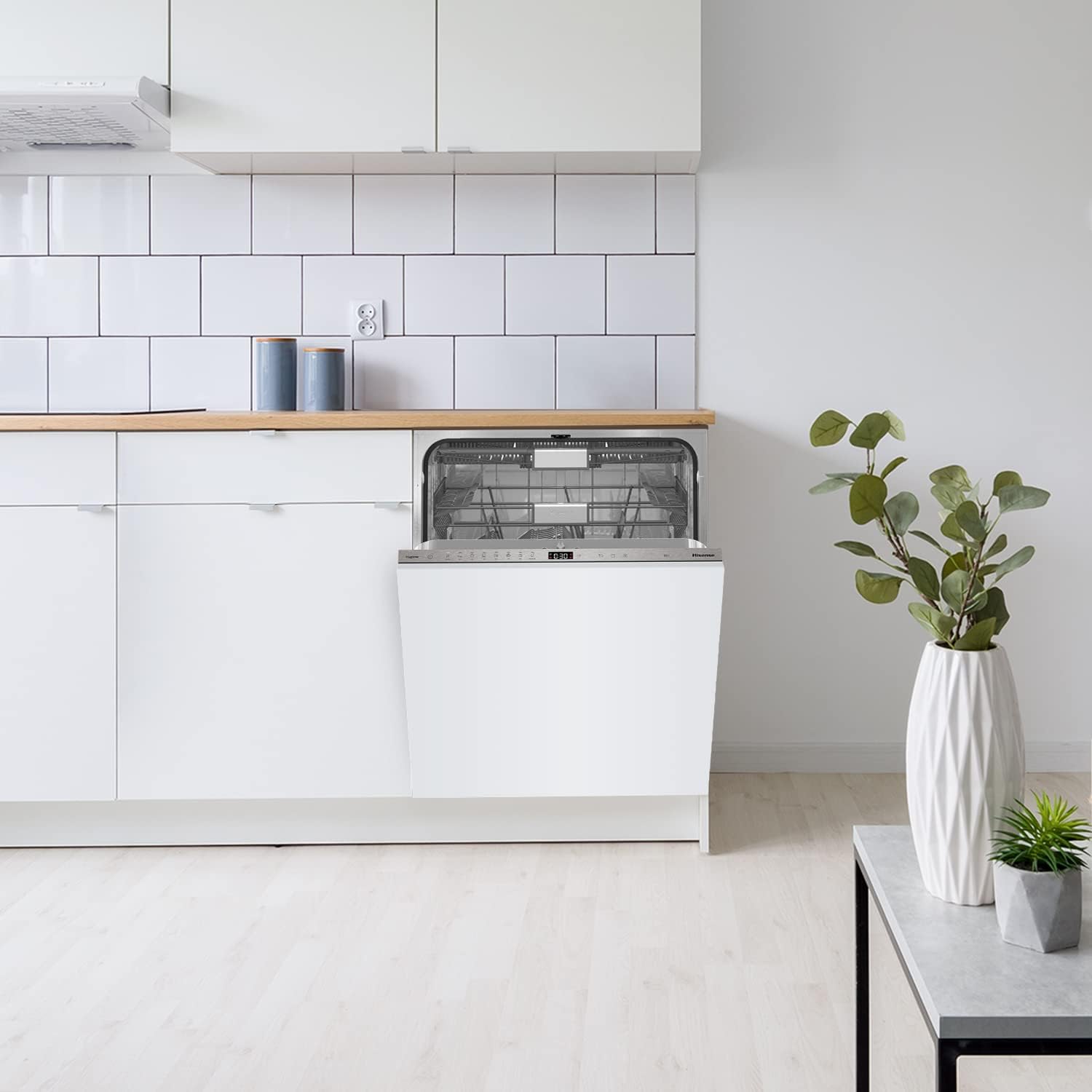
The Hisense HV693C60AD dishwasher seamlessly integrated into a kitchen cabinet, with its door slightly ajar, revealing the interior racks.
2. 安全情報
火災、感電、または怪我のリスクを軽減するため、電気製品を使用する際は、必ず基本的な安全上の注意事項に従ってください。この製品は家庭用としてのみご使用ください。
- 電気安全: 食器洗い機が適切にアースされていることを確認してください。延長コードやアダプターは使用しないでください。メンテナンスを行う前に電源を切ってください。
- 水の安全性: The Total Aqua Stop feature provides protection against water leaks. However, always check hoses for damage and ensure connections are secure.
- 子どもの安全: 食器洗い機が作動中やドアが開いているときは特に、お子様を食器洗い機に近づけないでください。洗剤は腐食性があります。
- 積載安全性: Load sharp items (knives, forks) with handles up to prevent injury. Do not overload the dishwasher.
- インストール: 設置は、地域の規則や規制に従って資格のある技術者が行う必要があります。

The Total Aqua Stop system provides enhanced protection against water leaks, ensuring safety and preventing potential damage.
3. セットアップとインストール
Your Hisense HV693C60AD is a fully integrated dishwasher designed for seamless installation into your kitchen cabinetry. A mounting and installation kit is included.
3.1 寸法と配置
Ensure the installation space meets the required dimensions for a proper fit. The dishwasher dimensions are approximately 55.5 cm (depth) x 60 cm (width) x 81.6 cm (height).
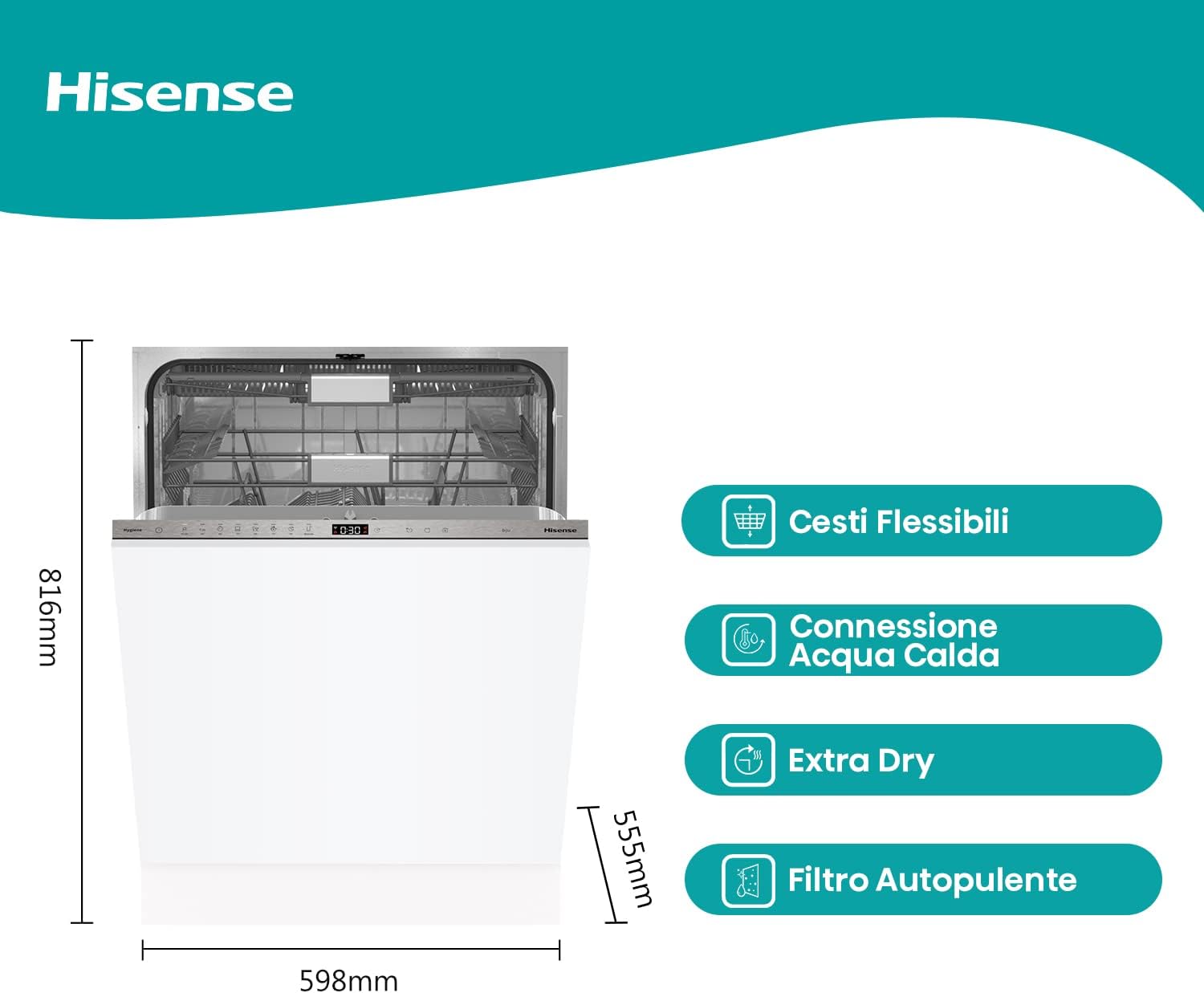
Detailed dimensions of the Hisense HV693C60AD dishwasher for installation planning.
3.2 水接続
This dishwasher supports a hot water connection, which can help save energy by utilizing pre-heated water. Connect the water inlet hose securely to a hot water supply.

The hot water connection point, designed to use pre-heated water for energy efficiency.
3.3 電気接続
Connect the dishwasher to a dedicated 220V power outlet. Ensure the electrical supply is stable and meets the appliance's requirements.
3.4 パネルの取り付け
The dishwasher is designed to have a custom kitchen panel installed on its front door for a fully integrated look. Refer to the included mounting kit instructions for detailed steps on attaching the panel.
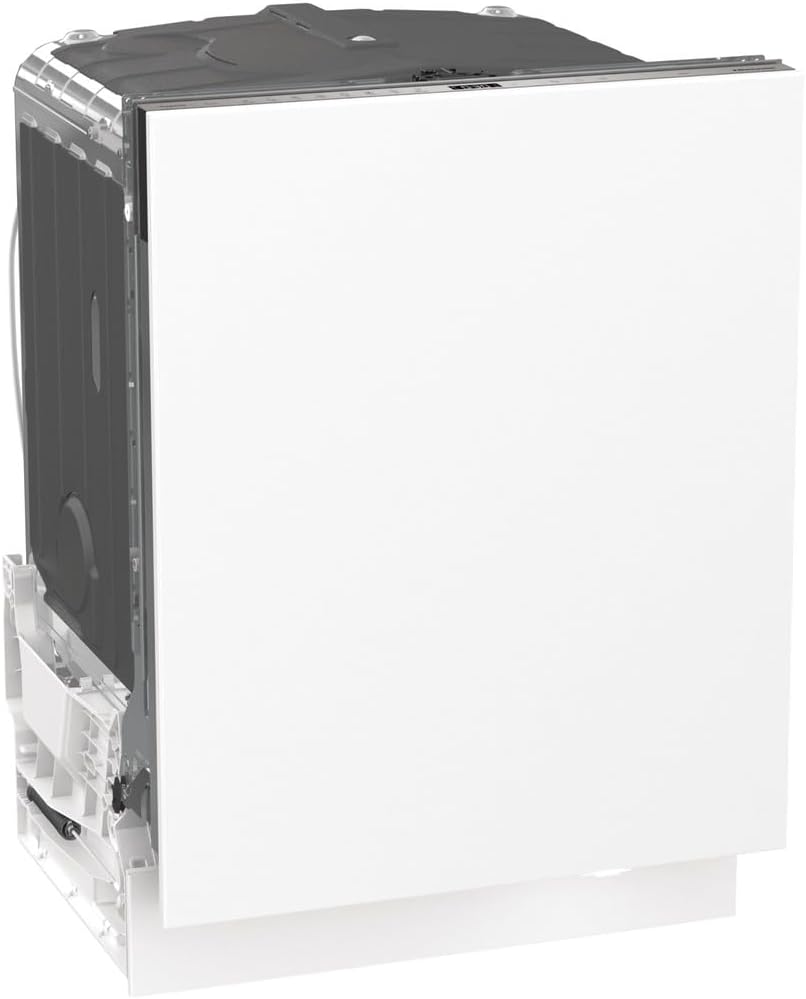
側 view of the dishwasher, illustrating its design for full integration with a custom kitchen panel.
4. 操作手順
Your Hisense HV693C60AD dishwasher offers advanced features for efficient and convenient dishwashing.
4.1 食器洗い機への食器の投入
This dishwasher accommodates up to 16 place settings and features flexible baskets and a third basket for cutlery. Arrange dishes to allow water spray to reach all surfaces.

The flexible baskets allow for versatile loading of various dish sizes and shapes.

The dedicated third basket provides ample space for all your cutlery, ensuring thorough cleaning.
4.2 Detergent Dispensing (Auto Dose)
The Smart Dosing feature automatically dispenses the correct amount of liquid detergent based on the selected program. The detergent reservoir has a 0.5-liter capacity, providing up to 20 wash cycles. A notification will appear on the control panel when the detergent level is low.
4.3 プログラムの選択
Choose from 7 wash programs and 7 temperature settings to suit your dishwashing needs. The intuitive control panel makes selection easy.
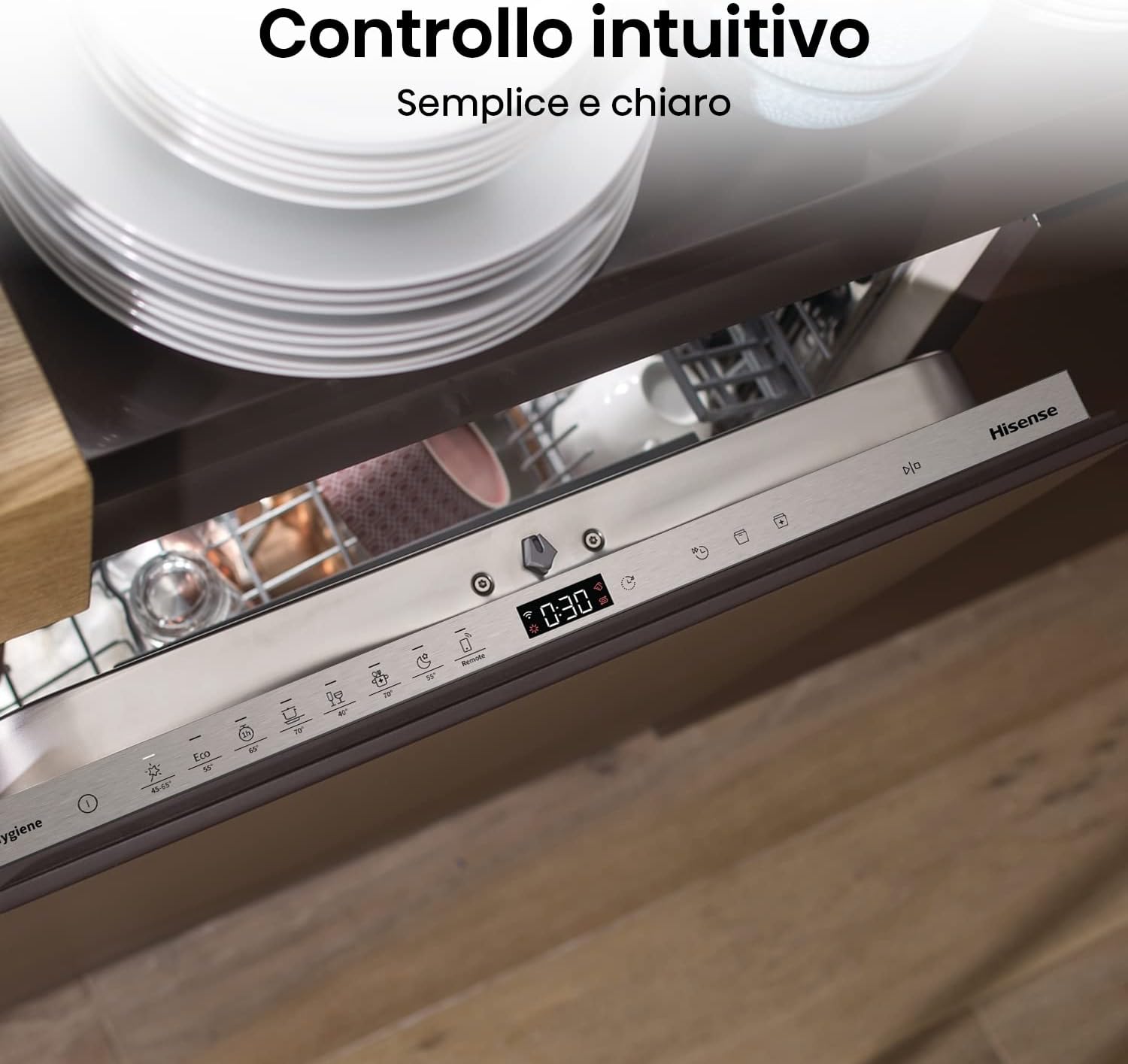
The intuitive control panel provides clear program selection and cycle information.
4.4 遅延開始
Utilize the delayed start function to program the dishwasher to begin a cycle at a later time, up to 24 hours. This allows you to take advantage of off-peak electricity rates or have dishes ready when you need them.

The delayed start feature allows you to schedule wash cycles for convenience.
4.5 エクストラドライ機能
For enhanced drying performance, select the Extra Dry function. This feature ensures dishes come out perfectly dry, reducing the need for manual towel drying.

The Extra Dry function ensures optimal drying results for all your dishes.
4.6 WiFi/ConnectLife Connectivity
Connect your dishwasher to the ConnectLife app via WiFi for remote monitoring and control. Receive instant notifications in case of a malfunction and activate programs from your smartphone.
5. メンテナンスと清掃
定期的なメンテナンスにより、食器洗い機の最適なパフォーマンスと寿命が確保されます。
5.1 セルフクリーニングフィルター
The dishwasher is equipped with a self-cleaning filter system. Periodically check and clean the filter to remove any food debris and ensure efficient drainage. Refer to the detailed instructions in the full manual for filter removal and cleaning.

Regular cleaning of the self-cleaning filter is essential for optimal dishwasher performance.
5.2 外装および内装の清掃
外側を拭くamp cloth. Clean the interior periodically with a dishwasher cleaner or a mixture of vinegar and baking soda to prevent odors and mineral buildup.
6。 トラブルシューティング
カスタマー サービスに連絡する前に、次の一般的な問題と解決策を参照してください。
| 問題 | 考えられる原因 | 解決 |
|---|---|---|
| 食器洗い機が起動しない | Power supply issue, door not closed properly, delayed start active. | 電源接続を確認し、ドアがラッチされていることを確認し、遅延始動をキャンセルします。 |
| 食器が汚れている | 不適切な装填、スプレーアームの詰まり、洗剤不足、プログラム誤り。 | Reload dishes, clean spray arm nozzles, check detergent level, select appropriate program. |
| 水が流れない | フィルターの詰まり、排水ホースの詰まり、排水ポンプの問題。 | Clean the filter, check drain hose for kinks or blockages. |
| 過度の騒音 | 皿がスプレーアームに干渉している、ポンプに異物が入っている、取り付けが不適切である。 | Rearrange dishes, inspect for foreign objects, ensure proper leveling. |
For error codes or persistent issues, consult the full instruction manual or contact Hisense customer support.
7. 仕様
Below are the key technical specifications for the Hisense HV693C60AD Dishwasher:
| 特徴 | 仕様 |
|---|---|
| モデル名 | HV693C60AD |
| インストールタイプ | プローブとオシロスコープとの統合 |
| 寸法(幅x奥行きx高さ) | 60 cm x 55.5 cm x 81.6 cm |
| 重さ | 31.5キロ |
| プレースセッティング容量 | 16 |
| プログラム数 | 7 |
| 騒音レベル | 42デシベル |
| エネルギークラス | C |
| 巻tage | 220V |
| 内部素材 | プラスチック |
| 特集 | Auto Dose, WiFi, Inverter Motor, Third Basket, Delayed Start, Total Aqua Stop, Extra Dry |
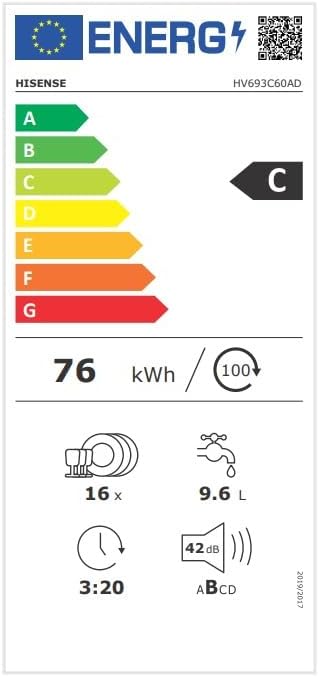
The energy label provides key performance indicators for the HV693C60AD model.
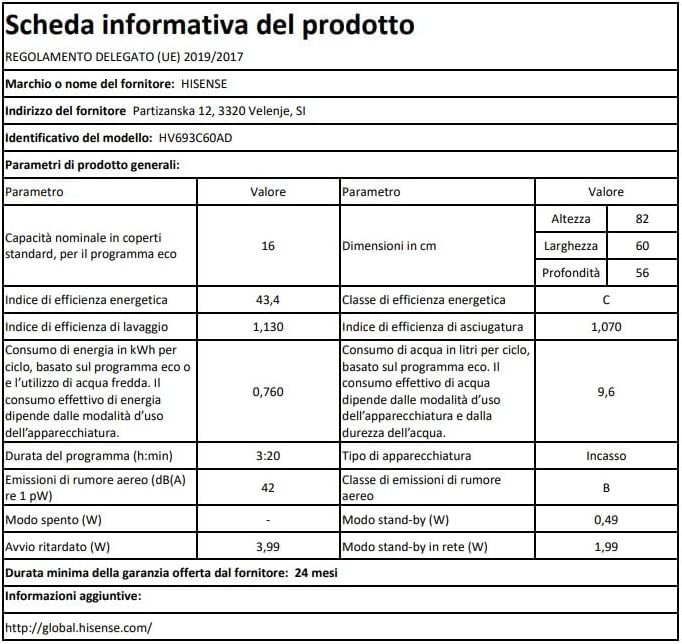
Detailed product information sheet outlining the dishwasher's performance and technical data.
8. 保証とサポート
Your Hisense HV693C60AD dishwasher comes with a minimum warranty period of 24 months from the date of purchase. For warranty claims, technical assistance, or spare parts, please contact Hisense customer support. Keep your proof of purchase for warranty validation.
For more information, visit the official Hisense webサイト: グローバル.ハイセンス.com


