導入
This manual provides essential instructions for the safe and efficient operation, installation, and maintenance of your Midea JL1643S-UF Freestanding One Touch Filter Water Purifier. Please read this manual thoroughly before using the appliance and retain it for future reference.
安全情報
火災、感電、人への傷害のリスクを減らすために、電気製品を使用するときは常に基本的な安全上の注意事項に従ってください。
- 電源のボリュームを確認してくださいtage は機器の定格 (220 ボルト) と一致します。
- 機器、コード、プラグを水やその他の液体に浸さないでください。
- Unplug the appliance from the outlet when not in use, before cleaning, or before performing any maintenance.
- 機器を直射日光や熱源から遠ざけてください。
- この機器は屋内専用です。
- コードやプラグが損傷している状態で機器を操作しないでください。
- 操作中は子供をアプライアンスに近づけないでください。
製品終了view
The Midea JL1643S-UF is a freestanding water purifier designed to provide clean, filtered water. It features a 3rd generation one-touch filter system and UV-LED sterilization.
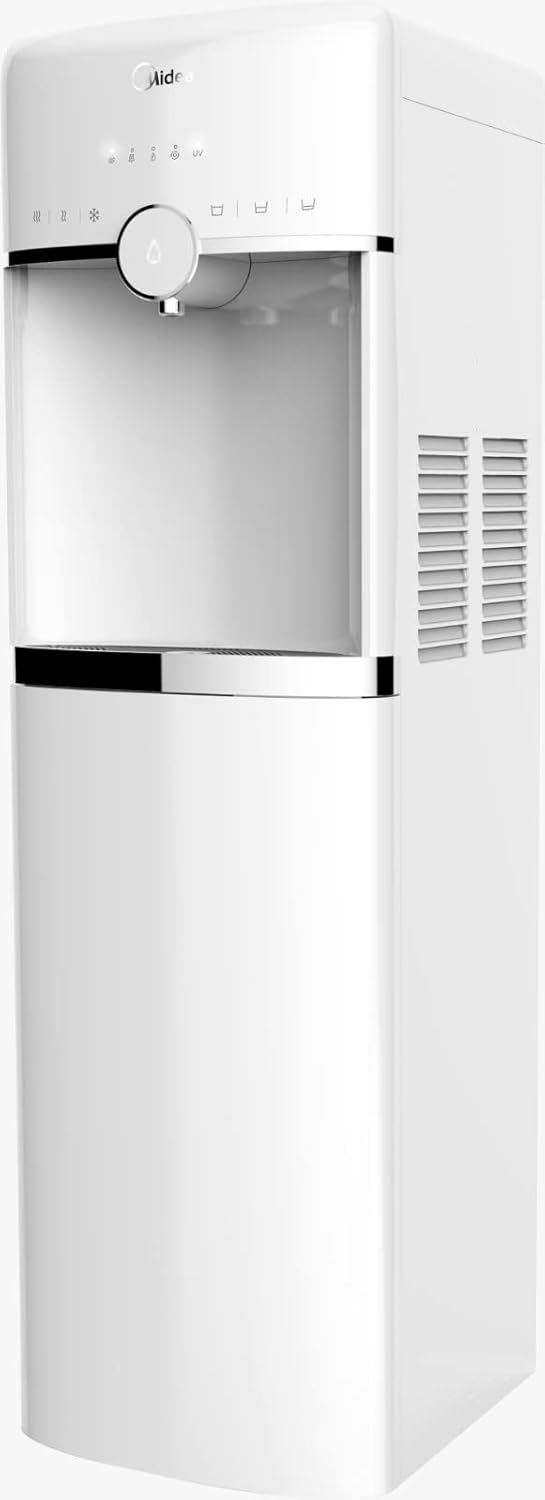
画像1: フロント view of the Midea JL1643S-UF Freestanding Water Purifier. This image displays the sleek white design, the water dispenser nozzle, and the touch control panel at the top.
主要コンポーネント:
- Water Dispenser Nozzle: For dispensing purified water.
- タッチコントロールパネル: 各種機能を操作します。
- フィルターコンパートメント: マルチSを収容tageフィルターシステム。
- 水タンク: 容量4.6リットル。
- UV-LED Sterilizer: Integrated for enhanced water purification.
- 受け皿: こぼれたものを回収します。
設定
- 開梱: Carefully remove the water purifier from its packaging. Retain all packaging materials for future transport if needed.
- 配置: Place the freestanding unit on a flat, stable, and level surface. Ensure there is adequate space around the unit for ventilation, especially at the back and sides where air vents are located. Avoid placing it near direct heat sources or in direct sunlight.
- 初期クリーニング: Before first use, wipe the exterior of the unit with a soft, damp cloth. Clean the water tank and drip tray with mild soap and water, then rinse thoroughly.
- フィルターのインストール:
- フィルター室のカバーを開きます。
- Insert the 3rd generation one-touch filters (PP, Pre Active Carbon, Ultrafiltration, Post Active Carbon) into their respective slots. Ensure they are securely locked in place. Refer to the markings on the filters and the unit for correct orientation.
- フィルターコンパートメントカバーを閉じます。
- 水の充填: Fill the water tank with potable tap water. Do not exceed the maximum fill line.
- 電源接続: Plug the power cord into a grounded 220 Volt electrical outlet. The unit will power on, and indicator lights may illuminate.
- 初期フラッシュ: Dispense and discard at least 2-3 liters of water to flush the new filters and internal system before consuming.
操作手順
- 電源オン/オフ: The unit typically powers on automatically when plugged in. Use the designated power button on the touch control panel to turn the unit on or off.
- 水の供給:
- Place a cup or container under the water dispenser nozzle.
- Press the water dispense button on the touch control panel. Water will flow until the button is released or a preset volume is reached (if applicable).
- UV-LED Sterilization: The UV-LED sterilization function operates automatically or can be activated via the touch control panel, depending on the model's specific programming. Refer to the control panel icons for UV activation status.
- Water Leakage Protection: The unit is equipped with water leakage protection. In the event of a leak, the system is designed to automatically shut off water flow to prevent damage. If this occurs, unplug the unit and contact customer support.
メンテナンス
Regular maintenance ensures optimal performance and longevity of your water purifier.
- フィルター交換のリマインダー: The unit features a filter replacement reminder system. An indicator light on the control panel will illuminate when it's time to replace the filters.
- フィルターの交換:
- Unplug the water purifier from the power outlet.
- フィルターコンパートメントを開きます。
- Twist and pull out the old filters.
- Insert new Midea JL1643S-UF compatible filters, ensuring they click into place.
- フィルターコンパートメントを閉じます。
- Plug the unit back in. Reset the filter reminder by pressing and holding the designated button (refer to control panel icons).
- Perform an initial flush as described in the Setup section.
- ユニットのクリーニング:
- 外側は柔らかくて乾いた布で拭いてください。amp 布で拭いてください。研磨剤や溶剤は使用しないでください。
- 定期的にドリップトレイを空にして清掃してください。
- For internal cleaning, follow the descaling instructions provided in a separate guide or contact customer support.
トラブルシューティング
| 問題 | 考えられる原因 | 解決 |
|---|---|---|
| 水は出ていない | Unit not plugged in; Water tank empty; Filters clogged; Water leakage protection activated. | Check power connection; Refill water tank; Replace filters; Unplug and re-plug, if issue persists contact support. |
| 水の流れが遅い | Clogged filters; Air in the system. | Replace filters; Dispense water for a few minutes to release trapped air. |
| 異常な味・臭い | New filters not flushed; Filters need replacement. | Perform initial flush; Replace filters. |
| フィルター交換後もフィルターリマインダーライトが点灯したままになる | Reminder not reset. | ライトが消えるまでフィルター リセット ボタンを押し続けます。 |
仕様

画像2: Midea JL1643S-UF Water Purifier with key dimensions. The image shows the height as 106cm, depth as 31cm, and width as 37.5cm.
| ブランド | 美的 |
| モデル | JL1643S-UF |
| 容量 | 4.6リットル |
| 寸法(D x W x H) | 31 cm x 37.5 cm x 106 cm |
| 重さ | 1.1キロ |
| 巻tage | 220ボルト |
| ワットtage | 520ワット |
| 材料 | Aluminium, Polypropylene (PP) |
| 騒音レベル | 1デシベル |
| インストールタイプ | フリースタンディング |
| フィルターシステム | 3rd Generation One-Touch (PP, Pre Active Carbon, Ultrafiltration, Post Active Carbon) |
| 特集 | UV-LED Sterilizer, Filter Replacement Reminder, Touch Control, Water Leakage Protection |
保証とサポート
For warranty information or technical support, please refer to the warranty card included with your product or visit the official Midea webサイトで確認してください。機器を自分で修理しようとしないでください。