導入
ご購入ありがとうございますasing the BN-LINK Smart Digital Outlet Timer. This device is designed to automate the power control of your electrical appliances, helping you save energy and enhance convenience in your daily life. With its user-friendly interface and robust programming capabilities, you can easily manage when your devices turn on and off.
Key features include a large, clear display, simple button operation, up to 20 programmable ON/OFF settings per day, and a repeat function for recurring schedules. It also incorporates important safety features to ensure reliable operation.
安全上の注意
Please read and understand all safety instructions before using this product to prevent injury or damage.
- Do not exceed the electrical rating: 定格巻tage: AC100V, Input Current: 15A, 50/60Hz, 1500W. Overloading can cause overheating and fire.
- This timer is constructed with PC flame-retardant material to effectively prevent electrical fires.
- The plug is equipped with an insulation cap to help prevent fires caused by tracking phenomena.
- タイマーを水に浸したり、過度の湿気にさらしたりしないでください。
- タイマーを分解したり改造したりしないでください。修理は必ず資格を持った専門家にご依頼ください。
- お子様の手の届かない場所に保管してください。
Applicable Electrical Appliances (Maximum Power Consumption)
- ヒーター器具: 1500W以下(例:電気ケトル、電気カーペット、暖房便座)
- 変圧器機器: 750W以下(例:テレビ、ステレオ、AV機器)
- Motorized appliances: 400W以下(例:ファン、換気扇、循環ポンプ)
- 照明器具: 750W以下(例:白熱灯、蛍光灯など)amps)
- LED照明器具: 250W以下(例:LED照明、LED蛍光灯など)amps)
注記: Simultaneous ON/OFF of two electrical appliances is possible by connecting an extension cord to the timer output and then connecting two electrical appliances to the extension cord. However, please ensure the total current does not exceed 15A, and pay attention to connections.
製品終了view
The BN-LINK Smart Digital Outlet Timer features a compact design with a large, clear LCD display and intuitive buttons for easy programming.

図1: フロント view of the timer, showing the large digital display and the arrangement of control buttons for day, hour, minute, clear, clock, program, and mode.

図2: Product dimensions. The timer measures approximately 70mm in height and 68mm in width, with a weight of 114.2 grams.

図3: Safety and programming features. The timer is made from PC flame-retardant material, features an insulation cap on the plug to prevent tracking fires, and supports up to 20 programmable settings.
設定
- 初期費用: Before first use, plug the timer into an outlet for at least 30 minutes to charge the internal battery. This battery backs up your settings during power outages。
- すべての設定をクリア: Press the 'Clear' button to reset any previous settings.
- 現在の時刻を設定:
- 「時計」ボタンを押します。
- Use the 'Day', 'Hour', and 'Minute' buttons to set the current day and time.
- Press 'Clock' again to confirm and exit time setting mode.
操作手順
オン/オフ時間のプログラミング
You can set up to 20 ON/OFF programs per day. Each program consists of an ON time and an OFF time.
- Press the 'Program' button to enter programming mode. The display will show '1 ON'.
- Use the 'Day', 'Hour', and 'Minute' buttons to set the desired ON time for Program 1.
- Press 'Program' again. The display will show '1 OFF'.
- Use the 'Day', 'Hour', and 'Minute' buttons to set the desired OFF time for Program 1.
- Repeat steps 1-4 for additional programs (up to 20). Press 'Program' to cycle through '2 ON', '2 OFF', and so on.
- After setting all desired programs, press the 'Clock' button to exit programming mode and return to the current time display.
Activating Programs
To activate your set programs, ensure the timer is in 'AUTO' mode. Press the 'Mode' button repeatedly to cycle through 'ON', 'OFF', and 'AUTO'. Select 'AUTO' for the timer to follow your programmed schedule.
手動オーバーライド
While in 'AUTO' mode, you can temporarily override the current program by pressing the 'Mode' button. This will switch the output to 'ON' or 'OFF' manually. To return to programmed operation, press 'Mode' until 'AUTO' is displayed again.
Screen Blanking Feature
After 3 minutes of inactivity, the screen automatically goes blank to save energy. Press any button to reactivate the display.
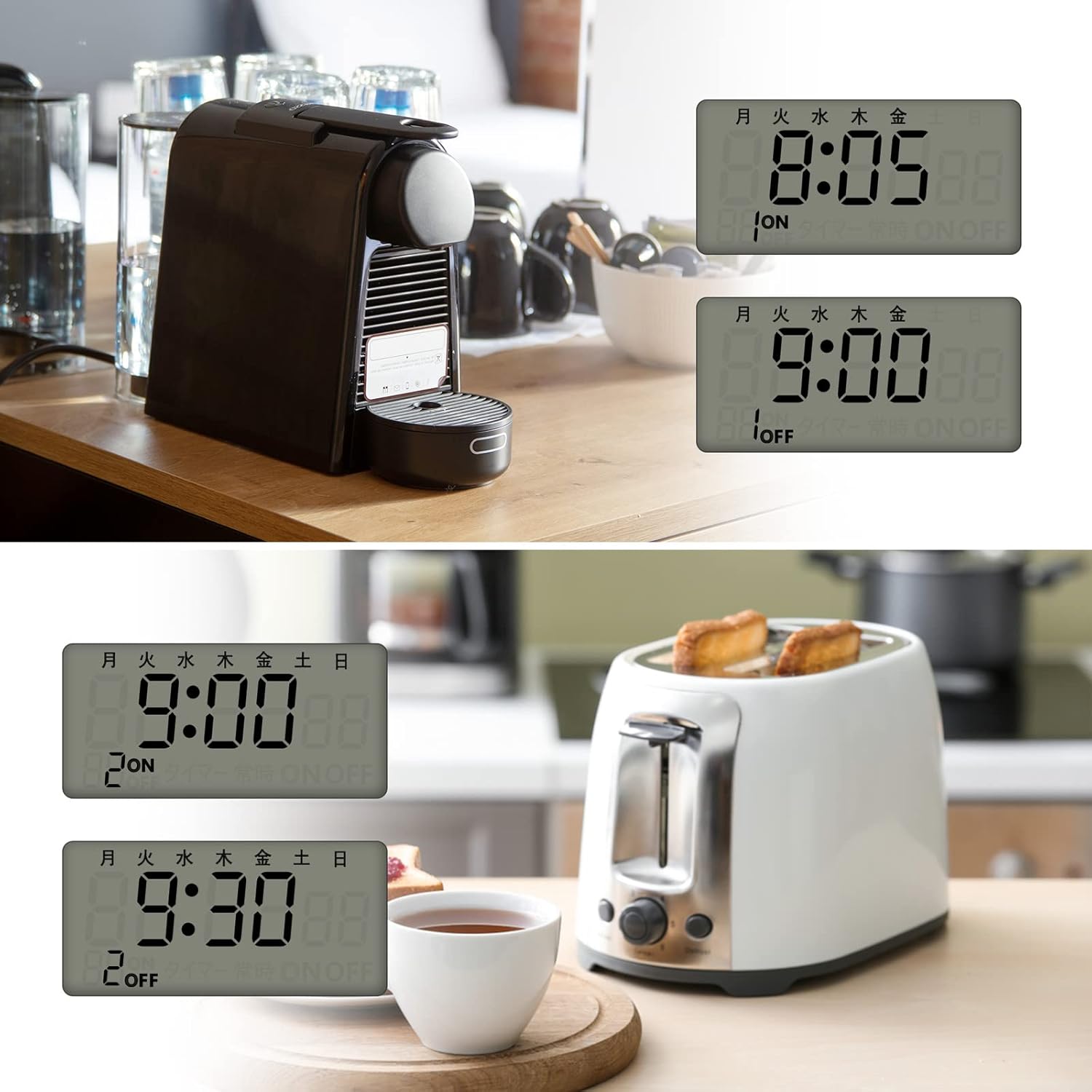
図4: 使用例amples. The timer can automate daily routines, such as turning on a coffee maker in the morning or a toaster at a specific time.

図5: Various applications. The timer is suitable for controlling humidifiers, lamp、Wi-Fi ルーター、装飾照明などもあります。

図6: Anti-theft lighting. The timer can be used to simulate occupancy by turning lights on and off at set times, enhancing home security.
メンテナンス
The BN-LINK Smart Digital Outlet Timer requires minimal maintenance.
- 外側は柔らかく乾いた布で拭いてください。研磨剤入りの洗剤や溶剤は使用しないでください。
- 清掃する前にタイマーのプラグが抜かれていることを確認してください。
- 長期間使用しない場合は、涼しく乾燥した場所に保管してください。
トラブルシューティング
| 問題 | 考えられる原因 | 解決 |
|---|---|---|
| Timer display is blank or unresponsive. | Internal battery is low or depleted; screen blanking feature is active. | Plug the timer into an active outlet for at least 30 minutes to charge the battery. Press any button to reactivate the display. |
| プログラムが起動しません。 | Timer is not in 'AUTO' mode; programs are incorrectly set. | Press the 'Mode' button until 'AUTO' is displayed. Review and re-enter your programs carefully, ensuring ON and OFF times are correct. |
| Appliance connected to timer does not turn on/off. | Appliance is not properly plugged into the timer; appliance is faulty; timer is overloaded. | Ensure the appliance is securely plugged into the timer. Test the appliance by plugging it directly into a wall outlet. Verify the appliance's power consumption does not exceed 1500W. |
| Timer is making unusual noises or smells. | Internal malfunction; electrical short. | Immediately unplug the timer from the wall outlet. Do not attempt to use it again. Contact customer support. |
仕様
| メーカー | BNリンク |
| モデル番号 | W6-6FXT-LOFJ |
| パッケージ寸法 | 11.5 x 9 x 8.2 cm |
| 材料 | プラスチック |
| 色 | 白 |
| 電池のタイプ | ニッケル水素(NiMH) |
| パッケージ重量 | 0.29キログラム |
| 電池が必要 | はい |
| 電池付属 | はい |
| 製品重量 | 114.2グラム |
| 製品寸法 | 奥行き3.3cm x 幅6.8cm x 高さ7cm |
保証とサポート
この製品には、 1年間のメーカー保証 購入日より。
For technical support, troubleshooting assistance, or warranty claims, please contact BN-LINK customer service. Refer to the product packaging or the retailer's web具体的な連絡先情報については、サイトをご覧ください。
Please have your model number (W6-6FXT-LOFJ) and proof of purchase ready when contacting support.