1. はじめに
Welcome to the user manual for your new Avtex W195TS Smart TV. This television is specifically designed for mobile living, offering versatile power options (12V, 24V, and 240V) and a range of smart features, including Wi-Fi, Bluetooth, and an integrated Freesat satellite decoder. This manual provides essential information for setting up, operating, maintaining, and troubleshooting your device to ensure optimal performance and enjoyment.
2. 安全情報
テレビをご使用になる前に、すべての安全に関する注意事項をよくお読みください。このマニュアルは、今後の参考のために保管してください。
- 電源: 正しい巻を確認してくださいtage is used (12V, 24V DC or 240V AC). Do not overload power outlets.
- 換気: 通気口を塞がないでください。テレビの周囲に十分なスペースを確保し、空気の流れを確保してください。
- 水と湿気: テレビを雨や湿気にさらさないでください。また、液体の入った物をテレビの上に置かないでください。
- クリーニング: 清掃する前にテレビの電源プラグを抜いてください。柔らかく乾いた布を使用してください。液体洗剤やエアゾール洗剤は使用しないでください。
- 配置: Place the TV on a stable, flat surface or mount securely to a wall/bracket. Avoid direct sunlight or heat sources.
- サービス: この製品を自分で修理しようとしないでください。 すべてのサービスを資格のあるサービス担当者に依頼してください。
3. パッケージ内容
Before setup, please check that all items are present in the box:
- アヴテックス W195TS スマートテレビ
- 電池付きリモコン
- 12V/24V DC電源ケーブル
- 240V AC電源アダプター
- テーブルスタンド(該当する場合)
- ユーザーマニュアル(このドキュメント)
4.製品オーバーview
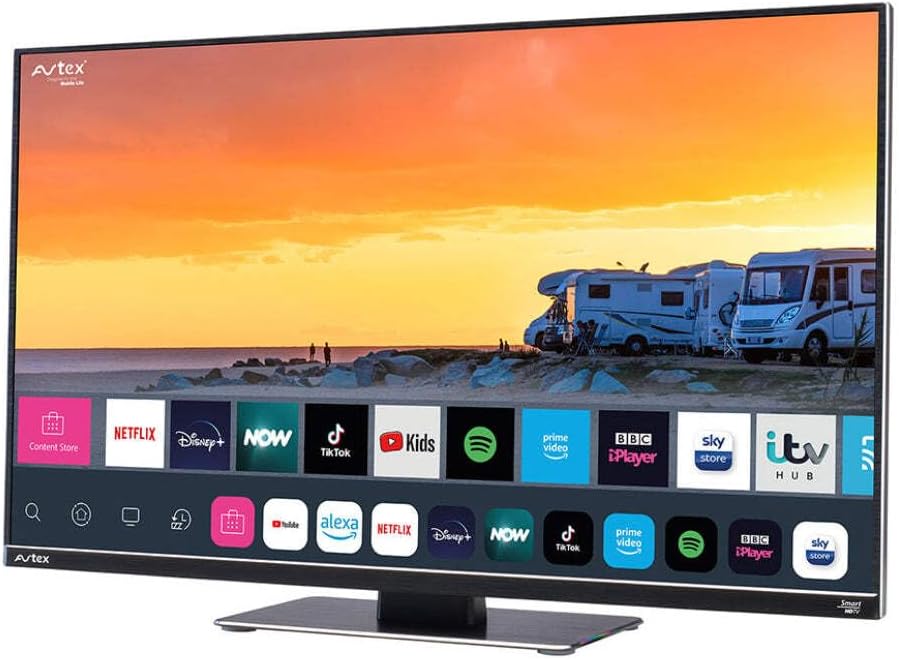
Figure 4.1: Avtex W195TS Smart TV Front View
This image shows the Avtex W195TS Smart TV from a slight angle, highlighting its slim design and the vibrant display. The screen shows a user interface with icons for popular streaming services like Netflix, Disney+, Now, TikTok, Kids, Spotify, Prime Video, BBC iPlayer, Sky Store, and ITV Hub. The background on the screen depicts a scenic view of motorhomes parked near a beach at sunset. The Avtex logo is visible on the top left and bottom left of the TV frame.
4.1. ポートと接続
- HDMI ポート: Blu-ray プレーヤー、ゲーム コンソール、セットトップ ボックスなどの外部デバイスを接続します。
- USBポート(2): USB ドライブからのメディア再生、または USB アクセサリの接続に使用します。
- アンテナ入力: For connecting a terrestrial TV antenna.
- 衛星入力: For connecting a satellite dish for Freesat or other satellite services.
- DC電源入力: For 12V/24V DC power connection.
- AC電源入力: For 240V AC power connection via adapter.
- イーサネットポート: 有線ネットワーク接続用。
- オーディオ出力: 外部オーディオ システムまたはヘッドフォンを接続します。
5. セットアップ
5.1. Installing the Stand (Optional)
- 画面の損傷を防ぐため、テレビを画面を下にして柔らかく清潔な表面に慎重に置いてください。
- スタンドをテレビの下部にある取り付け穴に合わせます。
- 付属のネジを使用してスタンドを固定します。
5.2. 電源接続
The Avtex W195TS supports multiple power inputs:
- 12V/24V DC: Connect the supplied 12V/24V DC power cable to the DC input on the TV and to your vehicle's 12V or 24V power outlet.
- 240V AC: Connect the supplied 240V AC power adapter to the AC input on the TV, then plug the adapter into a standard 240V AC wall socket.
注記: Do not connect both DC and AC power simultaneously.
5.3. Antenna/Satellite Connection
- Terrestrial TV: Connect your aerial cable to the 'ANTENNA IN' port.
- Satellite TV (Freesat): Connect your satellite dish cable to the 'SATELLITE IN' port.
5.4. 初回電源投入と初回セットアップ
- Connect the TV to power and press the power button on the remote control or TV.
- The First-Time Setup Wizard will appear. Follow the on-screen prompts to select your language, country, and time zone.
- Perform an automatic channel scan for both terrestrial and satellite channels.
- ネットワーク名を選択し、パスワードを入力して、Wi-Fi ネットワークに接続します。
6.運用
6.1.リモコン機能
Familiarize yourself with the remote control buttons for easy navigation and control of your TV's features.
- 電源ボタン: テレビの電源をオン/オフします。
- ソースボタン: Selects input sources (HDMI, USB, TV, Satellite).
- ボリューム+/-: 音量レベルを調整します。
- チャンネル +/-: テレビのチャンネルを変更します。
- ナビゲーション ボタン (上/下/左/右/OK): メニューのナビゲーションと選択に使用します。
- Smart Hub/Home Button: スマート TV インターフェイスにアクセスします。
- アプリボタン: Dedicated buttons for popular streaming apps (if available).
6.2. スマートテレビの機能
Your Avtex W195TS is equipped with smart TV capabilities:
- アプリストア: Download and install various applications for streaming, news, and entertainment.
- ストリーミングサービス: Access pre-installed or downloaded apps like Netflix, Disney+, Prime Video, BBC iPlayer, etc. (subscription may be required).
- Web ブラウザ: テレビで直接インターネットを閲覧できます。
- スクリーンミラーリング: Connect your smartphone or tablet to display content on the TV screen (compatibility may vary).
6.3. Bluetooth接続
Pair Bluetooth devices such as headphones or external speakers for enhanced audio experience.
- テレビの設定メニューに移動します。
- 「Bluetooth」または「接続されたデバイス」を選択します。
- Enable Bluetooth and put your device into pairing mode.
- リストからペアリングするデバイスを選択します。
6.4. USB経由のメディア再生
Insert a USB drive into one of the USB ports to view 写真を撮ったり、ビデオを再生したり、音楽を聴いたりできます。
- The TV will usually prompt you to open the media player.
- ナビゲートする fileリモコンを使用して。
7. メンテナンス
7.1. テレビの掃除
- 画面: 柔らかく糸くずの出ない布で画面を優しく拭いてください。頑固な汚れには、軽くamp布に水または画面専用の洗浄液を含ませます(画面に直接スプレーしないでください)。
- Casing: テレビの表面を拭くときは、柔らかく乾いた布を使用してください。asing. 研磨剤入りの洗剤や溶剤は使用しないでください。
7.2. ソフトウェアの更新
Periodically check for software updates to ensure your TV has the latest features and bug fixes. Updates can usually be found in the TV's settings menu under 'System' or 'Software Update'.
8。 トラブルシューティング
If you encounter issues with your Avtex W195TS, refer to the following common problems and solutions:
| 問題 | 考えられる原因 | 解決 |
|---|---|---|
| 電源なし | Power cable not connected; no power from outlet. | Check power cable connection; test outlet with another device; ensure correct voltage(12V / 24V / 240V)。 |
| 映像は出ないが音は出る | 間違った入力ソースが選択されました。ケーブルに障害があります。 | Press the 'Source' button on the remote to select the correct input; check HDMI/antenna cables. |
| 音は出ないが画像は表示される | 音量がミュートされているか低すぎる。外部オーディオ システムの問題。 | 音量のミュートを解除するかレベルを上げ、外部オーディオ デバイスへの接続を確認します。 |
| Wi-Fiに接続できません | パスワードが間違っている、ルーターに問題がある、テレビがルーターから離れすぎている。 | Re-enter Wi-Fi password; restart router; move TV closer to router or use an extender. |
| リモコンが動作しない | 電池切れ、障害物、ペアリングの問題。 | 電池を交換し、障害物を取り除いて、Bluetooth リモコンの場合は再度ペアリングしてください。 |
9. 仕様
| 特徴 | 仕様 |
|---|---|
| ブランド | アベテックス |
| モデル番号 | AVTEX W195TS |
| 画面サイズ | 19.5インチ |
| 解決 | 1080p(フルHD) |
| アスペクト比 | 16:9 |
| 接続技術 | Bluetooth、HDMI、Wi-Fi |
| USBポート合計 | 2 |
| 巻tage | 12 Volts, 24 Volts, 240 Volts |
| アイテム重量 | 2.5キログラム |
| モデル年 | 2018 |
10. 保証とサポート
Your Avtex W195TS Smart TV comes with a manufacturer's warranty. Please refer to the warranty card included in your product packaging for specific terms and conditions, including warranty period and coverage details. Keep your proof of purchase for warranty claims.
For technical support, troubleshooting assistance beyond this manual, or warranty inquiries, please contact Avtex customer service through their official website or the contact information provided with your product. When contacting support, please have your model number (AVTEX W195TS) and serial number ready.