1.製品オーバーview
The AZZA CSAZ-280B Spectra Black is an ATX Mid Tower gaming case designed to house various computer components. It features a tempered glass side panel and a steel right panel. This manual provides instructions for the proper installation and maintenance of your computer components within this case.

画像1.1: 左前方 view of the AZZA CSAZ-280B Spectra Black case, showcasing the tempered glass side panel and the front panel design with integrated RGB lighting.
主な特徴:
- Left Panel: Tempered glass with rubber mounts for secure installation.
- Right Panel: Solid steel panel.
- Motherboard Compatibility: Supports ATX, Micro-ATX, and ITX motherboards.
- Drive Bays: Up to three 2.5" drive bays and up to two 3.5" drive bays.
- Maximum CPU Cooler Height: Up to 170 mm.
- Maximum Video Card Length: Up to 290 mm.
2. セットアップとコンポーネントのインストール
Follow these steps for proper installation of your computer components into the AZZA CSAZ-280B case. Ensure the system is powered off and unplugged before beginning any installation.
2.1 フロントI/Oパネルの接続
The top panel of the case features various input/output ports and controls for convenient access.

画像2.1: トップダウン view of the case's front I/O panel, indicating the Power button, LED control button, Audio jacks (Mic and Headphone), two USB 2.0 ports, and one USB 3.0 port.
- 電源ボタン: Press to power on or off the system.
- LEDボタン: Controls the RGB lighting effects of the case.
- オーディオジャック: マイクとヘッドフォン用の個別のポート。
- USB 2.0ポート: Two ports for connecting USB 2.0 devices.
- USB 3.0ポート: One port for connecting USB 3.0 devices, offering faster data transfer speeds.
2.2 ドライブのインストール
The case supports both 3.5" HDDs and 2.5" SSDs. Refer to the images below for drive bay locations.

画像2.2: 内部 view showing the lower drive cage, capable of holding one 3.5" HDD or one 2.5" SSD, and an additional dedicated 3.5" HDD bay.

画像2.3: 内部 view showing two dedicated 2.5" SSD mounting brackets located behind the motherboard tray.
- For 3.5" HDDs: Install drives into the designated 3.5" drive cage located at the bottom front of the case. Secure with screws.
- For 2.5" SSDs: Install drives into the dedicated 2.5" mounting brackets behind the motherboard tray or in the lower drive cage. Secure with screws.
2.3 グラフィックカードのインストール
このケースは最大長さ 290mm のグラフィック カードをサポートします。

画像2.4: 内部 view illustrating the maximum supported length for a video card, which is 290mm.
- ケースの背面から必要な PCI-E スロット カバーを取り外します。
- Carefully insert the graphics card into the PCI-E slot on your motherboard.
- グラフィック カードをネジでケースに固定します。
2.4 ファンの取り付けと空気の流れ
Proper fan placement ensures optimal cooling performance. The case supports various fan configurations:
- フロント: Supports 3 x 120mm fans or 2 x 140mm fans.
- トップ: 2 x 120mm ファンをサポートします。
- 後方: 1 x 120mm ファンをサポートします。
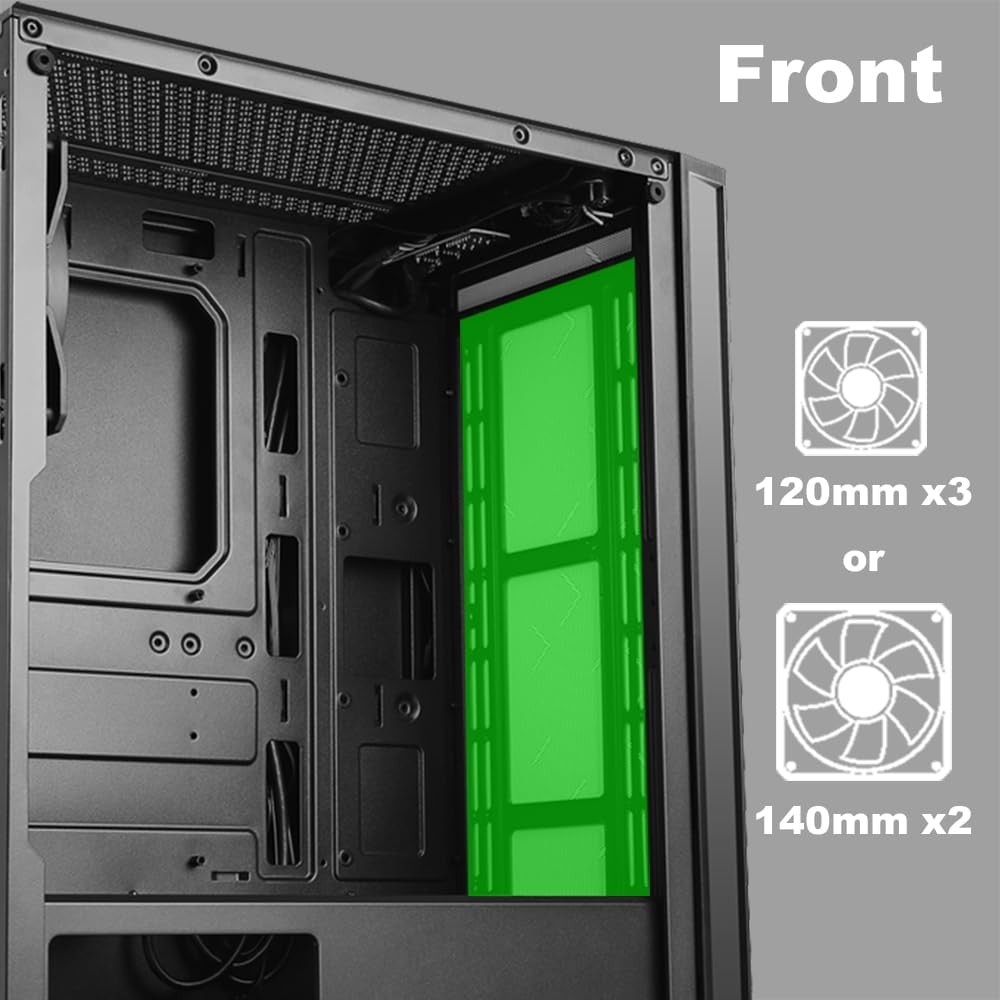
画像2.5: 内部 view of the front panel, highlighting the mounting locations for up to three 120mm fans or two 140mm fans.

画像2.6: 内部 view of the top panel, showing the mounting locations for up to two 120mm fans.

画像2.7: 内部 view of the rear panel, indicating the mounting location for one 120mm fan.
- Identify the desired fan mounting locations (front, top, rear).
- Secure fans to the case using appropriate fan screws.
- Connect fan power cables to the motherboard or a fan controller.
2.5 電源の設置
The power supply unit (PSU) mounts at the bottom of the case.
- Slide the PSU into the designated compartment at the bottom rear of the case.
- 背面のネジを使用して PSU をケースに固定します。
- Route power cables through the cable management cutouts to reach your components.
3. 操作手順
3.1 電源オン/オフ
To power on your system, press the power button located on the top I/O panel. To power off, either shut down through your operating system or press and hold the power button for several seconds.
3.2 LEDコントロール
Use the dedicated LED button on the top I/O panel to cycle through various lighting modes and colors for the integrated RGB elements of the case.
4. メンテナンス
定期的なメンテナンスは、PC コンポーネントの最適なパフォーマンスと寿命の延長に役立ちます。
- ダストクリーニング: 定期的に圧縮空気を使用して、ダストフィルターと内部部品を清掃してください。清掃前に、システムの電源をオフにし、プラグを抜いてください。
- ケーブル管理 Ensure cables are neatly routed to prevent obstruction of airflow and to maintain a clean interior.
- パネルのお手入れ: Clean the tempered glass panel with a soft, lint-free cloth and a mild glass cleaner. Avoid abrasive materials.
5。 トラブルシューティング
このセクションでは、発生する可能性のある一般的な問題について説明します。
- システムが電源オンにならない:
- すべての電源ケーブル (24 ピン ATX、8 ピン CPU、GPU 電源) がマザーボードとコンポーネントにしっかりと接続されていることを確認します。
- 電源スイッチが「オン」の位置にあることを確認します。
- フロント パネルの電源ボタン ケーブルがマザーボードのフロント パネル ヘッダーに正しく接続されていることを確認します。
- ファンが回転しない / LEDが点灯しない:
- Confirm fan power cables are properly connected to the motherboard or fan controller.
- Ensure LED cables are correctly connected to the motherboard's RGB header or the case's LED controller.
- Press the LED button on the top I/O panel to cycle through modes or turn on the lighting.
- USBポートが機能しない:
- Check that the USB 2.0 and USB 3.0 headers from the front panel are correctly plugged into the corresponding ports on your motherboard.
- オーディオジャックが機能しない:
- Ensure the HD Audio cable from the front panel is securely connected to the HD Audio header on your motherboard.
6. 仕様
Detailed technical specifications for the AZZA CSAZ-280B Spectra Black case.
| 特徴 | 仕様 |
|---|---|
| モデル名 | CSAZ-280B SPECTRA BLACK |
| ケースタイプ | ミッドタワー |
| マザーボードの互換性 | ATX、マイクロATX、ITX |
| 材料 | プラスチック、強化ガラス |
| 色 | 黒 |
| 寸法(長さ×幅×高さ) | 19.69 x 17.32 x 9.84インチ |
| アイテム重量 | 11ポンド |
| 2.5インチドライブベイ | 最大3 |
| 3.5インチドライブベイ | 最大2 |
| CPUクーラーの最大高さ | 170ミリメートル |
| ビデオカードの最大長 | 290ミリメートル |
| フロントI / Oポート | 2 x USB 2.0, 1 x USB 3.0, Audio, Mic, Power, LED Control |
| フロントファンのサポート | 3 x 120mm または 2 x 140mm |
| Top Fan Support | 2×120mm |
| Rear Fan Support | 1×120mm |
| 電源の取り付け | ボトムマウント |
7. 保証とサポート
7.1返品ポリシー
この製品は、小売業者の条件に従って、返金または交換のための 30 日間の返品ポリシーの対象となります。
7.2 テクニカルサポート
For technical assistance or inquiries regarding your AZZA product, please visit the official AZZA website or contact their customer support channels. You can find more information and contact details by visiting the AZZA Store on Amazon.


