1. はじめに
Thank you for choosing the WORKPRO 6-inch 1080W Dual Action Random Orbital Polisher. This manual provides essential information for the safe and effective operation, maintenance, and troubleshooting of your new polisher. Please read this manual thoroughly before first use and keep it for future reference. This tool is designed for various polishing and waxing applications, including car detailing, floor polishing, and metal polishing.
2. 安全情報
火災、感電、および人身傷害のリスクを軽減するために、電気製品を使用するときは常に基本的な安全上の注意事項に従ってください。
- 安全メガネや手袋などの適切な個人用保護具を着用してください。
- 作業エリアが清潔で、明るく、障害物がないことを確認してください。
- Do not operate the polisher in damp または濡れた状態。
- ツールの操作中は子供や周囲の人を近づけないでください。
- Unplug the polisher from the power source before making any adjustments, changing accessories, or performing maintenance.
- Do not force the tool; use the correct speed and pressure for the application.
- 使用する前に毎回電源コードに損傷がないか点検してください。
3. パッケージ内容
下記のすべての品目がパッケージに含まれていることをご確認ください。不足または破損している品目がある場合は、カスタマーサポートまでご連絡ください。
- 1 × Polisher Machine
- 1 × Auxiliary Handle
- 1 × Backing Pad
- 1 × Woolen Buffer Pad
- 6 × Foam Pads (various types for different applications)
- 2 × Replaceable Carbon Brushes
- 1 × Hex Key
- 3 × Hex Head Bolts
- 1 × Towel

図3.1: 含まれるコンポーネント
4 製品の特徴
The WORKPRO Buffer Polisher is engineered for efficiency and user comfort.
- 6 可変速度制御: Adjust speeds from 1400-5000 RPM to match project requirements, allowing for precise control during waxing and polishing.

Figure 4.1: Polisher Components Overview
- 高性能モーター: 9を装備 amp, 1080 watt motor and 15mm dual action orbital motion for powerful and efficient operation. Heat-resistant copper wire ensures longer working time.

Figure 4.2: High-Performance Motor
- 人間工学に基づいたデザイン: Features a comfortable grip hood and an auxiliary handle for non-slip control. The switch-locking mechanism reduces hand fatigue during extended use.

図4.3: 人間工学に基づいた設計
- デュアルアクション軌道運動: Provides high security and allows for polishing without glare, ensuring a smooth and even finish.

Figure 4.4: Dual Action Mechanism
5. セットアップ
- 補助ハンドルを取り付けます。 Secure the auxiliary handle to the polisher using the provided hex head bolts and hex key. Ensure it is firmly tightened for safe operation.
- Install the Backing Pad: Align the backing pad with the spindle on the polisher and screw it on securely.
- Attach Polishing Pads: The foam pads and woolen buffer pad attach to the backing pad via hook-and-loop fasteners. Select the appropriate pad for your task (e.g., foam pads for compounding/polishing, woolen pad for buffing).
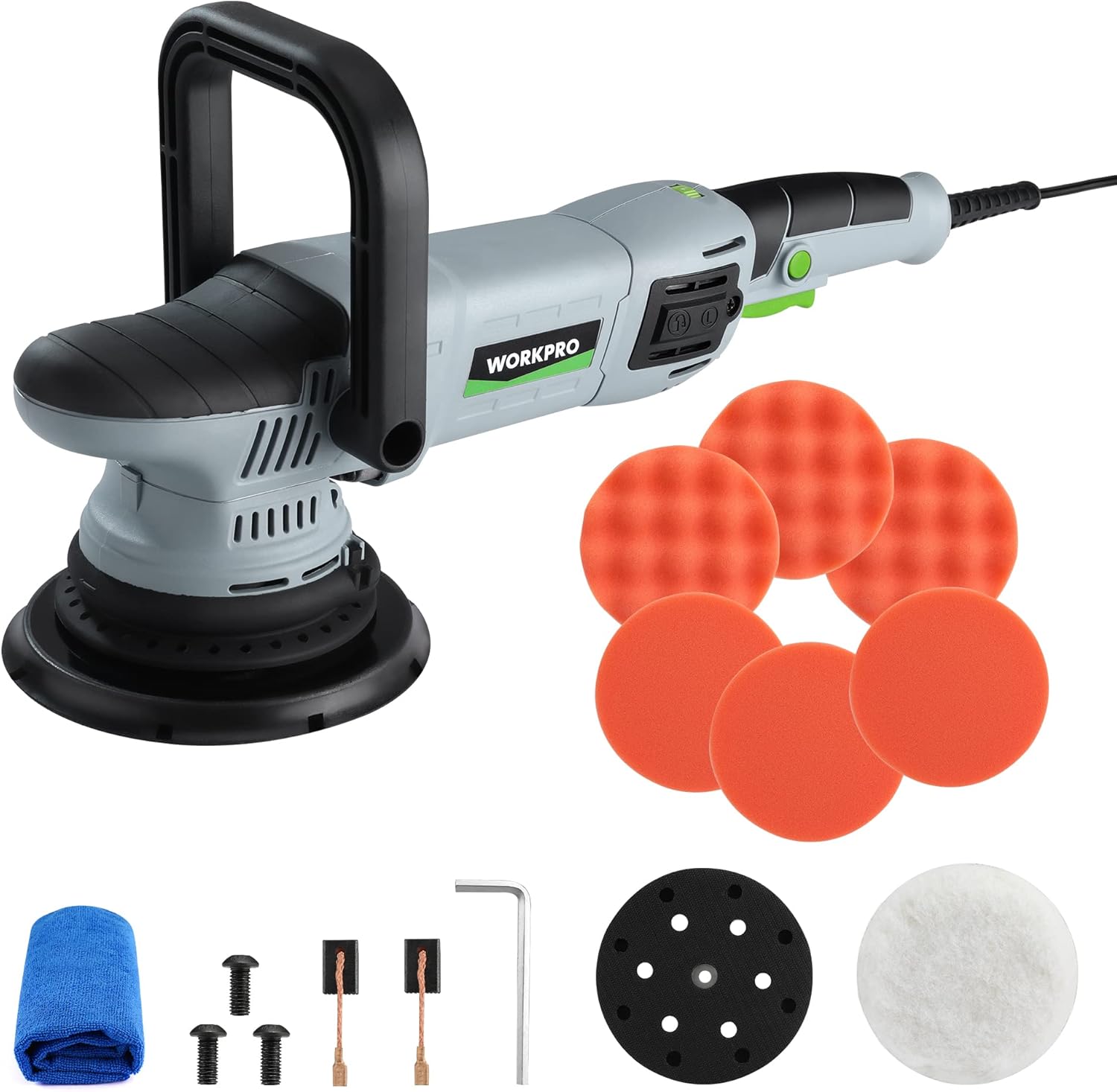
Figure 5.1: Polisher Setup
6. 操作手順
This section details the proper use of your WORKPRO Buffer Polisher for various applications.
- 電源オン/オフ: Plug the polisher into a suitable power outlet. Press the On/Off trigger to start the tool.
- Using the Switch Locking Mechanism: For continuous operation, press the lock button located near the trigger after starting the polisher. This will keep the tool running without needing to hold the trigger. Press the trigger again to release the lock and stop the tool.

Figure 6.1: Trigger and Lock Button
- 速度の調整: Use the 6-variable speed adjustor dial to select the desired RPM (1400-5000 RPM). Lower speeds are generally used for waxing and spreading compounds, while higher speeds are for polishing and buffing.

Figure 6.2: Speed Adjustor Dial
- 応募方法: The polisher can be used with either the auxiliary handle for two-handed control or by gripping the main body for single-handed operation, depending on the task and user preference.

図6.3: 複数の制御方法
- 一般的な使用法: Apply a small amount of compound or wax directly to the pad or the surface. Start the polisher at a low speed to spread the product, then increase speed as needed for polishing or buffing. Maintain even pressure and move the polisher in overlapping passes.

図6.4: 幅広い応用範囲
Video 6.1: WORKPRO Dual Action Buffer Polisher Kit in action, demonstrating variable speed control, switch locking mechanism, and various polishing applications on cars, tiles, and wood.
7. メンテナンス
定期的なメンテナンスにより、ポリッシャーの寿命が長くなり、最適なパフォーマンスが確保されます。
- クリーニング: After each use, wipe down the polisher with a clean, dry cloth. Remove any residue from the backing pad and ensure ventilation slots are clear.

Figure 7.1: Ventilation Slots
- カーボンブラシの交換: The carbon brushes are wear items and will need periodic replacement. When the tool's performance decreases or it stops working, check the carbon brushes. To replace, unscrew the carbon brush covers on the side of the motor housing, remove the old brushes, and insert new ones. Ensure the brushes are seated correctly before replacing the covers.

Figure 7.2: Carbon Brush Replacement
- パッドケア: Clean polishing pads thoroughly after each use to remove product residue. This prolongs their life and maintains polishing effectiveness.
8。 トラブルシューティング
| 問題 | 考えられる原因 | 解決 |
|---|---|---|
| Polisher does not start. | No power supply; damaged cord; worn carbon brushes. | Check power connection; inspect cord for damage; replace carbon brushes. |
| Reduced power or erratic operation. | Worn carbon brushes; motor overheating; excessive pressure. | Replace carbon brushes; allow tool to cool; reduce pressure. |
| 過度の振動またはノイズ。 | Loose backing pad; damaged pad; internal component issue. | Tighten backing pad; replace damaged pad; contact customer support. |
| 研磨結果が悪い。 | Incorrect pad type; insufficient product; improper technique. | Use appropriate pad; apply sufficient product; review 操作説明書。 |
9. 仕様
| 属性 | 価値 |
|---|---|
| モデル番号 | W125163AE |
| 電源 | コード式電気 |
| 巻tage | 12ボルト |
| Amp怒る | 9 Amps |
| ワットtage | 1080ワット |
| スピード | 1400~5000 RPM(可変) |
| アイテム重量 | 7.41 ポンド (3.37 キログラム) |
| パッケージ寸法 | 16.97 x 7.6 x 6.69インチ |
| 材料 | 金属、プラスチック |
| 色 | グレー、ブラック |
10. 保証とサポート
WORKPRO products are manufactured to high-quality standards. For specific warranty details, please refer to the warranty card included with your product or visit the official WORKPRO webサイト。
For technical support, replacement parts, or any inquiries regarding your WORKPRO Buffer Polisher, please contact WORKPRO customer service. Contact information can typically be found on the product packaging or the official WORKPRO webサイト。
You can also visit the WORKPRO Store on Amazon for more information and products: WORKPRO Amazonストア.


