導入
This manual provides essential information for the proper installation, operation, and maintenance of your TELE System TS6105 DVB-T2 HEVC Digital Terrestrial Decoder. Please read these instructions carefully before using the device to ensure optimal performance and safety.
The TS6105 decoder is designed to receive DVB-T2 HEVC 10-bit digital terrestrial television broadcasts, offering Full HD resolution up to 1080p@60Hz. It includes features such as automatic channel scanning (AUTOSCAN), an Electronic Program Guide (EPG), and multimedia playback capabilities via USB.
パッケージ内容
パッケージにすべてのアイテムが揃っていることを確認します。
- TELE System TS6105 DVB-T2 HEVC Digital Terrestrial Decoder
- リモートコントロール
- 電源アダプター
- ユーザーマニュアル(このドキュメント)

This image shows the compact design of the TS6105 decoder, highlighting the TELE System logo, model number TS6105 DVB-T2 HEVC, Dolby Audio, and HDMI branding on the front, with ventilation on the side.
設定
1. Connecting the Decoder
Before connecting, ensure your television and the decoder are turned off.

This image displays the rear panel of the TS6105 decoder, featuring the ANT IN, ANT OUT, COAXIAL, HD OUT (HDMI), SCART, and DC IN ports for power and signal connections.
- アンテナ接続: 地上アンテナケーブルを アリイン port on the rear of the decoder. If you wish to loop the signal to another device, connect a coaxial cable from the アリ・アウト port to the next device.
- TV Connection (HDMI): For the best picture quality, connect an HDMI cable from the HDアウト port on the decoder to an available HDMI input on your television. Select the corresponding HDMI input on your TV.
- TV Connection (SCART): If your TV does not have an HDMI input, connect a SCART cable from the スカート port on the decoder to the SCART input on your television.
- 電源接続: 電源アダプタをに接続します DC入力 ポートに接続し、アダプタを壁のコンセントに差し込みます。
2. First-Time Installation and Channel Scan
After connecting the decoder and turning on your TV, switch on the decoder. The first time you use it, an installation wizard will guide you through the initial setup.
- 言語の選択: Choose your preferred language using the remote control's navigation buttons and press OK.
- 国の選択: Select your country. This helps the decoder apply the correct regional settings for channel scanning.
- 自動スキャン: The decoder will automatically initiate the AUTOSCAN function. This process searches for all available digital terrestrial channels and organizes them logically using the LCN (Logical Channel Number) system. This may take several minutes.
- 完了: Once the scan is complete, the decoder will save the channels and display the first available channel.
デコーダーの操作
リモートコントロールオーバーview
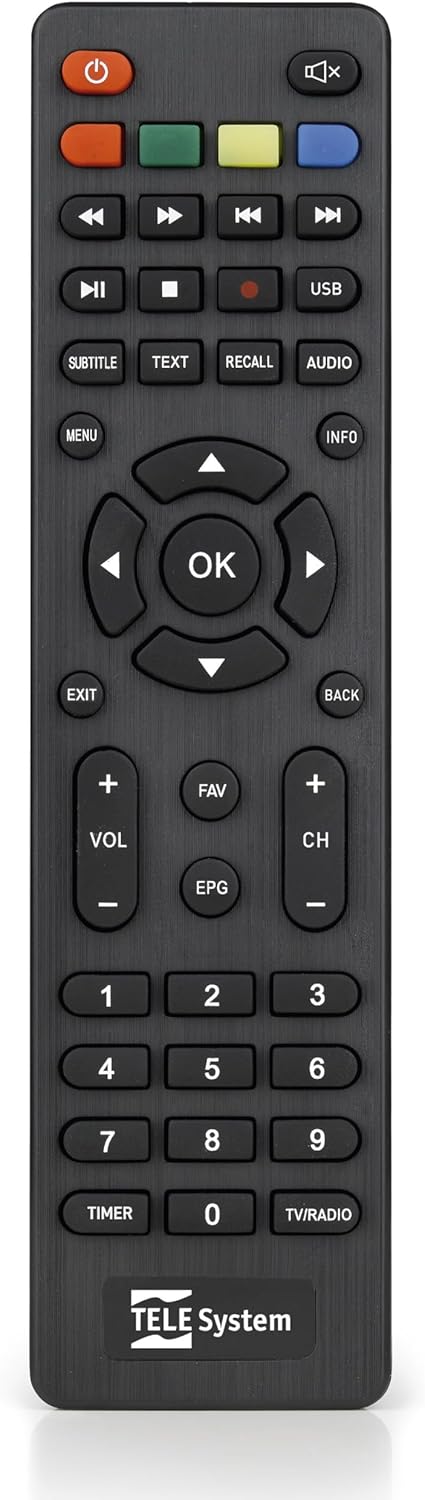
This image presents the remote control for the TS6105 decoder, featuring power, mute, channel, volume, navigation, EPG, media playback, and numeric buttons for comprehensive control.
- 電源スイッチ (U): Turns the decoder on or off (standby).
- CH +/-: チャンネルを上または下に変更します。
- VOL +/-: 音量レベルを調整します。
- OK: Confirms selections in menus or displays channel information.
- メニュー: 設定と機能のメイン メニューにアクセスします。
- 出口/戻る: 現在のメニューを終了するか、前の画面に戻ります。
- 番組表: 電子番組ガイドを開きます。
- 文章: Activates Teletext.
- 字幕: Toggles subtitles on/off or selects subtitle language.
- USB: Accesses the multimedia player.
- カラーボタン(赤、緑、黄、青): Functionality varies depending on the current menu or EPG.
電子番組ガイド(EPG)
を押す 電子ブック リモコンのボタンを view the Electronic Program Guide. The EPG provides information about current and upcoming programs for all channels. You can navigate through channels and time slots to see program details.
Multimedia Player (USB)
The TS6105 can play multimedia file■USBストレージデバイスから。
- Insert a USB drive into the USB port on the decoder.
- を押す USB button on the remote control or navigate to the multimedia section via the メニュー.
- Select the type of media you wish to play (Music, Photo, Video).
- 閲覧する filesとを押します OK 遊ぶ。
Pause TV / Timeshift
The Pause TV / Timeshift function allows you to pause live television and resume viewing later. This feature requires a USB storage device connected to the decoder.
- 番組を視聴中に、 一時停止 button (usually represented by two vertical bars) on the remote control.
- 再生を再開するには、 遊ぶ button (usually represented by a right-pointing triangle).
- You can also fast-forward or rewind using the respective buttons.
メンテナンス
クリーニング
To clean the decoder, ensure it is unplugged from the power outlet.
- 外側の表面を拭くときは、柔らかく乾いた布を使用してください。
- 液体クリーナー、エアゾール、研磨剤はデバイスを損傷する恐れがあるため使用しないでください。
- 通気口にほこりや障害物が入らないようにしてください。
ソフトウェアアップデート
定期的にメーカーの website for available software updates. Updates can improve performance, add new features, or resolve issues. Follow the instructions provided with the update file 気をつけて。
トラブルシューティング
If you encounter problems with your decoder, refer to the following common issues and solutions:
- 画像/音声なし:
- Ensure all cables (antenna, HDMI/SCART, power) are securely connected.
- テレビが正しい入力ソース(HDMI 1、AV など)に設定されていることを確認します。
- Check if the decoder is powered on and not in standby mode.
- チャンネルが見つかりません:
- Perform an AUTOSCAN again from the menu.
- Check your antenna connection and ensure the antenna is properly positioned and functional.
- Verify that your region has DVB-T2 HEVC broadcasts.
- リモコンが応答しない:
- リモコンの電池を交換してください。
- Ensure there are no obstructions between the remote control and the decoder's IR sensor.
- 画像のフリーズまたはピクセル化:
- This often indicates a weak or unstable signal. Check your antenna connection and position.
- Try rescanning channels.
仕様
- モデル: TS6105
- ブランド: TELEシステム
- 色: 黒
- チューナータイプ: DVB-T2 HEVC 10-bit
- ビデオ解像度: Up to 1080p@60Hz (Full HD)
- 接続性: HDMI, USB, SCART, Coaxial (ANT IN/OUT)
- 特徴: AUTOSCAN, LCN, EPG, Pause TV/Timeshift, Multimedia Player (USB), Teletext, Subtitle Support
- モデル番号: 21005353
保証とサポート
保証情報
This product comes with a manufacturer's warranty of 2 years. Please retain your proof of purchase for warranty claims. The warranty covers defects in materials and workmanship under normal use. It does not cover damage caused by misuse, accidents, unauthorized modifications, or improper installation.
カスタマーサポート
For technical assistance, troubleshooting beyond this manual, or warranty inquiries, please contact TELE System customer support. Refer to the official TELE System website or product packaging for the most up-to-date contact information.


