導入
This manual provides detailed instructions for the safe installation, operation, and maintenance of your bimar Wi-Fi Ceiling Fan, Model 1 (Ø 132). Please read this manual thoroughly before using the product and retain it for future reference.
使用目的: This high-performance ceiling fan is designed for ventilation in indoor domestic environments. Any other use is considered improper and potentially hazardous. The manufacturer cannot be held responsible for any damages resulting from improper use or repairs performed by unqualified personnel.
重要な安全上の注意事項
火災、感電、または人への傷害のリスクを軽減するために、次の点に注意してください。
- ファンを取り付ける前にすべての指示をお読みください。
- 設置は、すべての地域および国の電気規則に従って、資格のある電気技師が行う必要があります。
- 設置場所がファンの重量 (約 6.2 kg) を支えられることを確認してください。
- 設置または保守作業を行う前に、必ずメイン回路ブレーカーの電源を切ってください。
- 電源コードやプラグが損傷している状態でファンを操作しないでください。
- Keep hands, hair, and clothing away from moving blades.
- Do not insert any objects into the fan blades while it is operating.
- この機器は、安全に責任を負う人物による機器の使用に関する監督または指示がない限り、身体的、感覚的、または精神的能力が低下している人、あるいは経験と知識が不足している人(子供を含む)による使用を想定していません。
- 子供が機器で遊ばないように監督する必要があります。
箱の中身
Your bimar Wi-Fi Ceiling Fan package includes the following components:
- bimar Wi-Fi Ceiling Fan unit (with 3 blades)
- リモートコントロール
- Mounting hardware (screws, brackets, etc.)
- 取扱説明書(本書)

Image: The bimar Wi-Fi Ceiling Fan, featuring three light-colored wooden blades and a brushed metal motor housing and downrod.
セットアップとインストール
1. ファンの取り付け
資格のある電気技師による専門的な設置を強くお勧めします。 Ensure the ceiling structure can safely support the fan's weight and that all wiring complies with local electrical codes.
- 取り付け場所を準備します。 Turn off power at the circuit breaker. Securely attach the mounting bracket to a ceiling joist or a fan-rated outlet box.
- ダウンロッドとモーターを組み立てる: ダウンロッドをファンモーターハウジングに取り付けます。
- 扇風機を吊るす: ファン アセンブリを慎重に持ち上げて、取り付けブラケットから吊り下げます。
- ファンの配線: Connect the electrical wires (live, neutral, ground) from the ceiling to the fan's wiring, following the wiring diagram provided in the separate installation guide (if applicable).
- ブレードを取り付けます: Securely fasten the three blades to the motor housing.
- キャノピーを固定する: Raise the canopy to cover the wiring and mounting bracket, securing it in place.

画像: サイド view of the bimar ceiling fan, illustrating the angle of the light wood blades and the connection to the downrod.
2. Wi-Fiとアプリの接続
The bimar Wi-Fi Ceiling Fan is compatible with the Bimar Live Smart app for advanced control and scheduling.
- アプリをダウンロード: 検索する "Bimar Live Smart" in your smartphone's app store (iOS or Android) and install it.
- アカウントを作成する: アプリを開き、画面の指示に従って新しいユーザー アカウントを作成するか、既にアカウントがある場合はログインします。
- デバイスを追加: Power on the ceiling fan. In the Bimar Live Smart app, tap "Add Device" or the "+" icon. Select "Ceiling Fan" or the appropriate device type.
- Wi-Fiに接続します: Follow the app's instructions to put the fan into pairing mode (usually by pressing a button on the fan or remote for a few seconds). Connect the fan to your home 2.4GHz Wi-Fi network.
- デバイスに名前を付けます: Once connected, you can name your fan for easy identification within the app.

Image: A modern living room featuring the bimar ceiling fan installed, with a smartphone displaying the Bimar Live Smart app interface, indicating Wi-Fi and voice control capabilities.
操作手順
Your bimar Wi-Fi Ceiling Fan offers multiple control options for convenience.
1.リモコン操作
The included remote control allows direct access to all fan functions.
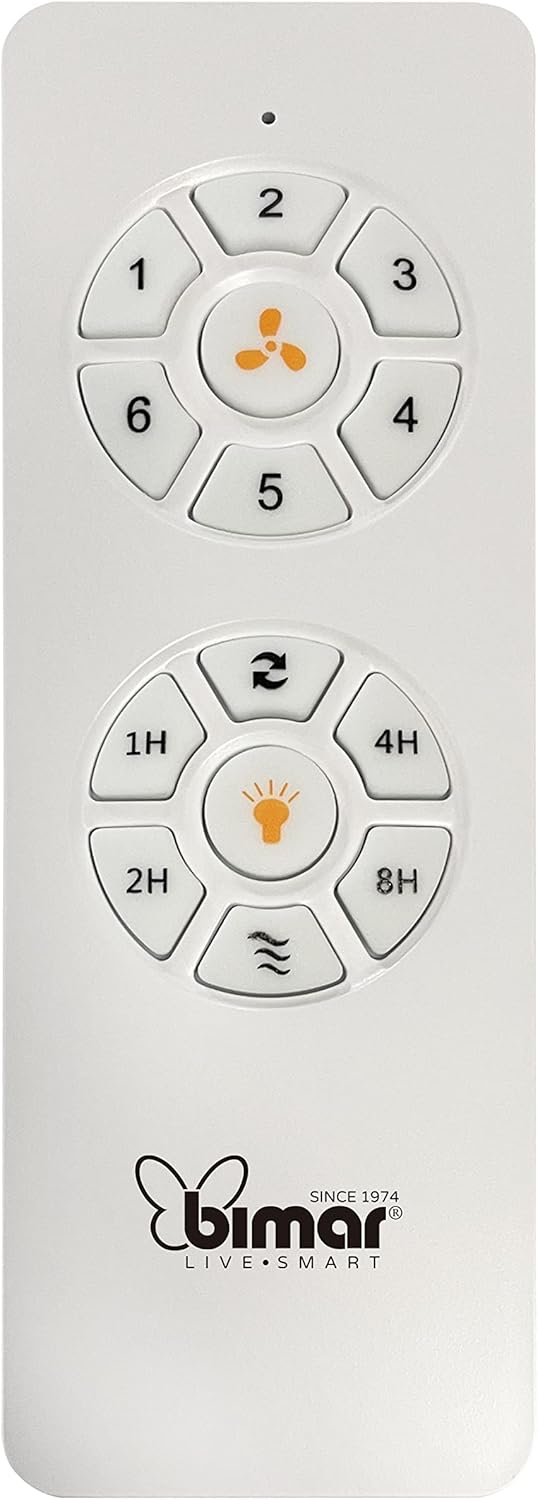
Image: The white remote control for the bimar ceiling fan, showing buttons for fan speed (1-6), fan on/off, timer (1H, 2H, 4H, 8H), mode selection, and reverse function.
- 電源オン/オフ: ファンアイコンボタンを押して、ファンのオン/オフを切り替えます。
- 速度調整: Use buttons 1-6 to select one of the six available fan speeds.
- タイマー機能: Press 1H, 2H, 4H, or 8H to set the fan to automatically turn off after the selected duration.
- モード選択: Use the mode button (often represented by waves or arrows) to cycle through Normal, Natural, Sleep, and Breeze modes.
- 夏/冬モード: The reverse button (often two arrows forming a circle) changes the blade rotation direction.
2. App Control (Bimar Live Smart)
Once connected to the Bimar Live Smart app, you can access enhanced features:
- リモート操作: Control all fan functions from anywhere with an internet connection.
- スケジュール: Program daily and weekly on/off times for automated operation.
- タイマー: Adjust the timer from 1 to 8 hours.
- Mode and Speed Selection: Easily switch between the 6 speeds and 4 operating modes.
3. 音声コントロール
The bimar Wi-Fi Ceiling Fan is compatible with popular voice assistants like Amazon Alexa and Google Assistant. After connecting the fan to the Bimar Live Smart app, link your Bimar account to your voice assistant app (e.g., Alexa app or Google Home app).
Example音声コマンド:
- 「アレクサ、天井のファンをつけて。」
- 「OK Google、天井ファンの速度を 3 に設定して」
- "Alexa, turn off the ceiling fan in 1 hour."
4. Operating Modes and Speeds
- 6 Ventilation Speeds: Adjust the airflow intensity to your preference.
- 通常モード: 選択した速度で一定の空気の流れを実現します。
- ナチュラルモード: ファン速度を変化させて自然な風をシミュレートします。
- スリープモード: 静かにゆっくりとした速度で作動し、邪魔されずに休むことができます。
- ブリーズモード: Provides a gentle, intermittent airflow.
5. Summer/Winter Function
The reversible blade function allows for year-round use:
- サマーモード(反時計回り回転): 下降気流を作り出し、涼しい風を生み出します。
- 冬モード(時計回り回転): Creates an upward airflow, circulating warm air trapped near the ceiling, improving heating efficiency.

Image: A diagram illustrating the airflow patterns for summer (indirect ventilation, pushing air upwards) and winter (direct ventilation, pulling air downwards) modes of a ceiling fan.
メンテナンス
定期的なメンテナンスにより、天井ファンの最適なパフォーマンスと寿命が確保されます。
- クリーニング: Before cleaning, ensure the fan is turned off and power is disconnected at the circuit breaker. Use a soft, damp cloth to wipe down the blades and motor housing. Do not use abrasive cleaners or solvents.
- 刃の検査: Periodically check the blades for any signs of damage or warping. Ensure all blade screws are tight.
- モーター潤滑: The fan's DC motor is designed for maintenance-free operation and does not require lubrication.
- ファスナーを締めます: Over time, some fasteners may become loose. Check and tighten all screws and connections annually.

画像: クローズアップ view of the bimar ceiling fan's brushed metal motor housing and the attachment points for the light wood blades, highlighting areas for cleaning and inspection.
トラブルシューティング
| 問題 | 考えられる原因 | 解決 |
|---|---|---|
| ファンが始動しない | 電源が供給されていません。リモコンの電池残量が少なくなっています。配線が間違っています。 | Check circuit breaker and wall switch. Replace remote batteries. Verify wiring connections (consult electrician). |
| ファンがぐらつく | ブレードまたは取り付けハードウェアが緩んでいる。ブレードのバランスが崩れている。 | Ensure all blade screws and mounting screws are tight. Use a balancing kit (not included) if necessary. |
| リモコンが動作しない | Low battery; Obstruction between remote and receiver; Remote not paired. | Replace remote batteries. Ensure clear line of sight. Refer to pairing instructions in the full manual. |
| Wi-Fi接続の問題 | Wi-Fi パスワードが正しくありません。ルーターが遠すぎます。5GHz ネットワークが選択されています。 | Verify Wi-Fi password. Move router closer or use a Wi-Fi extender. Ensure you are connecting to a 2.4GHz network. Reset fan and re-attempt pairing. |
| ファンがうるさい | Loose screws; Blades hitting an obstruction; Motor issue. | Check and tighten all screws. Ensure nothing is obstructing the blades. If noise persists, contact customer support. |
仕様
| 特徴 | 詳細 |
|---|---|
| ブランド | バイマール |
| モデル番号 | 1 |
| 製品寸法 | 132 x 132 x 27.5 cm(直径x直径x高さ) |
| 重さ | 6.2キロ |
| ブレード数 | 3 |
| 材料 | 木材 |
| 色 | Black (Note: Blades are light wood finish as shown in images) |
| モータータイプ | DC (Brushless, energy-saving) |
| 消費電力 | 35W |
| 制御方法 | Remote Control, Bimar Live Smart App, Voice Control (Amazon Alexa, Google Assistant) |
| ファン速度 | 6 |
| 動作モード | Normal, Natural, Sleep, Breeze |
| タイマー | 1~8時間 |
| 追加機能 | Silent operation, Summer/Winter mode (reversible blades) |
| 電源 | 電気 |
| インストールタイプ | 天井マウント |

Image: The three light wood fan blades, detached and laid flat, showcasinデザインと質感。


画像: 2 views of the bimar ceiling fan, illustrating different downrod lengths: one with a 25 cm downrod and another with a 13 cm downrod, affecting the overall height of the fan.
保証とサポート
For warranty information, technical support, or service inquiries, please refer to the warranty card included with your product or visit the official bimar webサイトでご確認ください。保証請求に備えて購入証明書を保管してください。
メーカー: Bimar S.r.l.
接触: ぜひご覧ください the bimar store on Amazon or the official bimar web連絡先の詳細についてはサイト。